[LOCAL MODE] [NO CLOUD] [NO BOT JOINS] [AUDIO NEVER LEAVES YOUR MAC]
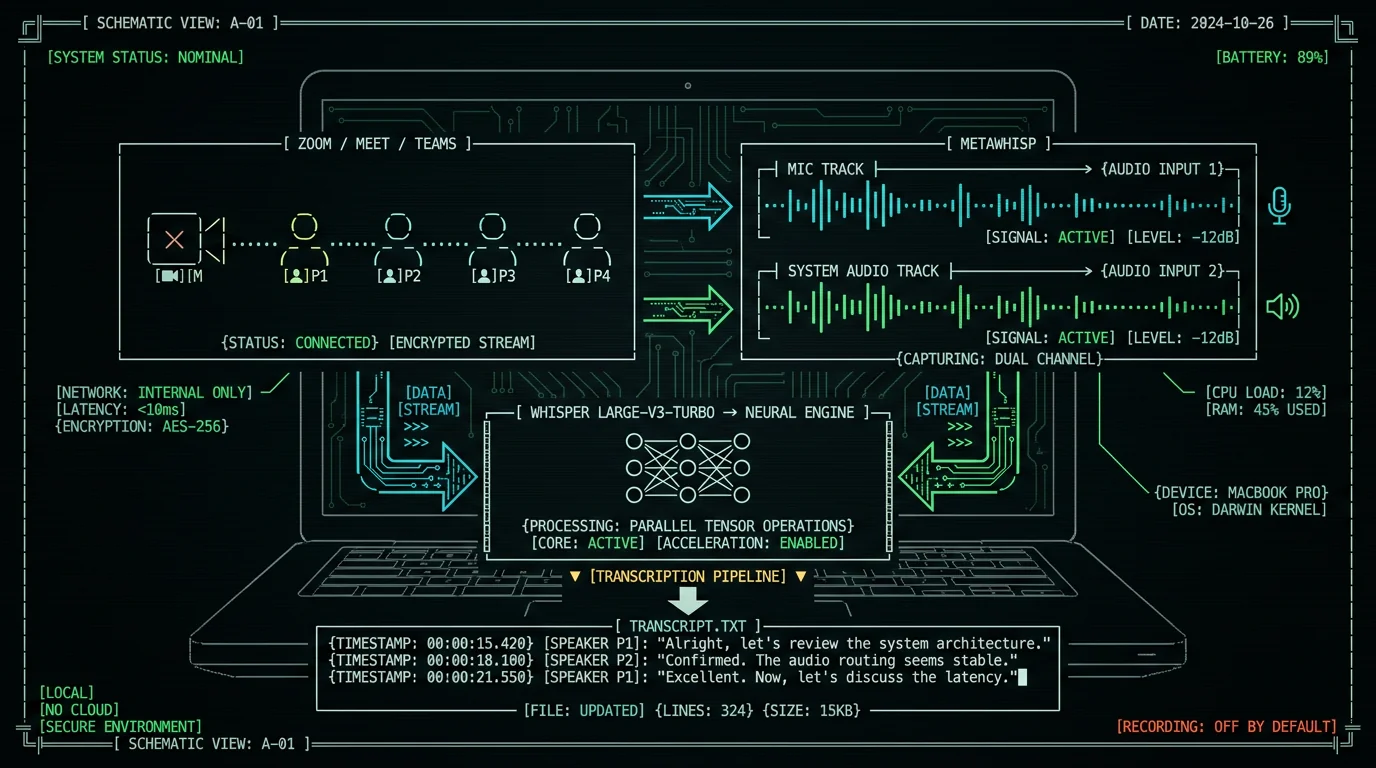
On-device AI meeting copilot for Mac — captures mic + meeting-app audio as two separate local tracks, transcribes with Whisper large-v3-turbo on the Neural Engine, then turns the transcript into structured notes. No bot joins your call. Audio stays on your Mac in local mode. Free download, no account.
What does "on-device AI meeting copilot for Mac" actually mean?
Three words, three honest definitions. On-device means the speech recognition runs on the Neural Engine of your Apple Silicon Mac. Audio is captured and processed locally. In MetaWhisp's local mode, the audio file never leaves the laptop — there's no upload step in the pipeline at all. No round trip to a server, no API key required for transcription, no waiting for someone else's GPU. AI meeting copilot means a tool that handles the boring part of meetings for you — the capturing, transcribing, note-taking, action-item extraction — so you can stay present in the conversation instead of typing. The "AI" part doesn't have to mean a cloud LLM. It can mean a local model, a BYOK model, or no model at all if you only need the transcript. For Mac means macOS 14 or later on Apple Silicon (M1 or later). Whisper large-v3-turbo runs comfortably in WhisperKit on the Neural Engine, which is the technical reason MetaWhisp exists as a Mac app and not, say, a web service. On Intel Macs, Whisper doesn't hit usable speeds. On Apple Silicon, it's fast enough to transcribe a meeting in roughly the time the meeting took. Put together: a Mac app that runs Whisper locally, captures your mic and the meeting app's audio, transcribes both, and gives you an AI-shaped way to turn the transcript into something useful when the call ends.How does MetaWhisp actually capture a meeting (the two-track part)?
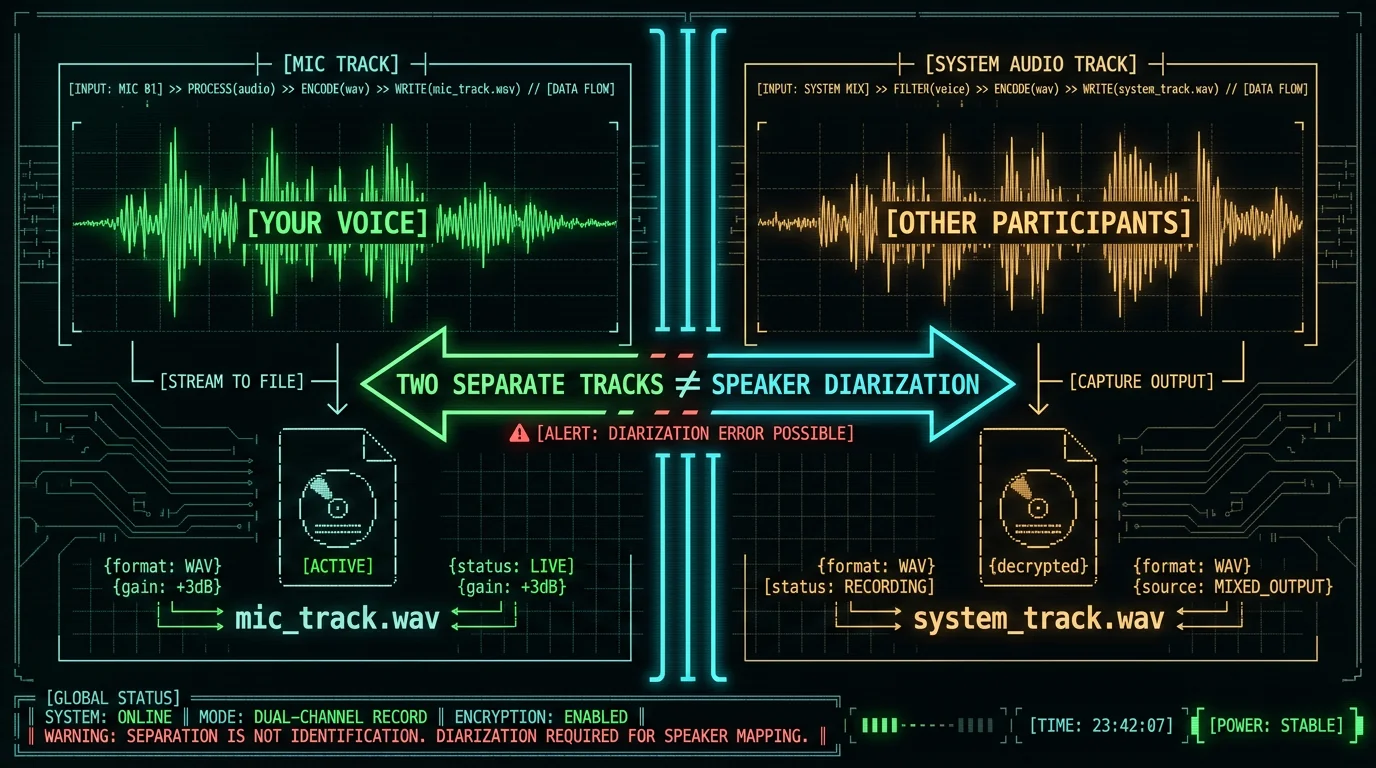
The single most important thing to understand about MetaWhisp as a meeting tool is this: when you start a recording, it captures your microphone audio and your Mac's system audio as two separate tracks, not one mixed file. Why this matters:- Your voice stays in its own track. The other participants' voices — which arrive through Zoom, Google Meet, Microsoft Teams, Webex, Slack huddles, anything — stay in a different track.
- Later, you can process them separately, mute one, or run AI on just one.
- If something sensitive happens on the other side (a customer's name, a number you shouldn't be storing) you can trim only that track.
- You can ship just the mic track to your own ASR for training data without leaking everyone else's voice.
Live transcription vs. live AI coaching — what does MetaWhisp actually do during a call?
A lot of AI meeting tools promise a live copilot experience: a panel pops up with "questions to ask" or "objection handling" prompts as the call happens. Otter, Read AI, and a dozen others sell exactly that. Honest version: MetaWhisp does not ship a live AI coach overlay that whispers prompts in your ear during a call. What it does do:- Live transcription in the MetaWhisp app window. As your mic and the meeting audio come in, Whisper large-v3-turbo produces a transcript that updates in near real time. You can see what's being said — useful for accessibility, useful for staying on track.
- Recording of both tracks for later review, search, and AI processing.
- Post-call AI: after you stop recording, you can run Structured, Correct, or Rewrite on the transcript to get notes, action items, cleaned-up prose. The AI only ever sees the text, not the audio.
What does MetaWhisp's "live Copilot" actually do during a meeting?
It transcribes in real time inside the MetaWhisp app window, captures both your mic and the meeting-app audio as separate local files, and prepares them for post-call AI. It does not generate live prompts like "ask about pricing" mid-call. The AI-shaped part of the workflow happens after the call, when you run Structured, Correct, or Rewrite on the transcript text. If you need a literal live AI assistant feeding you suggestions during the call, MetaWhisp is not that — and I'd rather tell you now than have you find out mid-standup.
Post-call AI: where the copilot becomes real work
If live transcription is the appetizer, post-call AI is the actual meal. MetaWhisp offers three post-processing modes that work on the transcript text:- Structured: turns a raw transcript into organized notes with sections like Summary, Decisions, Action Items, Open Questions. This is the closest thing to the "AI summary" you get from Otter or Fireflies, and it runs locally if you point it at a local LLM, or via your own API key, or via Pro's built-in cloud AI.
- Correct: cleans up filler words ("um", "uh", repeated phrases), fixes obvious transcription errors, gives you readable prose. Good for transcripts you plan to paste into a doc without re-reading.
- Rewrite: rewrites the transcript in a chosen voice or style — meeting minutes, blog draft, follow-up email. Less useful for raw meetings, more useful for client calls where you'll quote the substance later.
Consent, recording laws, and "tell your participants"
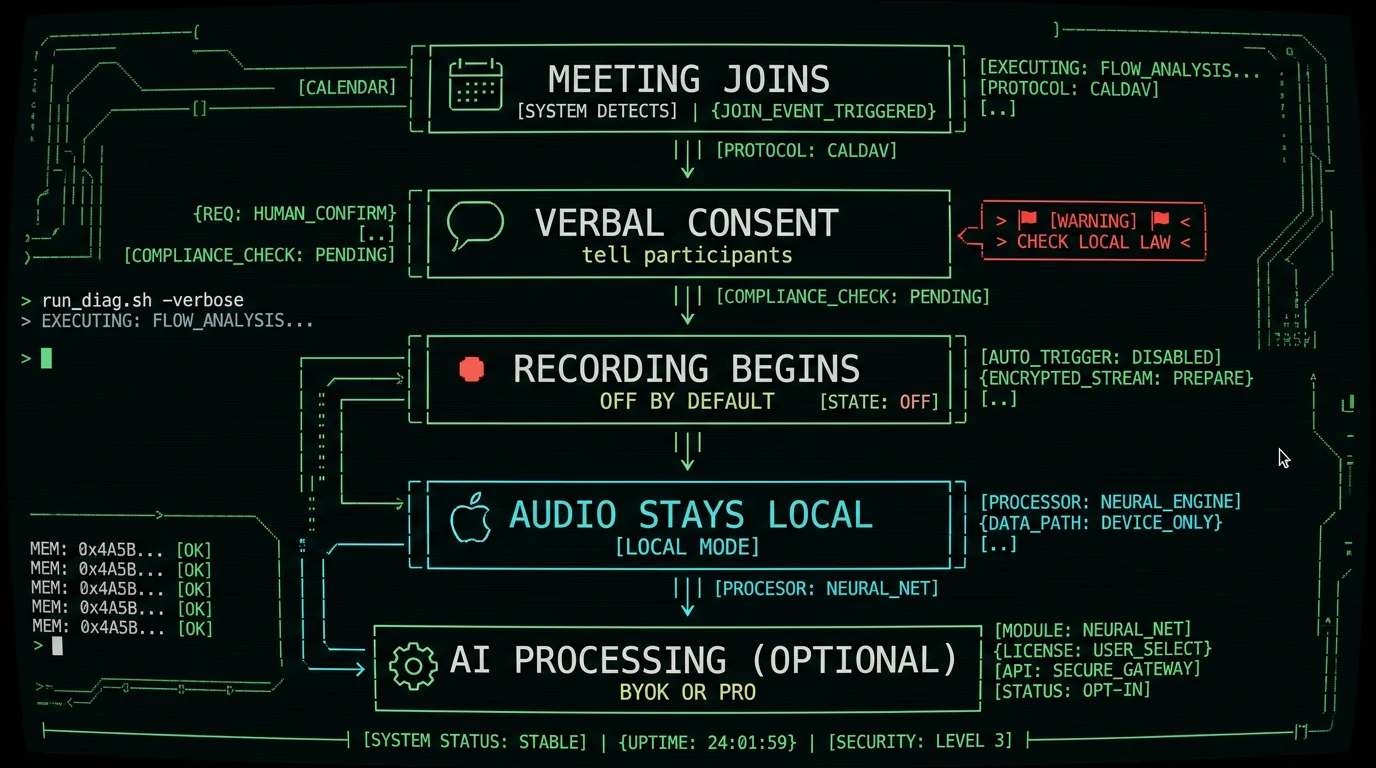
This is the part that has to come before anything else, even if it slows down the article. Recording a conversation without the other person's knowledge is illegal in many jurisdictions. In the US, the all-party-consent states (California, Florida, Illinois, Maryland, Massachusetts, New Hampshire, Pennsylvania, Washington, and others per state-by-state surveys of recording law) require explicit consent from every participant. In the EU, GDPR imposes strict rules on processing personal data, including voice, that apply whether the recording lives on your laptop or someone else's cloud. The specifics vary by jurisdiction. The principle doesn't. MetaWhisp can't tell you whether you're allowed to record a meeting. That is your legal responsibility, not the app's, and no tool on earth can grant you that permission. What MetaWhisp does:- Recording is off by default. You turn it on, deliberately, every time.
- Nothing is uploaded unless you explicitly turn on a cloud feature.
- The captured audio stays on your Mac in local mode.
- Tell people you're recording. "I'm going to record this so I can take better notes — okay?" is enough in most one-party-consent jurisdictions.
- In all-party-consent places, get explicit verbal or written confirmation before recording.
- For work meetings, check your company's recording policy and your employment contract.
- For client calls, send a calendar note the day before: "I'll be recording for note-taking. Let me know if you'd prefer I don't."
When does MetaWhisp beat a meeting bot (and when doesn't it)?
I'll be honest about both.| Dimension | MetaWhisp (on-device) | Meeting bot (Otter, Read AI, Fireflies) |
|---|---|---|
| Joins the call | No — captures audio on your Mac | Yes — appears as a participant |
| Audio storage | Local file on your disk by default | Vendor cloud (per their privacy policy) |
| Live AI prompts | No — post-call only | Yes, on most paid tiers |
| Speaker labels | No (no diarization) | Yes, on most paid tiers |
| Cost model | Free local; Pro $30/yr adds cloud AI | Typically per-seat, per-month (per their pricing pages) |
| Setup | Install Mac app, hit record | Connect calendar, bot joins automatically |
| Internet required | Only for cloud AI / cloud transcription | Yes |
- You don't want a third party on the call (client work, therapy, legal, healthcare).
- The conversation contains personal, financial, or competitive information.
- You're on a platform that blocks bots, or with people who don't like them.
- You want the audio to stay on your machine, full stop.
- You want "who said what" automatically labeled.
- You want live AI prompts during the call.
- You're on a team that lives inside the bot's workspace (searchable history, shared notes).
Does MetaWhisp join my Zoom or Google Meet call as a bot?
No. MetaWhisp runs entirely on your Mac. It captures audio from two sources: your Mac's microphone and your Mac's system audio output (the channel your meeting app uses to play other participants' voices). No third party joins the call. If someone screenshots the participant list, MetaWhisp isn't on it. This is the single biggest difference between MetaWhisp and meeting-bots like Otter or Read AI, and it's the reason people choose MetaWhisp for sensitive calls.
What does MetaWhisp NOT do for meetings (so you know the limits)?
I promised to be honest, so here is the honest list:- Speaker labels need your own key. MetaWhisp cannot tell you which participant said which line. The two-track recording only separates "your voice" from "everyone else's."
- No live AI coaching. No "questions to ask" panel, no objection-handling prompts, no real-time summarization of what was just said. AI work happens after the call.
- No automatic meeting joining. MetaWhisp doesn't read your calendar or pop into a Zoom link. You launch the call yourself; MetaWhisp just listens.
- No iOS app yet. It's on the roadmap for later in 2026. For now: macOS only.
- Cross-meeting search needs LLM access. Ask MetaChat "every meeting where we discussed churn" and it ranks conversations by meaning rather than keyword. The embeddings come from the cloud model, so this needs your own API key or Pro — without either, search falls back to keyword matching.
- No domain-specific accuracy claims. Legal, medical, and other specialized vocabulary haven't been benchmarked. Our own run on LibriSpeech test-clean came out at 2.76% WER (~97% accuracy) — but that's a clean-readings benchmark, not a courtroom deposition.
Can MetaWhisp identify who is speaking in a meeting?
No. MetaWhisp captures your microphone as one track and the meeting app's audio (everyone else) as a second track. It does not perform speaker diarization, which is the specific capability of labeling individual speakers within an audio stream. The second track is "everyone who isn't you," not "Alice said this, Bob said that." If your workflow depends on per-speaker attribution, you will need a separate diarization tool on top of MetaWhisp's output — and I am not aware of a free, on-device one that ships today.
Free tier vs. Pro for the meeting copilot flow
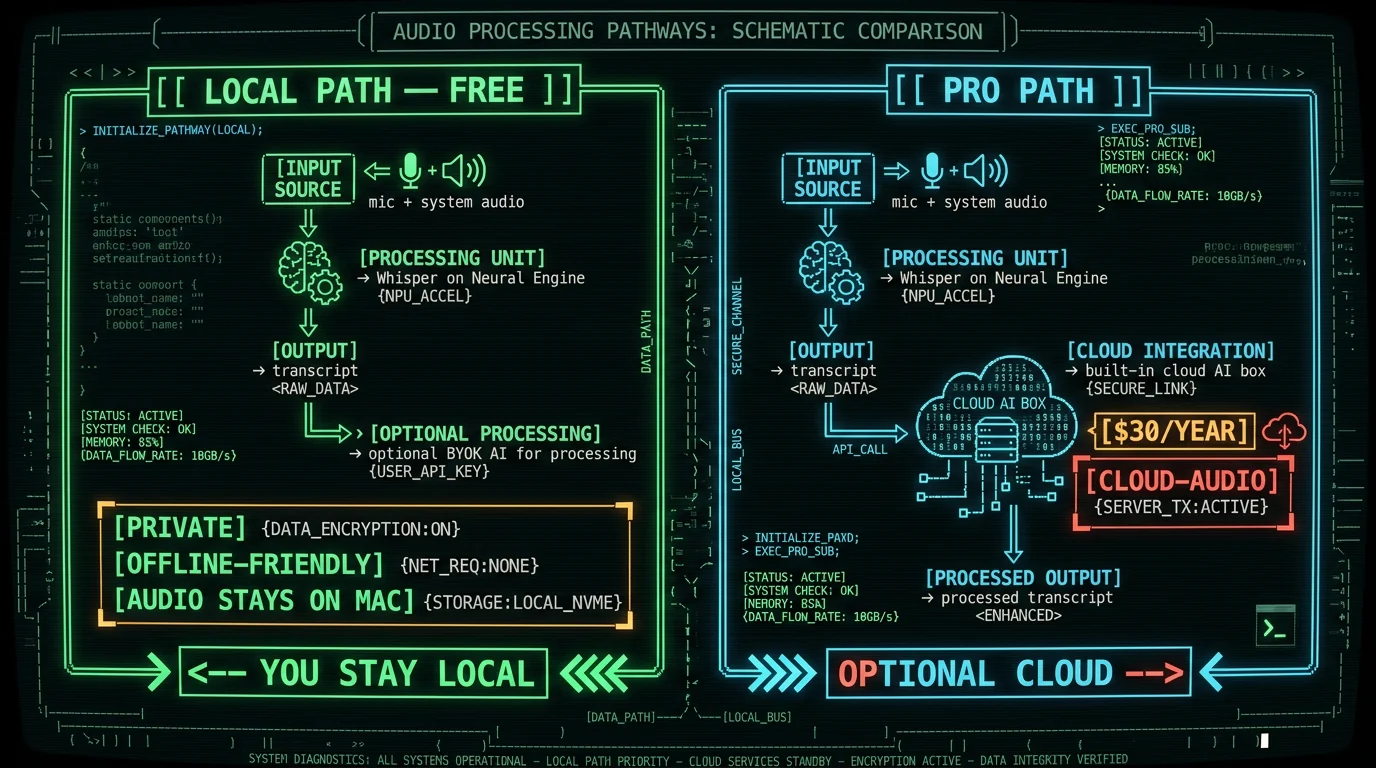
You can do a lot without paying MetaWhisp a cent. Here's the matrix:| Feature | Free + local | Free + BYOK | Pro ($30/yr or $7.77/mo) |
|---|---|---|---|
| Two-track meeting recording | Yes, unlimited | Yes, unlimited | Yes, unlimited |
| Local Whisper transcription (99 languages) | Yes, unlimited | Yes, unlimited | Yes, unlimited |
| Structured / Correct / Rewrite | No | Yes, via your OpenAI or Cerebras key | Yes, built-in cloud AI |
| Cloud transcription (Whisper large-v3-turbo) | No | No | Yes, with daily cap |
| Audio leaves your Mac | Never | Only transcript text → your own API | Yes, for cloud features (audio + text) |
| Priority support | No | No | Yes |
Do I need Pro to use the AI meeting copilot features?
No. The free tier gives you unlimited local recording and transcription — that alone handles most of what people call a "meeting copilot." For AI post-processing (Structured, Correct, Rewrite), the free tier works as long as you bring your own OpenAI or Cerebras API key. Pro is for people who want built-in cloud AI without managing a key, or who also want MetaWhisp's own cloud transcription (daily cap applies — see pricing page). If you're handling sensitive audio and want to stay fully local, BYOK with a local LLM is the path; if you want zero config, Pro is the path.
How do you set it up in 10 minutes?
Quick recipe. The full step-by-step with screenshots is in how to transcribe meeting minutes on a Mac; this is the short version.- Install MetaWhisp. Free download, macOS 14+, Apple Silicon. ~950 MB model download the first time you run it. No account, no email, no signup form.
- Grant mic permission and system-audio permission when macOS prompts. Say yes to both. Without system audio permission, the second track is silence — which is the #1 reason people think MetaWhisp "isn't working."
- Open Preferences → Recording Sources and enable both your microphone input and the system audio capture. Both tracks should appear in the input meter.
- Open your meeting app (Zoom, Meet, Teams, Webex, FaceTime, anything). Start or join the call.
- In MetaWhisp, hit Record. Both tracks start capturing. You'll see the live transcript begin updating in the app window.
- During the call: stay present. Don't transcribe by hand — that's the whole point. If you need to mark a moment, jot a one-word note in your notes app; the recording captures everything.
- End the call. Hit Stop in MetaWhisp. The two WAV files and the merged transcript are saved on your disk.
- Optional: run AI processing. With a BYOK key or Pro, click Structured on the transcript. Paste the result into wherever your notes live.
Pro tip: Before any high-stakes client call, do a 30-second test recording with both tracks enabled, then play the two WAV files back. Verifying that you actually captured the system audio (and not silence) is the single biggest failure mode I see people hit. It's almost always a permissions issue, not a bug. The second most common is forgetting to grant Screen Recording permission to the meeting app itself.
▣ 10-MINUTE SETUP CHECKLIST
- [✓] INSTALL METAWWHISP
- [✓] GRANT MIC + SYSTEM AUDIO PERMISSIONS
- [✓] START YOUR MEETING
- [✓] HIT RECORD IN METAWWHISP
- [✓] STOP + RUN AI AFTER THE CALL
[NO ACCOUNT] [NO CARD] [~950 MB MODEL DOWNLOAD]
Frequently asked questions
Does MetaWhisp join my Zoom or Google Meet call as a bot?
No. MetaWhisp runs entirely on your Mac and captures the audio your Mac is already playing through its speakers (the meeting app's output) plus your microphone. Nothing joins the call. Nothing appears in the participant list. If you're screen-sharing the roster, MetaWhisp isn't on it.
Can MetaWhisp tell me who said what in a meeting?
No. MetaWhisp splits the audio into two tracks: your microphone (you) and the system audio (everyone else). It does not perform speaker diarization, which is the technical capability to label individual speakers. The "everyone else" track is one mixed stream — useful for transcription, useless for attribution.
Is it legal to record a meeting with MetaWhisp?
That depends on where you and the other participants live, where your company is incorporated, and what you've agreed to in writing. Many US states (California, Florida, Illinois, Massachusetts, and others) require all-party consent. The EU's GDPR also restricts processing voice data. MetaWhisp only records when you turn it on, but the legal responsibility to inform participants and get any required consent is yours, not the app's. When in doubt, ask first.
Does the AI meeting copilot work fully offline?
The local recording and Whisper transcription are fully offline — the model runs on your Mac's Neural Engine and audio never leaves. The AI post-processing (Structured, Correct, Rewrite) needs to reach an LLM — either a local model you point MetaWhisp at, your own OpenAI or Cerebras key via BYOK, or Pro's built-in cloud AI. Without any of those, you still get the transcript.
Will my meeting audio leave my Mac?
Only if you opt in. In local mode, audio is never uploaded — there's no upload step at all in the code path. If you turn on Pro's cloud transcription, the audio is sent to MetaWhisp's servers for that specific service. If you use BYOK for AI processing, only the transcript text is sent to your own API provider, not the audio. Check the pricing page for what each tier actually transmits.
Which meeting apps work with MetaWhisp?
Anything that produces audio on your Mac. Zoom, Google Meet, Microsoft Teams, Webex, Slack huddles, FaceTime, Discord, Whereby, Around — MetaWhisp captures system audio regardless of source. The meeting app doesn't need a MetaWhisp plugin, integration, or SDK.
How accurate is MetaWhisp's meeting transcription?
Our own LibriSpeech test-clean run measured 2.76% WER (~97% accuracy) — that's the only first-party accuracy number we publish, and it's a clean-readings benchmark, not real meetings. In my own head-to-head test on the same recorded audio across seven apps, MetaWhisp came out at about 3.7% WER. Domain-specific accuracy (medical, legal, technical jargon, accents, cross-talk) has not been benchmarked — record a sample of your own meetings before trusting it for a deposition or a patient note.
Can MetaWhisp run on an Intel Mac?
No. MetaWhisp requires macOS 14 or later on Apple Silicon (M1 or later) because the Neural Engine on Apple Silicon is what makes Whisper large-v3-turbo fast enough to transcribe a meeting in roughly the time the meeting took. Intel Macs aren't supported today, and there's no workaround that I'm aware of.
What languages can MetaWhisp transcribe in meetings?
99 languages with auto-detect, per the underlying Whisper large-v3-turbo model. English, Russian, Mandarin, Spanish, German, French, Japanese, Korean, Portuguese, Hindi, Arabic, and many more. The same model handles the meeting regardless of which languages the participants speak, including multilingual calls.
Related reading
- Meeting transcription without a bot joining your call — the longer version of the bot-vs-local comparison
- How to transcribe meeting minutes on a Mac — the step-by-step setup guide with screenshots
- Processing modes: Structured, Correct, Rewrite — the full breakdown of what AI post-processing actually does
- Pricing: Free local vs Pro cloud — the comparison if you want built-in cloud AI without a BYOK key
