What Is Granola and Why Are People Looking for Alternatives?
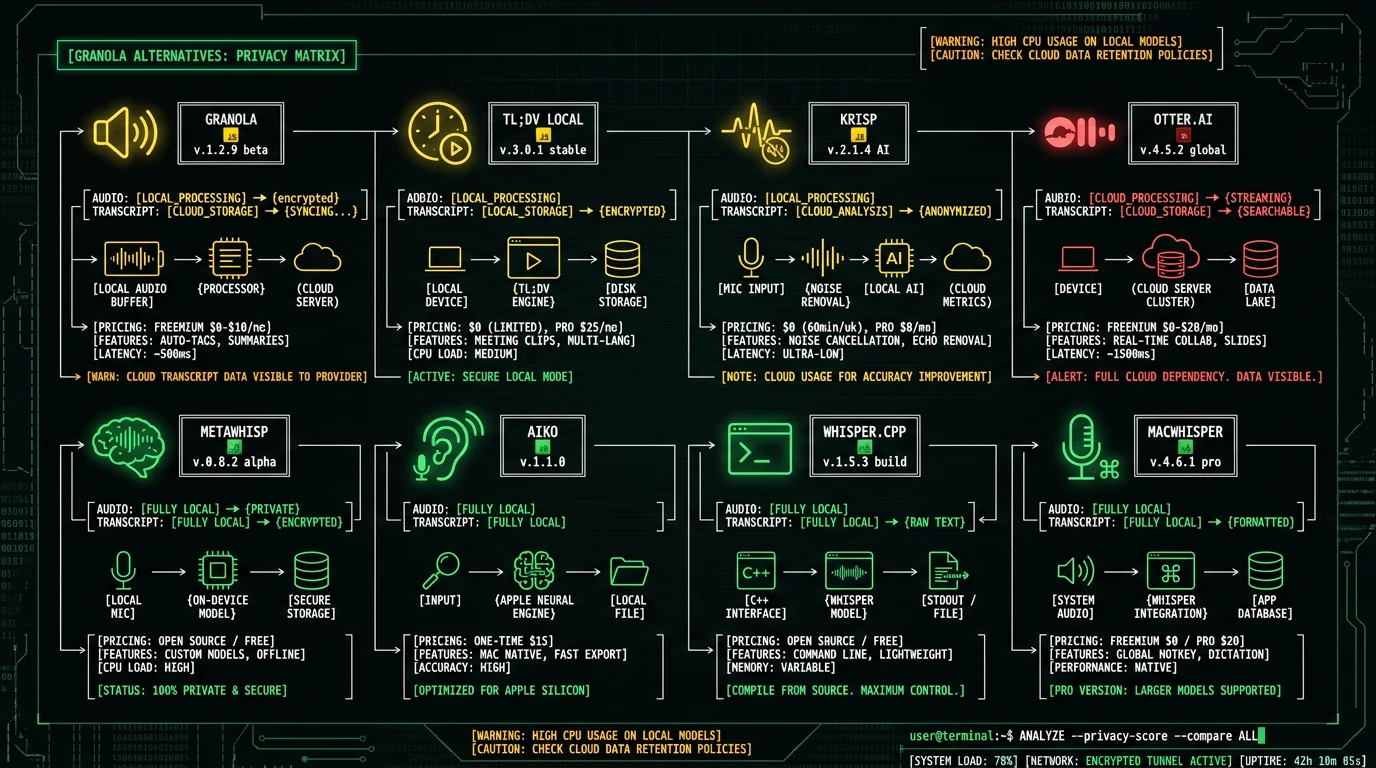
Granola is an AI meeting notepad that runs as a Mac app. Unlike traditional meeting transcription tools that join calls as a bot (Otter.ai, Fireflies, Fathom, Avoma), Granola sits on your computer and uses macOS system audio + your microphone to capture meeting audio. There's no bot in the call. The audio gets transcribed and AI-summarized into Notion-style structured notes. Per Granola's documentation, the architecture is:- Granola Mac app records system audio + mic locally during your meeting
- Audio is sent to Granola's cloud for transcription
- Transcript is sent through AI summarization in Granola's cloud
- Notion-style notes return to your Mac for editing and storage
- Notes sync to integrated tools (Slack, Notion, HubSpot) per your settings
How Does Granola's Pricing Compare to Alternatives?
Granola pricing as of May 2026, per their site:| Tool | Starting price | Free tier | Transcript location |
|---|---|---|---|
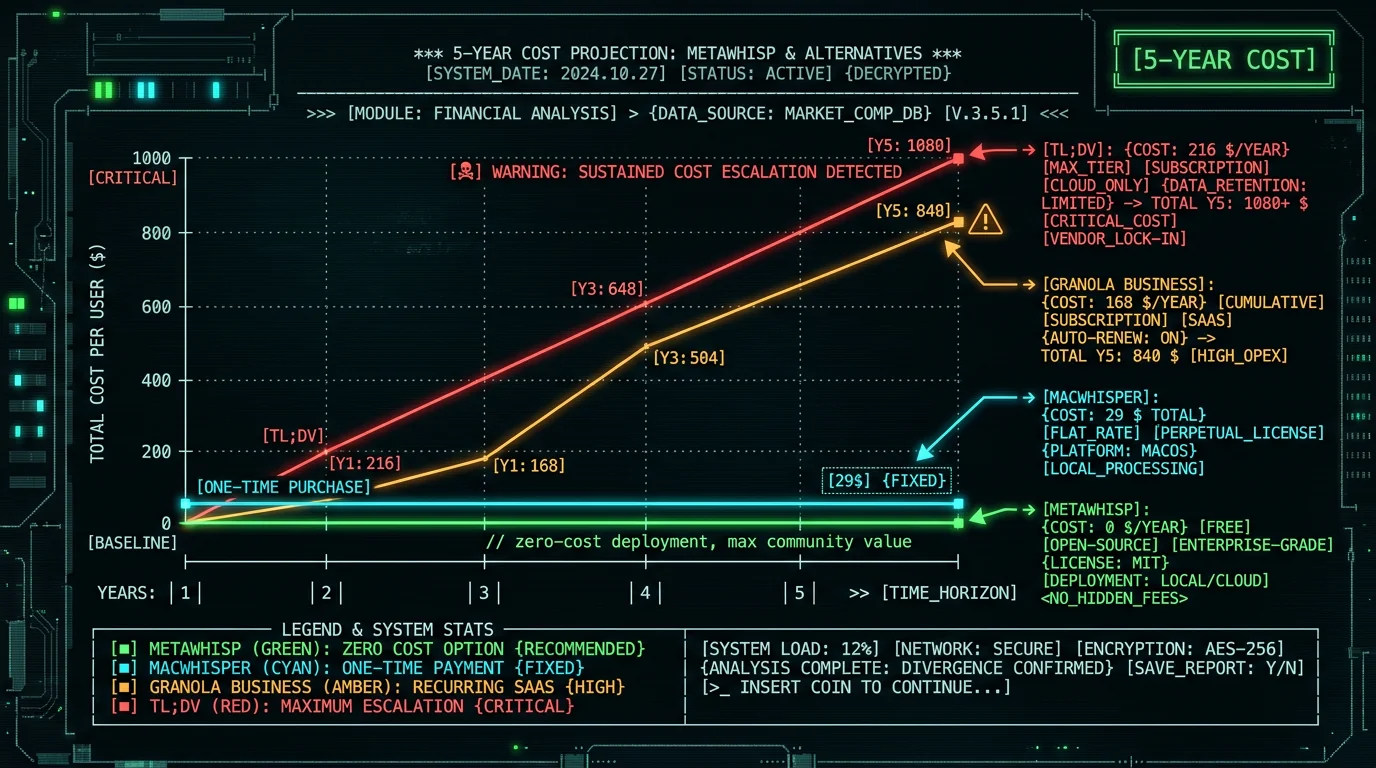
| Granola | $14/user/month (Business) | Limited free tier | Cloud |
| tl;dv | $18/user/month | Free tier with limits | Cloud |
| Krisp | $8/user/month | Free tier with limits | Cloud |
| Otter.ai | $8.33/user/month (Pro) | 300 min/month free | Cloud |
| MetaWhisp | Free | Free unlimited | On-device |
| MacWhisper | $29 one-time | Free with limits | On-device |
| SuperWhisper | $249 lifetime or $8.49/mo | Free with limits | On-device (local mode) |
| Aiko | Free (open-source) | Fully free | On-device |
- Cloud meeting note tools — $8-18 per user per month subscriptions. Granola is mid-pack. These tools handle the AI summarization for you in the cloud
- On-device transcription tools — Free or one-time payment. You get raw transcripts; AI summarization is up to you (use Claude, ChatGPT, or local LLM separately)
What Are the Best 7 Granola Alternatives for Mac?
The seven tools below cover the spectrum from "Granola-like cloud UX with more privacy controls" to "fully local nothing-leaves-Mac" workflows:1. MetaWhisp — Free fully-local transcription
MetaWhisp runs Whisper large-v3-turbo on Apple Neural Engine. Records audio locally, transcribes locally, audio never leaves your Mac. Versus Granola, the difference is now where the AI summary runs, not whether you get one: MetaWhisp includes Recap — a post-call summary of decisions, action items, and next steps. Recap runs only when you enable AI access, and you choose the path. Use a local LLM (Apple's MLX / Foundation Models) and the summary stays fully on your Mac; use your own API key or Pro for cloud-grade quality. The free, local-only path has no time or length caps and gives you the transcript; Recap is the one step that needs an LLM. Best for users who want maximum privacy and a built-in summary they control.2. MacWhisper — One-time payment, file-batch focused
MacWhisper at $29 one-time is the most mature commercial Mac Whisper app. Best for batch processing recorded meeting audio rather than live capture. Drop a .m4a or .wav file in, get a transcript. Supports multiple Whisper model sizes. On-device, no cloud. Good complement to Apple Voice Memos or another recorder.3. SuperWhisper — Customizable on-device dictation
SuperWhisper at $249 lifetime or $8.49/month is the most feature-rich on-device dictation app. Supports multiple Whisper models, customizable post-processing, system-wide dictation. Has a cloud-hybrid mode users should verify before enabling for sensitive content. Best for power users who want extensive customization.4. Aiko — Open-source free Whisper for Mac
Aiko is an open-source Mac Whisper wrapper available free on Mac App Store. Runs Whisper locally, batch processing, simple UI. Best for users who want fully open-source software without paying anything. Less polished than MacWhisper but functionally similar for transcription.5. whisper.cpp — Command-line for developers
whisper.cpp is the open-source C++ implementation of Whisper. Install via Homebrew:brew install whisper-cpp. Best for users comfortable with Terminal who want maximum control. Pairs well with shell scripts to automate meeting recording → transcription → local LLM summarization pipelines.
6. Apple Voice Memos + Apple Dictation file transcription
Built into macOS. Record meeting audio in Voice Memos, then use Voice Memos' transcription feature for English audio. Free, on-device, no third-party tool. Best for users who only need English transcription and prefer Apple's built-in tools over third-party software.7. tl;dv Local Mode — Cloud meeting tool with optional local processing
tl;dv offers a hybrid option where some processing happens locally. Less private than fully-local tools but more privacy-aware than pure cloud meeting tools. Best for users transitioning from pure cloud workflows but not ready to handle transcription manually. The right pick depends on whether you want a Granola-like polished UX (use Granola itself with its privacy trade-off accepted) or fully local control (use MetaWhisp or MacWhisper with manual summarization).How Do I Replicate Granola's "AI Summary" Workflow Locally?
Granola's main value-add beyond raw transcription is structured AI summary — meeting notes formatted with action items, decisions, attendees, topics. This requires an LLM. Three ways to do it locally: Option A: Manual paste to Claude/ChatGPT (privacy compromise) Use MetaWhisp or MacWhisper to get a local transcript. Paste it into Claude or ChatGPT with a prompt like "Summarize this meeting into action items, key decisions, and discussion topics, formatted as Notion-style notes." Output goes to your clipboard or to whichever tool you paste it into. Trade-off: the transcript text reaches Claude/ChatGPT servers. Better than Granola's audio + transcript upload, but not fully local. Option B: Local LLM via Ollama or LM Studio Run Llama 3.1 8B, Mistral 7B, or Qwen 2.5 7B locally on your Mac via Ollama or LM Studio. After transcription, pipe the transcript to the local LLM for summarization. Fully on-device, but quality is lower than Claude or ChatGPT for complex meetings. Best on M2 Pro+ Macs with 16 GB+ RAM. Option C: Hybrid with Apple Intelligence Apple Intelligence on macOS includes Writing Tools with summarization that runs partly on-device, partly on Apple's Private Cloud Compute. For users in Apple Intelligence-supported regions, this is the simplest local-ish summarization. Trade-off: Apple's privacy promises are stronger than most cloud vendors but still involve cloud servers for some operations. The choice between these depends on which trust boundary matters most: do you trust Claude/ChatGPT with transcript text, do you have the hardware for local LLMs, or do you trust Apple's Private Cloud Compute architecture.What About Granola's Spaces and MCP Server?
Per Granola's 2026 announcements, they shipped Spaces (team workspaces with access controls), a Personal API for Business tier users, and an Enterprise API for Enterprise tier users. They also launched an MCP server in February 2026 for integrating meeting context into AI agents. These features are valuable for teams using Granola as their primary meeting note system. They also illustrate Granola's product direction: deeper cloud integration, more team-collaboration features, more API surface for plugging into broader AI workflows. The product is moving away from "simple on-device alternative to Otter.ai" toward "cloud meeting intelligence platform with on-device capture." For users who want the on-device-capture part without the cloud-intelligence-platform part, the alternatives in this guide are more aligned with the original Granola value prop than Granola itself is becoming.Does MetaWhisp Summarize Meetings?
I'm Andrew Dyuzhov, solo founder of MetaWhisp. Short answer: yes — now it does, but on your terms. MetaWhisp ships Recap, a post-call summary (decisions, action items, next steps) plus automatic task extraction. The design rule was never "no summaries" — it was "no surprise uploads." So Recap runs only when you turn on AI access, and you pick where it runs:- Local LLM — fully private — Run Recap on a model that stays on your Mac (Apple's MLX / Foundation Models). Nothing leaves the device. Quality is solid for clean meetings and a step below frontier cloud models on messy, jargon-heavy calls — that gap is closing fast
- Your own API key or Pro — cloud-grade — Send the transcript text to a frontier model for the sharpest summaries. You opt in explicitly; there are no background uploads
- Free, local-only — transcription — Stay on the free path and you get the on-device transcript with no summary. Assemble notes yourself, or switch AI access on when you want Recap
Frequently Asked Questions About Granola Alternatives
Does Granola work offline?
Partial. Granola records meeting audio locally on your Mac without needing a bot to join calls. But transcription and AI summarization require Granola's cloud servers, so audio uploads when network is available. Pure offline operation is not supported in the standard Granola app as of May 2026. For fully offline alternatives, use MetaWhisp, MacWhisper, Aiko, or whisper.cpp which run Whisper transcription on-device.
What is the best free alternative to Granola for Mac?
MetaWhisp for live capture and transcription (free, on-device Whisper large-v3-turbo on Apple Neural Engine). Aiko for batch file transcription (free, open-source Mac App Store). Apple Voice Memos with built-in transcription for English audio (free, system-level). For meeting summarization, pair these with Claude (free tier), ChatGPT (free tier), or a local LLM via Ollama.
Is Granola HIPAA-compatible?
Granola offers Enterprise tiers that may include BAAs for healthcare customers. Standard Granola tiers are not HIPAA-compatible. For healthcare workflows on Mac where audio cannot leave the device, use on-device transcription via MetaWhisp or MacWhisper combined with local note-taking. This sidesteps the BAA requirement by ensuring audio and transcripts never leave the device.
Can I keep transcripts fully local while using Granola-style features?
Not with Granola itself. To keep transcripts fully local you need to switch to on-device tools: MetaWhisp or MacWhisper for transcription, plus a local LLM (via Ollama or LM Studio running Llama 3.1, Mistral, or Qwen) for AI summarization. Setup is more involved than Granola's polished UX but the privacy guarantee is structural rather than contractual.
Does Granola record without a meeting bot?
Yes. Granola captures meeting audio at the Mac system level using a combination of system audio output and microphone input. No bot joins the call. Other meeting attendees don't see Granola in the participant list. This is a meaningful upgrade over bot-based tools like Otter.ai, Fireflies, or Avoma where a bot participant is visible to all attendees.
What's the difference between Granola and MetaWhisp?
Granola: records locally, transcribes and summarizes in its cloud, full meeting workflow with team features. MetaWhisp: records and transcribes locally, and adds Recap — a built-in post-call summary that runs only when you enable AI access (a local LLM for full privacy, your own API key, or Pro). The free local-only path stays transcription. So MetaWhisp can now cover the Granola summary workflow while keeping it fully on-device if you use a local model — the main gaps versus Granola are team features and polish.
Which Granola alternative has the best free tier?
MetaWhisp has unlimited free usage with no time caps, no audio length limits, and no feature paywalls — runs Whisper large-v3-turbo on-device at zero cost. Aiko is fully free and open-source. Apple Voice Memos with transcription is free for English audio. For cloud meeting tools with free tiers, Otter.ai offers 300 minutes per month, Krisp offers limited free usage. Granola's free tier is more restricted than these.
About the Author
Andrew Dyuzhov is the solo founder and CEO of MetaWhisp, a free on-device voice-to-text app for macOS that runs Whisper large-v3-turbo on Apple Neural Engine. MetaWhisp focuses on the transcription layer of personal voice workflows rather than the full meeting-intelligence platform space that Granola occupies. The architectural decision to stay narrow-and-local rather than broad-and-cloud reflects a bet that on-device tools should be focused and verifiable rather than feature-rich and trust-required. Connect on X or GitHub.
Related Reading
- Meeting Transcription Without a Bot — bot-free meeting capture explained
- How to Transcribe Meeting Minutes on Mac — workflow guide
- Zoom Transcription on Mac — Zoom-specific guidance
- Private Voice-to-Text on Mac — on-device architecture deep-dive
- 7 Best Voice-to-Text Apps for Mac — broader landscape
