[LOCAL] [NO CLOUD] [NO BOT] [NEURAL ENGINE]
a private meeting-notes pipeline that runs on your MacBook
TL;DR. An offline AI secretary for MacBook meetings is a three-step pipeline: record the audio on your Mac, transcribe it locally with Whisper running on the Apple Neural Engine, then summarize the resulting text — all without uploading the audio. MetaWhisp is the transcription step. It does not auto-join Zoom, Meet, or Teams, and it has no bot. What it does: turn recorded meeting audio into a clean text file on your machine in minutes, with the option to add structured summaries via your own OpenAI or Cerebras key. Free local tier, no account, audio never leaves the MacBook in local mode. Grab the free download.
What counts as an offline AI secretary for MacBook meetings?
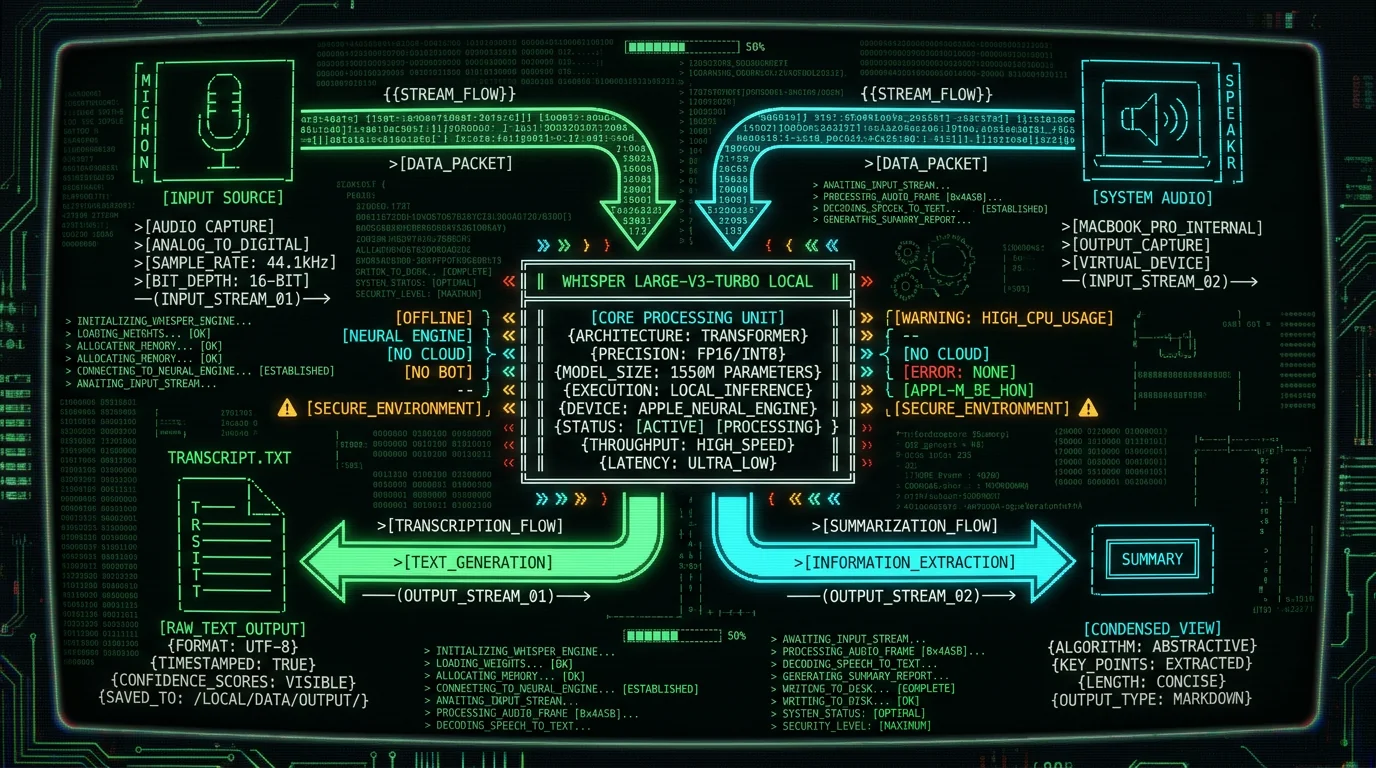
A real one does three jobs, in order. It captures the meeting audio. It transcribes that audio on the device that recorded it — not on a remote server. And it produces something you can paste into a doc, a CRM, or a project tracker. Optional, but usually expected: a summary with action items, decisions, and owners. The "offline" part is the load-bearing word. If the audio hits a remote Whisper API, a Google STT endpoint, or an Otter server, you don't have an offline secretary. You have a local recorder bolted to a cloud transcriber. That distinction matters because the moment audio leaves the MacBook, you're back to drafting DPAs, checking subprocessor lists, and hoping retention policies are honored.Short answer: an offline AI secretary for MacBook meetings is a stack of three things — a way to capture the audio, a local speech-to-text engine (typically Whisper running on the Apple Neural Engine), and an optional summarization step that operates on text only. "Offline" means the audio never reaches a remote server. "Secretary" means the output is structured: clean paragraphs, speaker turns, action items, decisions.
MetaWhisp covers the middle step. You feed it a recorded audio file (or hold the global hotkey and talk), and it returns text using WhisperKit with the Whisper large-v3-turbo model on the Neural Engine. The recording step is up to you — your Mac's Voice Memos, QuickTime, a virtual audio driver like BlackHole, or a paid tool like Rogue Amoeba's Loopback. The summary step is a separate concern, and you have a few honest options I'll cover below.
The core components in detail: An offline AI secretary for MacBook meetings requires three distinct layers working together on your local machine. The first layer is audio capture — this can be the built-in MacBook microphone for in-person meetings, a USB lavalier microphone for better audio quality, or a virtual audio driver like BlackHole for routing call audio from Zoom, Meet, or Teams into a recordable file. Without clean audio input, even the best transcription engine produces frustrating results. The second layer is local speech-to-text, and this is where Whisper large-v3-turbo running on the Apple Neural Engine through WhisperKit delivers the best balance of speed and accuracy on Apple Silicon hardware. The third layer is optional but practically necessary for most users: a summarization step that converts the raw transcript into structured notes with action items and decisions. This third layer can be handled by your own OpenAI or Cerebras API key in MetaWhisp's Structured mode, a local LLM through Ollama or LM Studio, or simply by reading the transcript yourself.
Why bother running an AI secretary offline on a MacBook?
The reasons I hear most often from the people who actually use this kind of setup: client confidentiality (lawyers, consultants, accountants), regulated data (clinicians, HR, recruiters handling candidate conversations), and a general allergy to subscription creep. Cloud meeting tools price by the minute, cap "free" tiers aggressively, and reserve the right to keep transcripts. There's also a quality angle people underestimate. On Apple Silicon, Whisper large-v3-turbo running through WhisperKit is fast — typically faster than real-time on an M1 or later. So you can transcribe a 30-minute meeting in roughly the time it takes to brew coffee, and then keep working. No upload bar, no queue, no "processing."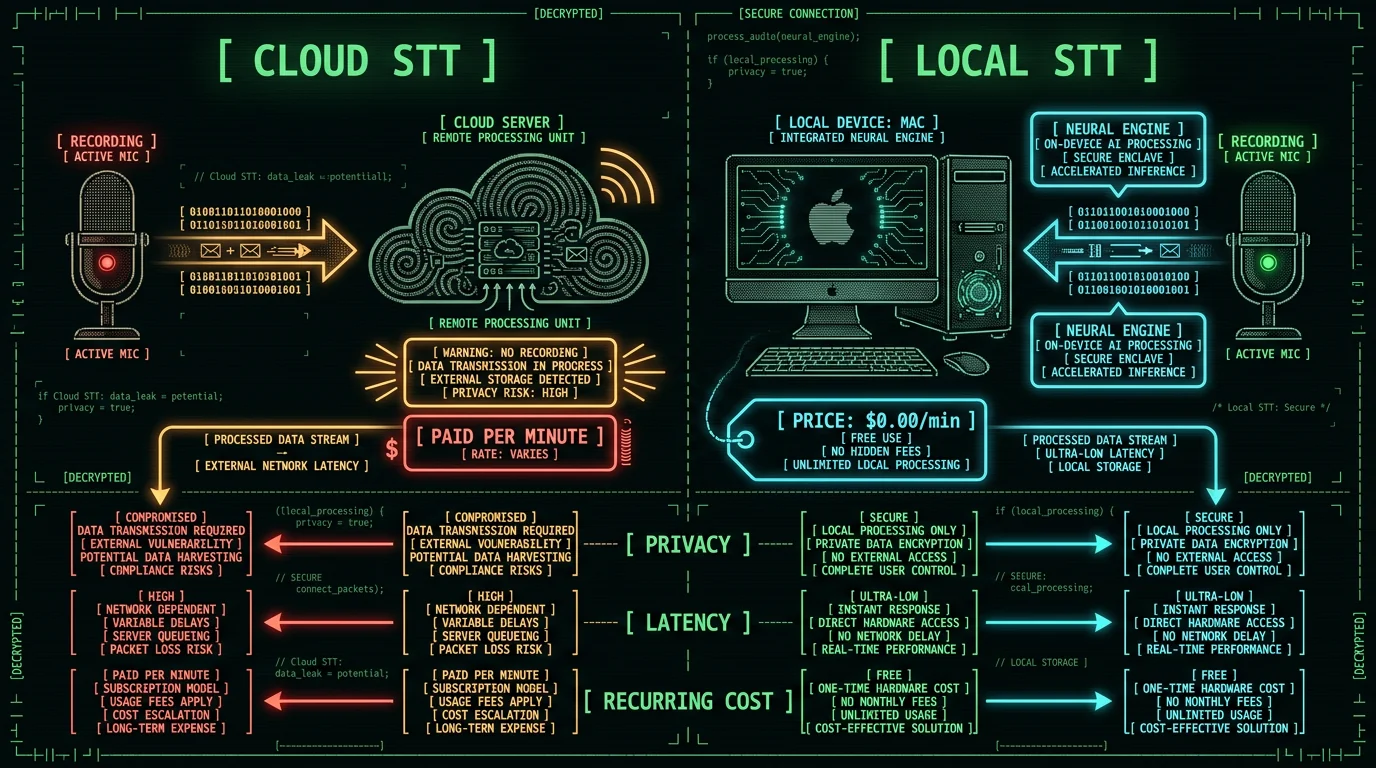
Three reasons people pick offline over cloud for meeting notes:
- Privacy by construction. Local mode audio never leaves the MacBook. There's no server log to subpoena, no retention setting to forget, no third-party processor to vet. For industries where the conversation itself is privileged — legal, medical, financial — this is the only comfortable option.
- Recurring cost goes to zero for transcription. Whisper large-v3-turbo is open weights. The Apple Neural Engine is already in your Mac. The model download is roughly 950 MB and you do it once. After that, every minute of meeting audio is free. If you also use the structured summary step, you can route that through your own OpenAI or Cerebras key — only the transcript text, never the audio.
- Latency and reliability. No upload, no queue, no "service temporarily unavailable." A spotty coffee shop connection doesn't break your workflow.
The honest scope: what MetaWhisp does — and what it doesn't
I'd rather be precise here than sound impressive. MetaWhisp is a voice-to-text app for macOS 14+ on Apple Silicon. It uses WhisperKit to run Whisper large-v3-turbo on the Neural Engine. The free local tier is unlimited and account-free: you hold a global hotkey (Right Option by default), talk, and MetaWhisp pastes the transcript into whichever app has focus. Or you drop a recorded audio file in and get the same thing. What it does not do: - It does not auto-join a Zoom, Google Meet, Microsoft Teams, or Webex call. There is no bot. Nobody on the call will see "MetaWhisp Notetaker has joined." - It does not record the meeting on its own. It expects you to bring the audio — either from a recording app or from a virtual audio driver that pipes system audio to a file. - It does not ship speaker diarization yet. If three people spoke, you get the words in order with rough sentence boundaries, but the transcript doesn't label "Alice / Bob / Carol." That's on the roadmap but not in the binary. - It does not run on Intel Macs. Apple Silicon (M1 or later) only, because that's what the Neural Engine needs. - It does not have an iOS or iPad app. macOS only today, with no iOS app. This matters because the marketing copy for a lot of "AI meeting secretary" tools implies all of those features are bundled. They're usually not — they're paying for a cloud service that bundles them. We bundle the part we do well and tell you the rest is your job.The private pipeline, end to end
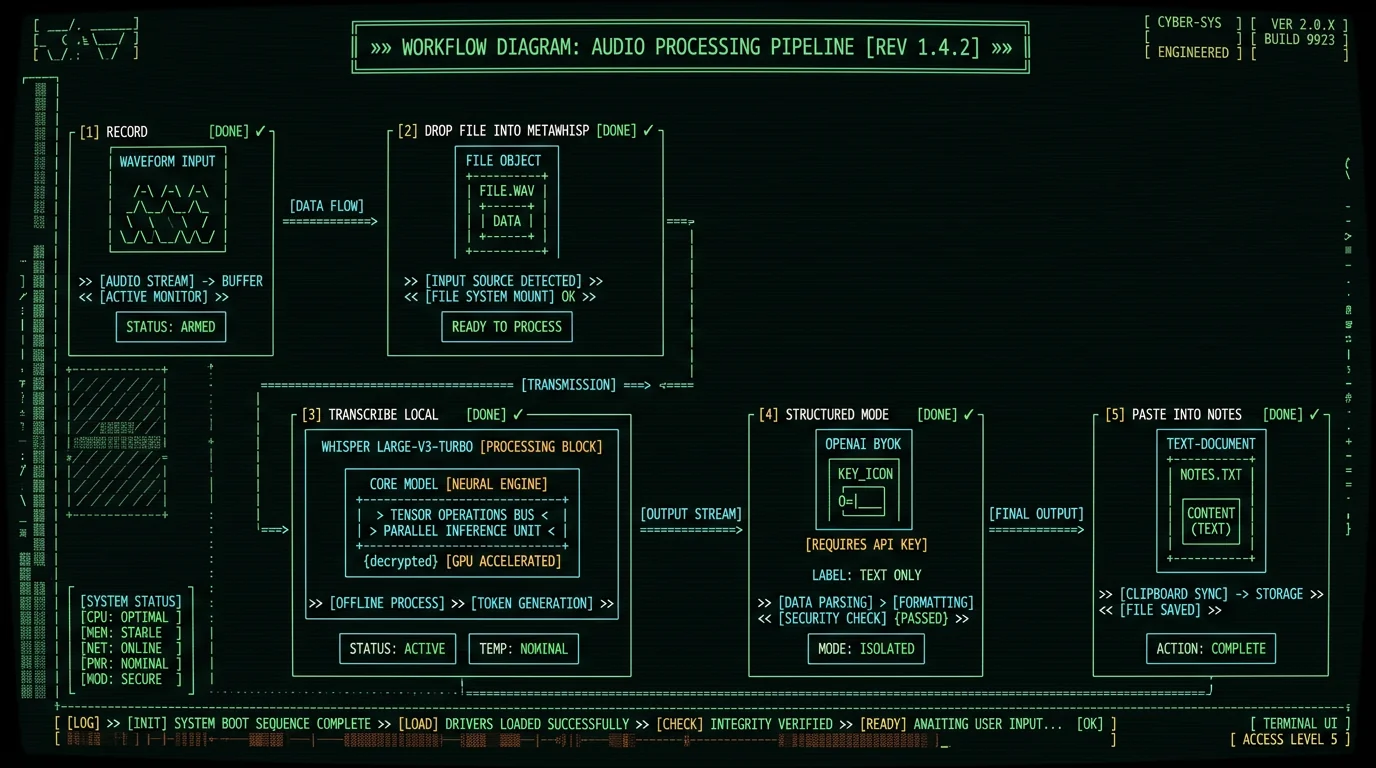
Here is the actual workflow I use, and that I'd recommend to anyone setting this up. Five steps, no cloud required for the audio.- Capture the audio. For in-person meetings, the Mac's built-in mic or a USB lav. For calls, a virtual audio driver that routes system audio (BlackHole 2ch is free and open source; Loopback is paid but smoother). Save the file as WAV or M4A.
- Open MetaWhisp and drop the file in. WhisperKit loads the model on first run (about 950 MB, cached after that). On an M1 Air, a 30-minute file takes a few minutes to transcribe. M2 and M3 are quicker.
- Read the transcript. It's a plain text file. Copy, paste, edit. No proprietary format.
- (Optional) Summarize via BYOK. If you want action items, decisions, and a clean summary, you can run the transcript through Structured mode using your own OpenAI or Cerebras API key. The audio stays on the Mac; only the text you paste in goes to the API, billed against your key, never to MetaWhisp's servers.
- Paste into your notes app, CRM, or ticket. Whatever you already use.
How do you capture meeting audio on a Mac without a bot joining?
This is the most common follow-up question, so it's worth its own section. If you are already on the call on your Mac, the audio is on your machine — you just need to route it somewhere you can record. The honest options:| Method | Cost | Setup | Quality |
|---|---|---|---|
| BlackHole 2ch (virtual audio driver) | Free, open source | ~10 min, Audio MIDI Setup aggregate device | Lossless, system audio |
| Loopback (Rogue Amoeba) | Paid (one-time) | GUI, drag-and-drop routing | Lossless, system audio |
| QuickTime Player → New Audio Recording | Free, built in | None (mic only by default) | Mic only — won't capture call audio unless you set the input to BlackHole/Loopback |
| Mac Voice Memos | Free, built in | None | Mic only |
| Zoom built-in cloud recording | Free with Zoom, but cloud | None | Cloud (defeats the point) |
Transcribing the file locally on Apple Silicon
Once you have a WAV or M4A, drop it into MetaWhisp. The first run downloads the Whisper large-v3-turbo model (~950 MB) and caches it in the app's container. After that, every subsequent file is local. The accuracy you'll see depends on the audio, not the app. In my own head-to-head WER test on the same recorded audio across seven apps (the only first-party number I have), MetaWhisp landed at 3.7% WER, roughly on par with the other top local Whisper implementations and meaningfully better than Apple Dictation, which came in at 11–14% WER on the same files. Public figures for large-v3-turbo cite low single-digit WER on standard benchmarks; for your actual meetings — with cross-talk, accents, and Zoom compression — expect a bit worse than the lab number. Domain-specific accuracy (legal jargon, medical terms, internal product names) has not been benchmarked by me. If you have a heavy accent in the room, results will vary. The transcription itself is plain text. There's no proprietary lock-in. If you stop using MetaWhisp tomorrow, your transcripts are still .txt files you can read. > Pro tip: If your meeting audio is a phone or Zoom call, transcribe a 10-second sample first. If Whisper's language detection picks the wrong language, you can pin the language in the app and rerun. Saves you from a 30-minute retry when the model decided your German client was speaking Dutch.Summarizing the transcript without uploading audio
This is where people expect magic and most often get burned. The audio transcription is the easy part — Whisper is good, it's local, it's free. The summary is the part that costs money and lives behind an API. The honest options:- Skip it. A clean transcript with paragraph breaks and named speakers is genuinely useful. You can read it in five minutes, copy out the action items, and move on. Don't let "no AI summary" stop you from having "AI transcript."
- BYOK with Structured mode. Add your own OpenAI or Cerebras key in MetaWhisp. Paste the transcript into Structured mode and ask for a summary with action items, decisions, and owners. Only the text goes to the API. The audio never touches a remote server, because the audio was never in the transcript.
- Local LLM. If you have Ollama or LM Studio running a summarization model on your Mac, you can copy the transcript into the chat. Slower than a hosted model, but fully local end-to-end.
- Read and write it yourself. The boring option. Often the fastest for short meetings.
Offline vs cloud: the real tradeoffs
| | Local (this guide) | Cloud meeting tool | | --- | --- | --- | | Audio leaves your Mac | No (in local mode) | Yes | | Visible "bot" in the call | No | Yes, usually | | Subscription cost | $0 for transcription; BYOK for summaries | Per-seat monthly fee, often with minute caps | | Works without internet | Yes | No | | Setup time | ~10–30 min first time | ~2 min | | Speaker diarization | Not yet (roadmap) | Usually included | | Auto-join on calendar invite | No | Yes | | Cross-platform | macOS only today | Web, iOS, Android, etc. | The cloud tools are not evil. For teams that need shared workspaces, live collaboration on transcripts, and auto-join from a calendar invite, they earn their fee. The trade is privacy, control, and recurring cost. For a solo founder, a lawyer with a small practice, or anyone whose meetings are not safe to hand to a third party, local is the more honest default.Can you use this for in-person meetings and iOS too?
In-person, yes. The Mac's built-in mic works for transcription. A USB lav works better. You hold Right Option, talk, and MetaWhisp pastes text into your running app — no recording, no file, just live dictation. For meeting notes, you can record with Voice Memos or QuickTime and drop the file in afterward. iOS — not yet. MetaWhisp is macOS-only today. As of right now, if your meeting is on an iPhone or iPad, the cleanest workaround is to record on the iOS device, AirDrop the file to your Mac, and transcribe locally. Once the iOS app ships, the same on-device WhisperKit path will run on iPhone and iPad with Apple Silicon. If you want to go deeper on the on-device side of the stack, the on-device transcription page has a longer description of how WhisperKit is wired up, what stays in memory, and what gets written to disk.What I'd actually do this week
If I were starting from zero, I'd do this:- Install BlackHole 2ch and set up the Multi-Output Device so call audio routes to both my headphones and BlackHole.
- Record one test meeting. Yes, tell people you're recording. Don't be weird about it.
- Drop the file into MetaWhisp. Read the transcript. Time how long it takes.
- Decide whether I need summaries. If yes, add an OpenAI key and try Structured mode on a few transcripts. If no, stop there — you've already saved an hour a week.
- Decide whether the Pro tier is worth it. For most people running a small practice or solo consulting, local + BYOK is enough. For teams that want shared transcripts and a calendar-driven bot, a cloud tool fits better. Be honest about which one you are.
FAQ
Does MetaWhisp join Zoom, Google Meet, or Microsoft Teams calls automatically?
No. MetaWhisp has no bot and never joins a call. The audio must already be on your Mac — either because you are in the room with a mic, or because you've routed system audio to a file using a virtual audio driver. If you want a tool that auto-joins from a calendar invite, you'll need a cloud product like Otter, Read AI, or Fathom. The tradeoff is that everyone in the meeting will see the notetaker join.
Can I transcribe a meeting on my Mac without uploading the audio?
Yes. MetaWhisp's local mode runs Whisper large-v3-turbo on the Apple Neural Engine and the audio never leaves the MacBook. The free local tier is unlimited and requires no account. If you use Structured mode or translation, you can supply your own OpenAI or Cerebras API key — only the text you paste in is sent to the API, never the audio, and the request is billed to your key, not to MetaWhisp.
Do I need a paid plan to get meeting summaries?
No. Summarization is not paywalled. On the free tier you can use Structured mode with your own OpenAI or Cerebras key. MetaWhisp Pro at $30/year or $7.77/month exists for people who want built-in cloud AI (no BYOK setup) and a built-in cloud transcription option, plus priority support. If you only need local transcription, Pro is optional.
How accurate is local Whisper for meeting transcription?
On my own head-to-head test running the same audio through seven voice-to-text apps, MetaWhisp came in at 3.7% WER — roughly on par with the other top local Whisper implementations and ahead of Apple Dictation (11–14% WER) on the same recordings. Public figures for Whisper large-v3-turbo cite low single-digit WER on standard benchmarks; expect somewhat worse on real meetings with cross-talk, accents, and Zoom compression. I have not benchmarked domain-specific accuracy for legal or medical vocabulary.
How do I route Zoom or Meet audio into a recording without a bot?
Install BlackHole 2ch (free, open source). In Audio MIDI Setup, create a Multi-Output Device that includes both your headphones and BlackHole. Set it as your system output. Now any audio that would play through your speakers also flows into BlackHole. Point a recorder (QuickTime works, or a dedicated app) at the BlackHole input. The other side of the call hears you normally; you hear them normally; the audio is captured to a file on your Mac. For Zoom-specific setups, see the Zoom transcription on Mac guide.
Does MetaWhisp identify different speakers in the transcript?
Not yet. Speaker diarization (labeling "Alice / Bob / Carol") is on the roadmap but is not in the current build. Today, you get the words in order with paragraph breaks at pause boundaries. If you need diarized output today, cloud tools like Otter or Read AI include it; that's a real reason to choose them, and I won't pretend otherwise.
Is there a free version of MetaWhisp?
Yes. The local mode is free and unlimited — no account, no trial, no time caps, no per-minute billing. The model download is roughly 950 MB and happens once. Pro is the paid tier ($30/year or $7.77/month) and it adds built-in cloud AI, a built-in cloud transcription option, and priority support. You can see the current pricing breakdown on the pricing page.
Can I use MetaWhisp for in-person meetings, not just calls?
Yes. The Mac's built-in mic works fine for short meetings; a USB lavalier is better for longer ones. Hold Right Option (the default global hotkey) to dictate live into any app, or record with Voice Memos / QuickTime and drop the file into MetaWhisp for a written transcript. Live dictation is most useful for short notes and replies; for a full meeting, a recorded file gives you a transcript you can edit and search later.
Is there an iOS or iPad version?
Not yet. The current build is macOS 14+ on Apple Silicon only. MetaWhisp is macOS-only today. In the meantime, the practical workaround is to record on the iPhone, AirDrop the file to the Mac, and transcribe locally there. The same on-device WhisperKit path will run on iPhone and iPad with Apple Silicon once the iOS build ships.
Andrew Dyuzhov — solo founder of MetaWhisp. Marketer and builder with ADHD who assembled this app on top of open-source Whisper. Not an ML researcher, not a lawyer, not a clinician — just someone who dictates daily in Russian and English and ran the only first-party 7-app WER test on real meeting audio. @hypersonq on X.
