⌥ HOLD → SPEAK → RELEASE → TRANSLATED TEXT PASTED
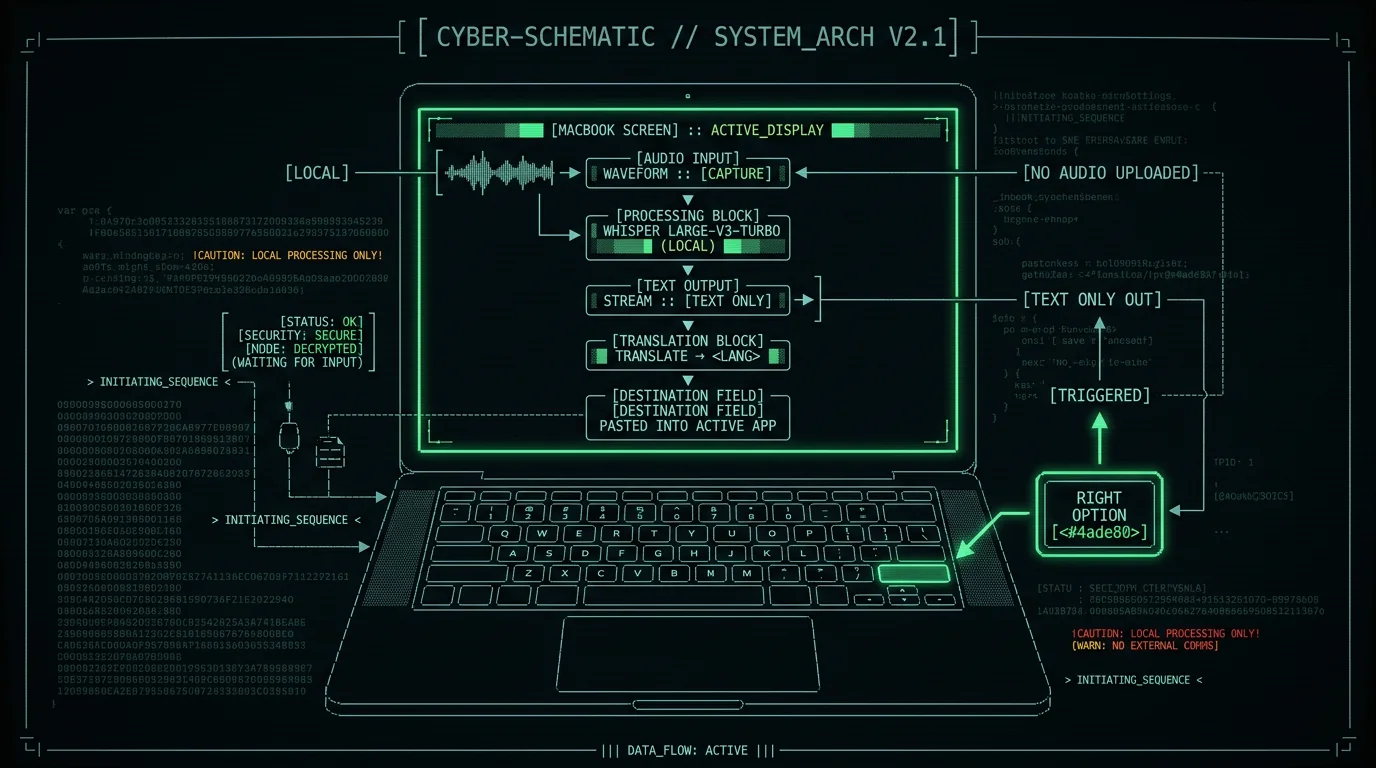
The 60-second answer. Real-time translation dictation on Mac means pressing one hotkey (Right Option by default in MetaWhisp), speaking in your language, and getting the translated text pasted live into whatever app you were just using. The speech-to-text runs locally with Whisper large-v3-turbo on your Apple Silicon Neural Engine; only the transcript text (never audio) is sent to your own OpenAI or Cerebras key for translation. It works on the free tier with BYOK, Pro just removes the key step. Free download.
What does "real-time translation dictation" actually mean on a Mac?
It means two things happen inside the same gesture, with no copy-paste step in between. First, your spoken words are transcribed — by an on-device model on Apple Silicon, not by a cloud service. Second, the finished transcript is translated into a target language you chose, and the result is pasted into the app you were using a second ago. You hold a key, you talk, you release the key, and the translated text just appears where your cursor is.
That two-step loop is what separates translation dictation from "type in Google Translate". You never re-speak, never re-type, never bounce between windows. The whole point is to remove the latency between "I had something to say" and "the other person can read it in their language".
Why voice + translation beats tab-switching
If you've ever replied to a foreign-language client by typing into Google Translate, copying, switching to your mail window, pasting, switching back, fixing the trailing newline, and then doing it again four sentences later — you already know the answer. Voice skips the worst of it: you stay in the app, you stay in the flow, and your hands never leave the keyboard.
For bilingual work (English ↔ Russian, English ↔ Spanish, Japanese ↔ English) the cost of context-switching compounds fast. Each switch adds noticeable re-orientation time, on top of the literal translation time. With a translate-hotkey binding, you keep the cognitive thread intact — your eyes stay on the email, the chat, the ticket.
Pro tip: If you dictate a lot into the same app (Slack, Mail, your IDE), bind a translation-only hotkey in MetaWhisp Settings → Translation and a separate dictation-only hotkey. That way you don't accidentally translate internal monologue into Spanish when you meant to keep it raw.
Set up a translate hotkey in MetaWhisp (step by step)
MetaWhisp's Structured / Translate modes are designed to plug into the same global hotkey. Translation works the same way dictation does: you hold a key, you speak, you release, the result lands in the active text field.- Install MetaWhisp and download the model. First run pulls ~950 MB of Whisper large-v3-turbo into your Mac — that's the speech model. It runs entirely on the Neural Engine from then on. (Free download, macOS 14+, Apple Silicon only.)
- Open Settings → API. Add your own OpenAI API key or Cerebras key. Free tier works on BYOK — translation is not paywalled. Pro is the option for people who don't want to manage a key at all.
- Pick Translate mode in the menu bar. MetaWhisp's process mode menu exposes Raw, Correct, Rewrite, Structured, and Translate. Pick Translate once and it sticks across launches.
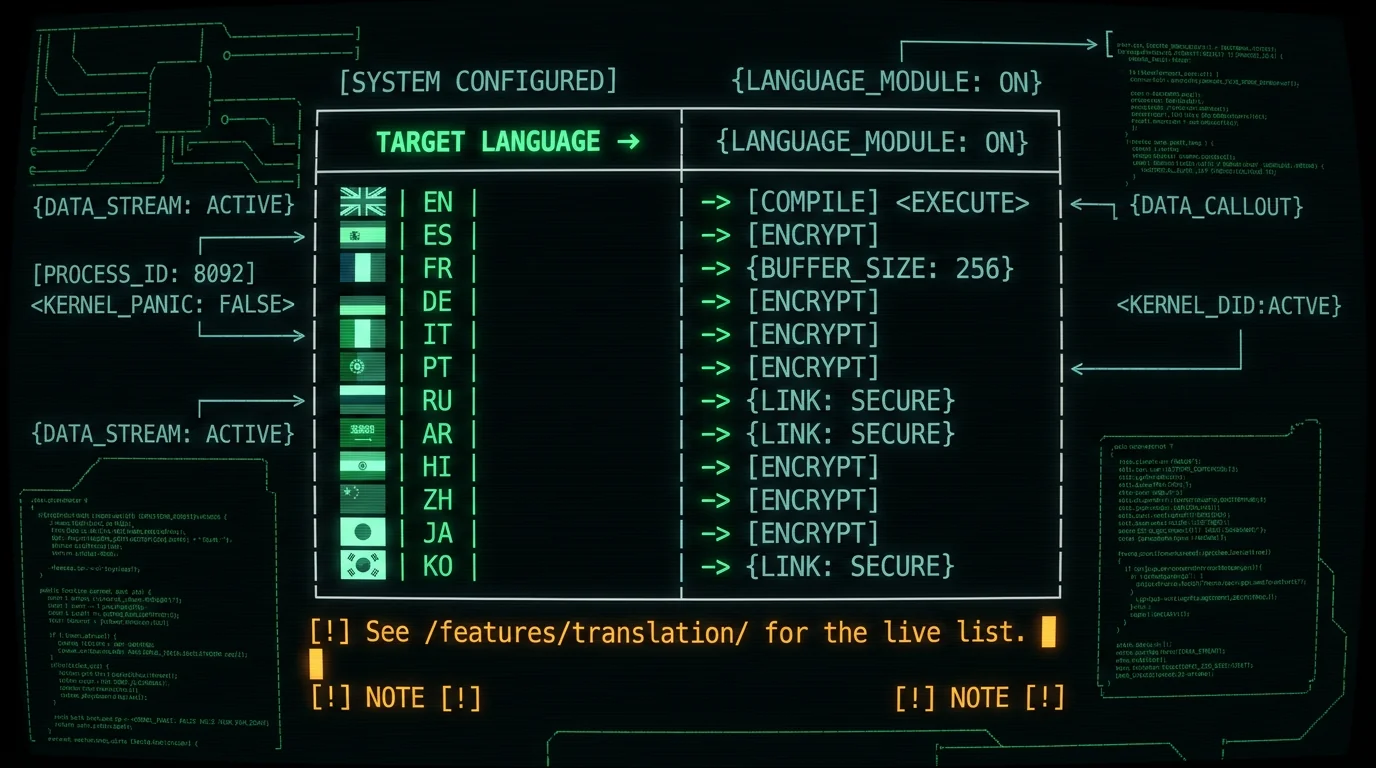
- Pick a target language. Translation ships with 12 target languages (English, Spanish, French, German, Italian, Portuguese, Russian, Arabic, Hindi, Chinese, Japanese, Korean — see the translation page for the current list).
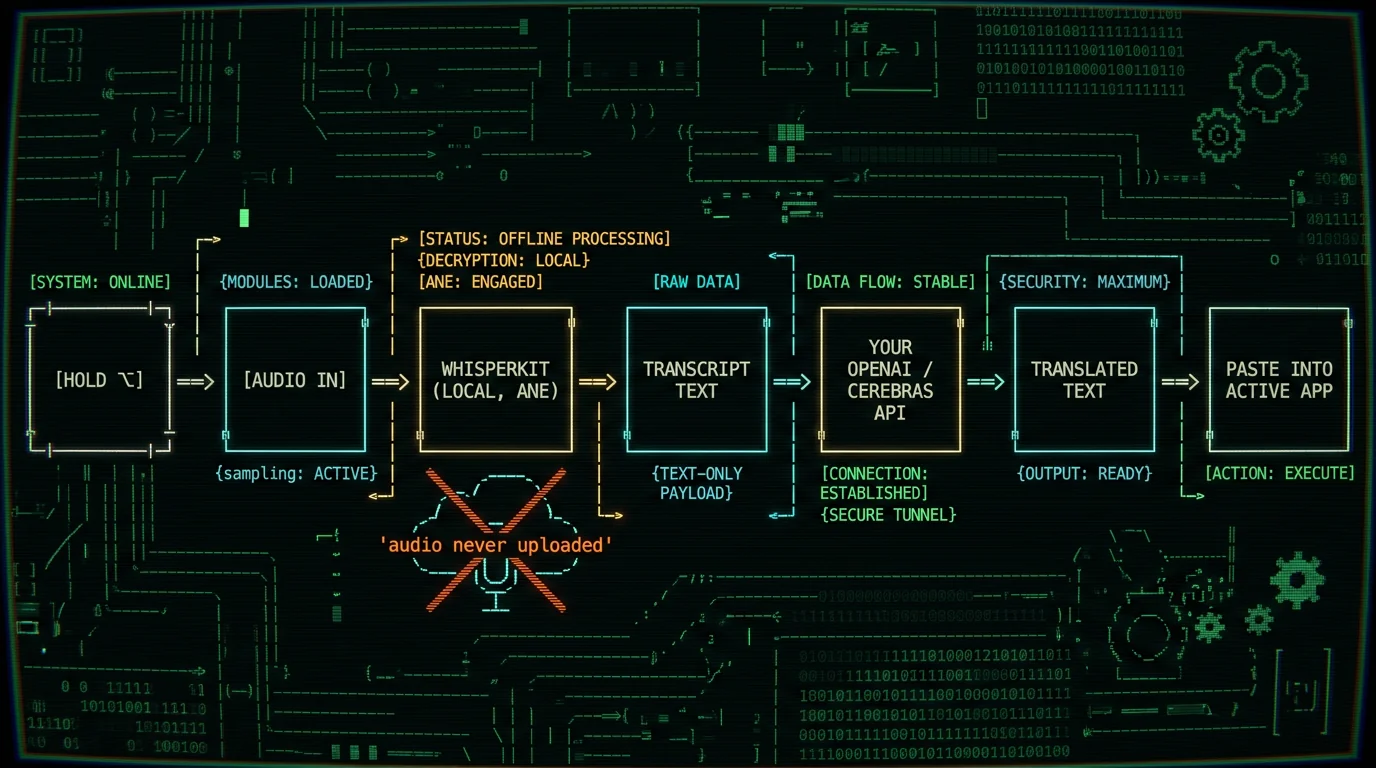
- Hold Right Option (or whatever you bound) and speak. Audio is transcribed locally. The transcript text is forwarded to your API for translation. The translated text pastes into the previously focused app.
- Release the key. That's it. Total loop time depends on dictation length and your API provider — short utterances feel effectively instant.
How the translate mode works under the hood
Two models cooperate, and they live on different sides of your Mac. The speech model — Whisper large-v3-turbo wrapped by WhisperKit — runs on-device on the Apple Neural Engine. It produces the transcript locally and hands a string of text to the next stage. Only that string (never the audio) is sent over HTTPS to your own OpenAI or Cerebras account for translation.
Because Whisper is multilingual by training, MetaWhisp's local side can hear 99 source languages with auto-detect. Translation is then a smaller problem: a few hundred tokens of text in, a few hundred tokens in your target language out. Your API bill reflects that.
Which 12 target languages can you dictate into and translate out of?
MetaWhisp's Translate mode ships with twelve target languages. The set was picked to cover the languages my own customers and beta users asked for most, plus a handful of long-tail ones: English, Spanish, French, German, Italian, Portuguese, Russian, Arabic, Hindi, Chinese (Simplified), Japanese, and Korean. For the current exact list and any additions, the translation page is the source of truth.| Mode | Source (what you speak) | Target (what gets pasted) | Pricing tier |
|---|---|---|---|
| Dictation only | 99 languages, auto-detect | (none — raw transcript) | Free, unlimited |
| Translate with BYOK | Same 99 | One of 12 target languages | Free, pay provider per token |
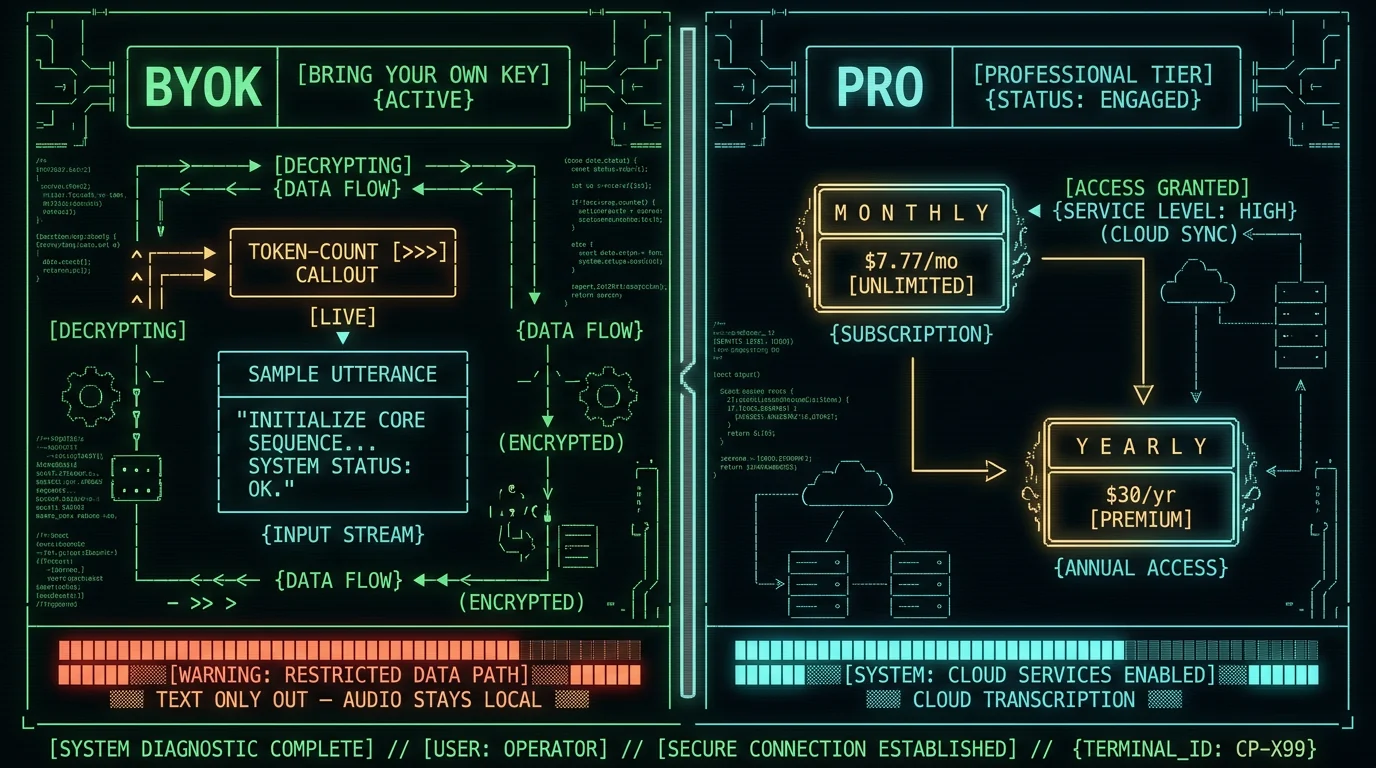
| Translate on Pro | Same 99 | One of 12 target languages | Pro: $30/yr or $7.77/mo |
| Correct / Rewrite / Structured | Same 99 | English (corrected) or JSON (structured) | Free with BYOK, paid on Pro |
Does translation dictation work offline?
Half of it does, half doesn't. The speech-to-text half is fully offline — WhisperKit and Whisper large-v3-turbo run on the Neural Engine with no network round-trip, so dictation alone works on a plane. The translation half, in any current implementation, requires a network call to an LLM. So if you're offline, translation turns into raw dictation until connectivity returns.
That's not unique to MetaWhisp. It's how every "real-time translator" works today: the speech model is local enough (in Whisper's case, small enough) but a quality translation model is much larger and runs server-side.
Honest gap: A fully offline translator that fits in a Mac's memory footprint and matches OpenAI translation quality does not exist yet, to my knowledge. Apple Translate uses on-device translation for fewer languages and a smaller model. I'll flag it the moment a credible local model shows up.
How much does translation dictation cost per month?
The big surprise for most people is how cheap a quality LLM translation is. OpenAI and Cerebras both charge by the token, and a typical short dictation is a few hundred input tokens producing a few hundred output tokens. I'm deliberately not quoting a per-request number here because providers change their pricing — check OpenAI's pricing page or Cerebras's pricing page for current rates. For context: my own personal use is heavy (I'm building MetaWhisp in two languages every day), and the monthly API bill for translation is a small fraction of a single ChatGPT subscription. If you already have an OpenAI account you like, you can reuse the same key — the same key works for MetaWhisp's translation and for the Correct/Rewrite/Structured modes.| Path | Per utterance | Audio location | Best for |
|---|---|---|---|
| Free + BYOK | Provider's per-token rate (your cost) | Stays on Mac | Light use, budget-conscious |
| Pro ($30/yr) | Built-in, no per-call math | MetaWhisp cloud | Heavy daily use, no key to manage |
| Pro Monthly ($7.77/mo) | Built-in | MetaWhisp cloud | Trying it out without an annual commit |
How MetaWhisp compares to Apple Translate and Google Translate for voice
Apple Translate is free, ships with macOS, and runs on-device for a smaller set of languages — it's the strongest offline competitor. Its weakness is voice: there's no app-level "translate as I speak into the active text field" loop; you talk into the Translate app, get a result, copy it manually. Google Translate via Chrome gets you a voice-input box, but the same workflow problem: it's a webpage, not part of your app's input, and copy-paste is back in your life. What MetaWhisp does differently is the loop: the global hotkey hands the result to the previously focused app. You're not switching. You're not copying. You're just talking. Here's how I'd frame the honest tradeoffs:If you need offline-only translation of long passages and don't mind a copy-paste step, Apple Translate is genuinely good and is right there on your Mac for free. If you want a fast voice loop into your actual apps, with full transcript-level control, MetaWhisp's Translate mode fits — and it costs less than a coffee a month at heavy use.
If your priority is translation quality and you already pay for ChatGPT, the gpt-4o family via your own key is hard to beat for general-purpose language pairs. That's exactly what MetaWhisp's BYOK path uses.
Founder's note: My personal workflow is Russian speech → English text into Linear tickets about 8 times a day. I run it on my own OpenAI key, not Pro, because I'm already an OpenAI customer. That's the free tier doing real work.
When translation dictation earns its keep (and when typing wins)
Translate-dictation is at its best when: - You talk faster than you type in your non-native target language. - You're responding in a chat window where you already have a hotkey-friendly flow. - The same paragraph in language A and language B is a daily occurrence. It's a worse fit when: - The translation has heavy domain vocabulary (legal, medical) and you need a human in the loop anyway. - You're offline. - You're dictating into a language MetaWhisp doesn't recognize as a source — Whisper supports 99, but edge cases exist for heavy code-switching. The plain rule I use: if a translation request takes longer to think about than to type, type it. If it takes longer to type than to say, say it. Translate dictation just removes the friction from saying it.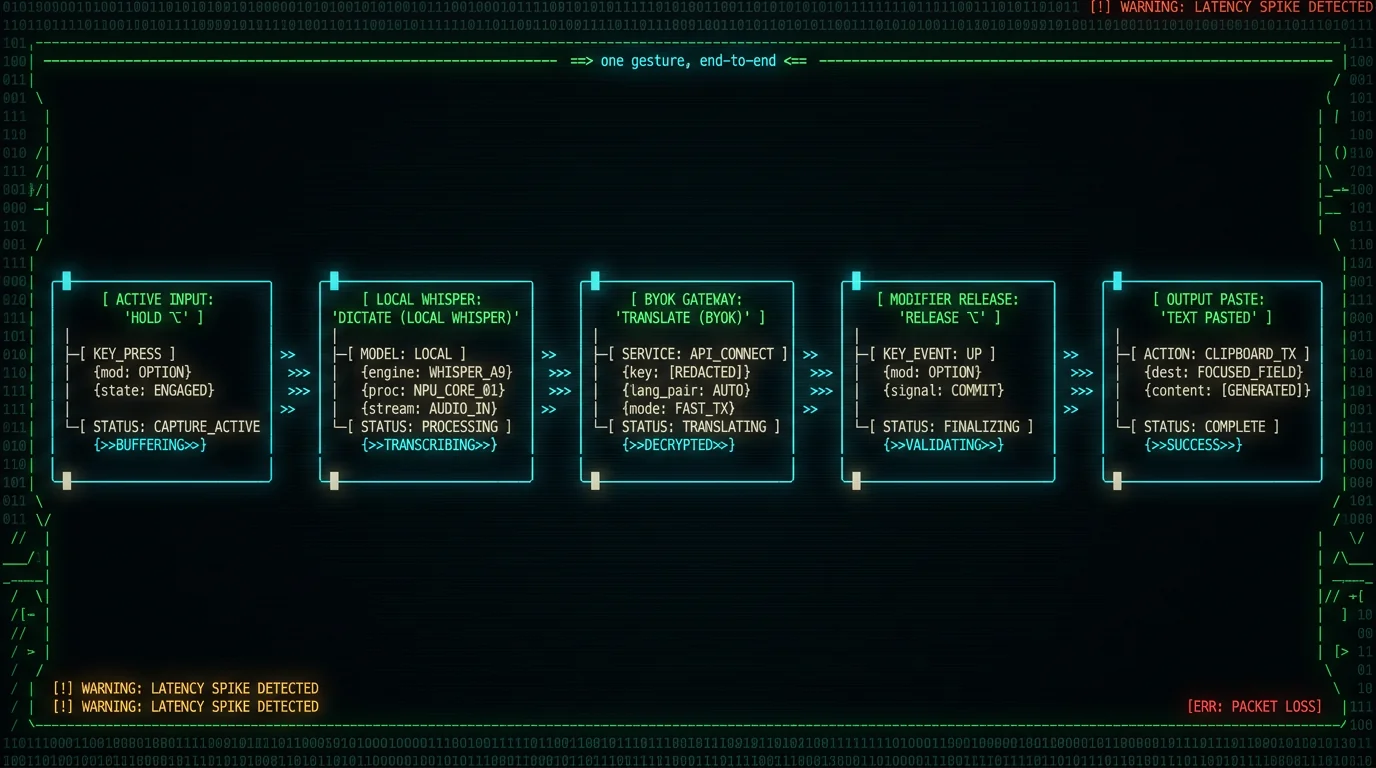
Get started
If you've read this far and translate-dictation looks like it would earn its keep for you, grab MetaWhisp, add your OpenAI key in Settings → API, switch to Translate mode, pick your target language, and start talking. The free tier with BYOK is the real path; Pro exists for people who want to skip the key step. The translation page is the canonical reference if any language list above drifts over time.FAQ: real-time translation dictation on Mac
Does MetaWhisp actually translate my voice in real time on Mac?
Yes. You hold the bound hotkey (Right Option by default), speak, release; the transcript text is sent to your OpenAI or Cerebras API for translation, and the translated result pastes into the focused app. The whole loop is one gesture.
Does translate mode work offline?
Half of it. Whisper large-v3-turbo via WhisperKit runs the speech-to-text on the Neural Engine offline. Translation, in any current implementation, needs a network call. If you're fully offline, translate mode falls back to raw dictation and queues the translation on reconnect.
Do I need a paid ChatGPT Plus account, or just an OpenAI API key?
Just an API key — the same kind you'd use for the OpenAI Playground or any other API tool. You pay per token. ChatGPT Plus is a separate consumer subscription and is not required. Cerebras works the same way via its own key.
Which languages can MetaWhisp translate into?
Twelve target languages today, including English, Spanish, French, German, Italian, Portuguese, Russian, Arabic, Hindi, Chinese (Simplified), Japanese, and Korean. The most up-to-date roster lives on the translation feature page.
Can I dictate in Russian and translate to English at the same time?
That's the default pairing most of my Russian-speaking users want, and yes, it works. Pick Russian as the auto-detected source (Whisper handles 99 sources; detection is automatic), pick English as the target in Settings, and Translate mode handles the rest.
Is my audio sent to OpenAI?
No. Only the transcript text (a string of words) leaves your Mac, and it goes to your own API key's account. The audio file itself never leaves the device. You can confirm this with a network monitor.
How much does translation dictation cost per month?
On the free tier, you pay your provider per token — a typical short dictation is a fraction of a US cent on gpt-4o-mini-tier models. On Pro, you pay a flat $30/yr (or $7.77/mo) and MetaWhisp covers the API cost on Pro.
Can I use MetaWhisp inside any Mac app?
Translated text pastes into whatever app was focused when you held the hotkey — Mail, Slack, your browser, your IDE, Notion, Pages, BBEdit, anything that accepts paste. The hotkey is global, and paste happens via Cmd+V after MetaWhisp stages the result.
Can I bind a different hotkey for translation dictation?
Yes. MetaWhisp exposes the global hotkey in Settings; rebind to any key combo your Mac accepts. Many users bind a second hotkey to Translate mode specifically so Raw dictation and Translate dictation don't collide.
Is translation a paid Pro feature in MetaWhisp?
No. Translation works on the free tier when you plug in your own OpenAI or Cerebras key (BYOK). Pro is the option for users who don't want to manage a key at all. Translation has never been paywalled separately from the rest of the app's modes — Correct, Rewrite, and Structured work on the same BYOK path.
