What Is Wispr Flow and Who Is It For?
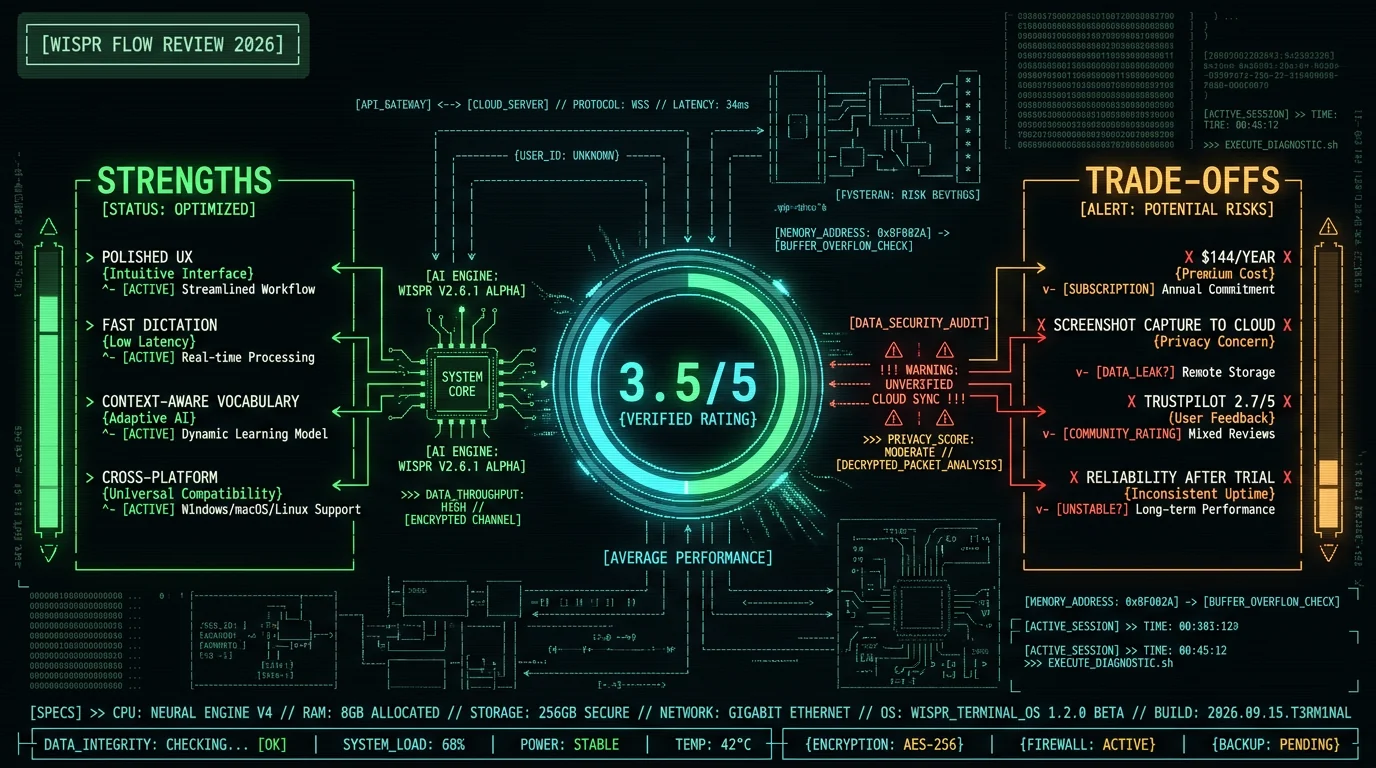
Wispr Flow is a voice dictation app for Mac, Windows, iPhone and Android that converts speech to text system-wide. You press a hotkey, speak, and your words appear in whatever app you're using — email, Slack, a document, a code editor. It's built by Wispr AI and positions itself as a premium, AI-enhanced dictation tool. The core search interest is large. Per Ahrefs keyword data (US, May 2026), the term "wispr flow" sees roughly 15,000 monthly searches with keyword difficulty 22, and "wispr flow pricing" adds another 1,100 — signs of a product with real traction and buyers actively evaluating it. Who it fits well:- Knowledge workers who dictate a lot of casual text (messages, emails, notes) and want polish over privacy
- Users who value the context-awareness feature that pulls vocabulary from the active window
- People who want the same dictation experience on both Mac and Windows
- Users comfortable with a $15/month subscription and cloud processing
How Much Does Wispr Flow Cost in 2026?
Wispr Flow uses a per-user subscription model. Pricing from Wispr's own pricing page (wisprflow.ai, checked 10 Aug 2026):| Plan | Price | Annual cost |
|---|---|---|
| Free tier | $0 (2,000 words/week desktop, 1,000/week iPhone) | $0 |
| Pro (monthly billing) | $15/user/month | Not published by Wispr |
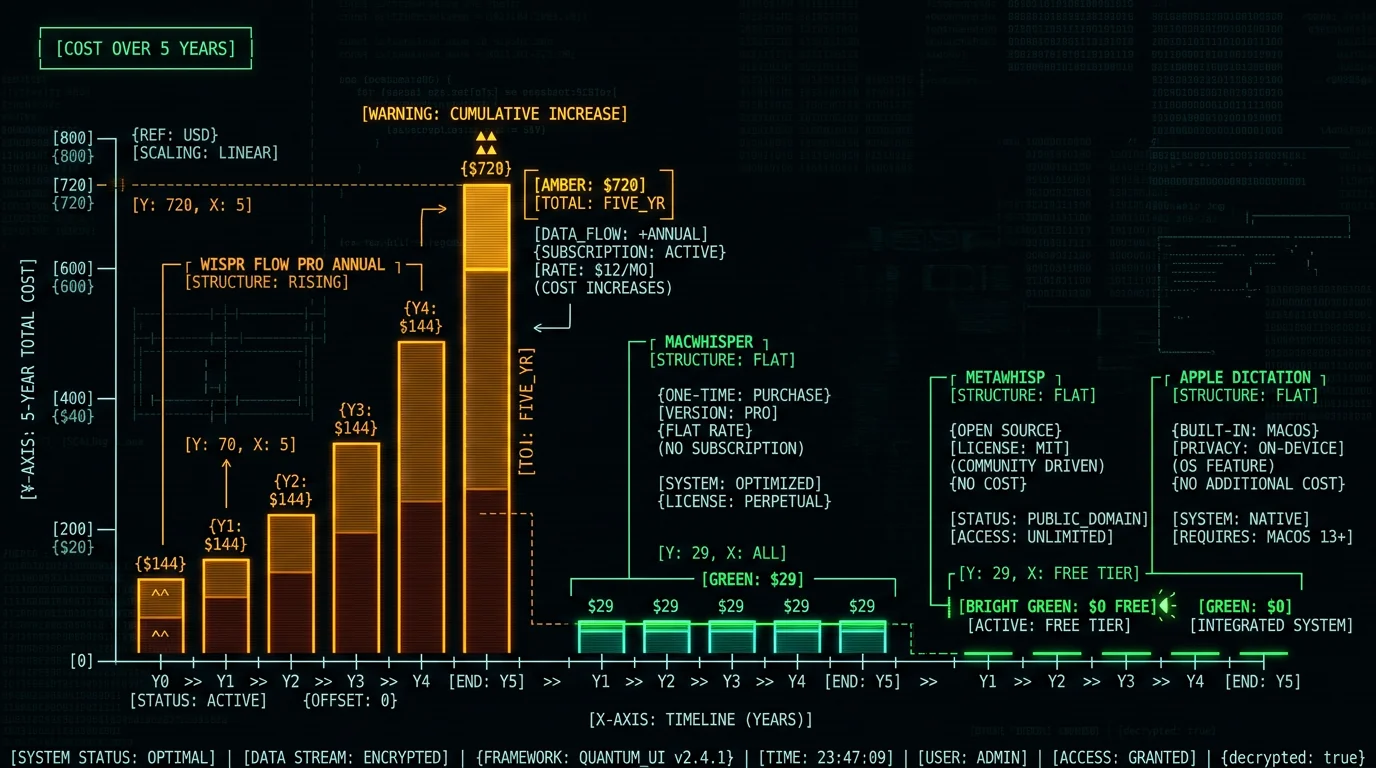
| Pro (annual billing) | $12/user/month (20% discount) | $144/year (12 × $12; no annual total published) |
- MetaWhisp: free for core transcription (the AI post-processing modes are an optional paid add-on, not required)
- MacWhisper: €64 one-time, plus a free tier
- superwhisper: $8.49/month, $84.99/year, or $249.99 one-time lifetime
- Apple Dictation: free, built into macOS
Is Wispr Flow Safe? The Screenshot Privacy Concern
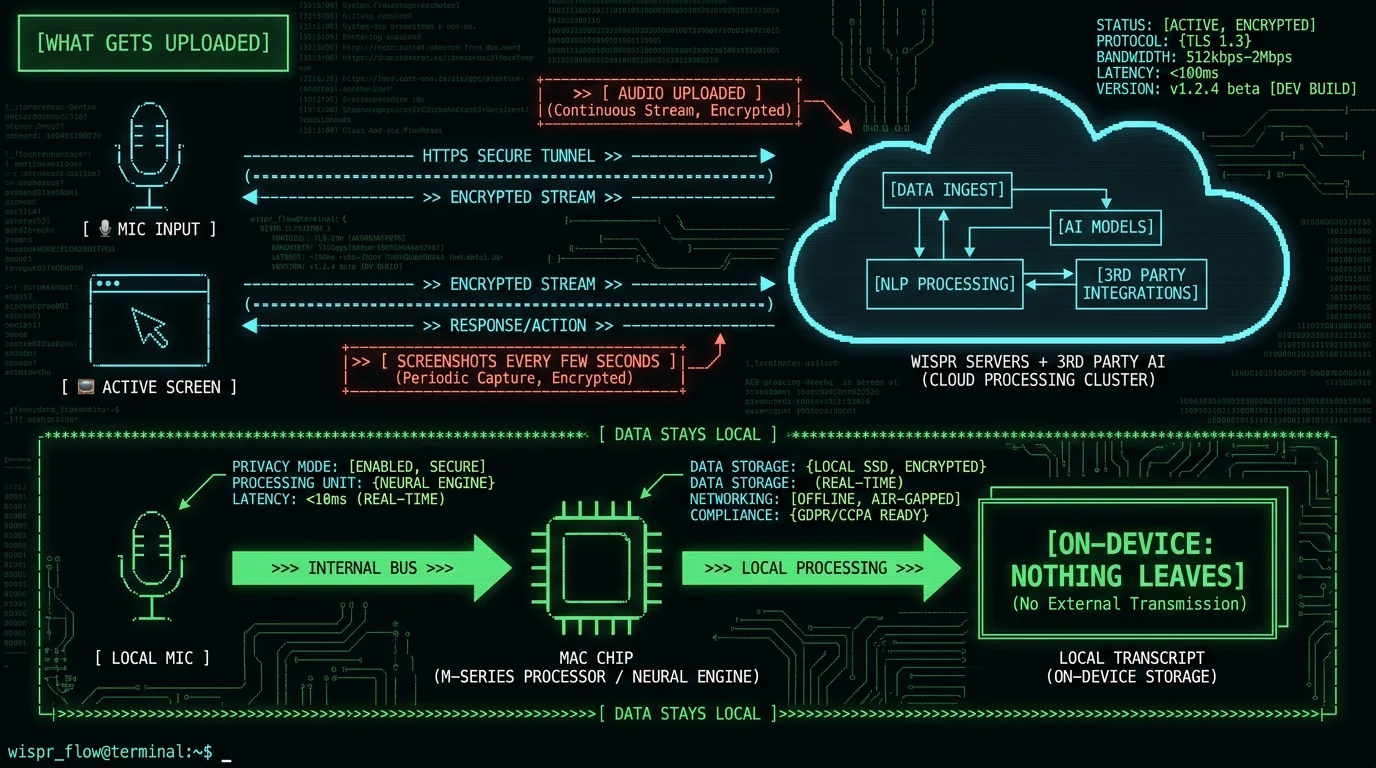
This is the single most important thing to understand before installing Wispr Flow. The keyword "is wispr flow safe" sees ~150 monthly US searches per Ahrefs, and the answer has a real caveat. Wispr Flow's context-awareness feature captures screenshots of your active window periodically and uploads them to cloud servers — including third-party AI infrastructure — to improve transcription vocabulary. This was documented in a viral May 2026 incident when a Reddit user posted network traces showing the screenshot uploads. Per independent reporting (embertype.com, Medium's Ryan Shrott, VocAI), Wispr's initial response was to ban the user who raised the concern; the CTO later apologized publicly and the account was restored. The screenshot architecture itself was not changed. What this means in practice:- Whatever is visible in your active window when a capture fires can be uploaded — passwords, financial data, medical records, legal documents, private messages
- The feature is tied to macOS Screen Recording permission; revoking it disables context-awareness but degrades the accuracy Wispr markets
- For casual non-sensitive dictation, this is a low practical risk; for confidential work, it's a structural exposure no Terms of Service can fully resolve
How Accurate Is Wispr Flow's Transcription?
Wispr Flow's transcription is built on modern speech recognition and produces clean, well-formatted output. Its accuracy on clear speech is competitive with the best available models. The context-awareness feature gives it a real edge on proper nouns, brand names, and technical vocabulary that appear on your screen — that's the upside of the screenshot trade-off. For grounding, here's a real measurement of the underlying open-source model class that powers most Mac dictation tools. I ran Whisper large-v3-turbo (the model MetaWhisp uses, and a close relative of what most modern dictation engines build on) against the standard LibriSpeech test-clean benchmark:| Metric | Result | Detail |
|---|---|---|
| Word Error Rate (normalized) | 2.76% | LibriSpeech test-clean, 30 utterances, May 2026 |
| Character Error Rate | 1.05% | Character-level accuracy |
| Speed vs real-time | 5.5× faster | PyTorch reference on Apple Silicon |
What Do Real Users Say About Wispr Flow?
The review picture is split, which is itself informative. Per aggregated review reporting (May 2026):- Trustpilot: 2.7/5 — organic consumer reviews skew negative
- G2: 4.5/5 — curated enterprise reviews skew positive
Wispr Flow vs On-Device Alternatives: The Core Trade-Off
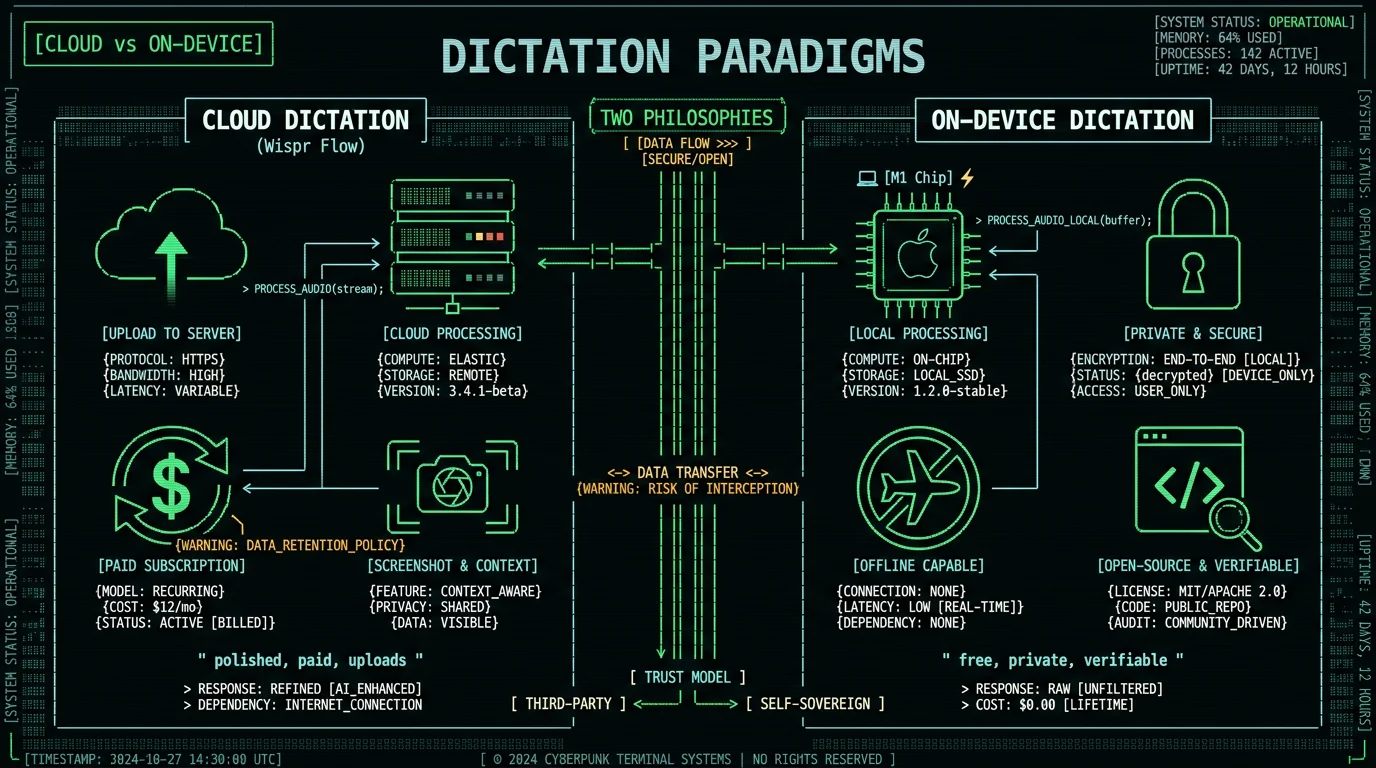
The real decision isn't "Wispr Flow or not" — it's "cloud dictation or on-device dictation." These are two philosophies:| Dimension | Wispr Flow (cloud) | On-device (MetaWhisp, MacWhisper, etc.) |
|---|---|---|
| Where audio goes | Uploaded to cloud | Stays on your Mac |
| Screenshot capture | Yes (context-awareness) | No |
| Cost | $15/user/month ($144/year at the annual rate) | Free or one-time |
| Works offline | No (cloud-dependent) | Yes |
| Context vocabulary from screen | Yes (the upside of screenshots) | No (use custom word lists instead) |
| Cross-platform | Mac, Windows, iPhone, Android | Mac-focused (superwhisper also on Windows and iOS) |
| Source code | Proprietary | Some open source (e.g. MetaWhisp) |
What Are the Best Wispr Flow Alternatives?
If the cloud architecture or the cost pushes you to look elsewhere, the main options for Mac:- MetaWhisp — Free, open-source (github.com/metawhisp), runs Whisper large-v3-turbo on-device via WhisperKit. No screenshots, no cloud, no subscription. The trade-off: no screen-context vocabulary (use a custom word list instead), Mac-only.
- MacWhisper — €64 one-time with a free tier, local models (cloud optional), system-wide dictation in both free and Pro, strong for batch file transcription.
- superwhisper — $8.49/month, $84.99/year or $249.99 lifetime; most customizable, offline with local models, also on Windows and iOS; has a cloud-hybrid mode to verify before using for sensitive content.
- Apple Dictation — Free, built-in, on-device on Apple Silicon. No custom vocabulary, silence cutoffs on long-form.
Wispr Flow Review: Final Verdict
Wispr Flow earns a 3.5 out of 5 in this review. It's a polished, fast, well-designed dictation app that a lot of users genuinely enjoy. The context-awareness feature is a real accuracy advantage for vocabulary-heavy work. It loses points for three specific things:- Screenshot capture to cloud — a structural privacy exposure that disqualifies it for confidential work
- $15/user/month recurring cost ($144/year on annual billing) — hard to justify when on-device tools match its core accuracy for free
- Reliability complaints + Trustpilot 2.7/5 — enough organic negative signal to recommend testing the free tier hard before committing
Frequently Asked Questions About Wispr Flow
How much does Wispr Flow cost?
Wispr Flow Pro costs $15 per user per month on monthly billing, or $12 per user per month on annual billing — a 20% discount, which works out to $144/year (12 × $12); Wispr publishes no annual total of its own (pricing page, checked 10 Aug 2026). The free tier gives 2,000 words per week on desktop and 1,000 per week on iPhone. Over five years the annual rate totals $720. On-device alternatives like MetaWhisp (free) or MacWhisper (€64 one-time) avoid the recurring cost.
Is Wispr Flow safe to use?
For casual non-confidential dictation, generally yes. For confidential work, with caveats: Wispr Flow captures screenshots of your active window and uploads them to cloud servers (including third-party AI) for context-awareness, documented in a viral May 2026 incident. This creates exposure for passwords, financial, medical, or legal content visible on screen. Confidential workflows are better served by on-device tools that never capture the screen.
Does Wispr Flow work offline?
No. Wispr Flow is cloud-dependent — audio is uploaded to its servers for transcription, so it requires an internet connection. It has a privacy mode but with offline limits. For fully offline dictation on Mac, on-device Whisper apps like MetaWhisp, MacWhisper, or Apple Dictation run entirely on your hardware without network connectivity.
Why does Wispr Flow have a 2.7 Trustpilot rating?
Wispr Flow's Trustpilot rating is 2.7/5 (versus 4.5/5 on enterprise-focused G2). The most consistent organic complaint is reliability degrading after the free trial — users report the app working well during trial then becoming inconsistent after payment. The consumer/enterprise rating gap is common in SaaS; test the free tier thoroughly before committing to annual billing.
What is the best free alternative to Wispr Flow?
For Mac, MetaWhisp is a free, on-device alternative running Whisper large-v3-turbo via WhisperKit — no screenshots, no cloud, no subscription. Apple Dictation is free and built-in. Aiko is free and open-source for batch file transcription. The trade-off versus Wispr Flow is no screen-context vocabulary, addressed by custom word lists in some apps.
Is Wispr Flow open source?
No, Wispr Flow is proprietary closed-source software. This means privacy claims rest on the vendor's policies rather than auditable code. Among polished Mac dictation apps, MetaWhisp is the open-source option (github.com/metawhisp, Swift) — its on-device behavior can be verified in source and confirmed by running it in airplane mode with a network monitor.
Is Wispr Flow good for healthcare or legal work?
Not for content covered by HIPAA or attorney-client privilege. Wispr Flow's cloud upload plus screenshot capture create third-party exposure that most compliance teams treat as disqualifying for regulated data. For healthcare or legal dictation, on-device tools where audio never leaves the device provide a HIPAA-compatible architecture without needing a Business Associate Agreement for the transcription step.
About the Author
Andrew Dyuzhov is the solo founder and CEO of MetaWhisp, a free, open-source, on-device voice-to-text app for macOS that runs Whisper large-v3-turbo locally via WhisperKit. He's a direct competitor to Wispr Flow, which is why this review leads with that disclosure and keeps every criticism tied to a sourced fact rather than opinion. He built MetaWhisp on an on-device, open-source architecture specifically because he believes privacy in a dictation tool should be verifiable in code, not promised in a policy. Connect on X or GitHub.
Related Reading
- Wispr Flow Alternatives — full landscape of dictation tools
- Wispr Flow Screenshot Capture Explained — deep-dive on the privacy concern
- Is Wispr Flow Free? — pricing and free tier breakdown
- MetaWhisp vs Wispr Flow — head-to-head comparison
- Best Voice-to-Text Apps for Mac — broader roundup
