Which Should You Choose: Wispr Flow or Apple Dictation?
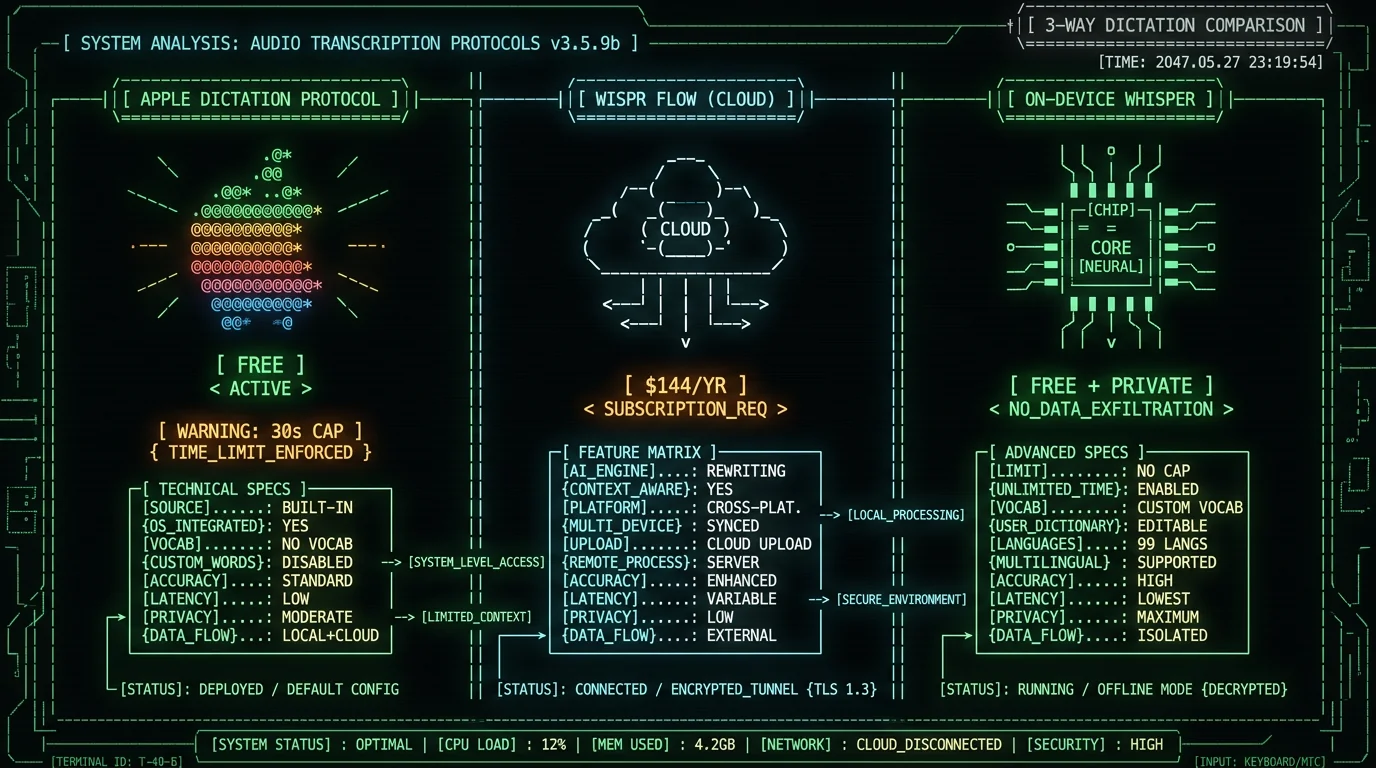
Quick decision framework:- Choose Apple Dictation if: you dictate short messages and notes in standard English, you want zero setup, and the ~30-second cap doesn't bother you. It's free and already on your Mac.
- Choose Wispr Flow if: you want AI rewriting that cleans up speech as you talk, you need the same tool on Mac and Windows, you dictate vocabulary-heavy content, and a $144/year subscription plus cloud processing are acceptable.
- Choose on-device Whisper (the third path) if: you want Apple Dictation's free-and-private nature but without the 30-second cap, with custom vocabulary and 99 languages, and you're on a Mac.
How Much Does Each Cost?
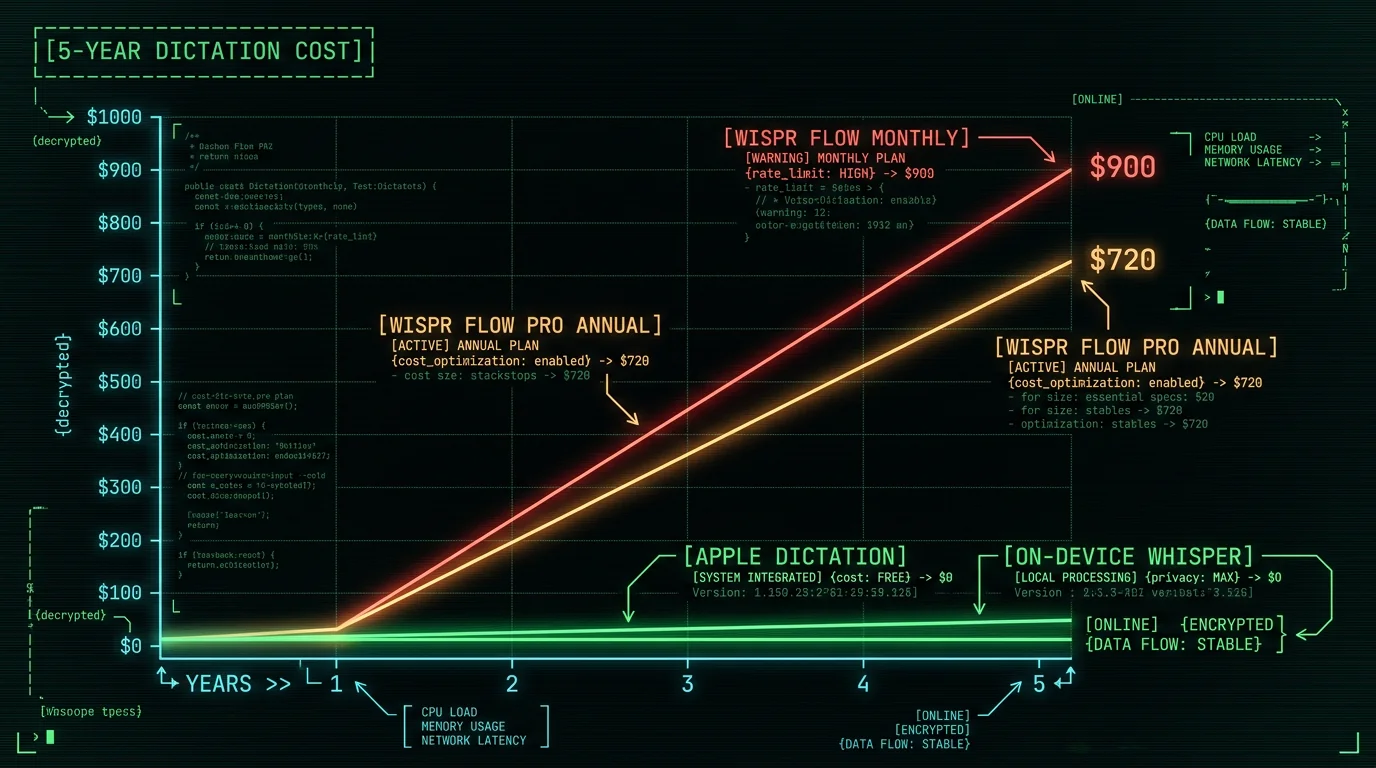
This is the starkest difference. One is free; the other is a recurring subscription.| Tool | Cost | 5-year total |
|---|---|---|
| Apple Dictation | Free (built into macOS) | $0 |
| Wispr Flow Free tier | $0 (weekly word cap) | $0 |
| Wispr Flow Pro (monthly) | $15/month | $900 |
| Wispr Flow Pro (annual) | $144/year | $720 |
| On-device Whisper (MetaWhisp) | Free | $0 |
What Are the Accuracy Differences?
Both produce good transcripts on clear speech, but they're built differently. Apple Dictation uses Apple's own speech recognition model, optimized for the languages and use cases Apple prioritizes. It's accurate on standard English and major languages, less so on technical vocabulary, accented English, or domain-specific terms. There's no way to add custom vocabulary to improve it. Wispr Flow uses modern speech recognition plus an AI layer that rewrites and formats output. Its context-awareness feature pulls vocabulary from your active window, which improves accuracy on names and technical terms — at the cost of capturing screenshots (covered below). For grounding, here's a real measurement of the open-source model class (Whisper large-v3-turbo) that powers most on-device Mac dictation tools. I ran it against the standard LibriSpeech test-clean benchmark in May 2026:| Metric | Result |
|---|---|
| Word Error Rate (normalized) | 2.76% |
| Character Error Rate | 1.05% |
| Median WER per utterance | 0.0% (most transcribed perfectly) |
| Speed | 5.5× faster than real-time |
What About the Apple Dictation 30-Second Limit?
This is Apple Dictation's most-complained-about limitation. Per multiple 2026 reviews (getvoibe.com), Apple Dictation cuts off each dictation session after roughly 30 seconds of continuous speech (behavior varies by macOS version and whether Enhanced Dictation is active). In practice this means:- Dictating a long paragraph gets interrupted mid-thought
- You have to re-trigger dictation repeatedly for long-form content
- The flow of speaking naturally is broken by the cap
Does Either Work Offline and Privately?
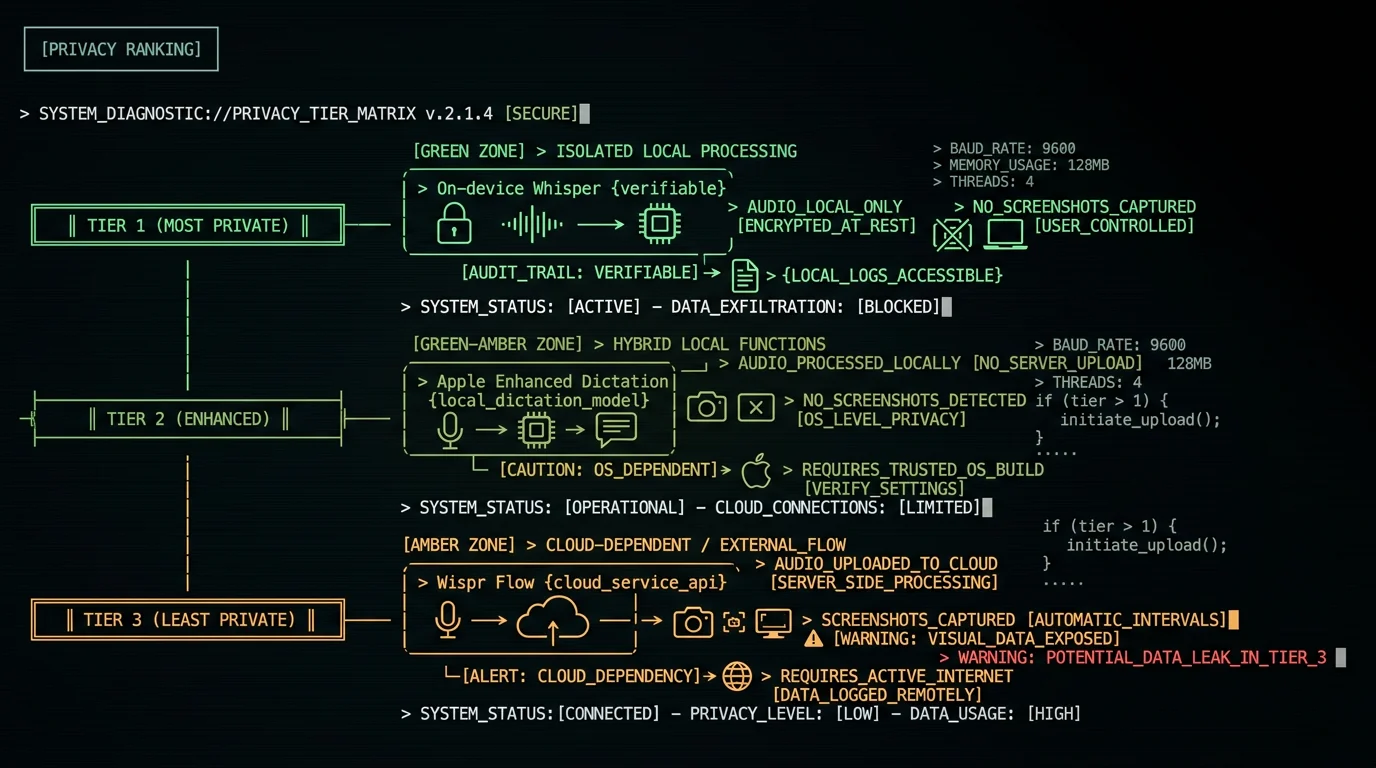
Both have a privacy story, but they're different. Apple Dictation: On Apple Silicon Macs with Enhanced Dictation, transcription runs on-device — audio doesn't go to Apple's servers for the core dictation. This is genuinely private for the dictation step. Standard (non-enhanced) dictation may route to Apple's servers depending on configuration. For most modern Macs, Enhanced on-device Dictation is the default. Wispr Flow: Cloud-dependent. Audio is uploaded to Wispr's servers for transcription, and its context-awareness feature captures screenshots of your active window and uploads those too — documented in a viral May 2026 incident (embertype.com). It requires an internet connection. For confidential content, this is a structural exposure. So on privacy, Apple Dictation actually beats Wispr Flow — Apple's on-device Enhanced Dictation keeps audio local, while Wispr Flow uploads both audio and screenshots. If privacy is your priority, the ranking is: on-device Whisper apps (most private, verifiable) ≈ Apple Enhanced Dictation (private for dictation) > Wispr Flow (cloud + screenshots).| Privacy dimension | Apple Dictation | Wispr Flow | On-device Whisper |
|---|---|---|---|
| Audio stays local | Yes (Enhanced) | No (uploaded) | Yes |
| Screenshot capture | No | Yes | No |
| Works offline | Yes (Enhanced) | No | Yes |
| Verifiable in airplane mode | Yes | No | Yes |
Can Either Handle Custom Vocabulary?
This matters for anyone dictating technical terms, brand names, or proper nouns. Apple Dictation: No custom vocabulary support. It uses a fixed model. Your only workaround is macOS Text Replacements, which auto-correct specific strings after dictation — clunky but functional for a handful of terms. Wispr Flow: Yes, via its context-awareness feature (reading your screen) plus configurable vocabulary. This is one of its genuine advantages, and the reason the screenshot capture exists. On-device Whisper apps: Most support custom vocabulary lists you provide explicitly — you add terms, the app biases transcription toward them, no screen reading required. These apps run Whisper through frameworks like WhisperKit, which expose decoding controls that make local vocabulary biasing possible. This gets you Wispr Flow's vocabulary benefit without the screenshot trade-off. If custom vocabulary is the reason you're considering leaving Apple Dictation, note that you can get it from a free on-device tool without paying for Wispr Flow's cloud subscription. Apple's own guidance on Dictation (Apple Support) confirms there's no user-facing vocabulary customization beyond system Text Replacements.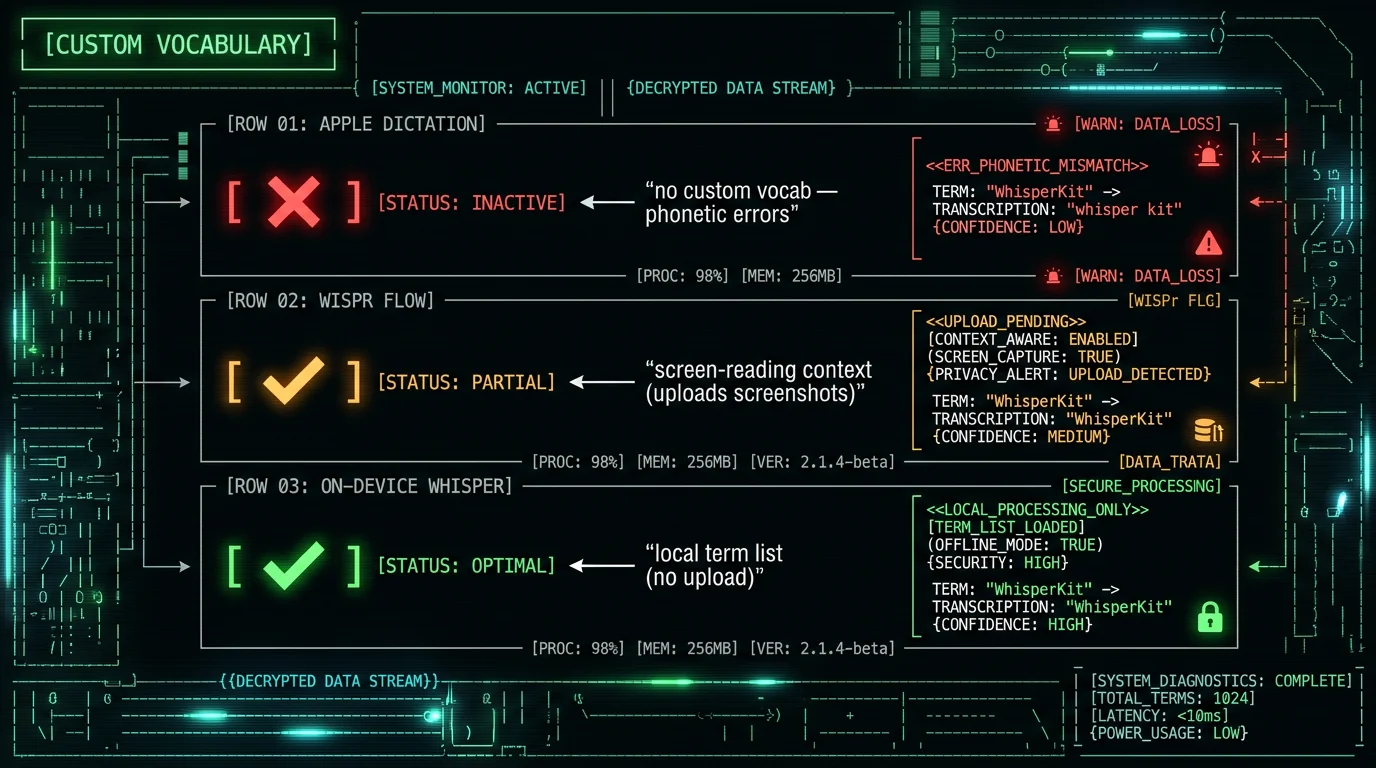
What's the Missing Middle Ground?
The "Wispr Flow vs Apple Dictation" comparison is really a comparison of two extremes. Apple Dictation is the free minimum: zero cost, zero setup, but capped and inflexible. Wispr Flow is the paid maximum: full features, but $144/year and cloud-dependent. On-device Whisper apps occupy the middle that neither extreme covers:- Free like Apple Dictation — no subscription (MetaWhisp is free; MacWhisper is ~$29 one-time)
- No 30-second cap — dictate continuously, unlike Apple Dictation
- Custom vocabulary — add technical terms, unlike Apple Dictation
- 99 languages — Whisper's full multilingual range
- Private like Apple Enhanced Dictation — audio stays on your Mac, unlike Wispr Flow
- No screenshot capture — unlike Wispr Flow
- Open source option — MetaWhisp's code is public (github.com/metawhisp), so privacy is verifiable, not just promised
Wispr Flow vs Apple Dictation: Final Verdict
- Apple Dictation wins on: cost (free), zero setup, privacy (Enhanced is on-device), and "good enough" short-form dictation.
- Wispr Flow wins on: AI rewriting, no cap, cross-platform, and custom vocabulary via context-awareness.
- Apple Dictation's weaknesses: 30-second cap, no custom vocabulary, no AI cleanup.
- Wispr Flow's weaknesses: $144/year, cloud upload, screenshot capture, Trustpilot 2.7/5 with post-trial reliability complaints.
Frequently Asked Questions
Is Wispr Flow better than Apple Dictation?
Wispr Flow is more capable — AI rewriting, no 30-second cap, custom vocabulary, cross-platform — but costs $144/year and runs in the cloud with screenshot capture. Apple Dictation is free, built-in, and private (Enhanced runs on-device) but caps dictation at ~30 seconds with no custom vocabulary. "Better" depends on whether you value features over free-and-private. Many Mac users get the best of both from a free on-device Whisper app.
Why does Apple Dictation stop after 30 seconds?
Apple Dictation is designed for short, transactional voice input (messages, searches, quick notes), so it caps continuous dictation at roughly 30 seconds. This isn't a bug — it's a product boundary reflecting Apple's design assumption. It's not configurable. For long-form dictation, on-device Whisper apps (MetaWhisp, MacWhisper, SuperWhisper) have no cap and are free or one-time purchase, removing this limit without a cloud subscription.
Is Apple Dictation more private than Wispr Flow?
Yes. Apple Enhanced Dictation runs on-device on Apple Silicon — audio stays local. Wispr Flow uploads audio to its cloud servers and captures screenshots of your active window for context-awareness (documented May 2026). For privacy, Apple Dictation beats Wispr Flow. The most private option overall is an open-source on-device Whisper app where you can verify zero network activity in airplane mode.
Is Wispr Flow worth $144 a year over free Apple Dictation?
Only if you specifically need AI rewriting, cross-platform support, or continuous dictation that Apple Dictation's 30-second cap blocks — and you're comfortable with cloud upload. If your main complaint about Apple Dictation is the cap or missing custom vocabulary, a free on-device Whisper app solves those without the $144/year cost or the cloud privacy trade-off, making the subscription hard to justify for many users.
Does Apple Dictation support custom vocabulary?
No. Apple Dictation uses a fixed model with no custom vocabulary support. The only workaround is macOS Text Replacements for auto-correcting specific strings. Wispr Flow supports custom vocabulary via context-awareness (reading your screen). On-device Whisper apps support explicit custom vocabulary lists without screen reading — getting the benefit without the screenshot trade-off.
What's the best free alternative to both?
For Mac, an on-device Whisper app like MetaWhisp (free, open-source, runs Whisper large-v3-turbo via WhisperKit). It removes Apple Dictation's 30-second cap and vocabulary gap, keeps audio on-device like Apple Enhanced Dictation, supports 99 languages, and costs nothing — without Wispr Flow's $144/year or cloud upload. Apple Dictation itself remains the simplest free option for short-form casual use.
About the Author
Andrew Dyuzhov is the solo founder and CEO of MetaWhisp, a free, open-source, on-device voice-to-text app for macOS that runs Whisper large-v3-turbo locally via WhisperKit. He's a competitor to Wispr Flow and builds the on-device "third path" described in this comparison — which is why the article leads with that disclosure and ties every claim to a sourced fact. Connect on X or GitHub.
Related Reading
- Wispr Flow Review 2026 — full standalone review
- Apple Intelligence Dictation Issues — fixing Apple Dictation problems
- Wispr Flow Alternatives — the full landscape
- How to Use Dictation on Mac — Apple Dictation guide
- Best Voice-to-Text Apps for Mac — on-device options compared
