Three plans, a 30-day window and 22 months of archived prices
The quick answer: Granola has three plans. Basic is $0, Business is $14 per user per month and Enterprise is $35. The free Basic plan records unlimited meetings, but the app only shows notes from the last 30 days. Older ones stay on Granola's servers, hidden until you upgrade, and a free CSV export gets a copy out. If you only need this month's notes, the free plan is enough.
Key takeaways
- Basic has no meeting cap and no daily transcription limit, but you can only open the last 30 days of notes.
- Business is $14 per user per month, billed monthly per workspace. Everyone in the workspace is a paid seat.
- On Basic, older notes are hidden, not deleted. A free CSV export gets your full history out.
- Business has cost $14 since at least December 2024. The free tier is what keeps changing.
How Much Does Granola Cost?
As of October 15, 2026, Granola's pricing page lists three plans: Basic at $0, Business at $14 per user per month and Enterprise at $35 per user per month. Its billing docs add that Basic and Business are billed monthly, and annual billing exists only on Enterprise contracts. A year of Business costs $168 per person.
| Plan | Price | Billing | What it adds |
|---|---|---|---|
| Basic | $0 | Free | AI notes for every meeting, chat across meetings, templates, shared folders, Slack, 30 days of visible history |
| Business | $14 per user per month | Monthly only | Unlimited history, model choice in chat, pre-meeting briefs, follow-up emails, Notion, HubSpot, Attio, Affinity and Zapier, the API |
| Enterprise | $35 per user per month | Monthly, or annual on a contract | SSO for 50+ users, admin controls, org-wide deletion and training policies, HIPAA with a BAA, advanced integrations such as Salesforce |
The pricing page shows Enterprise at $35, while the billing docs say "from $35" and don't say what would make it cost more. Every plan includes the Mac app (macOS 14 or later), the Windows app, and the iPhone, Android and Apple Watch apps. Granola's billing docs say the mobile apps are free to use.
What Does Granola's Free Plan Include?
Granola's homepage offers unlimited meeting notes for free, and its billing docs say no plan has a daily transcription limit. Basic includes AI notes from every meeting, custom templates, chat with the Auto model, shared folders, the Slack integration and every app. What it limits is the past: the app only shows the last 30 days of notes.
| Feature | Basic ($0) | Business ($14) |
|---|---|---|
| Meetings and transcription | Unlimited | Unlimited |
| Meeting history you can open | Last 30 days | Unlimited |
| AI chat across meetings | Auto model only | Auto, or pick a model |
| Pre-meeting briefs and follow-up emails | No | Yes |
| Workspace-wide dictionary | No | Yes |
| Integrations | Slack only | Slack, Notion, HubSpot, Attio, Affinity, Zapier |
| MCP (for Claude, ChatGPT and other AI apps) | Personal notes from the last 30 days | Personal and public workspace notes |
| API | No | Yes |
Two smaller gaps matter if you use AI tools a lot. On Basic, MCP can't hand raw transcripts to another AI app; that tool is paid-only, according to Granola's MCP doc. And follow-up emails also need Google sign-in with a connected Gmail, at least one external guest, and a meeting of 10 people or fewer.
What Happens to Your Notes After 30 Days?
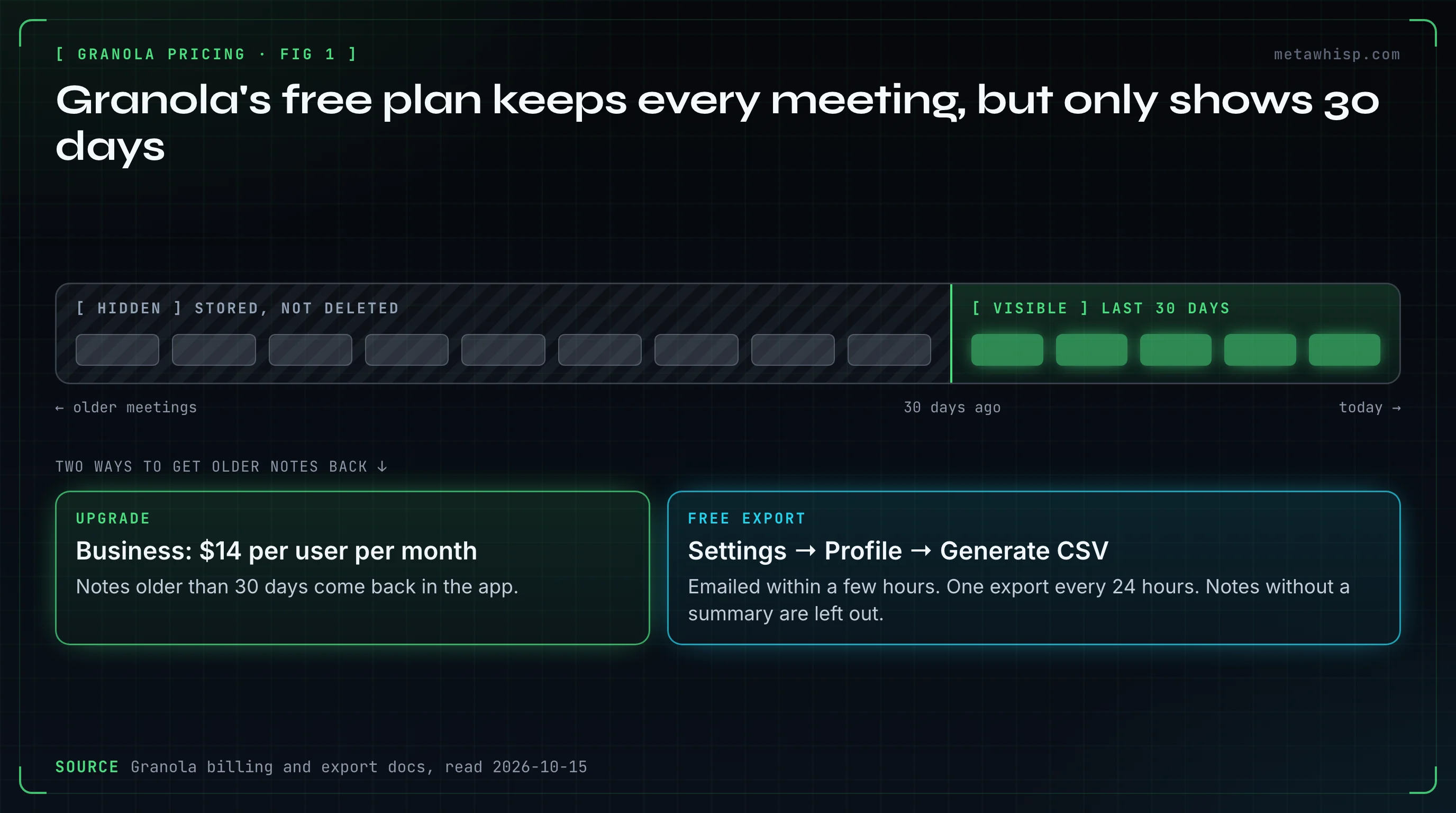
They're hidden, not deleted. Granola's billing docs say notes older than 30 days stay stored on Basic and come back when you upgrade. To keep them without paying, export a CSV of your whole history from Settings → Profile → Generate CSV. Granola emails the file within a few hours.
The export has limits:
- One export every 24 hours, and the download link expires after 24 hours.
- Notes without a summary are left out.
- Granola's docs disagree on what's inside. The export doc lists titles, summaries and transcripts; the billing doc mentions titles and summaries only. Run one export and check before you rely on it.
"Stored" is a policy, not a promise. Granola's Platform Terms let it end free access at any time without notice (§4.1). They also allow deleting accounts inactive for more than 30 days, including ones no longer paying, after reasonable efforts to notify you (§3.6). If an old meeting matters, export it.
How Has Granola's Pricing Changed Since 2024?
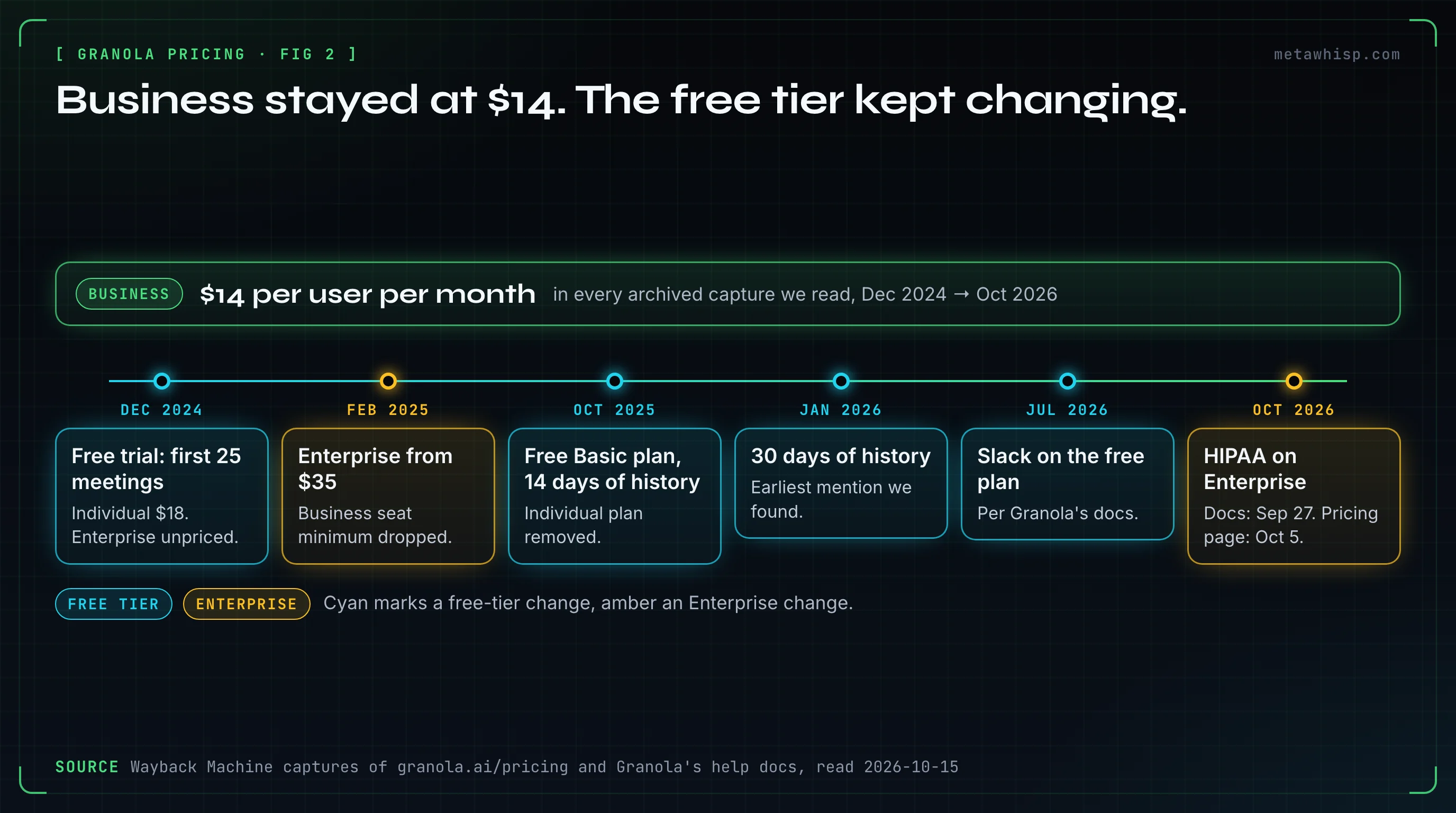
Business cost $14 per user per month in every archived copy of Granola's pricing page we read, from December 2024 to October 2026. The free tier changed instead. It was a 25-meeting trial until September 2025, then a free Basic plan showing 14 days of history, and it shows 30 days today.
| When | Free tier | Paid plans | What changed |
|---|---|---|---|
| Dec 2024 | Free trial: your first 25 meetings | Individual $18/month; Business $14/user, 3-seat minimum; Enterprise unpriced | Earliest capture |
| Feb 2025 | 25 meetings | Business minimum dropped; Enterprise "starts at $35" | Enterprise gets a price |
| Mar–Jun 2025 | 25 meetings | Plans FAQ lists an annual-commitment price of $12/user/month and Enterprise at $40 | The pricing page still says Enterprise "from $35" |
| Oct 2025 | Basic, $0, with 14 days of history | Individual removed; its users moved to one-seat Business at $14 | The free trial becomes a free plan |
| Jan 2026 | 30 days of history | Business $14, Enterprise $35 | Earliest "30 days" we found, in the help center (January 31, 2026 capture) |
| Apr–Jun 2026 | 30 days | API reaches Business (Enterprise keeps it) | Features move down the ladder |
| Jul–Sep 2026 | 30 days, now with Slack | Business $14, Enterprise $35 | Slack becomes free (docs, July 2026) |
| Oct 2026 | 30 days, with Slack | Business $14, Enterprise $35, HIPAA on Enterprise | HIPAA arrives (docs by September 27, pricing page by October 5) |
The annual price is the odd one out. Granola's plans FAQ listed "Annual commitment: $12/user/month" in captures from March to June 2025, right after Business at $14, and the line was gone by August 2025. In November 2025, an archived help article told long-time users they had been on an "extended free trial" of Business and could pay $14 per user per month or move to Basic.
How Does Granola Bill a Team?
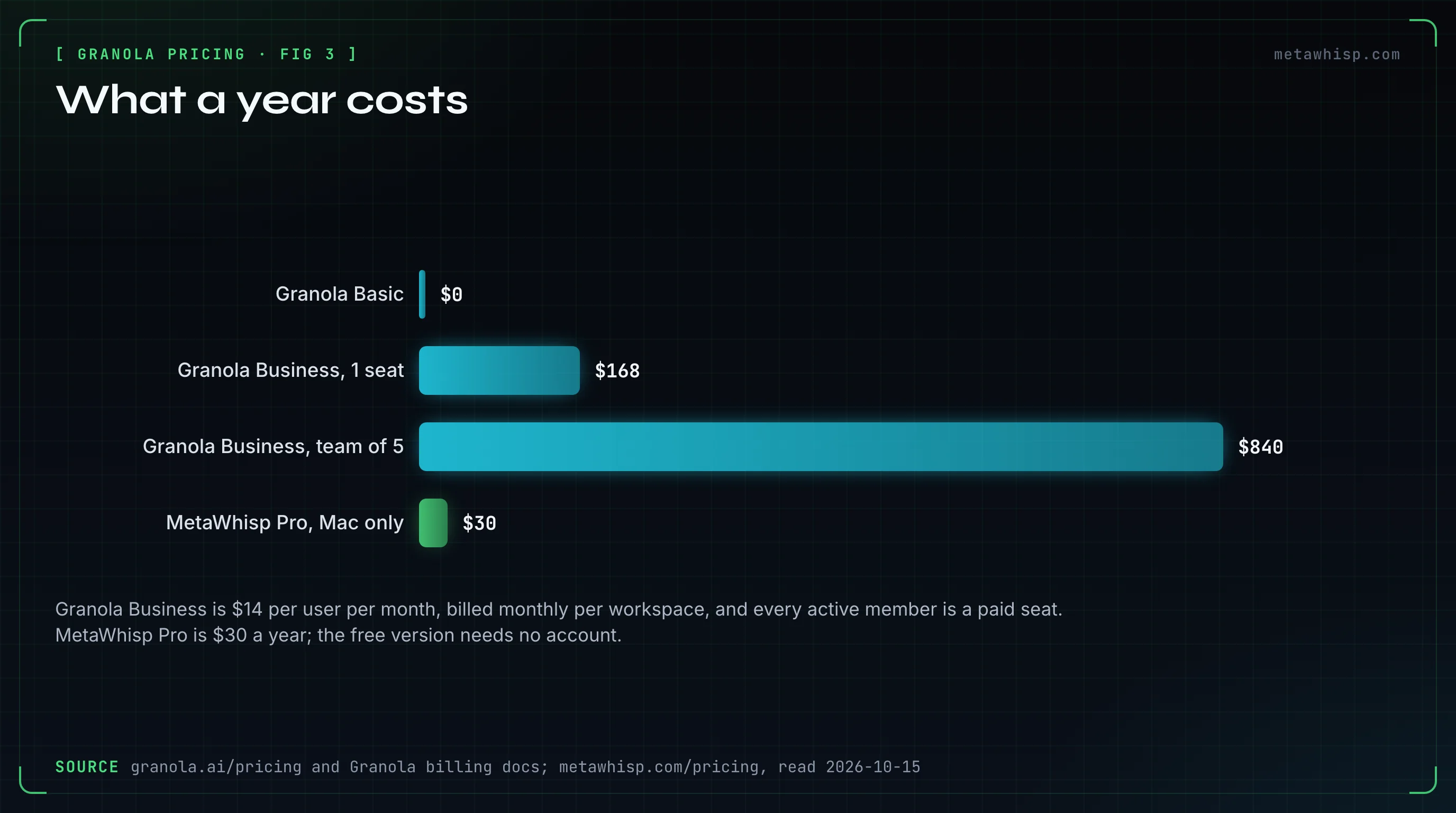
Per workspace. Granola's billing docs say everyone in a workspace shares one plan, and each active member is a paid seat, so you can't put some colleagues on Business and leave others on Basic. Pending invites aren't billed, and seat changes are prorated. A team of five on Business pays $70 a month, or $840 a year.
- Paying just for yourself: Granola's docs suggest creating a personal workspace and paying for one seat there. Notes and folders aren't shared between workspaces.
- Who can cancel: only workspace admins can cancel or change the plan. Members can upgrade.
- Removing someone: it deactivates their account in that workspace, and they lose access to their personal notes there. Granola also warns that removing a member doesn't remove their card from the subscription.
- No yearly discount: Business is billed monthly, so there's no cheaper annual Business price today.
Can You Get Granola for Less?
Yes, if you qualify. Granola gives 12 months of Business free to some students and to some startups, 50% off Business to nonprofits, and two months of Business to new users who join through a referral. Each program has a rule that's easy to miss.
| Program | What you get | Who qualifies | The catch |
|---|---|---|---|
| Students | 12 months of Business | Students at accredited universities in the US, UK and Canada, with an academic email | Marked "limited edition" |
| Startups | 12 months of Business | Fewer than 30 employees, pre-seed or seed funding from Granola's list of approved investors | Bootstrapped startups don't qualify, and neither does anyone who has paid for Granola or used a promo code |
| Nonprofits | 50% off Business | Organizations verified through Goodstack | Lasts only while the organization stays eligible |
| Referrals | 2 months of Business for the new user | A company email at a company with no Granola workspace yet | Gmail and Outlook.com addresses don't count |
Granola's own startup guide adds a trap: buy Business seats first and you can't join the startup program later. Many YouTube reviewers also share affiliate links promising one to three free months. We couldn't verify those offers.
How Do You Cancel Granola, and Can You Get a Refund?
A workspace admin opens Settings → Billing → Manage subscription, which leads to Stripe, and clicks Cancel subscription. Granola's cancellation doc says the plan runs to the end of the billing cycle, then the workspace drops to Basic. If you can't open the app, the same billing page works on the web. If you can't get into your account at all, Granola says to email hey@granola.so.
Refunds are murkier. The help docs have no refund policy for cancelling; they mention only prorated seat credits, and that tax already charged isn't refunded. Granola's Platform Terms, last updated December 19, 2025, say fees are paid upfront and are non-cancelable and non-refundable (§7.1). Unless an order form says otherwise, they also say plans renew for one-year terms (§10.2). The help docs describe monthly billing you can cancel anytime. We couldn't find which one governs a self-serve Business plan, so don't count on a refund. Our guide to cancelling AI note takers before they charge you covers the same traps for Otter, Fireflies and Fathom.
What Do Reviewers Say About Granola's Price?
Two of the four reviewers call the free plan generous, and three say the 30-day window is what makes them pay. We read the full transcripts of four YouTube reviews published from June to October 2026. The fourth reviewer doesn't discuss price.
- Tool Finder (September 2026) calls Granola well worth it and frames the 30-day wall as the reason to pay for constant access. Granola's own blog embeds this video in its pricing posts.
- Gig Guidance (October 2026) calls the free tier remarkably generous for weekly follow-ups, and says $14 pays for itself once you need notes from two months back.
- Just Ask Jon (August 2026), the only dedicated pricing video we found, says to start on Basic for two or three weeks and upgrade when you hit the history limit.
- Efficient App (June 2026), after a year of use, got the most value from recording unplanned conversations, on walks and over lunch. Its main friction was remembering to press record.
Two caveats come up again and again. There's no audio to play back, because Granola doesn't keep it, so a misheard name or number can't be checked. And in group calls, speakers often come out only as "Me" and "Them" unless you set up Granola's speaker tags, which name participants on Zoom, Meet and Teams in the desktop apps. On G2, Granola rated 4.6 out of 5 from 173 reviews on October 15, 2026, and the newest reviews on its first page carry G2's "Incentivized" label. One recent reviewer called the price steep for people who only occasionally need paid features.
Watch out for stale claims. Several videos, and some of Granola's own blog posts updated as recently as October 8, 2026, still say Slack is paid-only, the API is Enterprise-only, or MCP isn't on the free plan. Granola's pricing page and help docs say otherwise. Most of these reviewers earn affiliate commission from Granola.
What Does Granola Do With Your Notes?
Granola records your device's audio without a bot and doesn't keep the audio, according to its security page. Your notes and transcripts are stored on AWS in the US and kept until you delete them. On Basic and Business, Granola may use de-identified data to train its own models unless each user opts out in Settings.
- Who processes your data: Granola's trust center lists 16 subprocessors. They include OpenAI, Anthropic, Google Cloud, xAI and Fireworks.ai for AI features, and Deepgram and AssemblyAI for transcription.
- No regional storage: there's no EU or UK data residency option.
- Chat logs: conversations with the Fable 5 model aren't zero-retention; Granola's billing docs say Anthropic keeps them for 30 days.
- Compliance: SOC 2 Type II on every plan. HIPAA only on Enterprise, with a BAA that covers the desktop and laptop apps.
- Retention: optional transcript auto-deletion runs from one day to one year.
Is Granola Worth Paying For?
It depends on how far back you look. If you only need notes from the past month, Basic covers it for $0. Business at $14 per user per month makes sense if you search older meetings, push notes into Notion or a CRM, or want follow-up emails drafted. Enterprise is for companies that need SSO, HIPAA or admin control.
- Stay on Basic if you take notes for this week's follow-ups, and you're happy to export a CSV now and then.
- Pay for Business if you regularly ask "what did we decide in March?", or your notes have to land in a CRM, Notion or Zapier.
- Talk to Enterprise if you need SSO, HIPAA, workspace-wide deletion rules or an annual contract.
- Look elsewhere if you want your notes on your own computer rather than a US cloud, or you don't want a per-seat bill.
Is There a Free Alternative Without the 30-Day Window?
Yes. MetaWhisp is a free Mac app that records meetings without a bot, from your microphone and your Mac's own audio. By default it transcribes on your Mac with Whisper large-v3, and it keeps every transcript there. The free version needs no account and has no trial, no meeting cap and no history window.
It works differently from Granola. Turn on Meeting Recording in Settings, and you start each recording from the menu bar. Switch on call detection too, and MetaWhisp shows a notice when a Zoom, Meet or Teams call starts; it can also start recording by itself after 5 seconds if you allow that. By default, the free version transcribes on your Mac and no audio leaves it. Audio goes out only if you add your own Groq, OpenAI, Deepgram or Gemini key. Pro, at $7.77 a month or $30 a year, moves transcription to Groq through MetaWhisp's server, with 5,400 minutes a month; MetaWhisp's privacy page says its servers don't store your audio or transcripts. AI recaps run on a local model or your own API key for free, or with Pro's built-in AI. That's $30 a year against $168 for one Granola Business seat.
Its limits, plainly: it's a Mac app for macOS 14 or later on Apple Silicon, with no Windows, iPhone or Android version. On calls, the transcript is split into "Me" and "Them", not into named speakers. If that fits how you work, see how meeting notes work without a bot or download MetaWhisp free.
FAQ
Is Granola free?
Yes. Granola's Basic plan costs $0, records unlimited meetings and has no daily transcription limit. The catch is history: the app only shows notes from the last 30 days. Older notes stay stored and come back if you upgrade to Business at $14 per user per month.
Does Granola have a free trial?
Granola's billing docs mention time-limited trials of Business and Enterprise but don't say how long they last. One of Granola's own blog posts says there's no trial at all. Either way, the free Basic plan doesn't expire.
How much is Granola per month?
Business is $14 per user per month and Enterprise is $35 per user per month, as of October 15, 2026. Billing is per workspace, so every active member of the workspace is a paid seat. Business is billed monthly.
Does Granola offer annual billing?
Only on Enterprise contracts, according to Granola's billing docs on October 15, 2026. Business is billed monthly, so there's no annual Business discount today. An earlier plans FAQ listed $12 per user per month for an annual commitment, but it was gone by August 2025.
What happens to my Granola notes if I stop paying?
Your workspace drops to Basic at the end of the billing cycle. Notes older than 30 days are hidden, not deleted, and come back if you upgrade again. To keep them without paying, export a CSV of your history from Settings → Profile. Granola's terms also let it delete accounts inactive for more than 30 days, so export what matters.
Does Granola have a student discount?
Yes. Students at accredited universities in the US, UK and Canada can get 12 months of Business free with an academic email. Granola marks the offer "limited edition". Nonprofits get 50% off Business instead.
Related reading
- How to Cancel an AI Note Taker Before It Charges You
- MetaWhisp vs Otter.ai
- How to transcribe meeting minutes on a Mac
- AI note taker without a bot
Sources
Checked on October 15, 2026. Prices and plans change, so check Granola's pricing page before you rely on a number. The price history comes from Wayback Machine captures of Granola's pages; the review ratings are from G2 on the same day.
- Granola: pricing and Compare plans, homepage, subscriptions and billing, cancelling, workspaces, exporting notes, MCP, follow-up emails, setup and requirements
- Granola programs: students, startups, nonprofits, referrals, startup guide
- Granola privacy and security: security, subprocessors, model training, security and data FAQ, transcript auto-deletion
- Granola terms: Platform Terms (December 19, 2025)
- Price history (Wayback Machine): December 2024, February 2025, plans FAQ, March 2025, October 2025, pricing update, November 2025, help center, January 2026, HIPAA doc, September 2026, October 2026
- Reviews: G2; YouTube reviews by Tool Finder, Gig Guidance, Just Ask Jon and Efficient App
- MetaWhisp: pricing, privacy
