Is Wispr Flow Safe to Use?
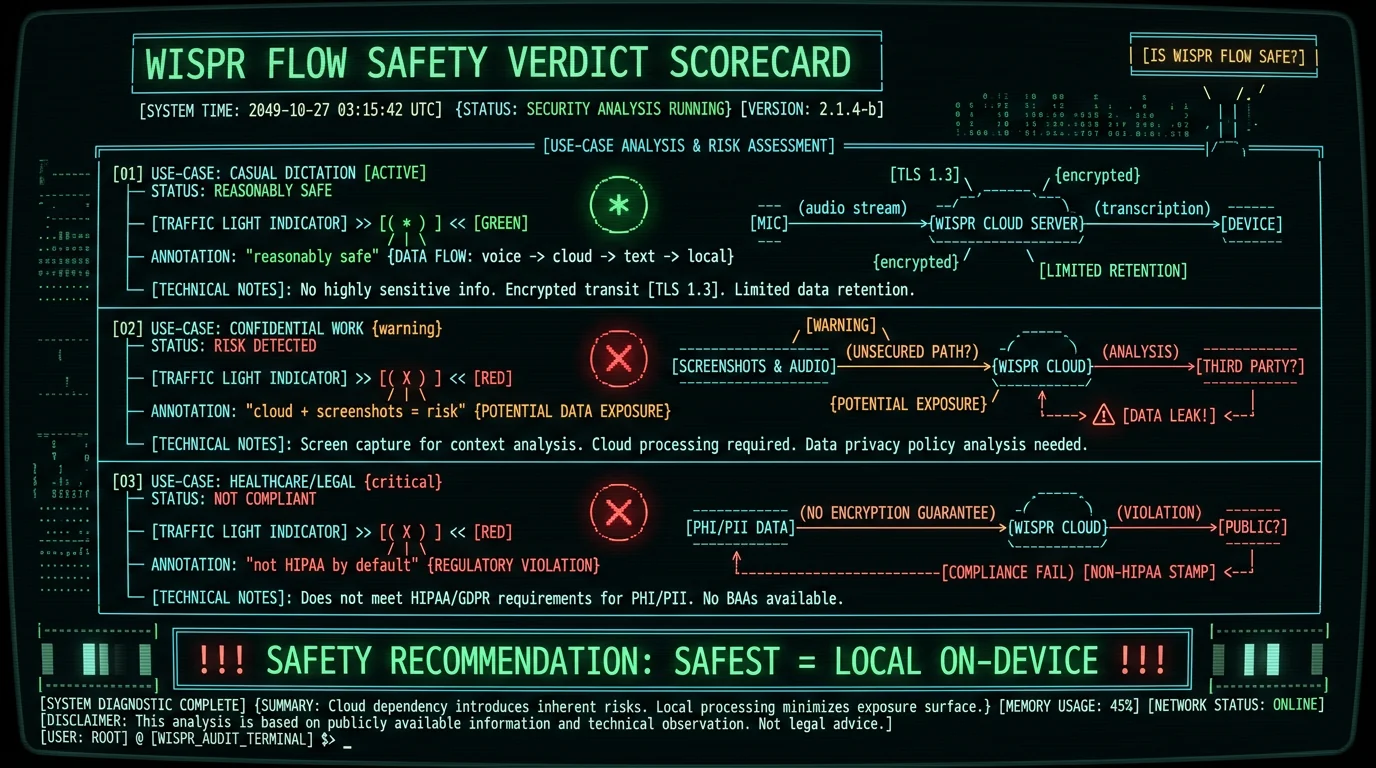
The honest answer is "it depends on what you dictate." Wispr Flow is a legitimate, funded company with a published privacy policy and standard security practices like encryption in transit. For everyday dictation — emails, messages, notes that aren't sensitive — it's reasonably safe in the same way most cloud apps are. The safety picture changes for sensitive content because of two architectural facts:- Your audio is uploaded to the cloud. Wispr Flow processes speech on its servers, so every dictation leaves your device.
- It captures screenshots. The context-awareness feature periodically captures your active window and uploads it, documented in a May 2026 incident (covered in our Wispr Flow screenshot deep-dive).
What Does Wispr Flow Do With Your Audio?
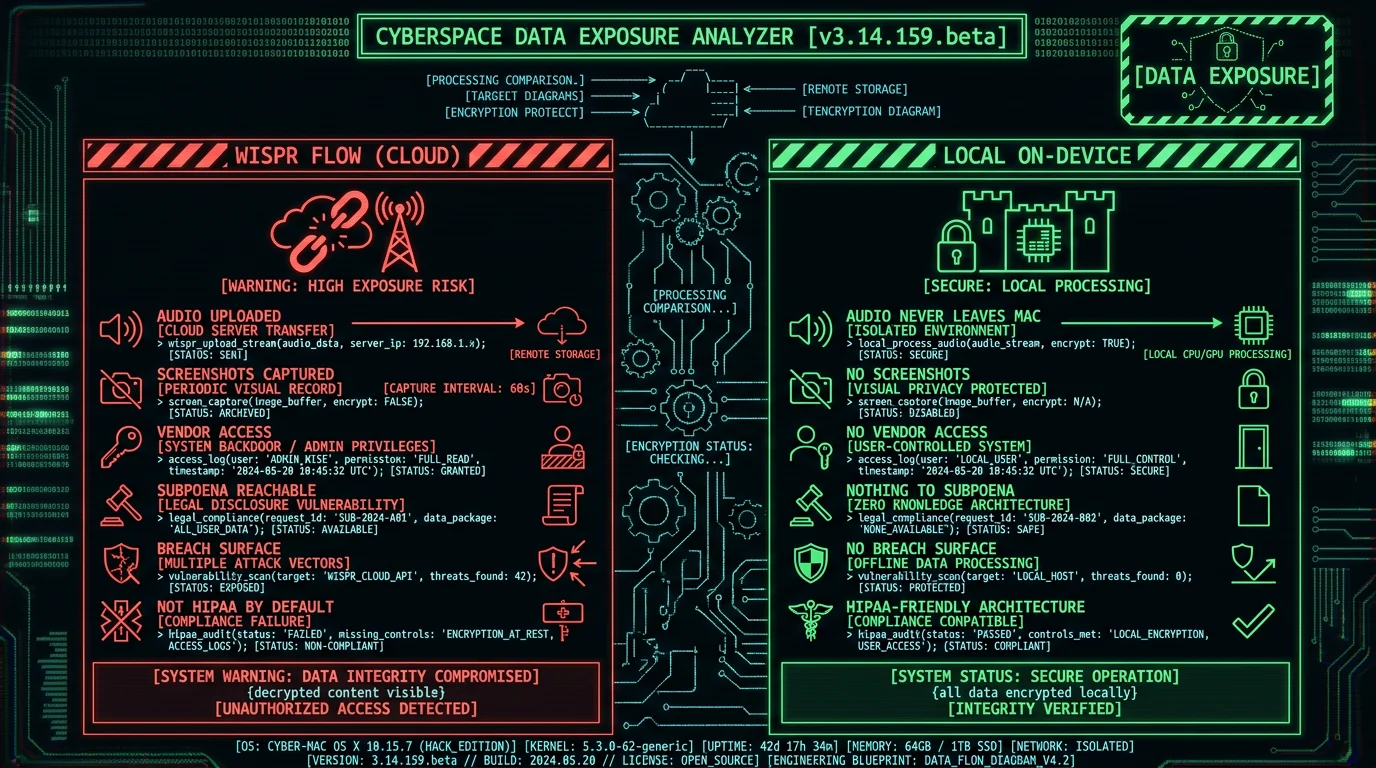
Wispr Flow uploads your audio to its cloud servers for transcription — there is no on-device mode at any tier. According to its published privacy practices, audio is processed to generate transcripts, and the company states it uses encryption in transit to protect data as it travels to its servers. The key safety considerations:- Audio leaves your device — unavoidable with cloud transcription; the audio is transmitted to Wispr's infrastructure
- Third-party AI processing — per user investigation, some processing routes through third-party AI services
- Data retention — check Wispr's current privacy policy for how long audio and transcripts are retained; cloud services typically retain some data for service operation
- Encryption in transit — Wispr uses standard transport encryption, which protects against interception but not against the vendor itself having access
Is Wispr Flow Safe for Confidential or Sensitive Work?
For confidential content, the honest assessment is: use caution, and for the most sensitive material, choose a different architecture. The combination of cloud upload plus screenshot capture creates exposure that matters for:- Healthcare — patient information (HIPAA-covered)
- Legal — attorney-client privileged material
- Finance — account details, financial decisions, client data
- Journalism — source protection
- Business — trade secrets, strategy, unreleased plans
- Personal — anything visible on screen during dictation, since screenshots capture the active window
Is Wispr Flow HIPAA-Compliant?
Not by default. Wispr Flow's standard consumer service is not HIPAA-compatible, and using it for protected health information without proper safeguards would be a compliance problem for healthcare providers. HIPAA compliance for a cloud service requires a signed Business Associate Agreement (BAA) and specific configuration. If Wispr Flow offers a HIPAA-eligible enterprise tier, it would require explicit setup, a signed BAA, and likely a higher price. The default app you download is not covered. For healthcare dictation on Mac, the simplest compliant path is on-device transcription where audio never leaves your device. When the data doesn't reach a third party, you don't need a BAA for the transcription step — there's no business associate to sign one. Per the HHS guidance on business associates, a BAA is required whenever a third party handles protected health information on your behalf — which on-device processing avoids by design. This is why on-device tools have a structural advantage for HIPAA workflows, covered in our guides on dictation for doctors and HIPAA-compatible speech-to-text on Mac.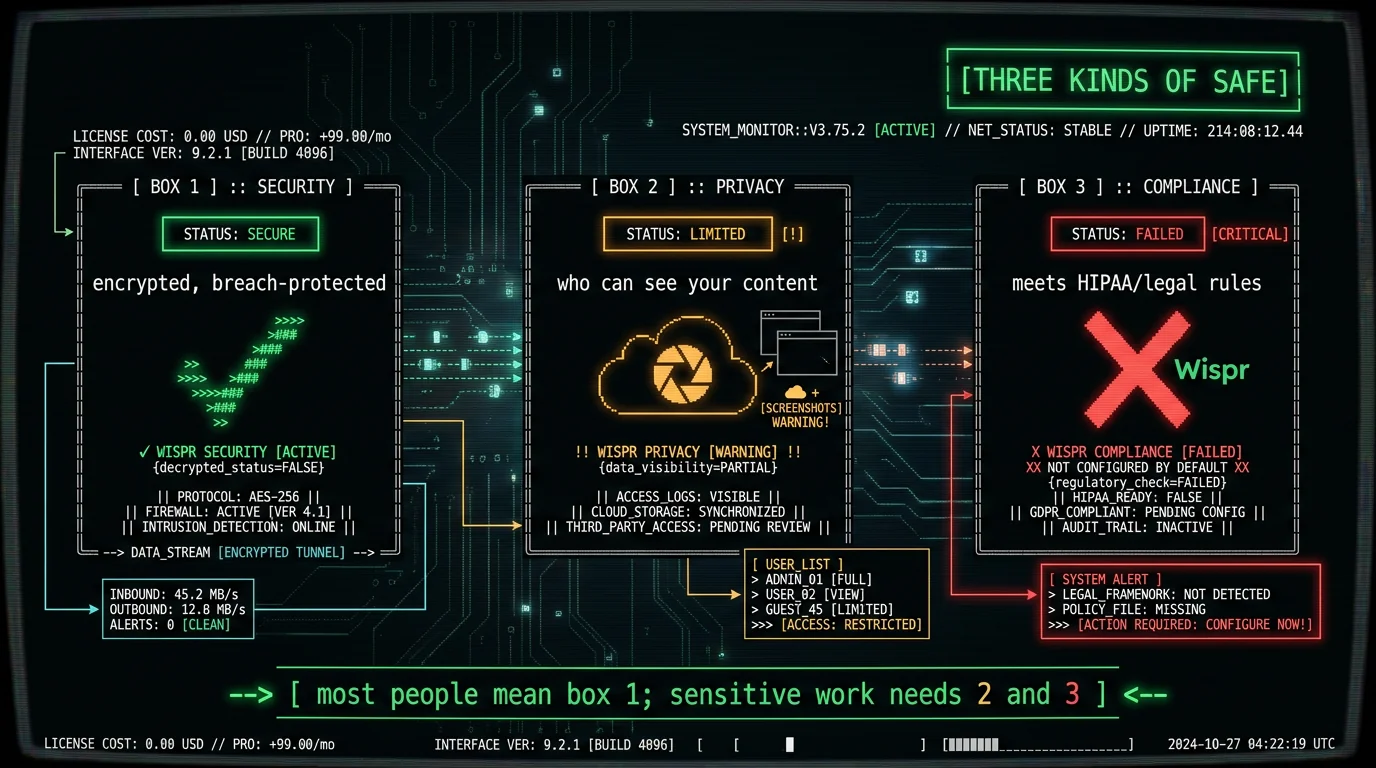
How Is Wispr Flow's Account and Login Security?
On the account-security side, Wispr Flow follows standard practices for a modern SaaS app — account login, and the data protections described in its privacy policy. General account-safety advice applies regardless of the app:- Use a strong, unique password (or sign in with a trusted SSO provider)
- Enable two-factor authentication if offered
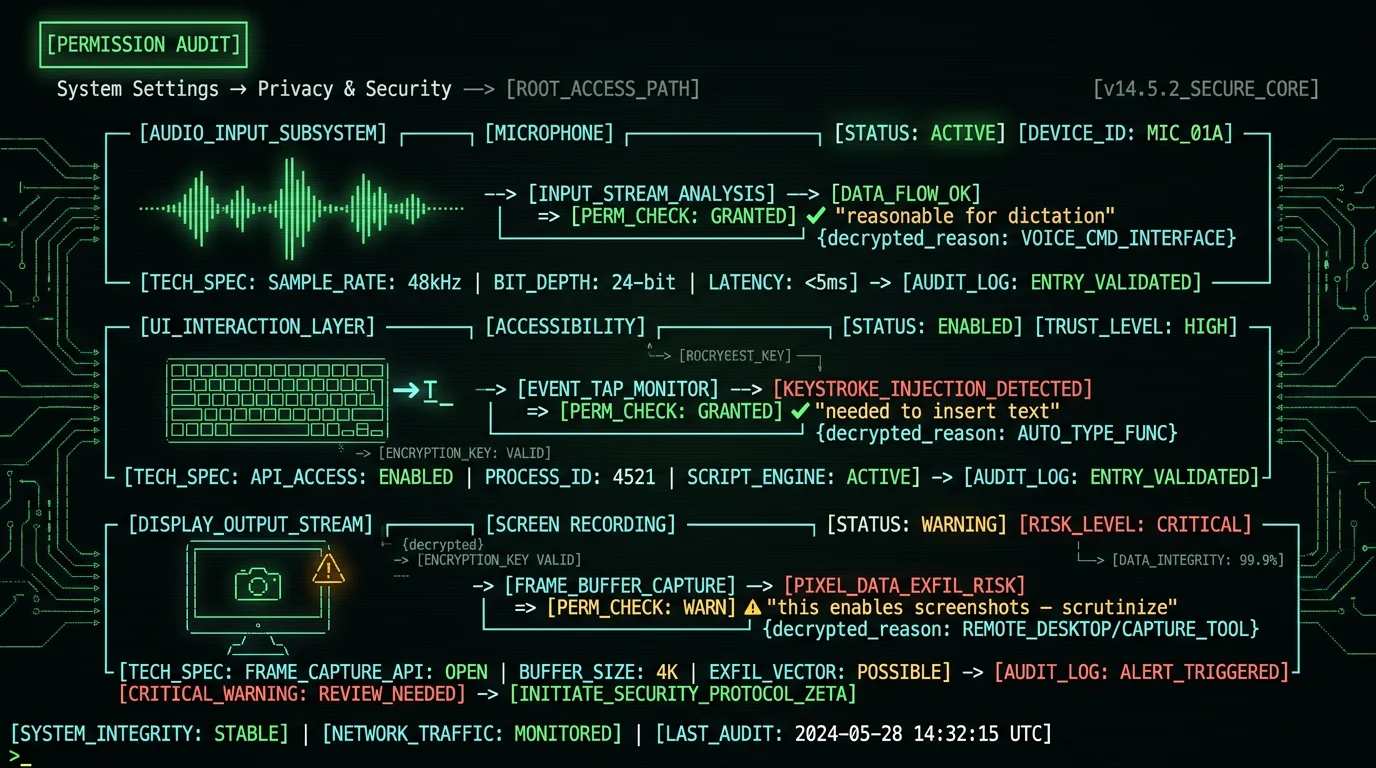
- Review what permissions you've granted (Microphone, Accessibility, Screen Recording)
- Revoke Screen Recording permission if you don't want screenshot capture
What's the Safest Way to Dictate on Mac?
The safest dictation setup on Mac is local, on-device transcription — and this is the broader point that applies far beyond Wispr Flow. When the speech model runs on your own Mac:- Audio never leaves your device — no upload, no vendor access, no breach surface
- No screenshots — on-device tools don't need to read your screen
- Works offline — and you can verify safety by running it in airplane mode
- No data retention to worry about — there's no server storing your audio
- HIPAA-friendly architecture — no third party means no BAA needed for transcription
- MetaWhisp — free, open-source, runs Whisper large-v3-turbo on-device via WhisperKit. No cloud, no screenshots, audit the code at github.com/metawhisp.
- Apple Dictation — free, built-in; Enhanced Dictation runs on-device on Apple Silicon
- MacWhisper — ~$29 one-time, on-device, strong for file transcription
- SuperWhisper — has on-device local models (verify you're not in cloud mode)
Is Wispr Flow Safe? The Verdict
- For casual dictation (non-sensitive emails, notes, messages): reasonably safe. Standard cloud-app safety with encryption in transit.
- For confidential work (health, legal, finance, journalism, business secrets): risky, due to cloud upload plus screenshot capture. Choose on-device instead.
- For HIPAA-covered data: not safe by default — not HIPAA-compatible without specific enterprise setup and a BAA.
- The safest setup overall: local on-device transcription, where safety is verifiable rather than promised.
Frequently Asked Questions
Is Wispr Flow safe to use?
For casual, non-sensitive dictation, reasonably safe — it uses encryption in transit and has a published privacy policy. For confidential work, it's risky: Wispr Flow uploads audio to its cloud and captures screenshots of your active window for context-awareness. It's not HIPAA-compatible by architecture. The safest setup for sensitive content is local on-device transcription where audio never leaves your Mac.
Does Wispr Flow store my audio?
Wispr Flow processes audio on its cloud servers to generate transcripts. Check its current privacy policy for specific retention periods. Cloud services typically retain some data for service operation. Even with encryption in transit, the vendor has access to your audio during processing. For zero retention, on-device tools don't store audio anywhere because nothing is uploaded.
Is Wispr Flow HIPAA-compatible?
Not by default. The standard consumer service is not HIPAA-compatible. HIPAA requires a signed Business Associate Agreement and specific configuration, which would need an enterprise tier if offered. For healthcare dictation on Mac, on-device transcription is the simplest compliant path — when audio never reaches a third party, no BAA is needed for the transcription step.
Does Wispr Flow really capture screenshots?
Yes. Wispr Flow's context-awareness feature captures periodic screenshots of your active window and uploads them to improve vocabulary accuracy, documented in a viral May 2026 incident. You can disable it by revoking Screen Recording permission in System Settings, though this reduces the contextual accuracy the app markets. On-device tools don't capture screens at all.
Is Wispr Flow encrypted?
Wispr Flow uses encryption in transit, which protects your audio from interception while it travels to Wispr's servers. However, encryption in transit doesn't prevent the vendor from accessing your audio during processing — the service necessarily decrypts it to transcribe. Encryption protects against outside attackers, not against the service itself having access. On-device transcription avoids this by never transmitting audio.
What's the safest dictation app for Mac?
An on-device app where audio never leaves your Mac. MetaWhisp (free, open-source, Whisper via WhisperKit) lets you verify safety in airplane mode and audit the code. Apple's Enhanced Dictation runs on-device on Apple Silicon. MacWhisper and SuperWhisper's local mode also keep audio local. The safest setup is one where privacy is verifiable rather than promised in a policy.
About the Author
Andrew Dyuzhov is the solo founder and CEO of MetaWhisp, a free, open-source, on-device voice-to-text app for macOS that runs Whisper large-v3-turbo locally via WhisperKit. He builds a competing on-device tool, which is why this assessment leads with that disclosure, credits Wispr Flow's legitimate security practices, and keeps the criticism tied to the specific architectural facts (cloud upload, screenshot capture) rather than vague alarm. Connect on X or GitHub.
Related Reading
- Wispr Flow Screenshot Capture Explained — the privacy incident in depth
- Wispr Flow Review 2026 — full standalone review
- Private Voice-to-Text on Mac — the on-device approach
- HIPAA-Compliant Speech-to-Text on Mac — for regulated workflows
- Wispr Flow Alternatives — safer on-device options
