How this review was built: we checked SuperWhisper's current published facts — pricing, models, privacy behavior — as of May 2026, and transcribed independent reviewer videos using Whisper large-v3-turbo (the same on-device model MetaWhisp runs) to pull what daily users actually report. Reviews referenced:
- Daniel (Tech & Data) — "Superwhisper Review - 2026"
- A Fading Thought (Robert) — "AI Dictation: It's About YOU, Not The App" (a long-term SuperWhisper power user)
- Ty Teaches Tech — "Mac Dictation Apps to Effortlessly Type at the Speed of Thought"
- houdztech — "Wispr Flow vs Superwhisper Review (2026)"
Quotes are short and attributed, with links to each source — a summary of public facts and reviewer opinion, not a reproduction of the videos.
What Is SuperWhisper?
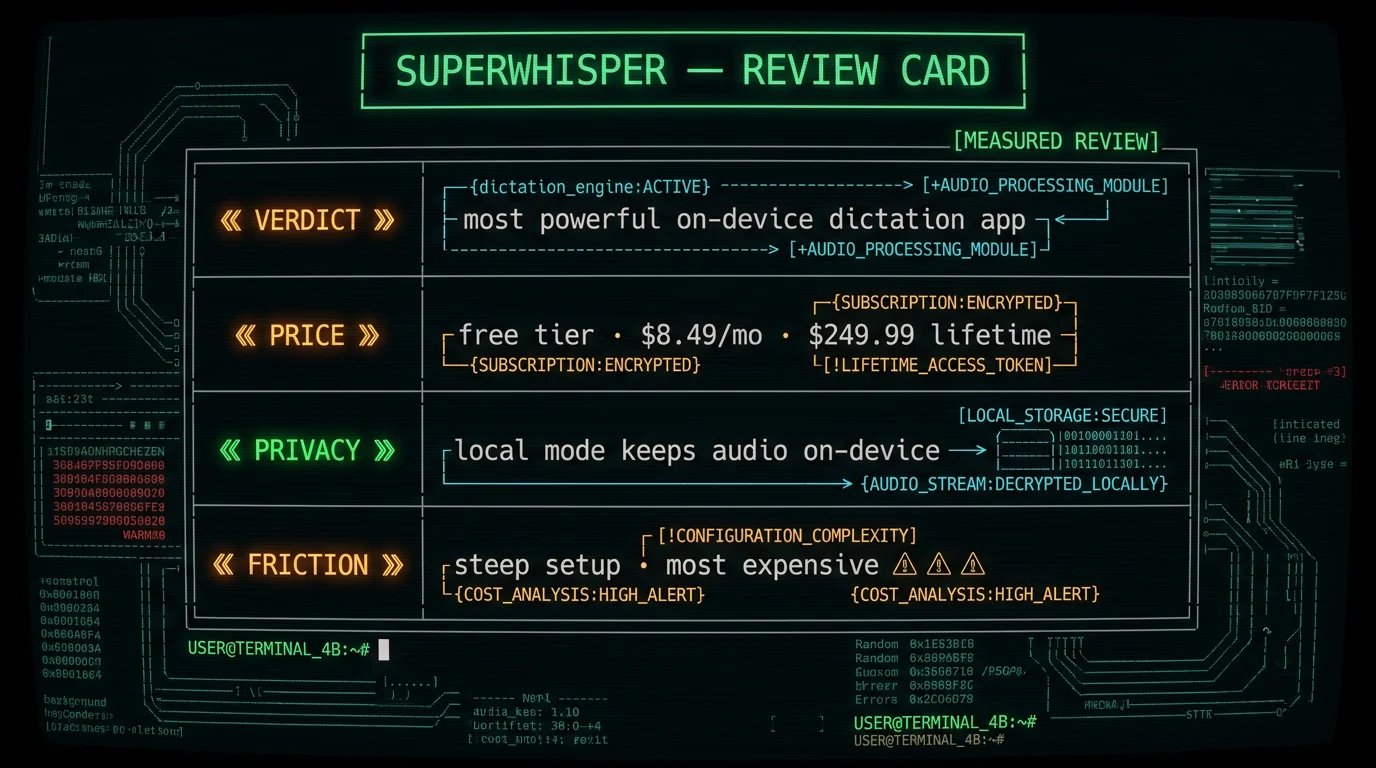
SuperWhisper is an AI voice-to-text app for Mac (also Windows and iOS) that goes well beyond plain dictation. It transcribes your speech, then runs a second AI pass that cleans up filler words, fixes punctuation, and reformats the text to match whatever you're writing — an email, a code prompt, a message. Its defining feature is custom modes: each mode has its own transcription model, its own AI processing prompt, and its own hotkey, and modes can switch automatically based on which app you're in.SuperWhisper Pricing (2026)
Pricing is where SuperWhisper draws the most debate, so here are the verified numbers. As of May 2026, SuperWhisper offers:- Free tier — permanent, with limits
- Pro monthly — $8.49/month
- Pro annual — $84.99/year (about $7.08/month)
- Lifetime — $249.99 one-time
How Private Is SuperWhisper, Really?
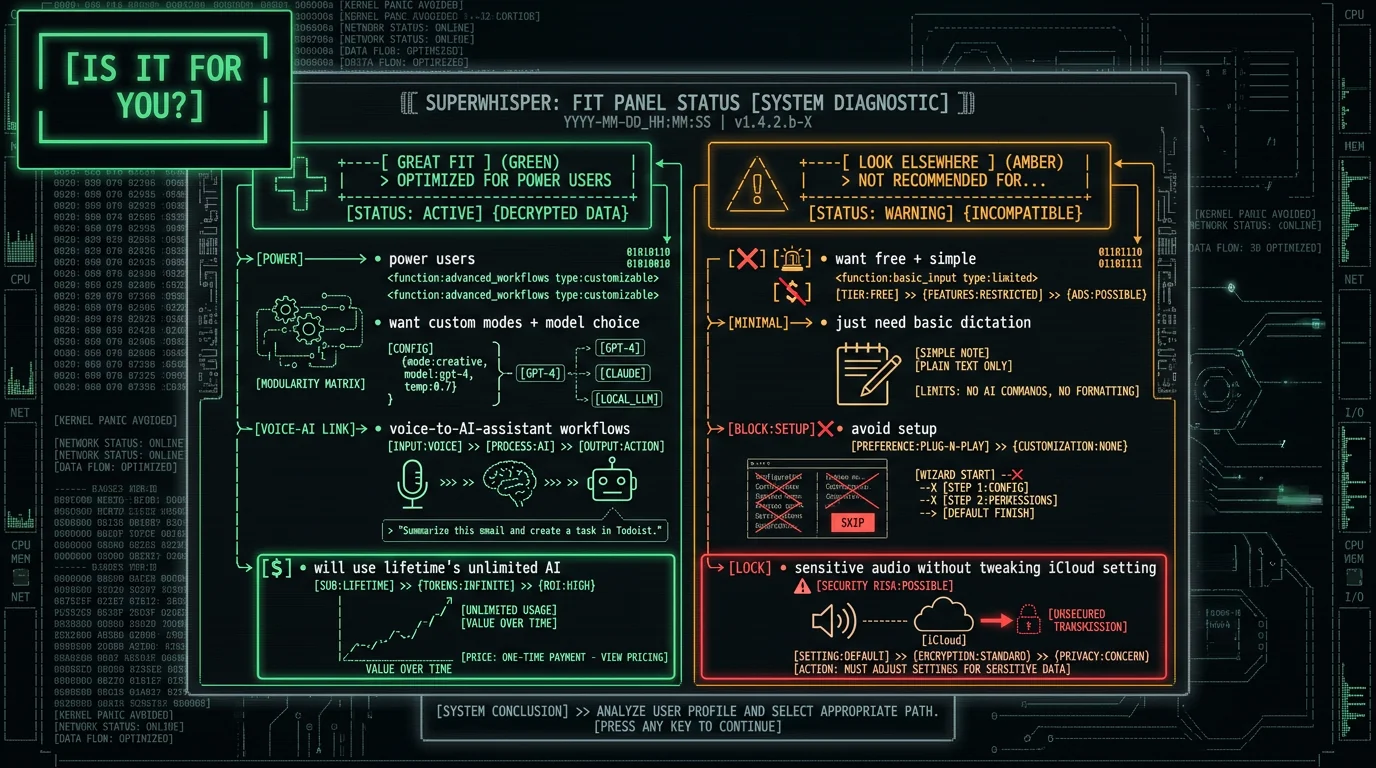
For privacy-conscious users this is the key question, and the answer is genuinely good with one caveat to know. Local mode keeps audio on the Mac. On Apple Silicon, SuperWhisper can run Whisper models (Tiny through large-v3-turbo) and Parakeet entirely on-device — no internet required, audio never transmitted. In a reviewer's words, it "keeps all your data local, nothing leaves your device." That's the architecture that matters, and it's a real privacy advantage over cloud dictation tools. The caveat: iCloud by default. By default, SuperWhisper writes your audio recordings into your iCloud Documents folder. If iCloud Drive is enabled, those recordings sync to iCloud and to other devices signed into your Apple account. This isn't audio "leaving for SuperWhisper's servers" — it's your own iCloud — but if you handle sensitive recordings, it's worth knowing and adjusting. It's a settings-level choice, not a hard limitation.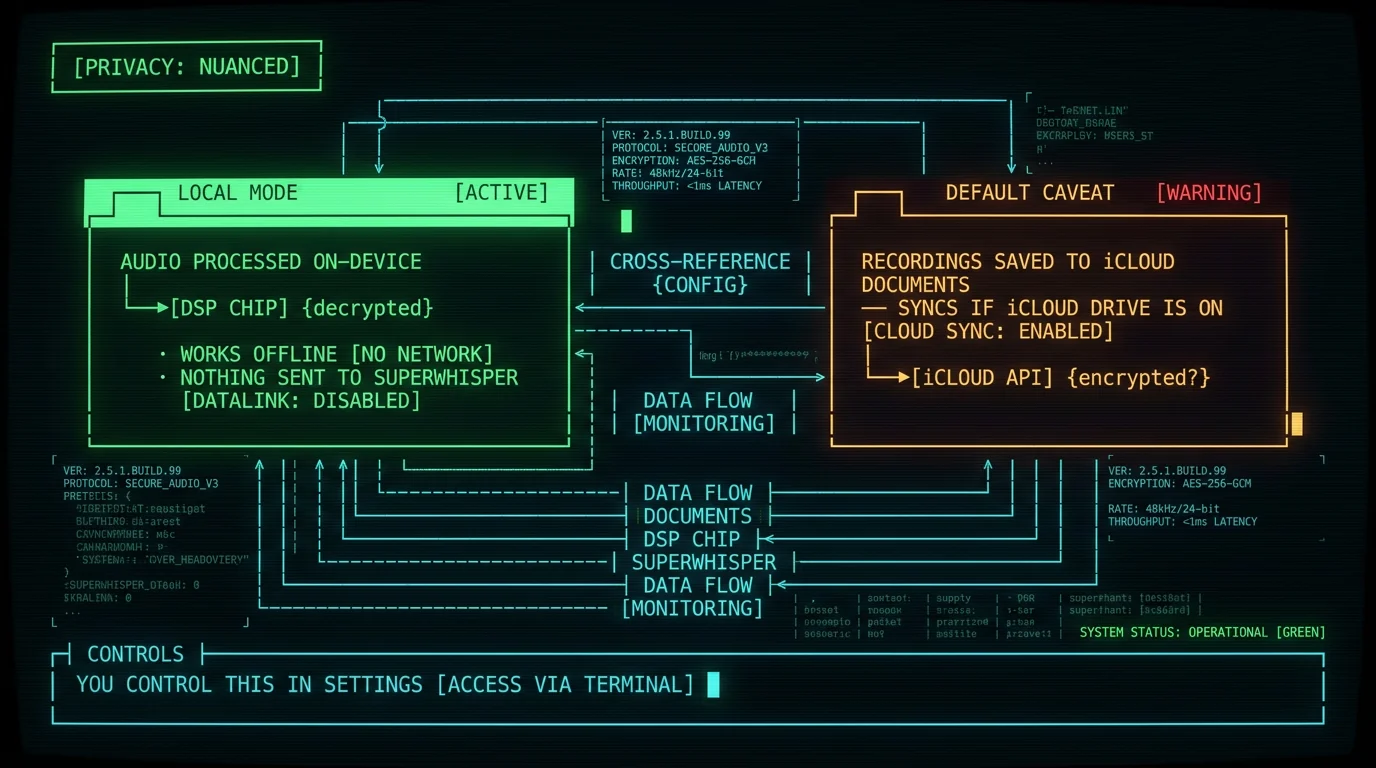
What's Genuinely Great About It
The praise in independent reviews is consistent, and it's earned. It's the most flexible dictation tool, full stop. Reviewers credit the custom modes, prompt layering, and model choice as best-in-class. One creator who has used it daily for over a year calls it "my personal top choice" precisely because of how far you can shape it — switching models per task, crafting prompts, even reprocessing the same recording through different modes. The AI cleanup is excellent. Daniel, in a dedicated review, called SuperWhisper "one of the best productivity upgrades I've made this year," highlighting how it removes filler, fixes grammar, and adapts tone per use case — turning messy speech into ready-to-send text for coding prompts or emails. It runs the same fast on-device model the best free apps do. On Apple Silicon, SuperWhisper's recommended local default is Whisper large-v3-turbo — accuracy close to full large-v3 at roughly 4x the speed, fitting in 8 GB of memory. (That's the same model class a free on-device app like MetaWhisp runs locally, which is why base accuracy across good on-device tools is similar — the differentiation is everything built around it.) Unlimited frontier AI on the lifetime plan. This is SuperWhisper's genuinely unique card: unlimited processing through top OpenAI and Anthropic models for a one-time price. For power users who want voice as a front-end to an AI assistant, nothing else offers that economics.The Real Friction
A measured review names the downsides too. Setup is the steepest of the popular apps. This is the most common criticism. One head-to-head reviewer, while giving the developer "massive props," admitted SuperWhisper's experience was "a little bit confusing" and the hardest of three apps to set up. Another flatly called it "not beginner-friendly" — downloading models, configuring accessibility permissions, choosing audio devices. (Notably, Daniel's review found the basic setup quick — "takes less than two minutes" — so the friction is less about installing and more about mastering modes and prompts to get the most out of it.) It's the most expensive on-device option. At $249.99 lifetime, it costs far more than one-time-purchase alternatives and obviously more than free tools. The price buys unlimited AI processing — but only matters if you'll use that. Even fans have gripes. The long-term reviewer above, despite making it his top pick, openly criticized recent interface redesigns and mode-switch notifications he finds distracting — a reminder that "most powerful" and "most polished" aren't the same thing.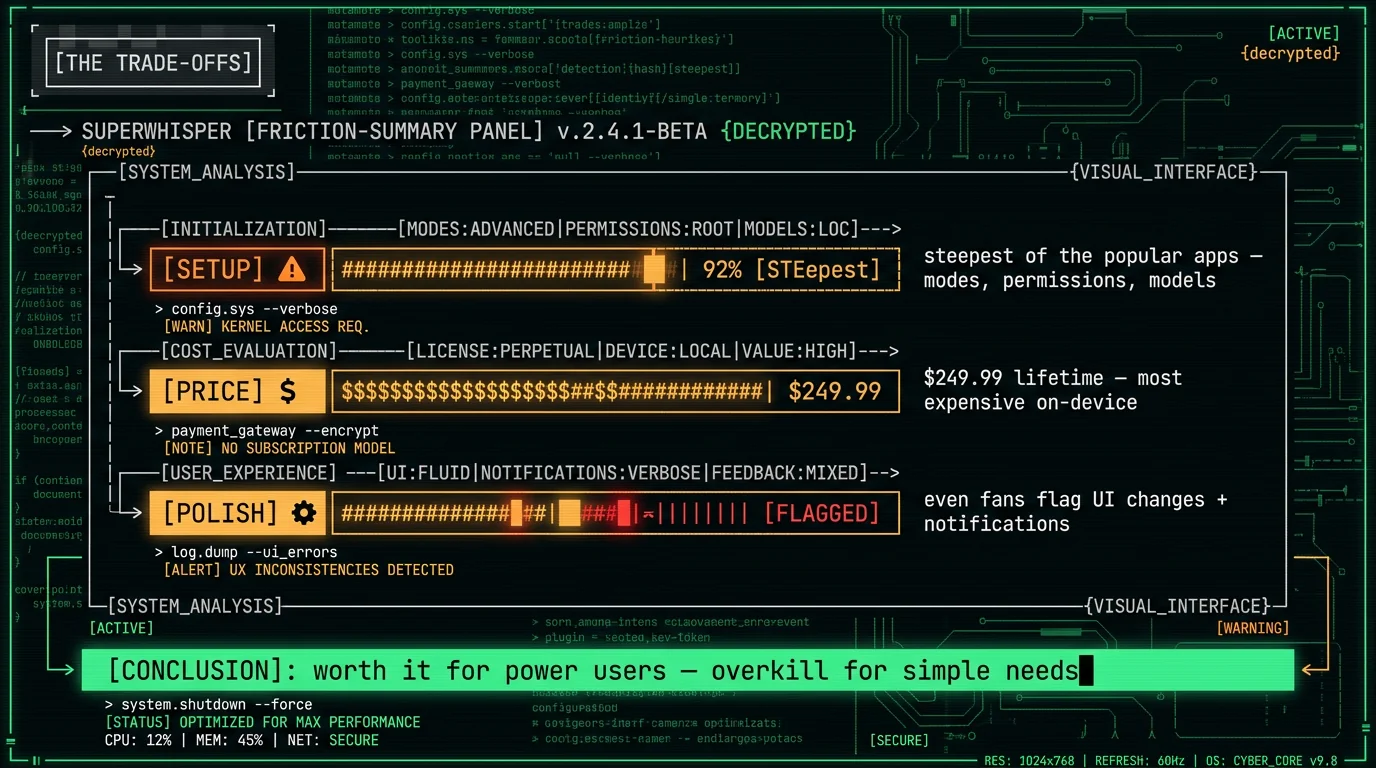
SuperWhisper vs a Free On-Device Option
Here's where I'm transparent about my own bias: I build MetaWhisp, a free, open-source, on-device dictation app, so weigh this section accordingly. The honest comparison isn't "which is better" — it's "which problem are you solving." SuperWhisper optimizes for power and configurability: many modes, model choice, prompt control, unlimited frontier AI. That depth is its value and its learning curve. A free on-device tool like MetaWhisp optimizes for a different thing — doing one job (fast, private dictation) well, for free, with nothing to configure. It runs Whisper large-v3-turbo locally via the Apple Neural Engine, keeps audio on the Mac, and is open source, so the privacy is auditable in code rather than only promised. What it doesn't try to be is a deeply customizable AI assistant — that's exactly SuperWhisper's territory.Who Should (and Shouldn't) Use SuperWhisper
Frequently Asked Questions
Is SuperWhisper worth $249.99?
It depends on usage. The $249.99 lifetime plan breaks even against the $84.99/year annual plan at roughly year three, and uniquely includes unlimited processing through top OpenAI and Anthropic models — which no subscription competitor matches at a one-time price. If you'll use SuperWhisper daily for years and take advantage of custom modes and AI processing, it's worth it. If you only need basic dictation, the free tier, the $8.49/month plan, or a free on-device app is the smarter spend. (Pricing as of May 2026.)
Is SuperWhisper private and safe?
In local mode on an Apple Silicon Mac, yes — transcription runs on-device, works offline, and audio is never sent to SuperWhisper's servers (verify by dictating in airplane mode). One caveat: by default it saves recordings to your iCloud Documents folder, so with iCloud Drive on, those files sync to iCloud and your other Apple devices. That's your own cloud, not a third party, and it's adjustable in settings. If you pick a cloud model for higher accuracy, audio is sent to that provider for that request. Check which mode is active before dictating confidential content.
Is SuperWhisper hard to set up?
The basic install is quick — one reviewer noted it "takes less than two minutes." The friction is in mastering it: reviewers call the broader experience "a little bit confusing" and "not beginner-friendly" because of downloading models, configuring accessibility permissions, choosing audio devices, and building custom modes and prompts. If you want plug-and-play, SuperWhisper has the steepest learning curve of the popular Mac dictation apps. If you enjoy configuring tools, that depth is the point.
Does SuperWhisper work offline?
Yes, with local models. On Apple Silicon, SuperWhisper runs Whisper models (Tiny through large-v3-turbo) and Parakeet entirely on-device, so dictation works with no internet connection. Cloud models require a connection and send audio to the provider for that request. Intel Macs can run cloud models but local performance is poor, so Apple Silicon is strongly recommended for the offline, on-device experience.
What's the best free alternative to SuperWhisper?
If you want SuperWhisper's on-device privacy without the price or setup, a free on-device app is the closest match. MetaWhisp is free, open-source, and runs Whisper large-v3-turbo locally on your Mac — the same model class SuperWhisper recommends — but focuses on simple, fast dictation rather than deep customization. Apple Dictation is also free and built-in for casual use. The trade-off: free tools don't offer SuperWhisper's custom modes, model switching, or unlimited frontier-AI processing.
How was this review put together?
This is a measured review built two ways. First, the verified facts — pricing, models, privacy behavior — checked against SuperWhisper's current information as of May 2026. Second, independent reviewer videos, which we transcribed using Whisper large-v3-turbo (the same on-device model MetaWhisp runs) and summarized with short attributed quotes and links. It's not a personal hands-on test of SuperWhisper; it's an honest synthesis of the public facts and what daily users report. The author builds a competing free app, disclosed above, which is why the tone stays factual and every claim is sourced.
About the Author
Andrew Dyuzhov is the solo founder and CEO of MetaWhisp, a free, open-source, on-device voice-to-text app for macOS that runs Whisper large-v3-turbo locally via WhisperKit. For this review he checked SuperWhisper's current published facts and transcribed independent reviewer videos using the same Whisper large-v3-turbo model — and discloses that MetaWhisp competes with SuperWhisper, which is why the review sticks to verified facts, keeps quotes short and attributed, and links every source. Connect on X or GitHub.
Related Reading
- Wispr Flow vs SuperWhisper — the easy-vs-powerful head-to-head
- Best Mac Dictation: Reviewer Picks — what creators recommend overall
- 7 Best Local Transcription Apps for Mac — the on-device landscape
- MetaWhisp vs MacWhisper — free vs paid on-device
- Dictation Apps With One-Time Payment — avoiding subscriptions
