Free local transcription that keeps participant audio on your machine.
TL;DR: Paid focus group transcription services charge per audio minute and route your recording through their staff or vendors — which collides with consent forms, IRB protocols, and participant confidentiality promises. On a Mac, you can transcribe the same recording yourself, locally, for free with MetaWhisp running Whisper large-v3-turbo on the Neural Engine. The trade-off today is real: there's no automatic speaker labeling, so you tag speakers by hand after the transcript lands. For sensitive qualitative work where the recording cannot leave the laptop, that's a fair price.
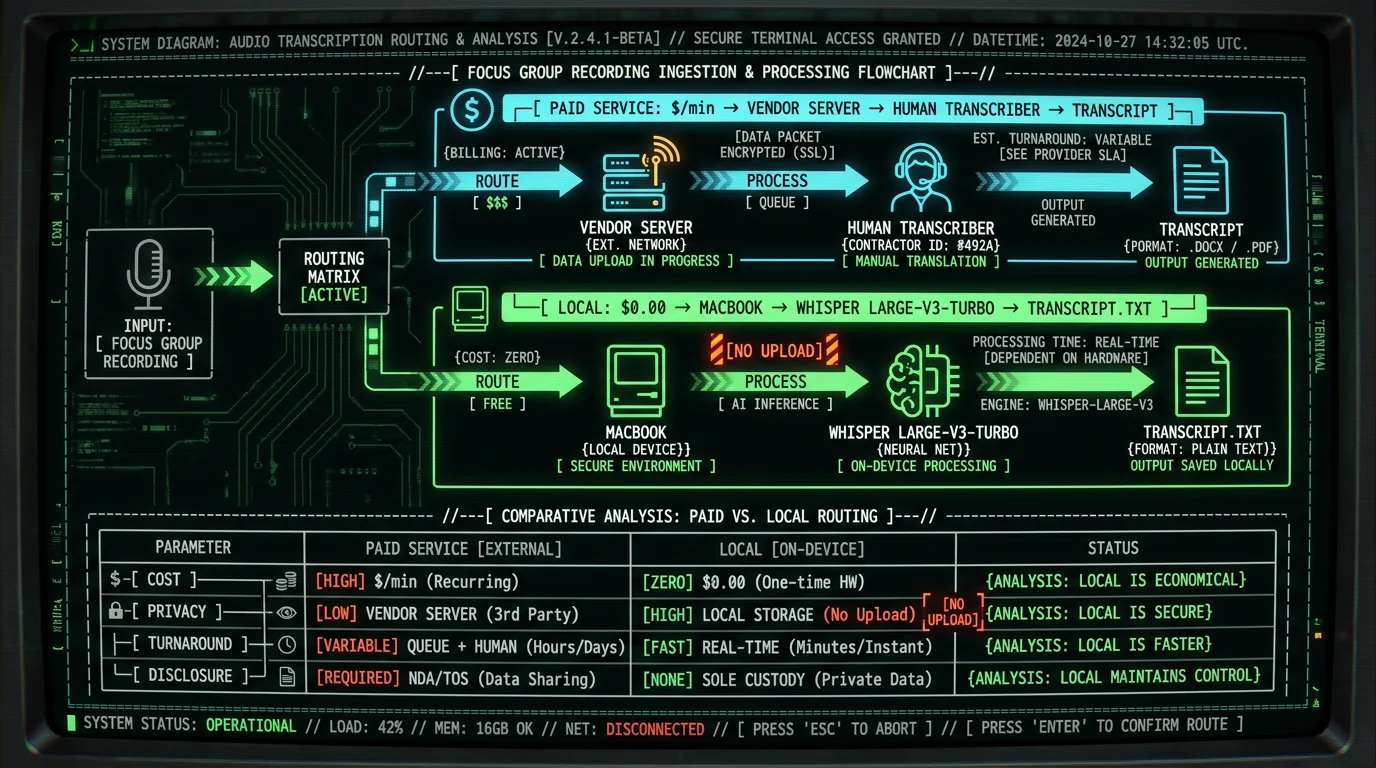
How much do paid focus group transcription services actually cost?
The honest answer is: per audio minute, with tiers that depend on turnaround, accuracy target, and how many speakers are talking over each other. I won't quote you specific rates here because every vendor changes them — and the price you see today may not be the one on your invoice tomorrow. What I can say is the structure.
Most services price per minute of audio. Three buckets show up most often: a budget tier where machines do the work and humans only spot-check it; a standard tier where a human types the whole thing with verification; and a premium tier for messy audio, heavy accents, or specialized vocabulary. The premium tier is the one most research teams actually need for a focus group, because focus groups are rarely clean — people interrupt, laugh over each other, and trail off mid-sentence. Each tier usually carries a turnaround window, and faster turnaround costs more. Speaker labeling (who said what) is typically an upcharge on top of the base rate.
So before you commit to a vendor, the question isn't really "is it $1.50 a minute or $3 a minute." It's: what does a 90-minute focus group cost end-to-end, with the tier and add-ons I actually need? Run that math once and you have a real number to compare against doing it yourself.
Pro tip: Don't price the audio minute alone. Add the cost of speaker labels, timestamps, and any rush surcharge. The "from $X/minute" headline is rarely the all-in figure for a focus group transcript.
| Factor | Paid service | Local on Mac (MetaWhisp) |
|---|---|---|
| Cost per 90-min session | Verify at vendor pricing page | $0 (free local tier) |
| Audio leaves your device | Yes | No |
| Speaker diarization | Often included, sometimes upcharged | Manual tagging |
| Third-party disclosure to consent form | Required | Not required |
| Turnaround | Hours to days by tier | Real time, plus cleanup |
| Best fit | Messy audio, tight deadlines, large groups | Confidential research, small groups, clean audio |
Why do consent forms make cloud transcription a problem?
Most IRB-approved consent forms for focus group research say some version of: audio will be stored securely, only authorized researchers will access it, and identifiers will be removed before sharing. Upload that audio to a third-party transcription vendor and you've just expanded "authorized researchers" to include every contractor with server access on their end. That's the disclosure problem.
Even vendors that sign BAAs and promise encryption at rest still have humans listening to the recording — that's literally the service. For some studies that's fine. For research on stigmatized behavior, mental health, minors, health conditions, or anything covered by HIPAA, GDPR, or institutional ethics rules, it's often not fine at all. Your consent form promised the participant their words would stay inside your team. A vendor's contractor in another timezone is, technically, outside your team.
This is where local dictation workflows start to look less like a tech preference and more like a compliance choice. If the audio never leaves the laptop, you don't have to add a vendor to the consent form, you don't have to amend your IRB protocol, and you don't have to write a data processing agreement. For some research designs, that's the whole decision.
Paid focus group transcription services charge per audio minute with separate fees for speaker labels, timestamps, and rush turnaround. Verify the all-in cost on each vendor's pricing page before you commit. The bigger issue than price is disclosure: when a vendor's contractor listens to the recording, you've expanded your "authorized researchers" past what the consent form usually allows. Local transcription sidesteps that — the audio never leaves your Mac, so the disclosure question goes away entirely.
What does local focus group transcription look like on a Mac?
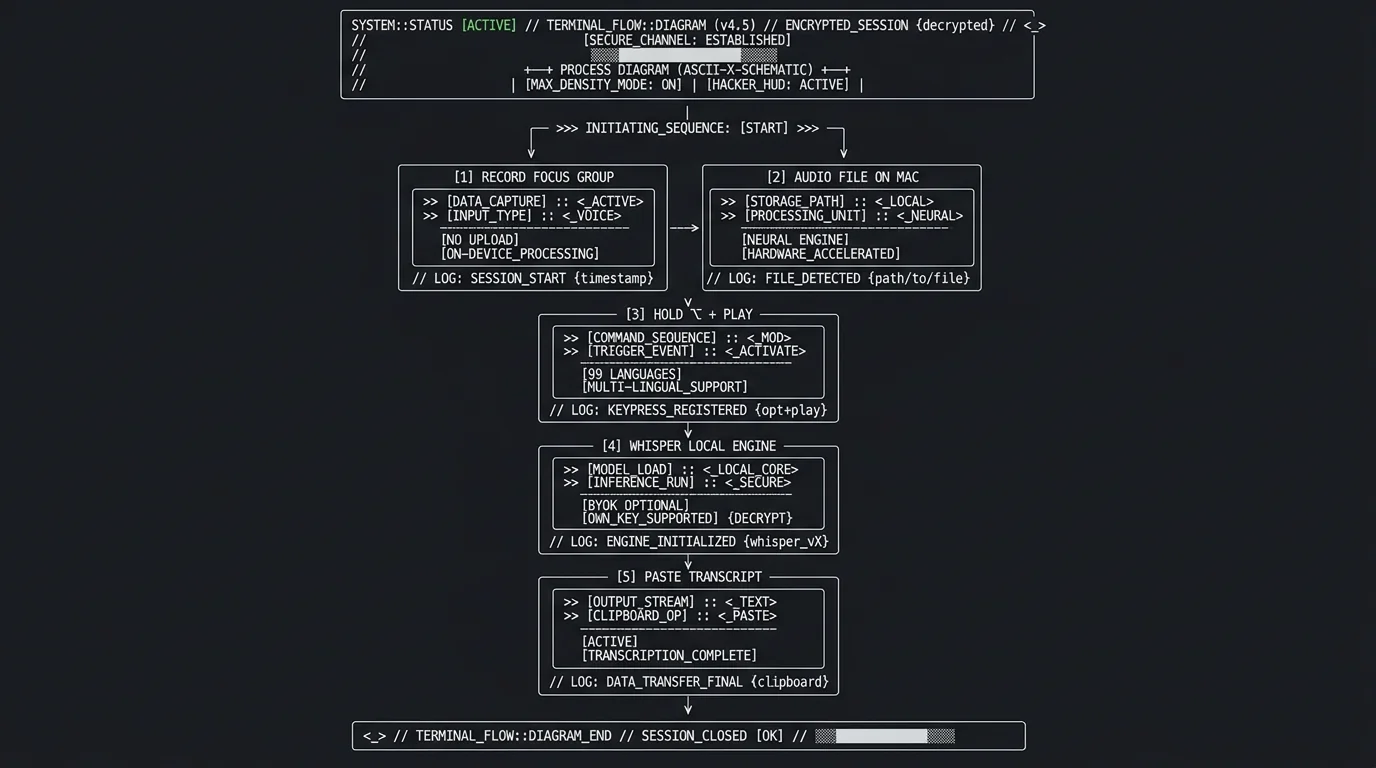
The actual workflow is shorter than people expect. You record the focus group however you normally would — QuickTime, a dedicated handheld recorder, your phone imported to the Mac, doesn't matter. The output is a single audio file.
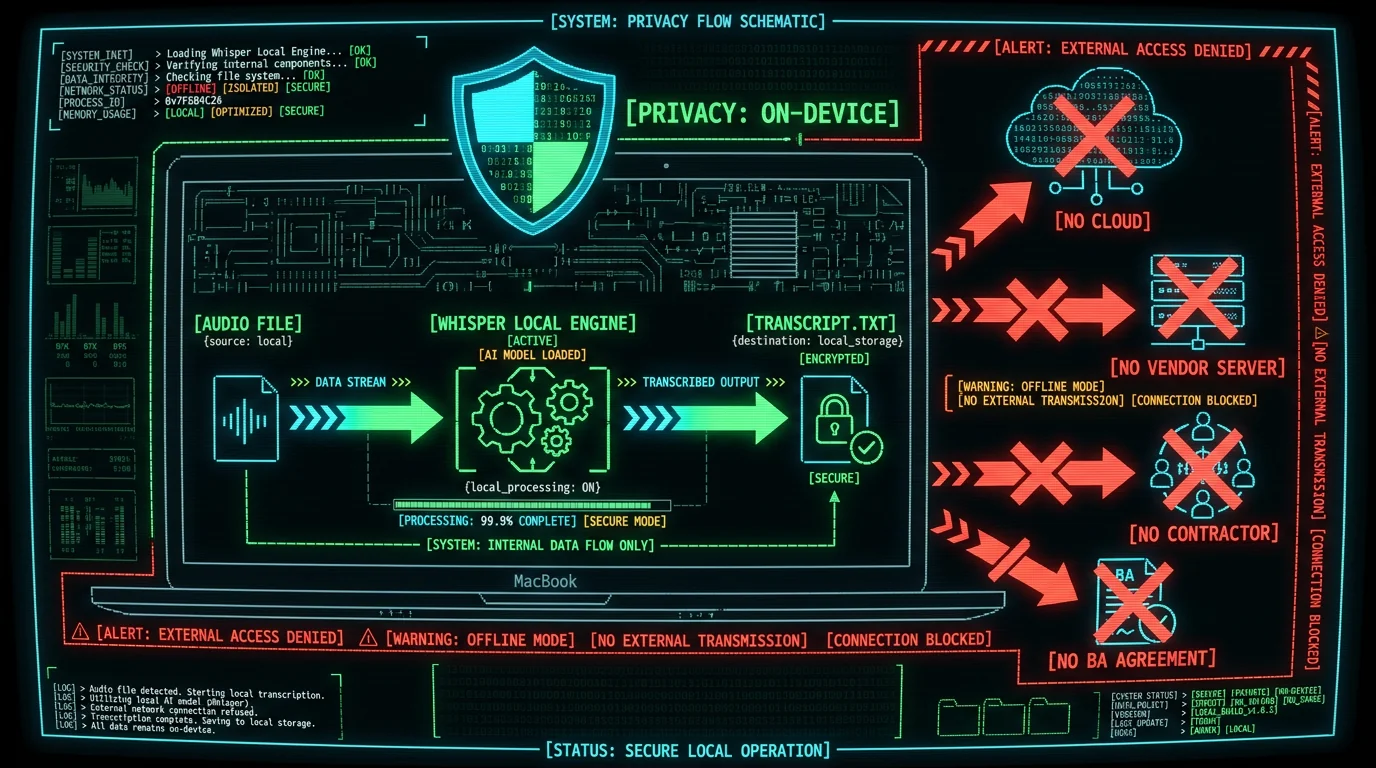
Then you open MetaWhisp, hold the global hotkey (Right Option by default), and play the recording back into your Mac's microphone or, better, route the audio through a virtual input. MetaWhisp listens with Whisper large-v3-turbo running locally on the Apple Neural Engine. It writes the transcript into your clipboard in real time, and you paste it into whatever you use for analysis — Word, NVivo, a plain `.txt` file, a Notion page. The whole pipeline is on-device: audio in, text out, nothing crossing the network.
Our own LibriSpeech test-clean run measured 2.76% WER — roughly 97% accuracy — on read English speech. Focus groups are messier than LibriSpeech, of course. Interruption, laughter, and crosstalk will push your effective error rate higher. But the raw transcription accuracy is rarely where the work goes. It goes into reading the transcript, deciding who's speaking, and pulling out themes — the analytical work that no service can do for you either way.
Can MetaWhisp handle overlapping speakers in a focus group?
Short answer: it transcribes what it hears. It doesn't tell you who said it. Speaker diarization — the automatic "Speaker A / Speaker B / Speaker C" labeling — is not shipped in MetaWhisp today. I'm putting that on the table because it's the one place a paid service with diarization baked in genuinely wins for focus group work.
What you do instead is simple and a little tedious: you listen back, identify speakers by voice, and tag the transcript manually. A few practical ways to make this less painful:
- Use a moderator and a small group. Three to six participants is a common group size because analysis gets harder with more voices.
- Record with seat numbers. Hand each participant a small card with a number, or seat them at labeled spots. When you tag speakers later, "Speaker 3, front left" is faster than guessing.
- Lean on your notes. The moderator's session notes almost always include who said what. The transcript's job is to capture exact words; the notes do the attribution.
- Accept that perfect speaker labels aren't required. Many qualitative analyses quote interesting passages without strict attribution. The transcript's existence matters more than its labeling precision.
The trade-off is real: a vendor that bundles diarization saves you this work. The trade-off you're paying for it with is the privacy and disclosure issue above. For sensitive research, most research teams in this situation accept the manual tagging.
Local focus group transcription on a Mac means the recording never leaves the laptop. You play the audio back through MetaWhisp running Whisper large-v3-turbo on the Apple Neural Engine and the transcript lands in your clipboard, ready to paste into Word, NVivo, or any text tool. MetaWhisp has no built-in speaker diarization today — you'll tag speakers manually by listening back and matching voices to your seating notes. For groups of three to six participants, this is workable in an afternoon. For groups of ten or more, the manual tagging is genuinely painful and a paid diarization service has a real edge.
What about accuracy when participants interrupt each other?
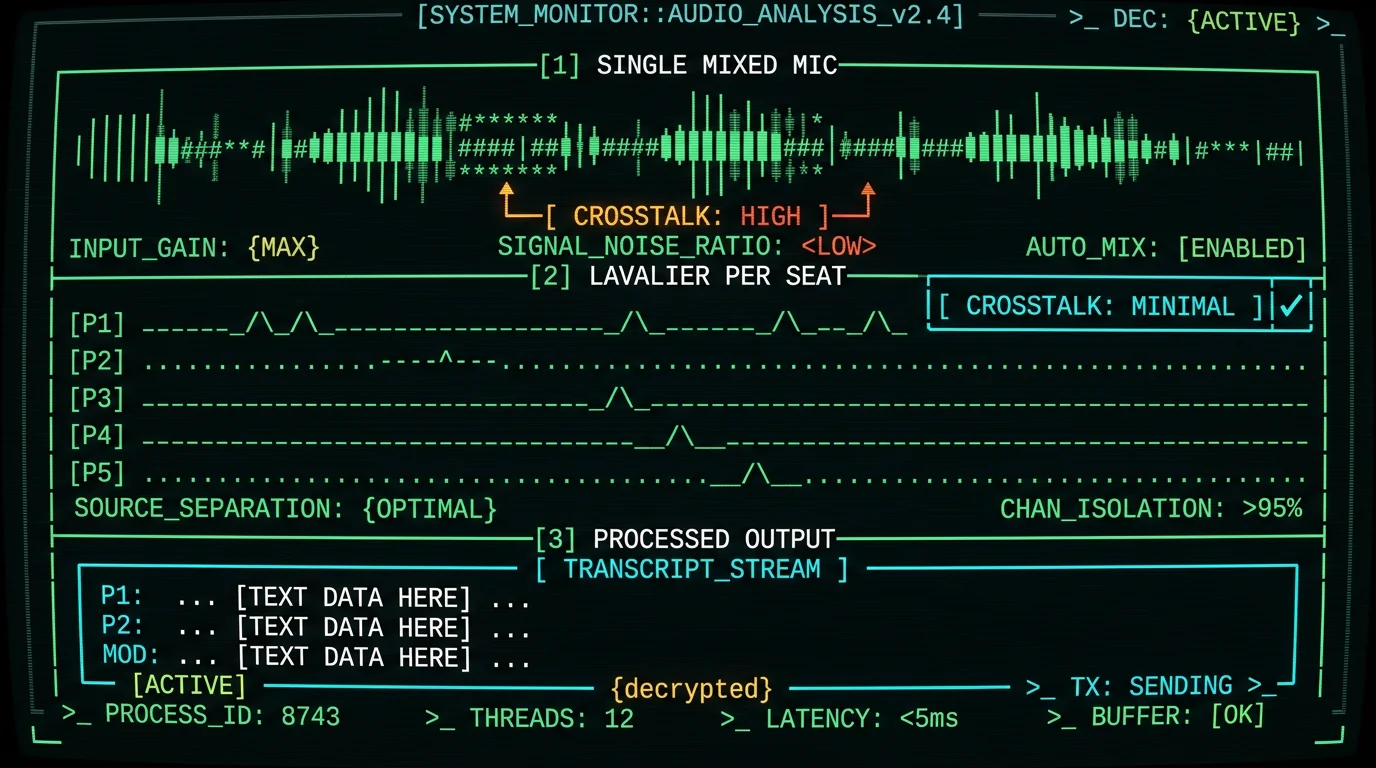
This is where the focus group transcription problem lives, and it's worth being honest: no automated system — local or cloud — is great at crosstalk. Whisper tends to do one of three things when two people talk at once: it picks one voice and drops the other, it merges both voices into garbled text, or it inserts a brief silence and moves on. Human transcribers do better, but they also flag "[crosstalk]" and move on.
What helps:
- Moderation discipline. A good moderator sequences speakers and redirects interruptions. That alone improves transcript quality more than any transcription method.
- Separate microphones for each participant. Lavalier mics per seat, mixed into a multitrack recording, give you the option to isolate voices later. You can run each track through MetaWhisp separately and the crosstalk disappears. This is genuinely the upgrade path for serious focus group research and it isn't expensive.
- Pause and resume. If the conversation breaks into natural pauses, that's a free improvement. Don't force continuous recording if your methodology allows segments.
The transcript quality from any method will be high enough for thematic analysis. It probably won't be high enough for conversation analysis, discourse analysis, or anything that depends on timing and turn-taking. Know which one you're doing before you choose a method.
How do you organize transcripts after the session?
The transcript lands in a single block of text. Before analysis you usually want it shaped. Standard formatting for qualitative research:
- Speaker labels on each line:
P1:,P2:,MOD:. - Timestamps every paragraph or every speaker turn.
- Paragraph breaks at topic shifts.
- A header with the session ID, date, location, facilitator, and participant count.
This is plain text work and goes fast. Ten to twenty minutes per 90-minute transcript, mostly mechanical. Once it's shaped, import into your analysis tool — NVivo, ATLAS.ti, Dovetail, even a spreadsheet with one row per speaker turn if you're doing lightweight coding.
If you use MetaWhisp's processing modes, the Rewrite and Correct options can also help here. Correct mode fixes obvious Whisper artifacts (wrong numbers, misheard brand names, garbled acronyms) using your own OpenAI or Cerebras API key — and only the transcript text leaves the Mac, never the audio. That's a useful middle ground if your protocol allows text-only cloud processing but not audio uploads.
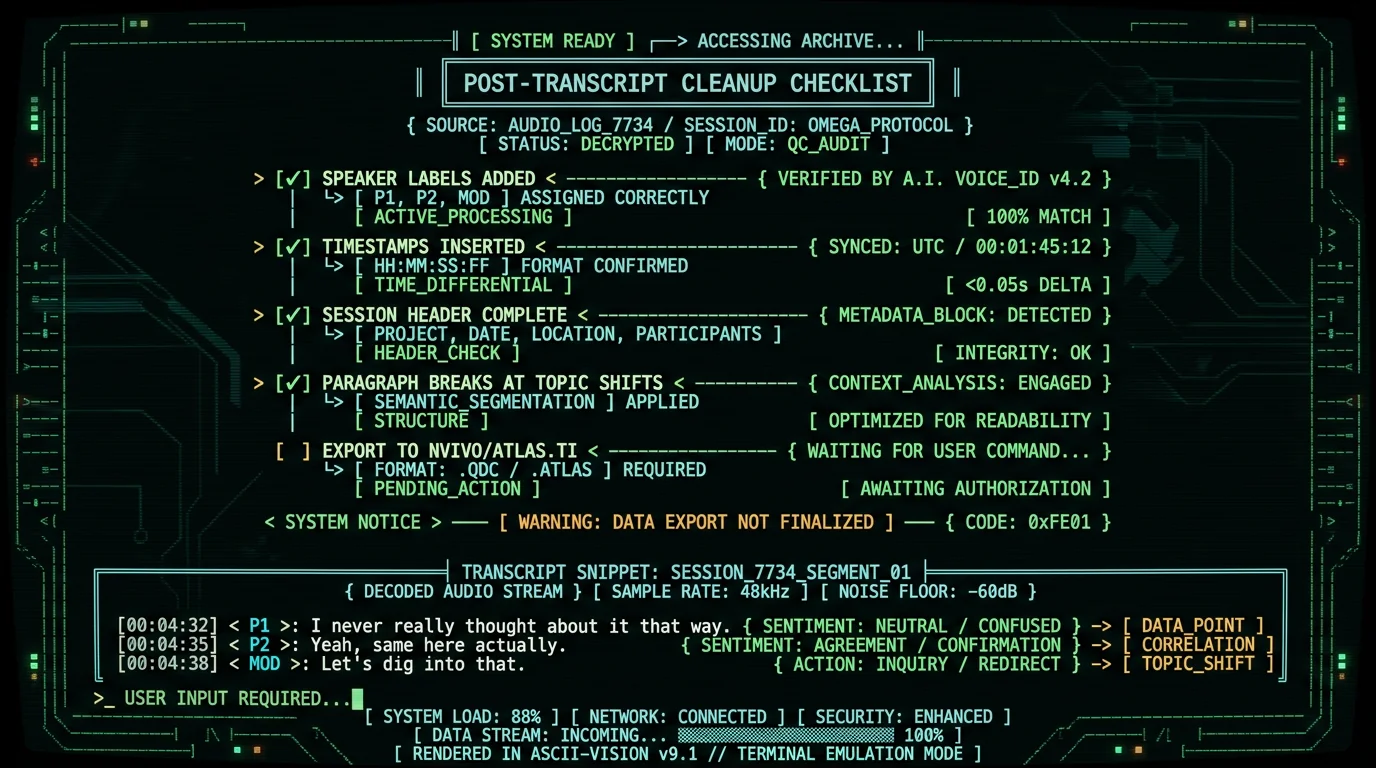
After a focus group transcript is generated locally on a Mac, you still need to shape it: add speaker labels (P1, P2, MOD), insert timestamps every speaker turn, break paragraphs at topic shifts, and add a session header with date, facilitator, and participant count. That cleanup is mechanical and takes 10–20 minutes per 90-minute session. Then import into your analysis tool — NVivo, ATLAS.ti, Dovetail, or even a spreadsheet. MetaWhisp's Correct mode can polish obvious Whisper artifacts using your own API key (BYOK), with only the transcript text — never the audio — leaving the Mac.
Is the local approach HIPAA-compatible?
Important distinction: nothing about an app makes it "HIPAA compliant" — compliance belongs to the covered entity (your practice, your university, your IRB), not the tool. What you can say about local processing is that it fits a HIPAA-aligned workflow because no audio leaves the device you control. That removes the Business Associate Agreement question entirely.
If your study involves protected health information and your consent form restricts access to authorized researchers on your team, local transcription is the simplest way to honor that promise. You'll still need to think about how you store the recording, who has access to the Mac, and whether you use FileVault, encrypted disks, and a screensaver password — the standard hygiene. But the transcription step itself doesn't create a new disclosure surface.
For non-health research, the same logic applies under GDPR, FERPA, or any institutional ethics framework that promises participants their words stay inside the research team. Local processing is the cleanest way to keep that promise.
When does a paid service still make sense?
I'm a founder of a free local tool and I'll give the honest answer: paid focus group transcription services are the right call when:
- You have a tight deadline and no time to clean up transcripts yourself.
- Your audio is genuinely bad — poor recording equipment, a noisy room, strong accents, lots of crosstalk.
- You need legally certified transcripts (some court and deposition contexts require this; focus groups rarely do).
- Your study design includes ten or more participants and the manual speaker labeling would take longer than paying for diarization.
- Your IRB explicitly requires third-party verification of transcripts as a methodological control.
For routine qualitative research with a manageable group, clean recording conditions, and time to spare, the local approach saves money and protects confidentiality in a way no vendor can match. The choice depends on what you're optimizing for.
For related reading on private voice workflows more broadly, see our guide to private voice-to-text on Mac and the technical details on how on-device transcription works. Pricing for MetaWhisp Pro — which adds cloud AI without requiring you to bring your own API key — is on our pricing page; the free local tier is unlimited and is what most research workflows actually need.
Local processing is HIPAA-compatible in the sense that it fits a HIPAA-aligned workflow — no audio leaves your Mac, so no Business Associate Agreement is needed with a transcription vendor. Compliance itself belongs to the covered entity (your practice or university), not the tool. The same logic applies under GDPR, FERPA, and most IRB protocols that promise participants their words stay inside the research team. You'll still want standard Mac hygiene (FileVault, encrypted disk, screensaver password) for the device that holds the recordings.
Frequently asked questions
How do I transcribe a focus group for free?
Record the session however you normally would, then play the audio file back into MetaWhisp on a Mac. MetaWhisp runs Whisper large-v3-turbo locally on the Neural Engine and pastes the transcript to your clipboard — no upload, no account, no time cap on the free local tier. You then tag speakers by hand using your session notes.
Is cloud focus group transcription HIPAA-compliant?
Compliance belongs to your practice or institution, not the tool. What local transcription does is remove the third-party processor from the loop entirely, so you don't need a Business Associate Agreement with a transcription vendor. That's why local is often the cleaner choice for sensitive qualitative research.
Can on-device transcription handle overlapping speakers?
No system — local or cloud — handles crosstalk perfectly. Whisper will pick one voice, merge them, or drop a fragment when two people talk at once. Separate lavalier mics per participant, recorded to multitrack, eliminate the problem and let you run each track through MetaWhisp individually.
How long does it take to transcribe a 90-minute focus group manually?
Local transcription on a Mac runs roughly in real time or faster on Apple Silicon — so the typing itself is free. What takes time is the cleanup: adding speaker labels, inserting timestamps, breaking paragraphs. Expect 10–20 minutes of mechanical work per session after the transcript lands.
What format do researchers want focus group transcripts in?
Standard qualitative format: speaker labels per line (P1, P2, MOD), timestamps every speaker turn, paragraph breaks at topic shifts, and a header with session ID, date, facilitator, and participant count. Plain text or .docx both work; NVivo and ATLAS.ti import either.
Do paid services include speaker labels?
Most do, but usually as an upcharge over the base per-minute rate. Verify the all-in cost — base rate plus speaker labels plus any rush fee — on each vendor's pricing page before you commit. Rates change often and vary by tier.
What if my focus group is in a language other than English?
MetaWhisp supports 99 languages with auto-detect. The same on-device pipeline runs in Russian, Spanish, Mandarin, Arabic, and most languages researchers commonly use in qualitative work. Accuracy varies by language and audio quality; English has the most public benchmark data.
Can I use MetaWhisp Pro instead of free local mode?
You can, but Pro sends audio to MetaWhisp's cloud for transcription. For research where confidentiality is the point, free local mode is the right tier — unlimited, no upload, no third-party processor. Pro is built for users who want built-in cloud AI without configuring their own API key.
Try MetaWhisp free for focus group work
Unlimited local transcription on macOS. Whisper large-v3-turbo on the Neural Engine. No account, no audio upload, no time cap, no third-party processor to disclose.
Free Download for MacAbout the author
Andrew Dyuzhov is the founder of MetaWhisp. He built the app to scratch his own itch — a marketer with ADHD who dictates in Russian and English daily and wanted voice-to-text that didn't phone home. He's run the local transcription workflow described above for his own qualitative research projects and knows the manual-speaker-tagging step is the trade-off you actually feel.
