After-class notes that never leave your laptop.
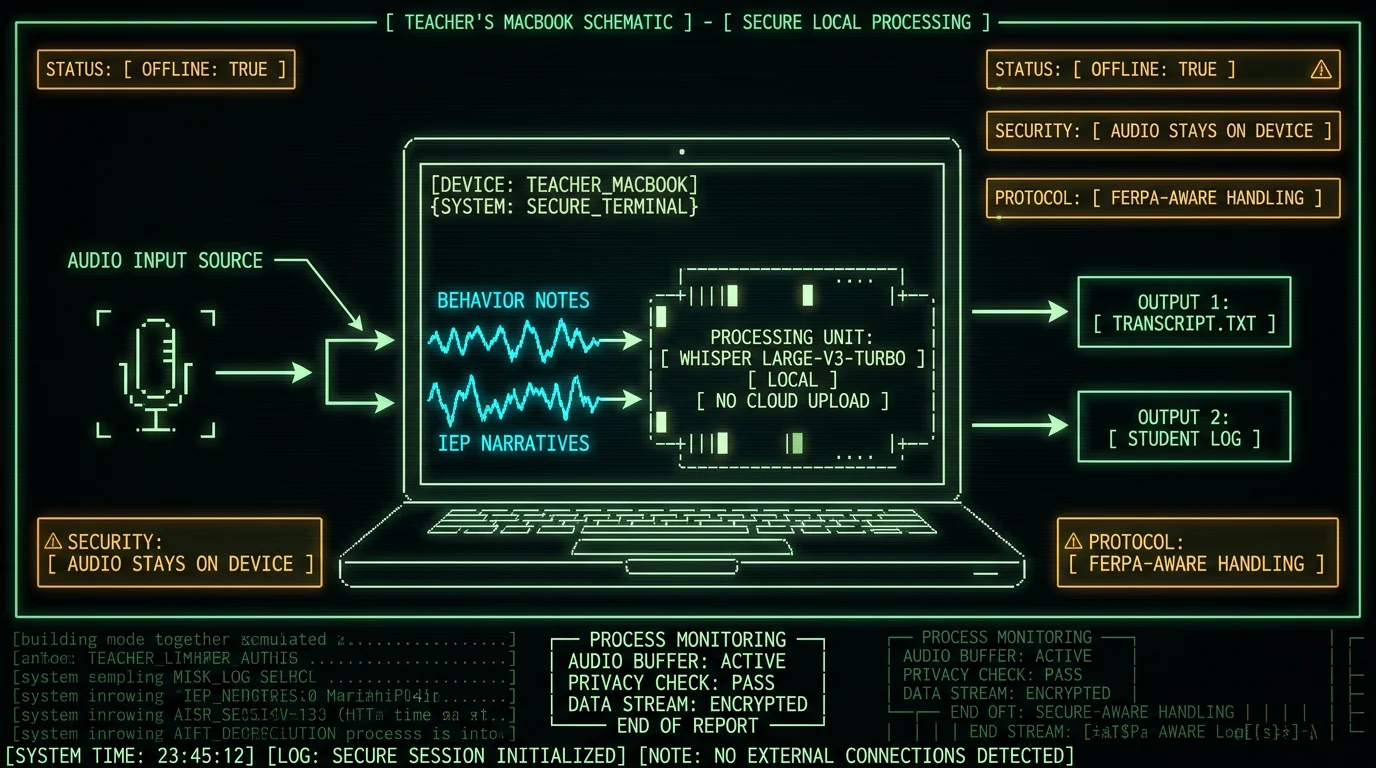
Short answer: Teachers can dictate behavior notes, parent-contact logs, and IEP narratives on a Mac with MetaWhisp in a way that keeps student audio and transcripts on the device. Local transcription is free and unlimited; cleanup and rephrasing run through your own OpenAI or Cerebras API key. No FERPA certification exists for any tool, so the right question is "where does the audio go" — and on a local Mac setup, it goes nowhere.
Why teachers need a different dictation tool than the default
Most "voice to text for teachers" coverage focuses on classroom capture — recording a lesson, transcribing a meeting with a parent, building a transcript of a student's reading. Those are legitimate use cases, but the higher-volume, higher-sensitivity workflow for most K-12 teachers is the documentation block: the thirty minutes after dismissal where you write up three behavior notes, recap two parent emails, and draft an IEP narrative that is due Friday.
That block is mostly typing. It is also the work where you are most likely to be tired, where the prose quality varies wildly, and where the content is exactly the kind of personally identifiable student information that FERPA is built around. A cloud dictation tool that uploads the audio to a vendor's servers puts that audio on infrastructure the vendor controls. The vendor's privacy policy, breach record, and contract terms become part of your district's risk surface.
A local Mac dictation tool shifts that risk back to the device. If the Mac is your own, the audio stays there. If it is a district-issued Mac, the audio stays on district hardware. Either way, no third-party server sees the recording.
What "cloud transcription" actually does to a student note
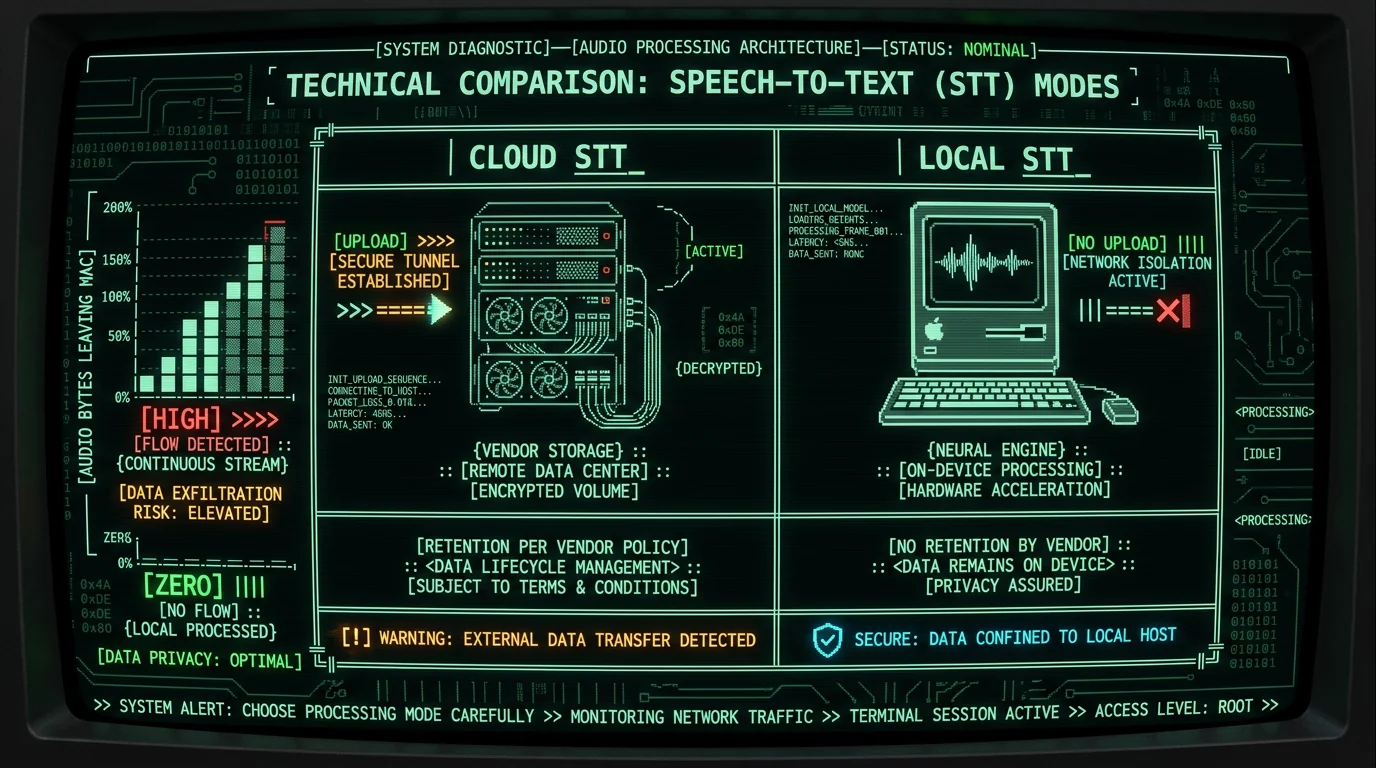
When you dictate into a cloud-based voice-to-text service, three things happen that matter for FERPA. First, your audio is uploaded to a vendor server, where it lives until the vendor deletes it per their own policy. Second, the transcript text is processed on that server and is also subject to retention. Third, anything the vendor does to improve their model — human review, training data inclusion, "anonymized" analytics — is governed by the vendor's terms, not your district's. Per the US Department of Education's Student Privacy Policy Office, FERPA gives parents the right to inspect education records and requires written consent before personally identifiable information from education records is disclosed. Audio of a teacher dictating about a named student — even informally — is the kind of thing that lives in this gray zone. The safest posture is to keep that audio and transcript under the school's control.Rule of thumb: if the recording contains a student name, a parent name, or anything tied to an identifiable child, treat it as education-record-grade data and keep it on hardware you control.
What "on-device" means in MetaWhisp — and what it does not
MetaWhisp has two tiers, and only one of them is fully on-device. In local mode, audio is captured from the Mac microphone and sent directly to WhisperKit — the open-source Whisper runtime from Argmax that compiles the model to Apple's Neural Engine. The Whisper large-v3-turbo weights (~950 MB) are downloaded once and then run locally. No audio is uploaded. No transcript is uploaded. The app itself does not include telemetry, analytics, or a phone-home signal.
In cloud mode (Pro tier only), audio is sent to MetaWhisp's cloud transcription service. That path exists for cases where the on-device engine is not available (older Intel Macs, some virtualized environments) or where the user explicitly opts in. This article is written for the local-mode workflow, because that is the workflow that matches a FERPA-aware posture.
The actual documentation workflow teachers run after class
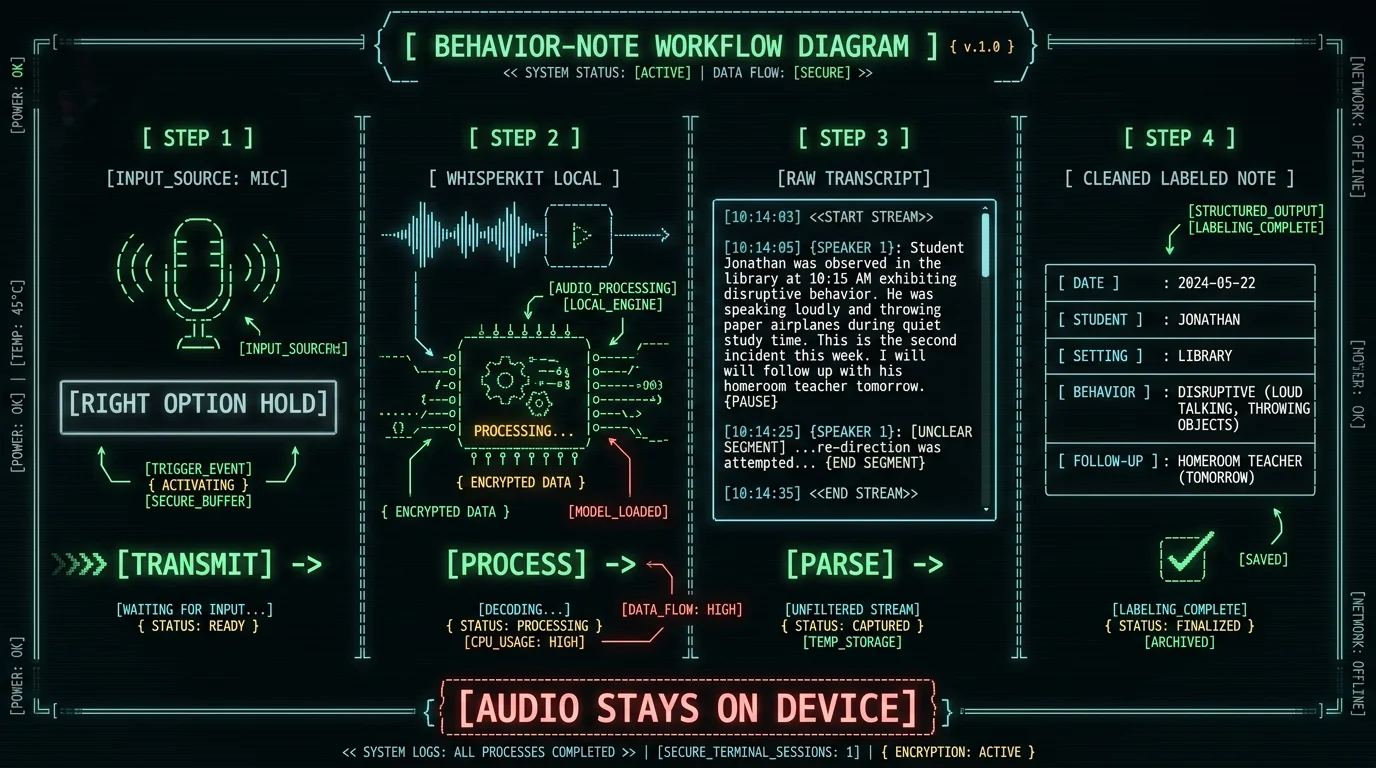
Here is the workflow I recommend to teachers and instructional coaches I talk to. It is the same workflow I use for any after-call notes on my own work, just retargeted at student records.Step 1 — Trigger MetaWhisp with a hotkey, anywhere on the Mac
Hold the Right Option key (the default), speak, release. The audio starts capturing the instant you press the key, and the transcript lands in the focused app — your gradebook, a Notes file, an email draft, your IEP tracker. The hotkey works in every text field on macOS, not just inside MetaWhisp. That matters because teachers do not want a new app to live inside; they want dictation to drop text into the apps they already use.Step 2 — Use a per-student note file or a daily log
Two patterns work well. The first is a single "today.md" file per workday that gets renamed and dated at the end of the day. The second is a per-student folder with one running note file per child. Either way, you dictate into the focused file, and the transcript lands as plain text. No proprietary format, no vendor lock-in, no cloud sync unless you turn it on.Step 3 — Run a cleanup pass on the transcript
Raw dictation is messy. Run-on sentences, false starts, "um"s, the occasional misheard name. For most teacher notes, you can either leave the rough edges in (these are working notes, not formal correspondence) or send the transcript through a cleanup mode. MetaWhisp's processing modes cover three patterns: Correct for fixing punctuation and obvious errors, Rewrite for tightening prose into something closer to a report-card comment, and Structured for turning a freeform observation into a labeled note (Date, Student, Setting, Behavior, Follow-up). On the free tier, those modes work with your own OpenAI or Cerebras key; on Pro, they run through MetaWhisp's bundled cloud AI.Workflow: dictating a behavior observation note
The fastest win is the behavior note. Sit down after the bell, open your per-student log, hold Right Option, and talk for 30-45 seconds. A typical dictation sounds like this: "Tuesday, third period, Marcus — redirected three times for off-task talk during the independent reading block. First redirect at the start, two more during the transition to the writing prompt. No escalation, no peer conflict. Re-teach expectations tomorrow."
That 35-second dictation becomes a clean dated note. Run it through Structured mode and you get a labeled observation ready to paste into your school's tracking system. The audio was captured, transcribed, and discarded on the Mac. Nothing was uploaded to a third-party server unless you explicitly added your own API key for the cleanup step.
Workflow: parent-contact logs after dismissal
The parent-contact log is the other high-volume documentation task. Most teachers dread it because the prose has to be more formal than a behavior note — a parent could read it later, an admin could reference it during a dispute. Two sentences by hand turn into five minutes of typing; the same five minutes of dictation turn into a clean recap. The workflow: after a phone call or in-person conference, open a per-family note file (or a single "parent calls.md"), hold Right Option, and dictate a tight summary. "Mrs. Alvarez called at 3:15 about Jayden's reading group placement. Discussed current Lexile, the intervention block option, and the timeline for re-evaluation. Follow-up: send the placement letter by Friday, copy the counselor." That becomes a parent-contact entry that reads like you spent twenty minutes on it. Run it through Rewrite mode if you want the prose softened to a more formal register ("Mrs. Alvarez contacted the school at 3:15 p.m. to discuss Jayden's reading group placement…"). On BYOK, the cleanup text goes to your own OpenAI or Cerebras account. The audio never went anywhere.Pro tip: date the file the day of the contact, not the day you write it up. "2026-04-12-parent-call-alvarez.md" is search-friendly six months later when the counselor asks what you actually said.
Workflow: IEP narratives and meeting prep
IEP narratives are the highest-stakes teacher documentation, and they are also the work most worth dictating. A present-levels narrative is a paragraph or two of prose connecting observation data to goals. Typing it is slow because the sentences are long and the language is precise. Dictating it is faster because the prose is closer to how you would explain it to a colleague. The pattern: open a draft document for the student, dictate a paragraph at a time, run each paragraph through Correct mode for punctuation and grammar, then read the whole thing once before the meeting. The on-device transcription does the heavy lifting; the cleanup step is cosmetic. On a 2-3 page present-levels narrative, this is the difference between ninety minutes of typing and thirty-five minutes of talking-and-correcting. If your district requires a particular IEP template or boilerplate, paste the headers in once and dictate the body sections under each header. The hotkey works inside any text field, including Pages, Word, Google Docs in Chrome, and plain text editors.What MetaWhisp doesn't do for teachers
Honesty is part of the deal. Here is what is not shipped yet or not part of the current product.- No iOS app. MetaWhisp is a Mac desktop app. If your documentation happens on an iPad in the classroom, this is not the tool for that surface yet. iOS is not shipped; do not buy on a promise.
- No live classroom capture. MetaWhisp is for the after-class documentation block, not for recording a lesson or capturing a student's reading for assessment. Use a dedicated recording tool for that, and treat that audio as education-record-grade data.
- No speaker diarization. If you need "who said what" across a meeting, MetaWhisp will not separate speakers today. Diarization is on the roadmap but is not shipped.
- No semantic transcript search across all your notes. You can search your notes with Spotlight and Finder because they are plain text files. That is genuinely useful. A semantic "find every student I wrote about using the word 'defiant'" feature is not shipped.
- No FERPA certification. No tool has one. Compliance is a district-level responsibility, not an app-level one. What an on-device tool gives you is a smaller attack surface, not a certification.
How MetaWhisp compares to other dictation tools a teacher might consider
I am biased — I built it — so I will keep this short and link to sources for the cells I am not first-party for. The honest version is that for a teacher who is typing on a Mac, the realistic alternatives are Apple Dictation, Superwhisper, Wispr Flow, and MacWhisper. None of them are bad. They make different tradeoffs.| Tool | Audio leaves Mac? | Free tier | Cleanup / rephrasing | FERPA posture |
|---|---|---|---|---|
| MetaWhisp (local mode) | No | Unlimited | BYOK OpenAI/Cerebras, or Pro | Smallest attack surface |
| Apple Dictation | Varies (offline dictation works on Apple Silicon for short snippets) | Built-in | None built in | On-device for short text; check Apple's docs |
| MacWhisper | No in local mode | Limited (paid Pro for full) | Built-in (cloud optional) | Local mode available |
| Superwhisper | No in local mode | Limited | Built-in (cloud optional) | Local mode available |
| Wispr Flow | Yes, by default | Tiered | Built-in (cloud) | Cloud-first by design |
| Web/cloud STT APIs | Yes | Usage-based | — | Largest attack surface |
Accuracy and what to expect from the Whisper model
The model doing the work is Whisper large-v3-turbo, run locally through WhisperKit on the Neural Engine. Our own run of the local pipeline came in at 2.76% WER (~97.24% accuracy) on the standard LibriSpeech test-clean benchmark, which is the only first-party accuracy number I will quote because I have the transcript in hand. Real-world accuracy on classroom audio is harder to characterize cleanly because the noise floor, mic quality, and vocabulary are different; we have not run a teacher-specific benchmark, so I will not invent one. For teacher documentation specifically, the practical accuracy questions are different from a clean LibriSpeech test: how well does it handle student names (often misheard), how well does it handle technical IEP vocabulary, how well does it handle "um"s and false starts. The honest answer: it is generally good, names sometimes need a manual fix, and the cleanup modes exist for exactly that reason.How to roll this out for a teacher or a team
If you are one teacher, download MetaWhisp, grant microphone permission, hold Right Option, and start with a single working file for a day. If it feels faster than typing after a week, keep it. If not, you have lost nothing — local mode is free. If you are a coach or admin thinking about a team rollout, the practical checklist is short:- Make sure every teacher is on a Mac running macOS 14 or later on Apple Silicon (M1 or later). Intel Macs fall back to a slower path.
- Decide whether teachers will add their own API key for cleanup, or whether the school will fund Pro seats so cleanup is bundled.
- Establish a per-student folder convention so notes live in a consistent place — iCloud Drive, a district-synced folder, or local-only on the device.
- Write a one-page note for staff about what local mode means and what BYOK means, so they can answer a parent or admin's question without guessing.
FAQ
Is voice to text for teachers on Mac actually FERPA-compliant?
No app is FERPA-certified, and "compliance" belongs to the school or district, not the tool. What an on-device Mac setup does is keep the audio and transcript on hardware the school controls, which is a much smaller risk surface than sending it to a third-party server. Per the US Department of Education's Student Privacy Policy Office, districts are responsible for protecting education records; a local-only transcription setup makes that easier, not automatic.
Does MetaWhisp upload my audio to a cloud server?
In local mode (the default and the only mode on the free tier), no. Audio is captured from your Mac's microphone and processed by WhisperKit running the Whisper large-v3-turbo model on the Neural Engine. Nothing is uploaded. Pro adds a cloud-transcription option for users who explicitly turn it on; if you never turn it on, your audio never leaves the Mac.
Can I clean up the transcript without sending audio anywhere?
Yes. Add your own OpenAI or Cerebras API key under Preferences and MetaWhisp will send only the transcript text — not the audio — to your account for cleanup. The audio stays on the Mac. Pro removes the bring-your-own-key step by bundling in built-in cloud AI for the same text-cleanup modes.
Can I dictate into my gradebook or my school's IEP tracker?
Yes, in any app that has a text field on macOS. MetaWhisp uses a global hotkey (default Right Option) and pastes the resulting transcript wherever your cursor is. It works in Pages, Word, Google Docs in Chrome, your gradebook web app, your IEP tracker's web form, Notes, TextEdit, and plain text files.
Does MetaWhisp work offline?
Yes, after the one-time model download (~950 MB). Once the model is on disk, local transcription works with no internet connection. The cleanup modes require connectivity if you are using BYOK or Pro cloud AI, but the core dictation does not.
Is there an iPad or iPhone version for classroom use?
Not yet. MetaWhisp is a Mac desktop app for macOS 14 or later on Apple Silicon. MetaWhisp is macOS-only today. If your documentation happens on an iPad in the classroom, MetaWhisp is not the right tool for that surface today.
How accurate is local Whisper transcription for teacher documentation?
Our own LibriSpeech test-clean run measured 2.76% WER, which is the only first-party number I have. Real classroom audio is messier than LibriSpeech; we have not benchmarked teacher-specific audio, so I won't quote a number I don't have. Names are the most common error category, which is what the cleanup modes are for.
What does MetaWhisp cost for a teacher?
Local mode is free and unlimited — no subscription, no per-minute billing, no account. Pro is $30/year or $7.77/month and adds built-in cloud AI for cleanup (no BYOK needed), a cloud-transcription option, and priority support. Full details on the pricing page. For a teacher using MetaWhisp only for local dictation and their own OpenAI key for cleanup, the cost is effectively zero.
About the author — Andrew Dyuzhov is the solo founder of MetaWhisp, a free on-device voice-to-text app for macOS. He is a marketer and builder who assembled the app with AI coding tools on top of open-source Whisper, and he dictates his own notes in Russian and English daily. He is not a lawyer, an ML researcher, or a district administrator — for FERPA questions specific to your school, talk to your district's privacy officer. Find him on X.
