Stop the charge, ask for a refund, delete your data, remove the app
Short answer: cancel with whoever bills you. On a card plan, open Wispr Flow on a Mac or PC, go to Settings → Plans and Billing, click Manage subscription and cancel in Stripe's billing portal. App Store and Google Play subscriptions are cancelled in the store. Deleting the app cancels nothing. If you want a refund, ask support before you delete your account.
Key takeaways
- Who bills you decides where you cancel: Stripe (card), the App Store, Google Play or your team's admin.
- Cancelling keeps your account and data. You keep paid access until the period ends, then drop to the free plan.
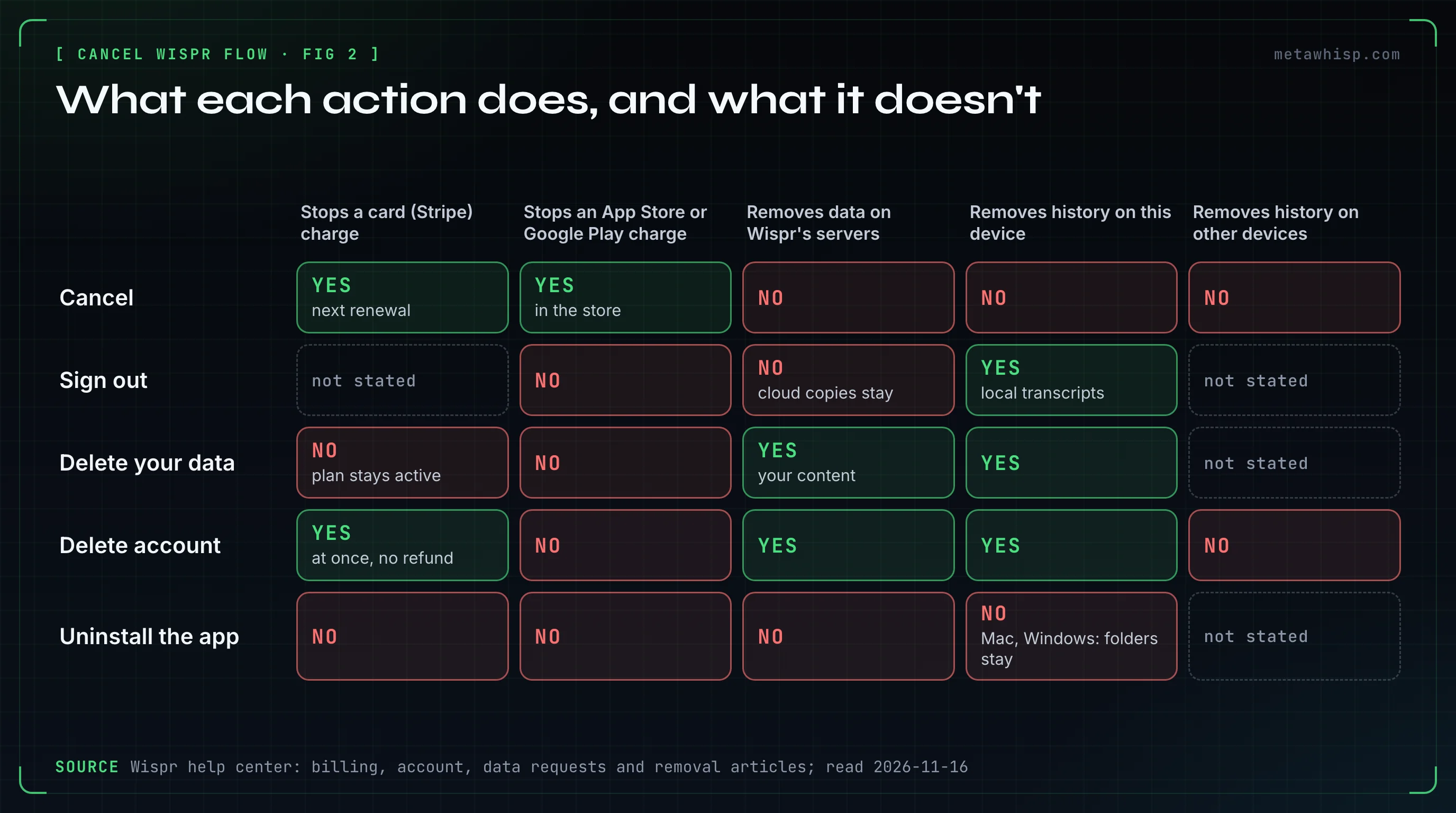
- Deleting your account ends a card subscription at once with no refund, but not an App Store or Google Play one.
- Wispr's terms and help center differ on refunds. Ask support in writing while the subscription is active.
| What you want | Card (Stripe) | App Store | Google Play | Team member |
|---|---|---|---|---|
| Stop the next charge | Settings → Plans and Billing → Manage subscription | iPhone Settings → your name → Subscriptions → Wispr Flow | Play Store → profile → Payments & subscriptions → Subscriptions → Wispr Flow | Ask your admin |
| Ask for a refund | Wispr support, before deleting the account | reportaproblem.apple.com | Google Play's refund page | Ask your admin |
| Delete the account | Ends the plan at once, no refund | Cancel with Apple first | Cancel with Google first | Your organization decides |
| Remove the app | Cancels nothing | Cancels nothing | Cancels nothing | Ask IT |
Who Bills You for Wispr Flow?
Wispr's billing page says where you stop renewal depends on who bills you. There are four main cases: a card charged through Stripe (you subscribed in the desktop app or on Wispr's site), the Apple App Store, Google Play, or a team plan an admin pays for. Your device doesn't decide it.
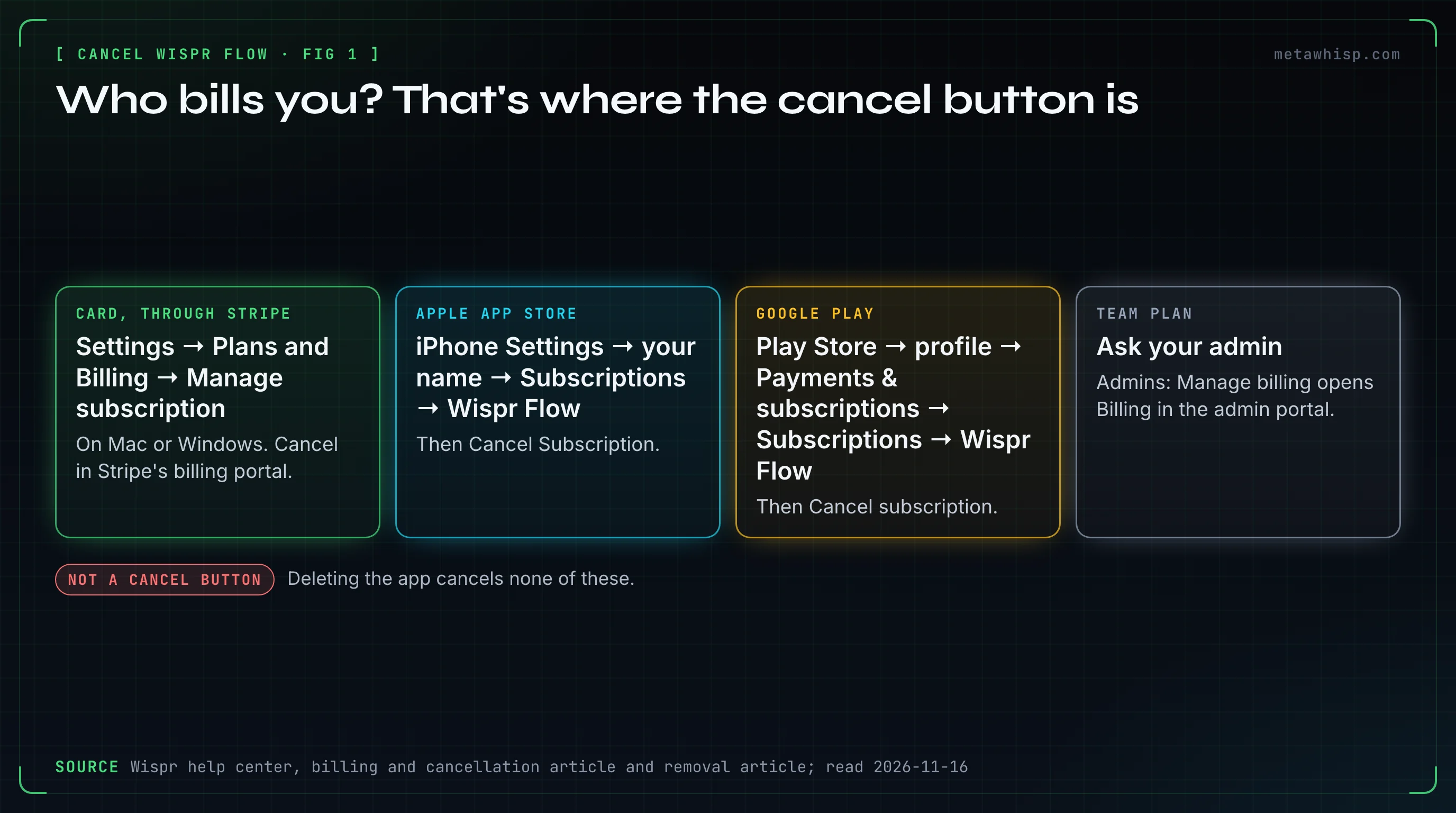
- Desktop app: under Settings → Plans and Billing, a Manage subscription button means Stripe. The notice You can manage subscription via Apple means a store, even for Google Play purchases.
- Phone app: card and team plans show Go to the desktop app to manage plan. Tapping it does nothing.
- No button at all: a promotional or other mobile subscription has none, and Wispr says to contact support. Enterprise plans invoiced by sales go through the account team.
- Two charges: a Google Play subscription can run alongside a desktop plan. In the Android app, look for Manage your Google Play subscription beneath the other plan's card.
- Team: only admins can change billing, and only an admin, your IT team or Wispr support can remove you.
How Do You Cancel a Wispr Flow Subscription?
On a card plan, open Wispr Flow on your Mac or PC, go to Settings → Plans and Billing and click Manage subscription. Stripe's billing portal opens in your browser, and you cancel there, not inside Flow. There's no separate auto-renew switch. Store subscriptions are cancelled in the store.
- Open Settings → Plans and Billing. Wispr's pricing FAQ calls it Plan & Billing, so the name may differ in your version.
- Click Manage subscription and cancel in Stripe's portal. Wispr's pages don't name the buttons there, so we can't either.
- Back in Flow, the plan card should read Cancels and a date. If it still says Renews, click the header control with the tooltip Click to refresh. Per the help center, a stale label doesn't undo a completed cancellation.
- App Store. Open iPhone Settings → your name → Subscriptions → Wispr Flow and tap Cancel Subscription. Or in the Flow app, open Account → Manage plan, tap Cancel, then Cancel Subscription in Apple's sheet. Flow then shows Plan ends in N days. On a trial the Flow app shows no Cancel, so use iPhone Settings.
- Google Play. Open the Play Store, then profile → Payments & subscriptions → Subscriptions → Wispr Flow and tap Cancel subscription. In the Flow app, under Account → Manage plan, Wispr's pages call the button Cancel plan, Cancel subscription or just Cancel. It opens Google Play.
- A card plan, no computer. No Wispr page describes a way to cancel it on the web or from the phone apps. Write to support: the form at wisprflow.ai/support, or support@wisprflow.ai.
- Team admins. Manage billing opens Billing in the admin portal, where Manage Subscription opens Stripe. Outstanding seat charges may remain.
How Do You Cancel a Wispr Flow Pro Trial?
It depends on whether a payment method is attached. Wispr's help center says a trial without a subscription has no management button: there's nothing to cancel, and you move to the free plan when it ends. A trial started with payment details bills when it ends, unless you cancel first through Plans and Billing → Manage subscription.
Wispr's pages disagree on whether a trial exists. The home page says Flow is free, with no trial countdown and no credit card. The help center describes 14-day default trials and a desktop sidebar line, Trial ends in N day(s). We couldn't verify what new accounts get today, so check your screen:
- A Manage subscription button on desktop means a card subscription exists; unless it already reads Cancels, it will bill. Cancelling there works during a trial too. No button and no Apple notice means there is nothing to cancel.
- Store trials. Apple says to cancel at least 24 hours before a trial ends. Wispr's help pages disagree on whether Android has a trial at all, so check your Play Store subscriptions.
- Students. The students page says its 3 months of Pro auto-renew at 50% off; the help center describes a $0, no-card offer for selected accounts.
What Happens After You Cancel Wispr Flow?
Cancelling only stops the next renewal. Paid access, store purchases included, runs to the end of the billing period shown, and then the account returns to the free plan. Your account and data stay where they are, and nothing is refunded automatically when you cancel.
- The free limit is unclear. Wispr's plans page gives Mac and Windows a 2,000-word weekly allowance, where Flow slows down, and a 5,000-word maximum, where it blocks dictation. The Android article says 3,000 words and admits the app may still say 1,000; the pricing page gives no number, and reset times differ by page. Go by what your app shows.
- Don't switch plans afterwards. Switching or upgrading a Stripe plan clears the scheduled cancellation. Cancel again.
- Charged after cancelling? Wispr lists that as a reason to contact support.
What Is Wispr Flow's Refund Policy?
Wispr's terms say you can cancel at any time and that refunds are only issued if required by law. Its help center is softer: nothing is refunded automatically when you cancel, but support may offer a full refund, a prorated refund or cancellation without one, and only while a Wispr-billed subscription is active. No page gives a refund window in days.
- The two pages don't match, so get support's answer in writing. The terms say they don't override mandatory local laws on cancellation rights. This is not legal advice.
- A support refund ends access: each option cancels the subscription immediately.
- App Store. Apple handles it. Sign in at reportaproblem.apple.com and choose Request a refund.
- Google Play. Wispr says it can't refund store purchases, and Google's refund page says contacting the developer is often the quickest way. They point at each other, so we'd start with Google's page.
How Do You Delete Your Wispr Flow History and Account?
Pick the smallest tool that does the job: delete one transcript, wipe local history, delete your content from Wispr while keeping the account, or delete the account. On Mac or Windows, account deletion is under Settings → Account → Delete account. Deleted transcripts can't be restored, so export a copy first.
First export: on Mac or Windows, open Settings → Data and Privacy, use Download your data and select Request a copy. Then:
- One transcript. On desktop, hover over it on the Hub home page, open More options (⋮) and select Delete transcript. On iPhone, long-press the row and tap Delete. On Android, tap More options (⋮), then Delete.
- All local history, on desktop. Under Settings → Data and Privacy, set Local data storage to Never store data locally and confirm Delete all data. Another help page lists a separate Delete all transcripts control in desktop Settings. Cloud copies may remain.
- Your content on Wispr's side, account kept, on desktop. On the same page, select Delete your data and type DELETE. Your subscription stays active.
- The whole account. On desktop, Settings → Account → Delete account, then type your account email. On iPhone, Menu → Account → Delete account. One help page puts the request under Settings → Data and Privacy instead. Android has no delete button: use desktop, or ask through Report an issue and Account management, which only opens a ticket.
Deletion removes local and cloud account data. Billing records and a record of your request stay, and so does local history on your other devices. How long it takes is unclear: Wispr's pages say up to thirty days, 90 days by default, and no single fixed duration. Being signed out isn't proof, so ask support to confirm. Signing back in can cancel a pending deletion.
Staying on the free plan? Check Dictation cloud storage and Improve the model for everyone under Settings → Data and Privacy. The help center says both default to on; Wispr's privacy page reads as if storage were off until you turn it on. Turning them off doesn't stop everything: the same page says Flow still uploads details such as word count, app, URL and timestamp.
How Do You Uninstall Wispr Flow on Mac, Windows, iPhone and Android?
Uninstall last, and on every device. Removing the app doesn't cancel a subscription (Wispr, Apple and Google all say so) or delete your account. On Mac and Windows it also leaves your data folders behind, so a full removal takes a few more steps.
- Mac. Quit Flow from its menu-bar icon, stop leftover Wispr processes in Activity Monitor and move Wispr Flow to the Trash. In Finder, press Shift + Command + G and trash the Wispr Flow items in
~/Library/Application Support/, plus Logs, Preferences and Caches under~/Library/. Remove Flow from System Settings → General → Login Items and clear its permissions under System Settings → Privacy & Security. Review what you moved, then empty the Trash. - Windows. Quit Flow, then uninstall it under Settings → Apps → Installed apps. The standard uninstaller keeps your data:
%APPDATA%\Wispr Flowholds dictation history, notes and dictionary entries. Delete only Wispr Flow items, never parent folders such as AppData. - iPhone. Sign out first (Menu → Account → Sign out): deleting the app alone leaves session and shared data behind. Remove the keyboard under Settings → General → Keyboard → Keyboards, then delete the app.
- Android. Sign out, then open Settings → Apps → Wispr Flow, choose Force stop, clear storage and uninstall.
Wispr's removal article has the full list of leftovers. On a managed work device, ask IT first.
What Do Reddit Users Complain About in Wispr Flow?
In our sample of Reddit threads about Mac dictation apps, 18 people complained about Wispr Flow's price, 9 about paying a subscription at all and 5 about privacy and data. Nobody in the sample describes a trial charge, a refund or a failed cancellation, so it can't show how often those go wrong.
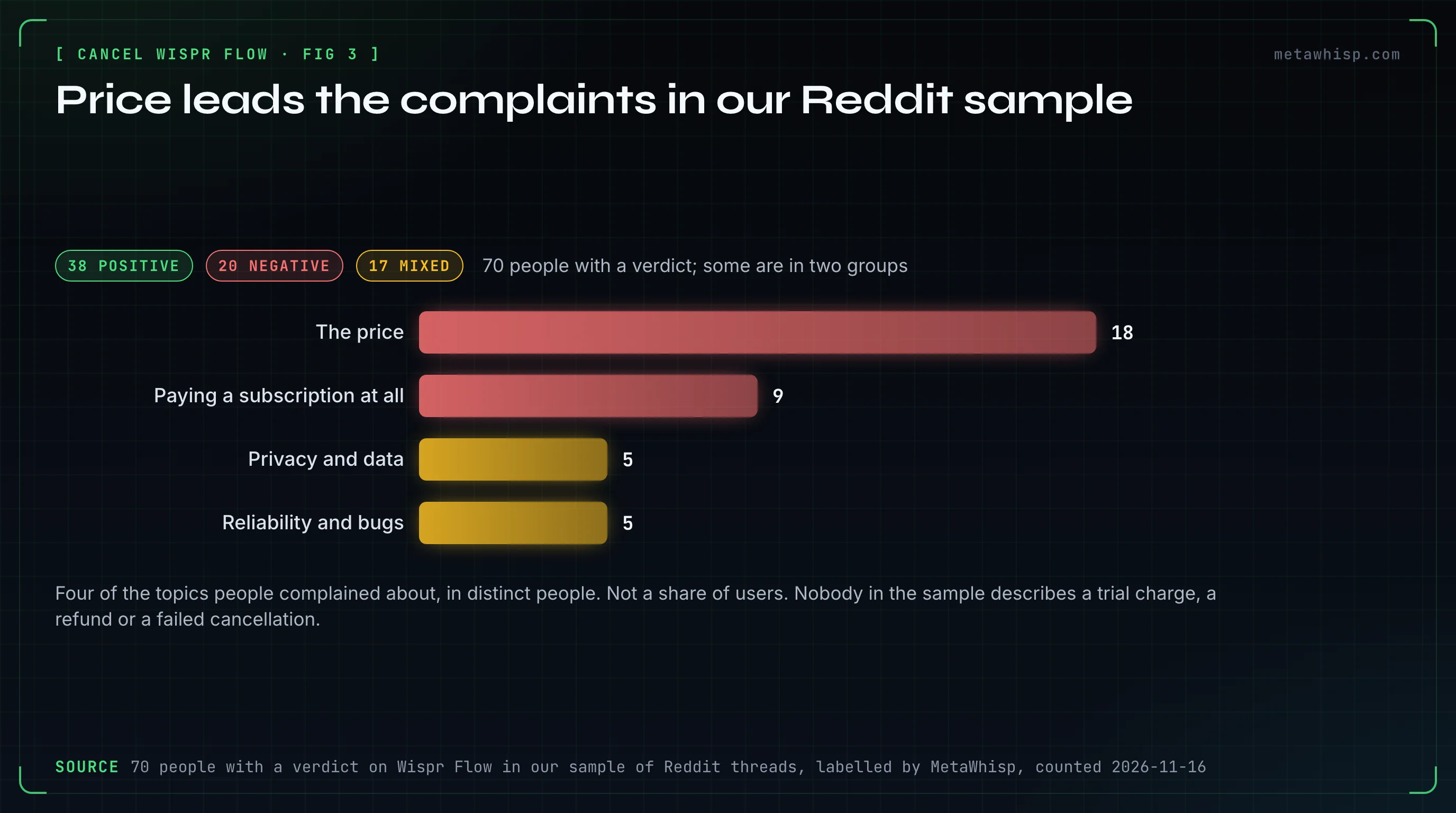
The complaints run from January 2025 to October 2026; the oldest comment we counted is from March 2024. Of 70 people with a verdict, 38 were positive, 20 negative and 17 mixed (a few are in two groups).
- The full exit. One commenter moved to an on-device Mac app, cancelled, and "had them delete everything off of their servers and uninstalled the apps".
- The defaults. Another told people to check the privacy settings, because the defaults seemed eager to send usage data. The help center confirms both switches start on.
- What failed. Nothing about cancelling. The one complaint about getting help: a commenter couldn't get an answer by email or the contact page. Refunds on card plans come only through support, so write early and keep a copy.
Alternatives people named: VoiceInk (3 people), Spokenly (2), Superwhisper (2), and Willow Voice, Voibe, Typeless and FluidVoice (1 each). The sample is from our Reddit roundup, which groups price with the subscription (20 people) and privacy with cloud-only processing (6).
Where Does MetaWhisp Fit If You're Leaving Wispr Flow?
MetaWhisp is our own app, so weigh this accordingly. It fits one kind of leaver: a Mac user leaving over the price, the subscription or the cloud. The free version has unlimited on-device dictation with no account, no trial and no credit card, so there's nothing to cancel later. It isn't in the Reddit sample.
By default, the free version of MetaWhisp transcribes on your Mac with OpenAI's Whisper large-v3, a one-time download of about 3 GB. Tap Right Command to dictate into any app. It's open source (MIT).
The limits: it's a Mac app for macOS 14 or later on Apple silicon. There's no Windows, iPhone or Android app (Wispr Flow runs on all four), no team workspace and no audio-file import. "Nothing leaves the Mac" holds only by default: with your own Groq or OpenAI key, dictation audio goes to that provider. MetaWhisp Pro is itself a subscription ($7.77 a month or $30 a year) that moves transcription to the cloud, so look at the free version.
FAQ
How do I cancel my Wispr Flow subscription?
Cancel where you pay. For Pro bought in the desktop app or on Wispr's site, open Settings → Plans and Billing on Mac or Windows and click Manage subscription to open Stripe's billing portal. App Store and Google Play subscriptions are cancelled in the store.
Does Wispr Flow charge you when the Pro trial ends?
It depends on how the trial started. Wispr's help center says a trial with no subscription attached moves you to the free plan when it ends. A trial started with payment details bills when it ends unless you cancel first under Plans and Billing → Manage subscription.
Can I get a refund from Wispr Flow?
Maybe, and only by asking. Wispr's terms say refunds are only issued if required by law. Its help center says support may offer a full refund, a prorated refund or none while the subscription is active. App Store refunds go through Apple at reportaproblem.apple.com.
Does deleting the Wispr Flow app or my account cancel the subscription?
Deleting the app cancels nothing. Deleting your account cancels a subscription billed through Stripe at once, with no refund, but not an App Store or Google Play subscription. Cancel those with Apple or Google first, and ask support about a refund before deleting the account.
How do I delete my Wispr Flow account and history?
On Mac or Windows, open Settings → Account → Delete account and type your account email. On iPhone it's Menu → Account → Delete account. For history only, open Settings → Data and Privacy on desktop: Never store data locally clears local history, and Delete your data removes your content from Wispr while keeping the account.
How we checked
On November 16, 2026, we read Wispr's help center, terms of service and its home, pricing, privacy and students pages, plus Apple's and Google's support pages. The Reddit counts come from our labelled sample of threads, found on Google on October 21, 2026. We didn't run Wispr Flow, so menu and button names are as the help pages show them and may differ in your version.
Related reading
- How to Cancel an AI Note Taker Before It Charges You
- Wispr Flow Pro vs Free: Is $15/mo Worth It?
- Wispr Flow Alternatives (Free & Paid)
- Wispr Flow One-Time-Payment Alternatives
- Best Mac Dictation App According to Reddit
Sources
- Wispr help center: billing, account, data requests, history, removal, plans, trial end, free cap, Android, discounts, promotion, refunds, support, teams, leaving a team, data switches, security, iPhone keyboard, Windows, devices
- Wispr's site: home, pricing, terms, privacy, students
- Apple: cancelling, refunds, uninstalling on Mac. Google Play: cancelling, refunds
- Reddit: r/WisprFlow, r/superwhisper on defaults, r/superwhisper on support
