Two different jobs. One Mac. The wrong tool costs you hours.
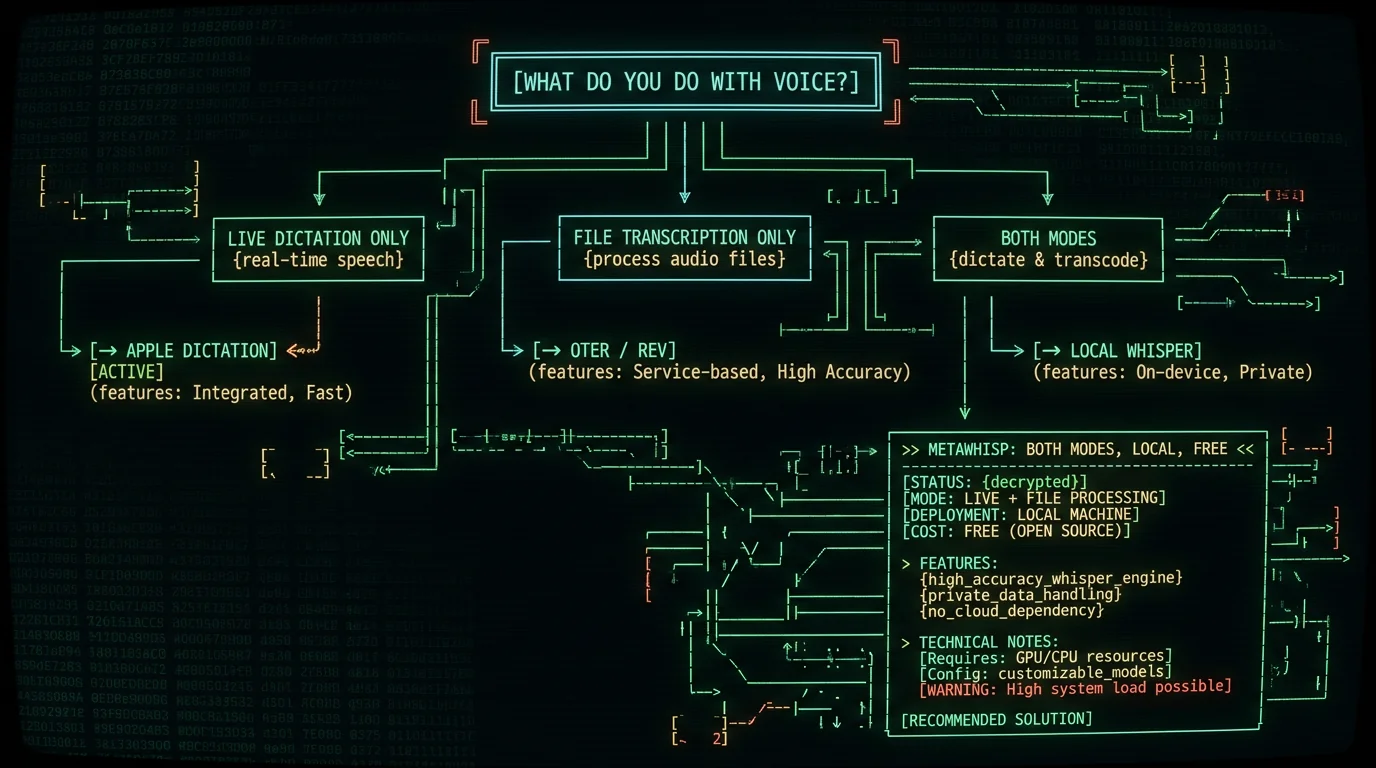
TL;DR: Dictation is live voice typing: you hold a hotkey, speak, and words appear at your cursor in any app. Transcription is asynchronous file processing: you drop in an audio or video file and get text back. They're not the same problem, and most Mac apps only solve one. Apple Dictation does live dictation only. Cloud services like Otter and Rev do file transcription only. A Whisper-based app like MetaWhisp does both — locally, for free.
People search for "voice to text on Mac" and end up downloading the wrong app. Not because the apps are bad — because the buyer never realized there were two different jobs to do in the first place. I've watched it happen in my own DMs more times than I can count. So let's fix that.
This guide explains the difference plainly, shows which one fits which workflow, and tells you honestly when you need both. No fake benchmarks, no invented studies. If you're weighing tools already, my head-to-head comparison of the best voice-to-text apps for Mac sits one click away.
What is dictation on a Mac?
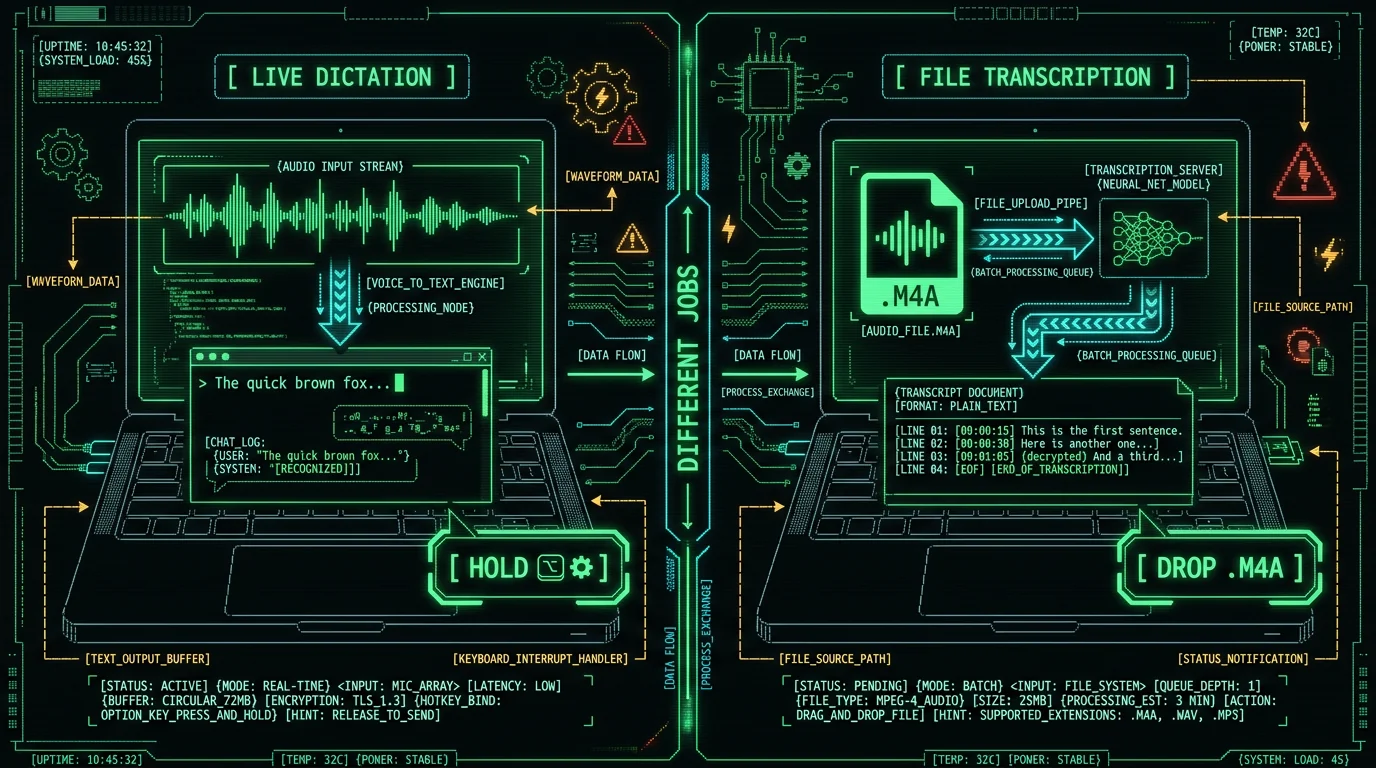
Dictation is live voice typing. You press a key (or a button), you talk, and your words show up at whatever text cursor is active on screen. Stop talking, stop typing. There is no audio file. There is no "transcript" you save and email later. The whole point is that the text lands where you already are — Slack, Notion, Gmail, a CMS, a chat box.
Dictation is the right tool when you're writing in real time and want your voice to replace your fingers. Email replies. Slack messages. First drafts of blog posts. Journal entries. Jira tickets. Anywhere you would have typed, you can talk instead. The defining feature is the hotkey-to-cursor loop: hold a key, speak, release, text appears.
Apple Dictation does exactly this. You double-tap Fn (or the dedicated mic key on newer MacBooks), speak, and the system inserts text wherever your cursor is. It's built into macOS, free, and very fast. But — and this matters — it only does this one job. There is no file mode. You can't feed it a recorded interview and ask for a transcript. That's a different product, with a different name.
The mental model: dictation is a typing replacement. The output is live text. The input is your microphone, in the moment.
What is transcription on a Mac?
Transcription is asynchronous file processing. You already have audio — usually a recording — and you want text. Common sources: a recorded Zoom meeting, an interview you captured on your phone, a podcast episode you produced, a voice memo you've been meaning to write up, a lecture recording, a deposition audio file. The audio exists as a file. You want it as text.
Transcription is the right tool when the audio already exists and you need a text version of it. Drop a file in, wait, get a transcript out. No hotkey, no live cursor, no typing replacement. The workflow is async because the audio is already finished — it's not being generated live by your voice right now.
Services like Otter, Rev, Trint, and Sonix were built for this job. They upload your file to a server, the server runs a speech model, and you get text back, usually with timestamps and speaker labels. The privacy and cost tradeoffs are real: your audio leaves your Mac, and you pay per minute or per seat. For a fuller breakdown of the landscape, see my roundup of the best voice-to-text apps for Mac.
The mental model: transcription is a file converter. The output is a text document. The input is a finished audio file.
Dictation vs transcription: what's the actual difference?
Here's the clean version, side by side. This is the table I wish someone had shown me before I bought my first subscription.
| Dimension | Dictation (live) | Transcription (file) |
|---|---|---|
| Input | Live microphone | Existing audio/video file |
| Output destination | Your active text cursor | A saved transcript file or document |
| Trigger | Hotkey or button | File drop or upload |
| Latency tolerance | Low — words appear as you speak | Higher — minutes for an hour of audio is fine |
| Typical use case | Email, chat, first drafts | Meetings, interviews, podcasts, lectures |
| Built into macOS? | Yes — Apple Dictation | No |
| Done well by | Apple Dictation, MetaWhisp, Wispr Flow | Otter, Rev, Trint, MetaWhisp |
Pro tip: If you only ever talk while typing in apps, you only need dictation. If you only ever process recorded files, you only need transcription. If you do both — and most knowledge workers do — you need a tool that handles both jobs.
The other axis that matters: where the audio goes. Apple Dictation sends your voice to Apple's servers for processing (unless you toggle the on-device enhancement). Pure file-transcription SaaS like Otter and Rev definitely upload your files. Tools built on top of WhisperKit can run the model locally on your Mac's Neural Engine, so the audio never leaves the device in the first place. That's the bet MetaWhisp is built on.
Which Mac workflow do you actually need?
Don't buy a tool. Buy the workflow. Pick the scenario that matches your week, then match the tool to it.
If your week looks like "talk into apps"
You sit in Gmail, Slack, Notion, and a CMS. You write a lot. You want your voice to replace typing. You don't have interview files sitting around waiting to be transcribed. → You need dictation. Apple Dictation is free and good enough for English on a recent Mac. If you dictate in multiple languages, write long-form, or care about formatting, a Whisper-based tool gives you much better accuracy and language coverage.
If your week looks like "process recordings"
You record meetings, interviews, lectures, or podcast episodes. The audio lives on your disk. You need it as text — searchable, quotable, editable. → You need transcription. Apple Dictation can't do this. Cloud services like Otter and Rev can, but they upload your files and charge per minute. A local Whisper app can do it offline for free.
If your week looks like both
You write live with your voice and you process recordings. Welcome to the majority. → You need a tool that does both jobs, ideally on the same model so accuracy is consistent. This is exactly why MetaWhisp exists — live hotkey dictation plus on-device file transcription, both running Whisper large-v3-turbo on the Mac's Neural Engine.
Quick self-test: in the last month, did you (a) talk into an app to write something, (b) feed an audio file into a tool to get text, or (c) both? If (c), the single-app route is going to save you money and tool-switching. If (a) only, Apple Dictation may genuinely be enough. If (b) only, look at Whisper-based local transcription or evaluate cloud services against your privacy and budget tolerance.
Can one Mac app do both dictation and transcription?
Yes — but only if the app is built on a flexible speech model and exposes both interfaces. The two interfaces are different on purpose. Live dictation needs low-latency streaming so words appear as you speak. File transcription accepts a finished file and runs it through the same model in batch, which is why a one-hour file might take a few minutes to process.
The reason most apps pick one side: it's hard to do both well. Cloud services like Otter started with meeting transcription and added a live note-taking mode later. Wispr Flow started with live dictation and is mostly a dictation product. Apple Dictation is dictation only. Nothing in macOS does file transcription natively.
Honest note: I'm building MetaWhisp, which does both modes on the same Whisper model running locally. Free, unlimited, no account. So I have skin in this — but the underlying reason it works is that Whisper is a general speech model, not a single-mode engine. Any app that wraps WhisperKit cleanly could theoretically do both.
How does Apple Dictation fit into this picture?
Apple Dictation is the default Mac dictation experience. Double-tap Fn, talk, get text. It's free, it's already on your Mac, and for short English dictation into a chat box it works fine. Apple's own Dictation user guide documents the hotkeys and language support.
Where it falls short for buyers doing real work:
- No file transcription. You cannot point it at a .m4a or .mp3 and ask for a transcript. If your main need is processing recordings, Apple Dictation is the wrong product.
- Server-side by default. Apple offers an "Enhanced Dictation" toggle that downloads a model for offline use, but the regular dictation path sends your voice to Apple servers. That matters for medical, legal, and journalism work.
- English-first accuracy. Works well in English. Multi-language code-switching and accented English accuracy are not its strength compared to Whisper large-v3-turbo.
- No AI post-processing. You get raw text. No automatic cleanup, no formatting, no translation. Tools like MetaWhisp's processing modes add a layer on top.
Bottom line on Apple Dictation: it's a free, built-in live dictation tool for casual typing. It is not a transcription tool. If your workflow involves recorded files, you need something else. If your workflow is purely live English typing into apps and you don't care about offline privacy, Apple Dictation alone may be enough — and that's a legitimate answer.
How a Whisper-based app handles both jobs
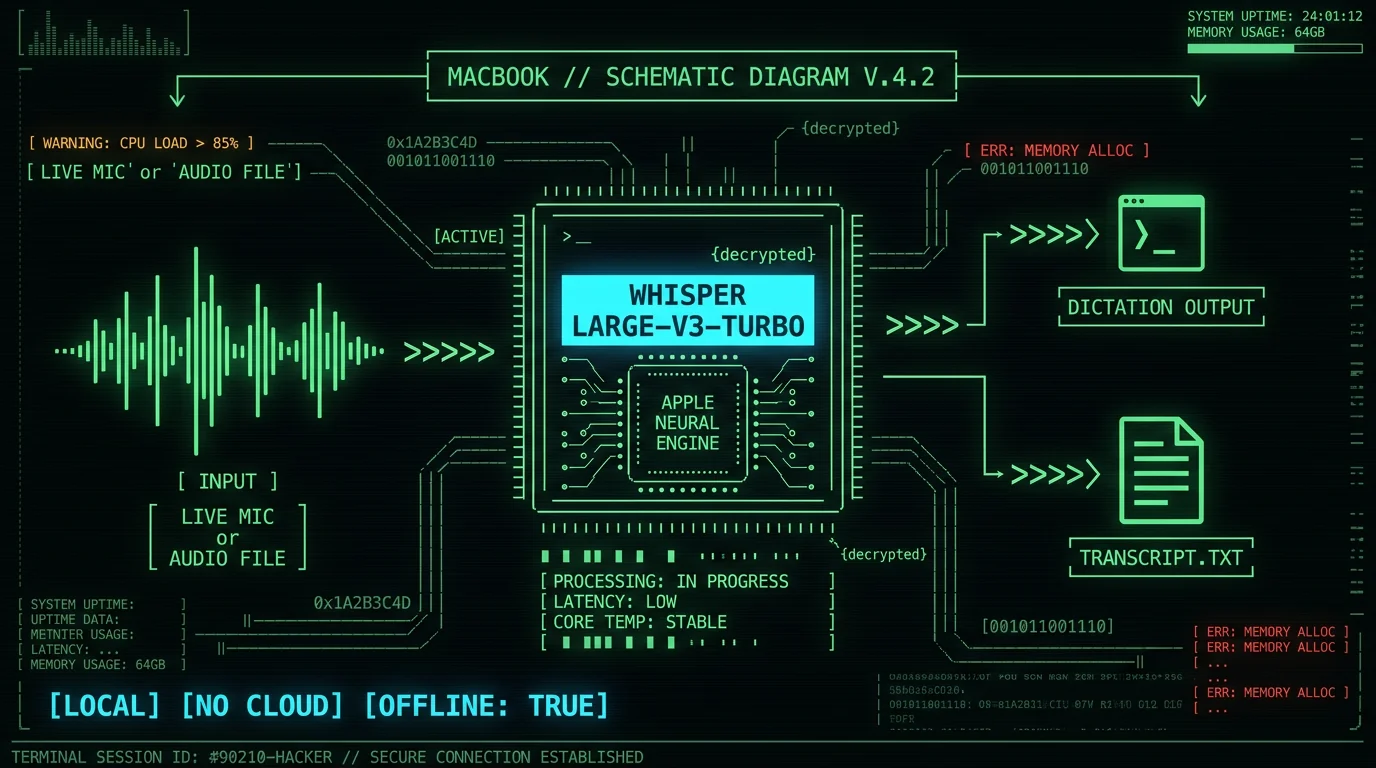
Whisper is OpenAI's open-source speech recognition model. The large-v3-turbo variant is what runs on Apple Silicon Macs through WhisperKit. Same model, two interfaces — and that architectural choice is what lets one app cover both dictation and transcription without compromising either.
For live dictation, the app streams audio from your microphone, chunks it, runs each chunk through Whisper, and inserts the recognized text at your cursor. Latency is the design constraint: chunks need to be small enough that words appear as you speak them.
For file transcription, the app reads an audio or video file, decodes it, runs the full recording through Whisper in segments, and assembles a transcript document. Speed matters less because the file is already finished — accuracy and language coverage matter more.
MetaWhisp's on-device transcription follows this exact pattern. The hotkey-driven live mode (default Right Option ⌥) and the file mode share the same Whisper large-v3-turbo model running locally on the Neural Engine. You get one accuracy ceiling across both jobs, and audio never leaves your Mac in local mode.
What about accuracy, languages, and audio quality?
Accuracy is the question everyone asks first, and the answer is the same for both modes: it depends on the model, the audio, and the language. Whisper large-v3-turbo is the current state of the art for open-source speech recognition. In our internal head-to-head test of Mac apps, MetaWhisp came in around 3.7% WER; published accuracy figures for the underlying Whisper model vary depending on the benchmark and test conditions.
Our own internal run of MetaWhisp on the LibriSpeech test-clean set came in at 2.76% WER (roughly 97% accuracy) — that's the only first-party number I'll cite, and it applies to clean English read speech. Real-world numbers vary by microphone, accent, and background noise.
Honest gap: I have not benchmarked legal or medical domain accuracy. If you're dictating surgical notes or deposition testimony, run a pilot on your own audio before committing. Domain-specific jargon and accented speakers can shift WER in either direction.
Languages: Whisper large-v3-turbo supports 99 languages with auto-detect. If you dictate in Russian and English in the same day (I do), it handles code-switching reasonably well. Apple Dictation supports fewer languages reliably and is English-first in practice.
Audio quality matters more than people think. A bad USB mic in a quiet room beats a great mic in a noisy café. For live dictation, an AirPods mic is fine for short messages. For file transcription of recorded interviews, the recording quality is the ceiling — no model can recover words that weren't captured.
When dictation and transcription blur together
The clean split breaks down in a few real workflows. Worth naming because these are the cases where buyers get confused:
- Meeting notes: You join a Zoom meeting. You want both a live note (you're typing during the meeting) and a transcript of what was said (you want the full audio as text later). That's dictation + transcription in the same hour. Different tools, or one tool that does both.
- Voice memos to articles: You record a 10-minute voice memo on a walk, then later want it as text to edit. That's pure file transcription. The "live" feeling is misleading — you weren't typing while you talked.
- Dictated emails while traveling: You're on a train, dictating into Gmail. Pure live dictation. No file involved.
- Podcast production: You have a finished .wav of an episode. You want show notes, a transcript, maybe translated captions. Pure file transcription, possibly with translation on top.
If your work fits the first or fourth bullet, you specifically need a tool that handles both modes — or you're going to pay for two subscriptions forever.
What about privacy, cost, and offline use?
Three things separate the tools more than any feature checklist:
Privacy. Live dictation tools that send audio to a server know what you said. Cloud transcription services store your files and transcripts on their infrastructure. For sensitive work — medical, legal, journalism, internal company strategy — local processing is the default-safe choice. WhisperKit-based apps can run entirely on-device.
Cost. Apple Dictation is free. Local Whisper apps are free for the local mode. Cloud transcription services typically charge per minute (Otter, Rev, Trint all have published pricing pages — check their current rates before committing). Subscription stacks add up. If you're processing hours of audio per week, the math gets painful fast.
Offline use. A plane, a client site with no Wi-Fi, a hospital where the network is locked down. If the tool needs the cloud, you're stuck. Local Whisper works offline because the model is on your disk. MetaWhisp's pricing keeps the offline local mode free and unlimited — Pro adds cloud features, not basic dictation.
| Tool type | Dictation? | Transcription? | Local? | Typical cost |
|---|---|---|---|---|
| Apple Dictation | Yes | No | Partial (toggle) | Free |
| Wispr Flow | Yes | No | No | Subscription |
| Otter / Rev / Trint | Limited | Yes | No | Per-minute or seat |
| MetaWhisp (local mode) | Yes | Yes | Yes | Free |
| MetaWhisp Pro | Yes | Yes | Optional | $30/year or $7.77/month |
I'm biased toward the bottom row because I built it, but the column structure is the honest part. Most tools force a choice. Whisper-based local apps don't have to.
Honest limits of the tools on the market today
Before you commit to anything, here's what doesn't work well anywhere yet — including in MetaWhisp:
- Speaker diarization on transcribed files. "Who said what" labels are not shipped in MetaWhisp yet. Other tools market this feature, accuracy varies, and the privacy tradeoff is real. If you need speaker attribution, plan for a second tool or wait.
- Domain-specific jargon accuracy. Legal terms, medical terminology, internal product codenames. WER climbs. No app solves this out of the box — custom vocab lists help but aren't a fix.
- Perfect formatting from raw dictation. You say "new paragraph" and hope. All tools struggle with structural voice commands compared to typed shortcuts. The post-processing modes help after the fact but aren't magic.
- iOS parity. MetaWhisp is macOS-only today. MetaWhisp is macOS-only today., but it isn't here. If your main device is an iPhone, you're waiting.
If a vendor claims their app nails all four of those, ask for the benchmark. "It just works" usually means "we didn't measure".
How to pick the right tool for your week
Here's the simple decision tree I'd use if I weren't already running MetaWhisp:
- Only live dictation into apps, English only, casual use? Apple Dictation. Free, built-in, done.
- Live dictation into apps, multiple languages, want formatting polish? Wispr Flow or MetaWhisp. Both work; both have real tradeoffs.
- Only file transcription of recordings, English, willing to upload? Otter or Rev. Compare their current per-minute pricing on their sites.
- File transcription, sensitive audio, offline needed? Local Whisper app — MetaWhisp is the one I built, and it's free for local use.
- Both dictation and transcription, one budget, one workflow? Local Whisper app. The math and the privacy both work out.
If you're in bucket five, grab the MetaWhisp download and run it for a week. The free local mode covers both jobs, audio never leaves your Mac, and there's no account to create. If you want built-in cloud AI for post-processing without configuring your own key, Pro is $30/year — but you genuinely don't need it to start.
FAQ: dictation vs transcription on Mac
Is dictation the same as transcription?
No, they solve different problems. Dictation is live voice typing — you speak and words appear at your cursor in real time. Transcription is converting an existing audio or video file into text. Most Mac apps do one or the other. Apple Dictation does only dictation. Cloud services like Otter and Rev do only transcription. Whisper-based apps like MetaWhisp can do both.
Can Apple Dictation transcribe audio files on a Mac?
No. Apple Dictation is a live dictation tool only. It does not accept audio files as input and will not produce a transcript document. For file transcription on macOS you need a third-party app — either a cloud service like Otter or Rev, or a local Whisper-based app like MetaWhisp.
What is the best transcription app for Mac?
It depends on your priorities. For sensitive audio that cannot leave your Mac, a local Whisper app is the right answer — free, offline, no upload. For team meeting notes with collaboration features, Otter is the mainstream pick. For human-verified transcripts in legal or medical work, Rev's human service is the standard. There is no single "best" — there's only the best fit for your constraints.
Do dictation apps work offline on Mac?
Some do. Apple Dictation has an Enhanced mode that downloads a model for offline use. WhisperKit-based apps run entirely offline because the model sits on your local disk and executes on the Neural Engine. Cloud-based dictation tools (Wispr Flow's cloud features, Otter's live mode, etc.) require an internet connection by design. If offline use matters, confirm the offline path before you subscribe.
How accurate is voice-to-text on a Mac in 2026?
Whisper large-v3-turbo (the model most modern Mac apps wrap) does not have a single canonical WER figure — published numbers depend on the benchmark and test conditions. In our internal head-to-head test, MetaWhisp came in around 3.7% WER; a separate LibriSpeech test-clean run measured 2.76% WER. Apple Dictation is harder to benchmark externally but trails large-v3 on noisy audio and accented English in practice. Real-world accuracy varies by microphone, accent, language, and background noise — no public benchmark covers every condition.
Can one app do both dictation and file transcription?
Yes, if the app is built on a flexible speech model and exposes both interfaces. MetaWhisp does both — live hotkey dictation plus on-device file transcription — on the same Whisper large-v3-turbo model. Apple Dictation does only the dictation half. Otter and Rev do only the transcription half. If you do both kinds of work, a dual-mode app saves you a second subscription.
Is voice-to-text private on Mac?
Only if the audio stays on your device. Local Whisper apps (MetaWhisp local mode, WhisperKit-based tools) process audio entirely on the Neural Engine — nothing is uploaded. Cloud services upload your audio to their servers by design. Apple Dictation's default mode also uses Apple's servers; the offline toggle changes that. For HIPAA-sensitive workflows, the local-mode path is the only one I'd trust, and even then "HIPAA-compatible" describes the tool's behavior — actual compliance is on your practice.
Do I need both dictation and transcription, or just one?
Walk through your last week. If you only typed into apps with your voice, you only need dictation. If you only ever processed recorded files, you only need transcription. If you did both — wrote live with your voice AND processed recorded audio — you need both modes. Most knowledge workers, myself included, land in the third bucket within a month of trying voice tools seriously.
