12 Fireflies alternatives, sorted by where your transcripts live
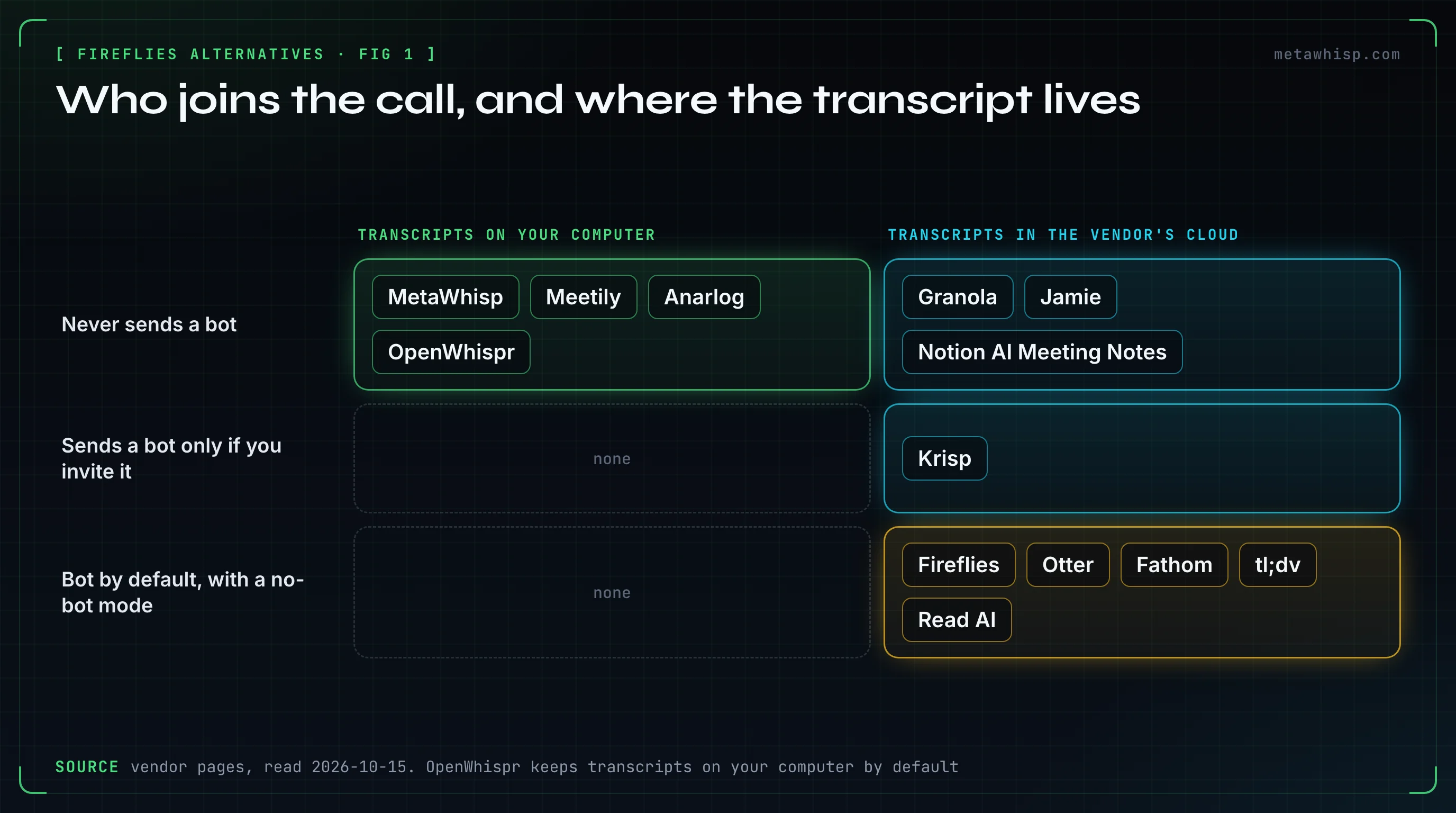
The quick answer: if you want meeting notes without a bot in the participant list, the alternatives split in two. MetaWhisp, Meetily, Anarlog and OpenWhispr keep your transcripts on your own computer. Granola, Jamie, Notion and Krisp skip the bot but store notes in their cloud. Before you switch, though, know that Fireflies itself can now record without a bot on its desktop app.
Key takeaways
- Fireflies' desktop "Take Notes" mode records without a bot, but saves no audio and labels people "Speaker 1" and "Speaker 2".
- On Fireflies Free, unlimited transcription now depends on letting the bot auto-join your calendar meetings (accounts created since September 1, 2026).
- Four bot-free alternatives keep transcripts on your computer: MetaWhisp, Meetily, Anarlog and OpenWhispr.
- No bot doesn't mean no consent: several bot-free tools announce the recording, and some leave it to you.
Which Fireflies Alternatives Don't Join the Call?
As of October 15, 2026, eight of the tools below don't send a bot by default: seven never do, and Krisp sends one only if you invite it. They capture your microphone and your computer's audio instead. Four more, Otter, Fathom, tl;dv and Read AI, use a bot by default but offer a no-bot mode. Prices are per user per month, with annual billing in brackets or as a yearly total. Jamie's are the US-dollar prices from its docs.
| Tool | Joins your call? | Where transcripts live | Free plan | Entry paid plan | Platforms |
|---|---|---|---|---|---|
| Fireflies (for reference) | Yes by default; desktop "Take Notes" mode without a bot | Fireflies cloud, US | 400 min of storage; unlimited transcripts only with auto-join on (accounts since Sep 1, 2026) | $18 ($10) | Web, Mac, Windows, iOS, Android |
| MetaWhisp | Never | Your Mac | Free, no account, no meeting cap | $7.77, or $30 a year | Mac (Apple Silicon) |
| Meetily | Never | Your computer | Free open-source edition | $120 a year | Mac (Apple Silicon), Windows, Linux from source |
| Anarlog (formerly Hyprnote) | Never | Your computer | Free with local models | $14, or $140 a year | Mac, Windows and Linux in beta |
| OpenWhispr | Never | Your computer by default | 5 hours of meetings a month | $8, or $80 a year | Mac, Windows, Linux, iPhone |
| Granola | Never | Granola cloud, US | Unlimited meetings, last 30 days visible | $14, monthly only | Mac, Windows, iPhone, Android |
| Jamie | Never | Jamie cloud, Frankfurt | 10 notes a month, 30 minutes each | $29 ($24) | Mac, Windows, iPhone, Android |
| Krisp | Not by default; optional bot | Krisp cloud, US | None (7-day trial) | $16 ($8) | Mac, Windows, iPhone, Android |
| Notion AI Meeting Notes | Never | Notion cloud | A limited trial | $24 ($20), a full Notion seat | Notion desktop app on Mac and Windows |
| Otter | Yes by default; desktop app without a bot | Otter cloud, US | 300 min a month, 30 min per conversation | $16.99 ($8.33) | Web, Mac, Windows, iPhone, Android |
| Fathom | Yes by default; no-bot mode in a Mac beta | Fathom cloud, US | Unlimited recordings | $20 ($16) | Mac, Windows, iPhone, web |
| tl;dv | Yes by default; desktop audio without a bot | Mostly EU | Unlimited recordings; full AI notes on the first 10 meetings | $29 ($18) | Web, Mac, Windows, mobile |
| Read AI | Yes; joins every calendar meeting by default | AWS, Virginia | 5 reports a month, 1-hour cap | $19.75 ($15) | Mac, Windows, iPhone, Android |
A disclosure: MetaWhisp is our app. It's on this list because it fits the brief, and its limits are spelled out below like everyone else's.
Why Do People Leave Fireflies?
Money comes up most. Of the 20 most recent one- and two-star Trustpilot reviews of Fireflies on October 15, 2026, 12 describe billing problems, from trial charges and unwanted charges to hard cancellation and refund fights. Nine complain about slow, canned or missing support replies, and three of those say an AI bot answered. Two say the meeting bot joined calls it shouldn't.
Fireflies' own pages explain some of it:
- Free isn't quite unlimited. For accounts created on or after September 1, 2026, Fireflies Free gives three meeting transcriptions by default. Unlimited transcription needs "Auto-join calendar meetings" switched on. The invite-only option doesn't count.
- AI credits upgrade themselves. When a paid account runs out of AI credits, Fireflies' help center says it automatically subscribes you to the next credits tier unless you turn Auto-Upgrade off. Its terms of service, updated September 28, 2026, say the opposite: Auto-Upgrade is off by default and needs your consent. Purchased credits are non-refundable.
- The refund pages disagree. Fireflies' refund policy offers a full refund within 7 days under a meeting cap. Its billing guide says it doesn't refund subscriptions at all.
- The bot defaults to everything. The auto-join setting starts on "All meetings". Google Meet can also list the Notetaker under "With potential risks", which Fireflies says is a Meet label, not a real risk.
Fireflies replied publicly to most of those Trustpilot reviews, and overall it rates 4.5 from 855 reviews there and 4.7 from 754 on G2. In these reviews, billing and support complaints dominate; the bot and transcript quality come up a few times each. For cancelling before a trial bills, see our guide to cancelling AI note takers.
Can Fireflies Record Without a Bot?
Yes. Fireflies' Mac and Windows desktop app has a "Take Notes" mode that captures your computer's audio with no bot in the call. Fireflies' help center lists what you give up: no audio or video file is saved, speakers show as "Speaker 1" and "Speaker 2", Sales Assist doesn't work, and you can't switch to the bot mid-meeting.
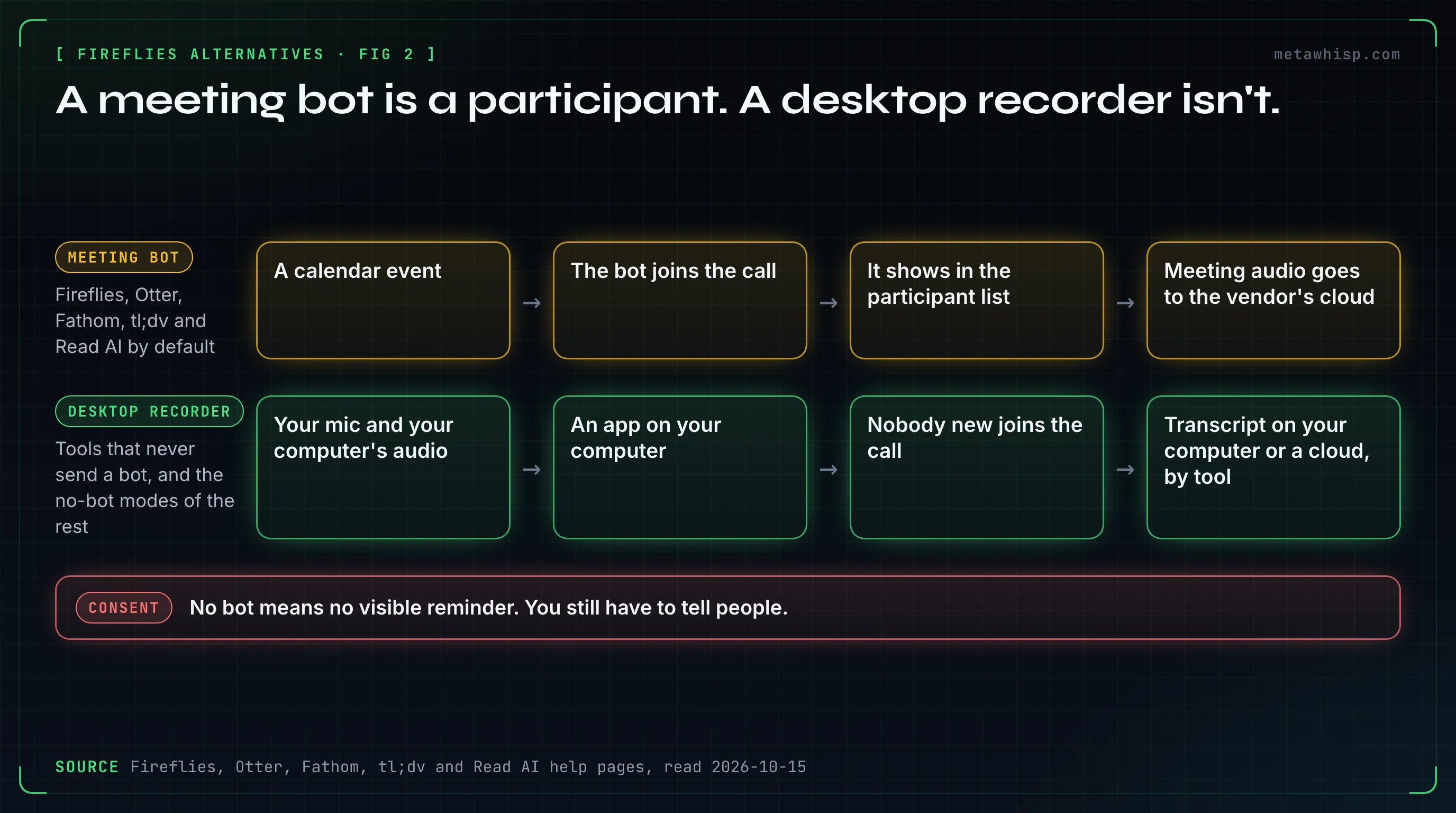
What doesn't change: the transcript still lands in Fireflies' US cloud. The help pages we read don't say whether the audio is transcribed on your computer or on Fireflies' servers. By default, Take Notes plays an audio notice and, on Mac, posts a chat message in supported meeting apps. An "AI Taking Notes" badge shows on your video only if you pick Fireflies' virtual camera. Only one of the six top-ten results for "fireflies alternative" that we read mentions this mode.
If the bot was your only problem, try Take Notes before you migrate. If you also want your notes off a vendor's cloud, read on.
Which Alternatives Keep Transcripts on Your Computer?
Four do: MetaWhisp, Meetily, Anarlog and OpenWhispr. None joins the call, all can transcribe on your computer, and all four are open source under the MIT license. They differ most in platforms, speaker names and what the free version caps.
MetaWhisp: free on a Mac, with no meeting cap
MetaWhisp records the meeting from your microphone and your Mac's own audio. Turn on Meeting Recording in Settings and you start each recording from the menu bar; switch on call detection too, and it offers to record when a call starts. The free version needs no account and, by default, transcribes on your Mac with Whisper large-v3, with no meeting cap. Transcripts are stored on your Mac. Pro, at $7.77 a month or $30 a year, moves transcription to Groq through MetaWhisp's server, with 5,400 minutes a month, and adds built-in AI. MetaWhisp's privacy page says its servers don't store your audio or transcripts.
The limits: it's Mac-only (macOS 14 or later on Apple Silicon), with no Windows or phone app. Calls are split into "Me" and "Them", not into named speakers. It doesn't announce the recording to other people, so tell them yourself. AI recaps need a local model, your own API key or Pro.
Meetily: open source, with a paid tier for speaker labels
Meetily captures your mic and system audio and transcribes on your device with Whisper or Parakeet. The Community Edition is free under the MIT license; its GitHub repository had 31,761 stars on October 15, 2026. Speaker identification is a Pro feature at $120 a year, listed per user on Meetily's pricing card; its FAQ says each license covers one device. It runs on Apple Silicon Macs (macOS 11 or later) and Windows 10 or later, and Linux builds from source.
Anarlog (formerly Hyprnote): local files and your choice of models
Hyprnote was renamed twice in 2026 and is now Anarlog; hyprnote.com redirects to a different product. Anarlog stores notes and transcripts in a local SQLite database and keeps recordings as local files. It lets you pick the transcription engine and the AI model separately, and has no minute cap for local use. Pro is $14 a month or $140 a year. The catch: built-in on-device transcription runs only on Apple Silicon Macs, and the Windows and Linux apps are in beta.
OpenWhispr: dictation and meetings, on every desktop
OpenWhispr started as a dictation app and now takes meeting notes too, and separates up to 8 speakers locally, keeping the names you assign. It runs on Mac, Windows and Linux. Free covers 5 hours of meetings a month; Pro is $8 a month or $80 a year. Its docs say audio is kept on your computer for 30 days by default, and they flag that Teams on Windows sometimes records silence.
Which Bot-Free Alternatives Store Notes in the Cloud?
Granola, Jamie, Notion AI Meeting Notes and Krisp record from your device without joining the call, then process and store notes on their servers. You get polished summaries, team sharing and mobile apps; you give up control of where the notes live. Their free plans range from Granola's unlimited meetings to none at all for Krisp.
Granola: the most generous free plan in this group
Granola never auto-joins and doesn't keep the audio. Its free Basic plan has unlimited meetings, but the app only shows the last 30 days of notes; Business is $14 per user per month, billed monthly. Notes live on AWS in the US. On Basic and Business, Granola may train its own models on de-identified data unless each user opts out. Our breakdown of Granola's pricing covers the 30-day window in detail.
Jamie: stored in the EU
Jamie records without a bot on any platform, stores meetings in Frankfurt and says all processing stays in Europe. It deletes the audio after transcription. It says it doesn't train on your data. The free plan gives 10 AI notes a month, each capped at 30 minutes; Plus costs $29 a month, or $24 billed annually.
Notion AI Meeting Notes: if you already live in Notion
The Notion desktop app captures system audio and your mic, with no bot, and the notes land in your workspace. Admins can enforce an audio consent message. It needs a Business or Enterprise seat, with Business at $24 a month or $20 billed annually, and Notion says speaker labels work in English only.
Krisp: noise cancellation plus notes
Krisp records through a virtual microphone and speaker in any app that accepts them, and offers a bot only if you want one. It has no permanent free plan, just a 7-day trial; Core is $16 a month or $8 billed annually. Krisp's own pages describe where transcription happens three different ways, so check before you rely on on-device processing.
What About Otter, Fathom, tl;dv and Read AI?
All four use a bot by default and offer a no-bot mode, so they solve the bot problem only partly. Otter's and tl;dv's desktop apps record without the bot. Fathom's no-bot mode is a Mac-only beta, and Teams still needs the bot. Read AI's bot joins every calendar meeting by default.
- Otter: free gives 300 minutes a month and caps each conversation at 30 minutes. Pro is $16.99, or $8.33 billed annually. Otter's privacy policy says it trains its AI on de-identified audio and on transcripts that may contain personal information.
- Fathom: the most generous free plan of these four, with unlimited recordings and storage. Premium is $20, or $16 billed annually.
- tl;dv: mostly EU hosting. Free recordings are deleted after 3 months, and its help pages warn that people may get no automatic notice in no-bot mode.
- Read AI: three ways to capture, including a no-bot desktop recorder. Free gives 5 reports a month with a 1-hour cap.
Does a Bot-Free Note Taker Still Need Consent?
Yes. Removing the bot removes the visible reminder, not the duty to tell people. Recording laws differ by place, and some require everyone's consent. Several bot-free tools announce the recording for you; others leave it to you. This isn't legal advice, and none of the six top-ten pages we read mentions consent at all.
| Tool | How participants find out |
|---|---|
| Fireflies Take Notes | Audio notice, plus a chat message on Mac, on by default; a camera badge if you pick Fireflies' camera |
| Fathom | A chat message if you turn Recording Notice on; otherwise Fathom asks you to confirm you have consent |
| Jamie | Optional email before the meeting and a chat notice |
| Notion | Admins can enforce an audio consent message |
| Granola | A chat message and a video watermark each user can turn on; Enterprise admins can enforce them (in pilot) |
| tl;dv (no-bot) | Participants may get no automatic notice |
| MetaWhisp | No notice to others; tell them yourself |
Do You Get the Audio Back?
Often not. Granola, Jamie and Fireflies' Take Notes mode keep text only, so a misheard name can't be checked against a recording. Otter, Fathom's audio mode, tl;dv and Read AI keep recordings in their cloud, though Read AI lets only Enterprise plans play them back. OpenWhispr keeps audio on your computer for 30 days by default.
MetaWhisp keeps text too. It keeps a recovery copy of the audio on your Mac only when a transcription fails or the app quits mid-meeting, and deletes it at the first launch after 7 days. If replaying the meeting matters more than privacy, pick a tool that keeps the recording, and check how long it keeps it.
How Do You Choose a Fireflies Alternative?
Answer two questions first: should anything join the call, and where should the transcript live? Then check speaker names and platforms. Those four answers narrow the list to one or two tools faster than any ranking.
- Want notes off any vendor's cloud? Pick a local tool. MetaWhisp on a Mac, OpenWhispr or Meetily if you also need Windows or Linux.
- Need named speakers? OpenWhispr separates up to 8 voices locally and remembers names you assign. Granola names speakers in Meet, Zoom and Teams on desktop. Fireflies' own bot names them too; its no-bot mode doesn't.
- Need your data in the EU? Jamie stores meetings in Frankfurt and says processing stays in Europe; tl;dv hosts mostly in the EU.
- Already in Notion? Notion AI Meeting Notes keeps everything in one workspace, if you're on Business or Enterprise.
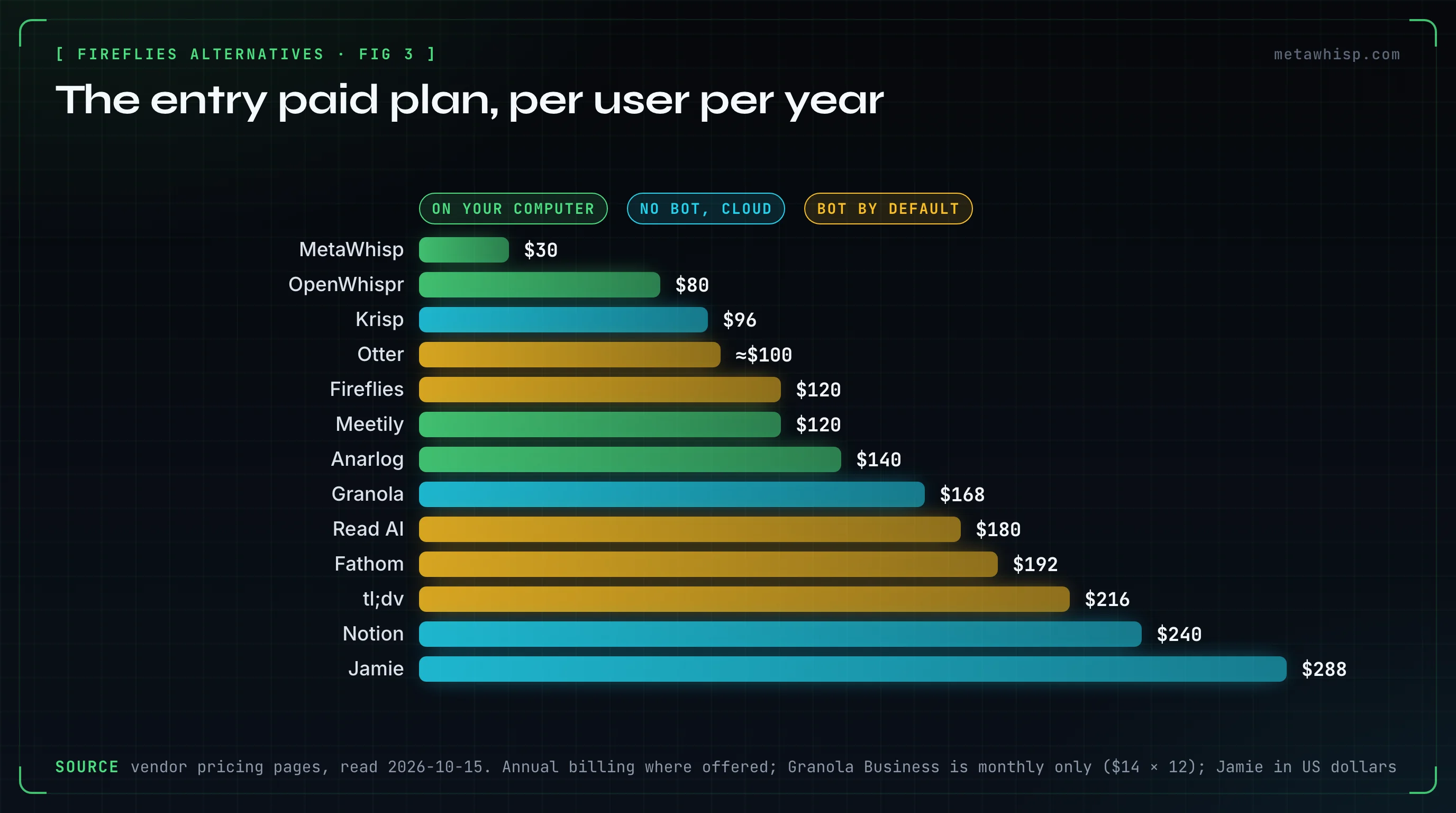
- Want the cheapest paid plan? MetaWhisp Pro is $30 a year. Among the cloud tools, Krisp Core and Otter Pro billed annually come to about $96 and $100 a year.
FAQ
What's better than Fireflies AI?
It depends on what bothers you. If it's the bot, try Fireflies' own Take Notes mode, or Granola or Jamie, which never join. If it's where your data lives, pick a local tool such as MetaWhisp, Meetily, Anarlog or OpenWhispr. If it's price, MetaWhisp Pro costs $30 a year.
Is Read AI or Fireflies better?
They're closer than they look. Both send a bot by default, and both have a no-bot desktop recorder. Read AI Pro costs $19.75 a month, or $15 billed annually. Fireflies Pro costs $18, or $10 billed annually. Both store data in the US.
Can Fireflies AI be trusted?
Fireflies lists SOC 2 Type II, ISO/IEC 42001 and GDPR, offers HIPAA on Enterprise, and its terms say it doesn't train generative AI on your content. Against that: money is the top Trustpilot complaint, its refund pages contradict each other, and a proposed class action under Illinois' biometric privacy law is pending. Fireflies' motion to dismiss was fully briefed in August 2026, with no ruling on the public docket as of its September 23 update.
Is there a free Fireflies alternative?
Yes. MetaWhisp is free on a Mac with no account and no meeting cap. Meetily's open-source edition and Anarlog with local models are also free. Among cloud tools, Granola's free plan has unlimited meetings but shows only 30 days of notes, and Fathom's free plan has unlimited recordings.
Can Fireflies record without a bot?
Yes, on its Mac and Windows desktop app, with the "Take Notes" mode. It saves no audio or video file, labels people "Speaker 1" and "Speaker 2", and still stores the transcript in Fireflies' US cloud. Its Chrome extension also records Google Meet without a bot.
Which bot-free alternatives work on Windows?
Granola, Jamie, Krisp, Notion, Meetily and OpenWhispr all have Windows apps, and Anarlog's is in beta. MetaWhisp is Mac-only. Otter's and tl;dv's Windows desktop apps can also record without a bot, and so can Read AI's and Fireflies' own.
Related reading
- Granola Pricing: Is the Free Plan Enough?
- How to Cancel an AI Note Taker Before It Charges You
- MetaWhisp vs Otter.ai
- AI note taker without a bot
Sources
Checked on October 15, 2026. Prices and plans change often, so check each vendor's pricing page before you rely on a number. Review counts are from Trustpilot (most recent one- and two-star reviews) and G2 on the same day.
- Fireflies: pricing, free plan and auto-join, recording without a bot, desktop audio, auto-join settings, how the bot joins, AI credits, refund policy, billing and refunds, data storage, security, terms
- Reviews and court records: Trustpilot, G2, Fricker v. Fireflies.AI Corp. docket
- Local tools: MetaWhisp pricing, MetaWhisp privacy, Meetily pricing, Meetily Pro, Anarlog pricing, Anarlog security, OpenWhispr pricing, OpenWhispr speaker labels, OpenWhispr storage
- Cloud tools: Granola pricing, Granola security, Jamie pricing, Jamie security, Notion AI Meeting Notes, Notion pricing, Krisp pricing, Krisp recording, Krisp security, Krisp homepage FAQ
- Bot-first tools: Otter pricing, Otter desktop app, Otter privacy policy, Fathom pricing, Fathom without a bot, tl;dv pricing, tl;dv desktop app, Read AI pricing, Read AI auto-join
