🎙️
[ WHISPER LARGE-V3-TURBO ] + [ LOCAL LLM ] — ON-DEVICE ONLY
Short answer: Yes — MetaWhisp is a free Mac app that ships its own on-device Whisper model (large-v3-turbo, ~950 MB, 99 languages) and an optional on-device polish LLM, with no LM Studio, no Ollama, and no separate server. If you want local dictation plus a local LLM in one install, it is the app that finally answers the question nobody in the dictation threads could.
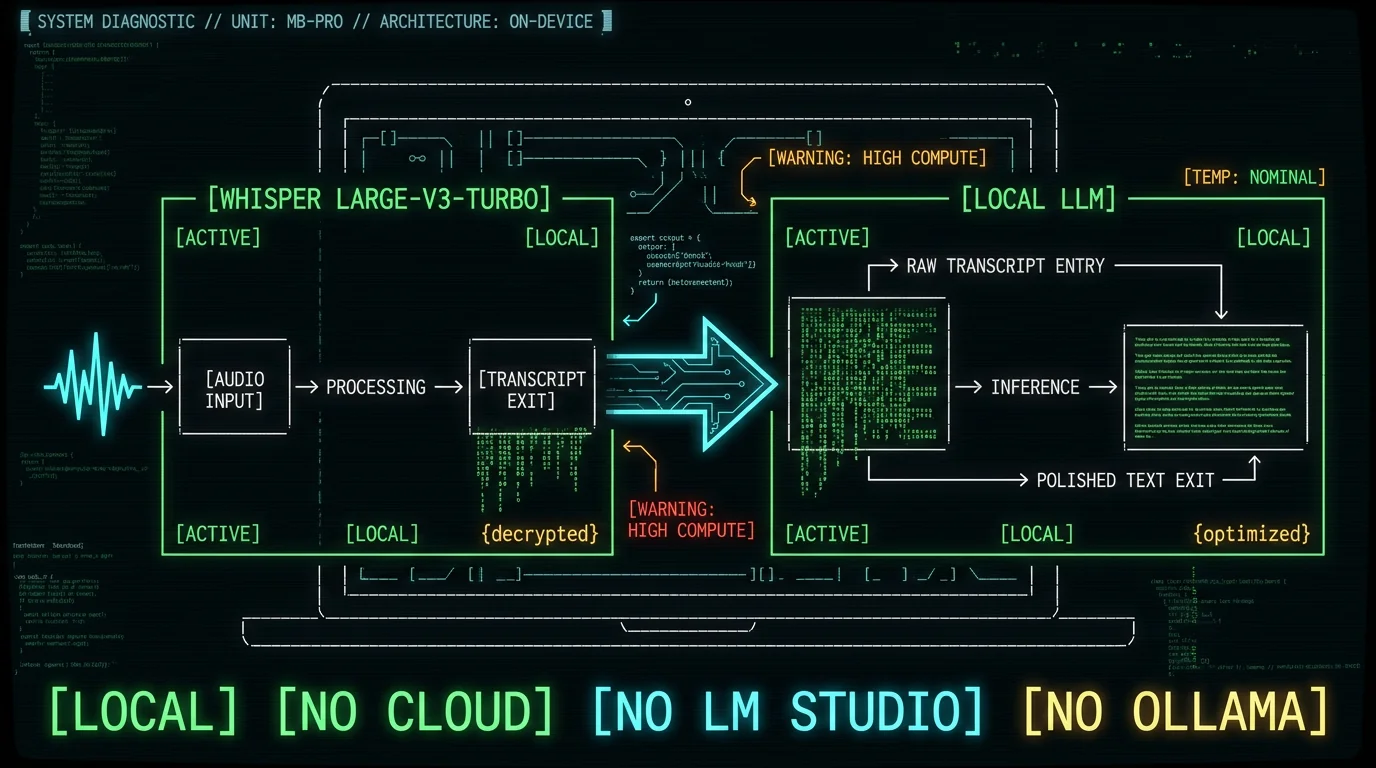
Why can't anyone name a dictation app that ships its own local LLM?
If you've spent any time in a Mac dictation forum, you've seen this exact question: "Is there one app that does local dictation AND a local LLM polish, without spinning up LM Studio?" The replies are always the same shrug — "just point your dictation app at your LM Studio endpoint." The whole thread is people relitigating the same workaround. That's a real gap, and it's the gap this article is built around. Most "AI dictation" apps do one of three things:- Ship the Whisper model locally and punt polish to an external OpenAI-compatible endpoint — usually LM Studio, Ollama, or a hosted API key.
- Ship the Whisper model locally and offer no polish at all.
- Skip local entirely and send your audio to the vendor's own server.
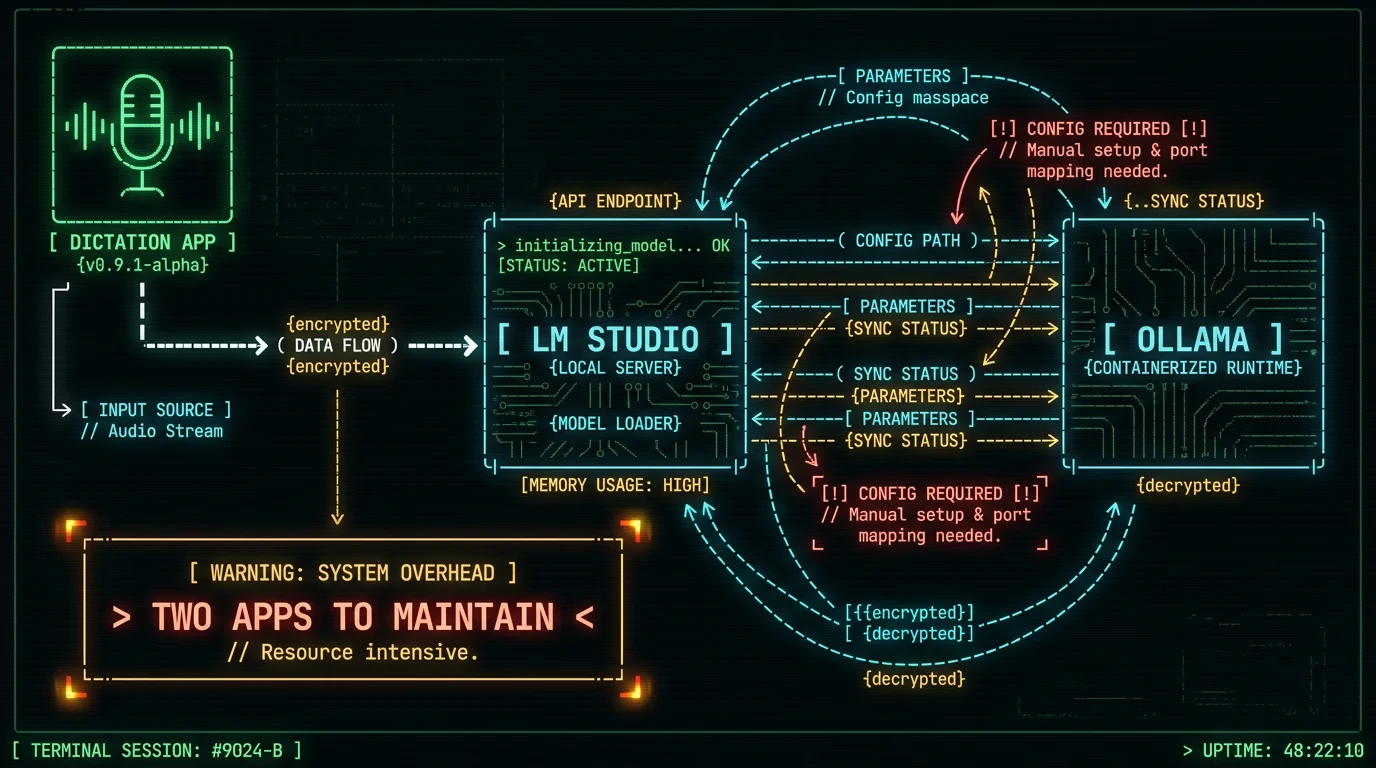
Why don't more apps bundle a polish LLM? Most dictation apps don't bundle a polishing model for the same reason text editors didn't bundle spell check in 1995 — shipping a good general-purpose language model means picking one model family, hosting the weights, keeping them updated, and accepting the support burden when a user can't run them on their hardware. LM Studio and Ollama exist precisely so app developers don't have to make that choice: the user supplies the model and the app just calls it. That architecture is reasonable. It's also why your "local" dictation workflow ends up needing two apps, one terminal command, and an afternoon of picking GGUF quant files.
Why do most apps punt to LM Studio or Ollama?
When an app says "supports any OpenAI-compatible local endpoint," it almost always means: open LM Studio, start its local server on port 1234, then point the dictation app athttp://localhost:1234/v1. Ollama does the same thing on port 11434. Both are excellent tools. They are also a separate process, a separate download, and a separate set of decisions about which model to load.
That separation matters for two reasons. First, it breaks the "one app" promise — you now have a dictation app, a model runtime, a model file, and a hotkey chain that has to work in two places. Second, it puts the model choice on the user, and most users don't want to learn what a 4-bit quant is. They want their transcripts cleaned up.
What changed on Apple Silicon in 2025?
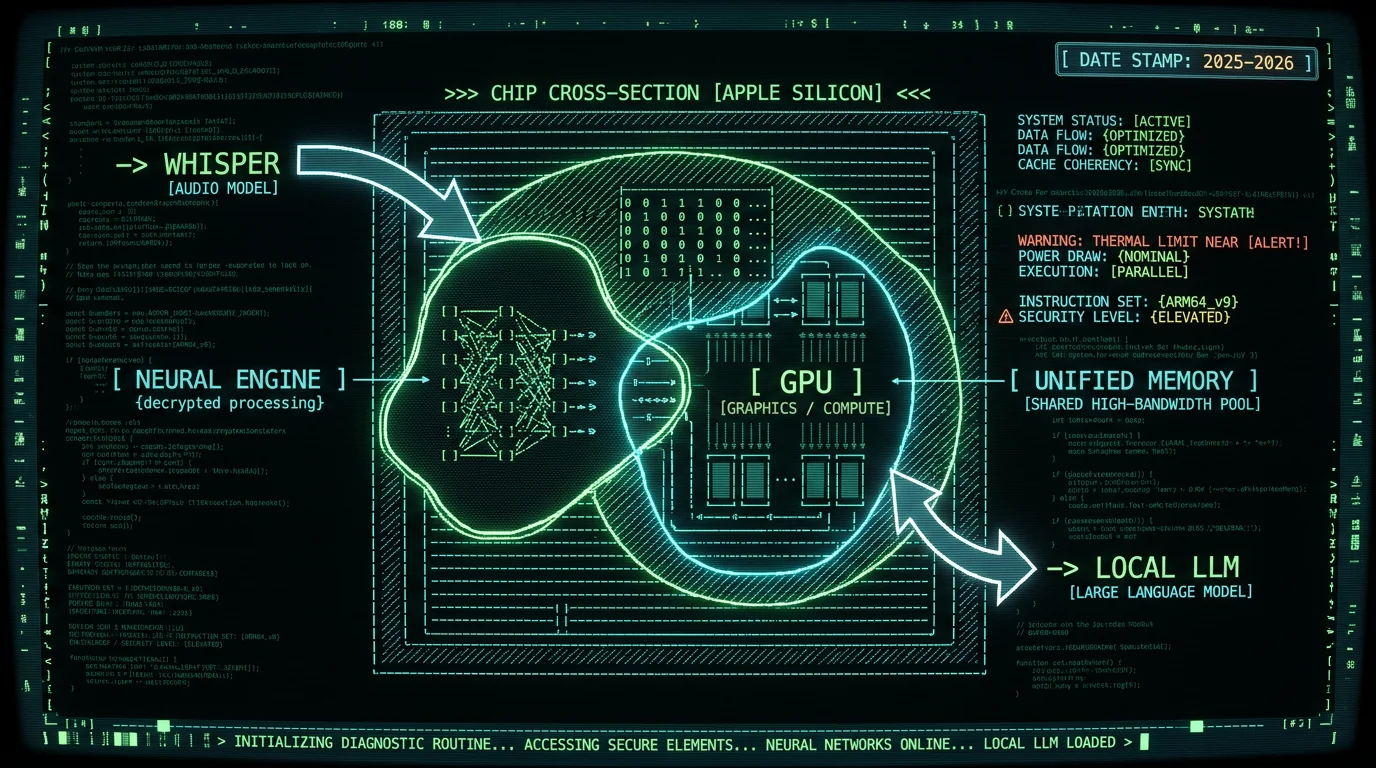
Two pieces of platform work made "one app, two on-device models" practical on a Mac for the first time. Apple's MLX framework is an open-source array library built specifically for Apple Silicon. It treats the GPU like an array primitive, which makes porting and running models from Hugging Face dramatically easier than the old "compile PyTorch and pray" path. For a small team shipping a Mac app, MLX is the difference between "we can plausibly do this" and "this is a research project." The second piece is Apple Intelligence and its on-device Foundation Models framework — the platform layer Apple shipped that gives every Mac a built-in local LLM surface apps can call into without bundling weights themselves. That is the strategic platform decision that made "one Mac app, on-device polish" a real product category instead of a hackathon demo.
Why does Apple Silicon matter for local LLMs? Unified memory is the underrated piece. On an Intel Mac with a discrete GPU, the CPU and GPU have separate RAM pools and you have to copy weights between them. On Apple Silicon, the CPU, GPU, and Neural Engine all draw from the same pool of unified memory. That is what lets a Mac load a transcription model on the Neural Engine and a polish model on the GPU at the same time, from the same RAM, without the copy-tax. Neither of these capabilities — MLX, Apple Foundation Models, unified memory — was on the table three years ago. All of them are now.
Can your Mac run Whisper and a polish model at the same time?
This is the question that actually decides whether the whole idea works on your machine. The honest, qualitative answer:- 8 GB unified memory: tight. Whisper will run, but you'll likely keep polish off or use the lightest model. This is also why I wrote a separate guide on Whisper models for 8 GB MacBooks.
- 16 GB unified memory: comfortable. Both models fit, plus a normal workload of apps in the background.
- 24 GB and up: trivial. Headroom for bigger polish models or longer recordings.
MetaWhisp: one app, two on-device models, no separate server
MetaWhisp is the answer to that unanswered forum question. It's a free Mac app that ships its own on-device Whisper model and its own on-device polish model, with no LM Studio, no Ollama, and no separate server to babysit. The transcription side runs WhisperKit with the Whisper large-v3-turbo weights — the same model OpenAI open-sourced, compiled to run on the Neural Engine. 99 languages with auto-detect, roughly 950 MB download, free, unlimited. Audio never leaves your Mac. No account, no telemetry, no time caps. The details are on the on-device transcription page. The polish side is a local LLM that runs on the GPU through Apple's on-device ML stack. It is entirely optional — local dictation works fine without it. When you turn it on, transcripts come out cleaner: filler words removed, punctuation fixed, light rewrites so what you said reads like what you meant. No audio leaves your Mac in this path either; the polish model runs on the same machine as the transcription model.Honest founder note: I built MetaWhisp specifically because this was the gap I kept getting asked about. Every time someone emailed me asking for an app that does both, I had to point them at three separate tools. I wanted one Mac app, one hotkey, zero network.What MetaWhisp is not: it's not a chat product, it's not a notes product, and the local LLM is not exposed as a general-purpose assistant. The polish model is scoped to one job — clean up the transcript that Whisper just produced. If you want a general local-LLM chat UI on macOS, look elsewhere; that isn't what we ship. And the local-LLM polish is not a Pro feature — it lives on the free tier. The honest comparison, verified only against things I can confirm from each vendor's public page or first-party docs:
| App | Transcription | Polish model | Polish runs where | Setup burden |
|---|---|---|---|---|
| MetaWhisp (free) | Local, Whisper large-v3-turbo | Local LLM, bundled | Your Mac | One app |
| MetaWhisp Pro | Local + cloud (60 min/day cap) | Cloud AI built in | MetaWhisp servers | One app, paid |
| Wispr Flow | Cloud | Cloud polish | Vendor servers | Account + paid |
| SuperWhisper | Local | External — LM Studio / Ollama / OpenAI | Whatever you point it at | Two apps |
| MacWhisper | Local | None bundled | — | One app |
| Apple Dictation | Local | None | — | Built-in |
How does the local-LLM polish pass work inside MetaWhisp?
The pipeline is short on purpose. You hold the hotkey (default Right Option ⌥) and talk. WhisperKit produces a raw transcript on the Neural Engine. If you've enabled local polish, that raw transcript goes to the local LLM on the GPU with a tight, scoped prompt — clean up filler words, fix punctuation, preserve meaning, don't add content. The polished text is pasted into whatever app had focus. That third step is the entire integration. There is no general chat UI, no system-prompt editor, no model picker on every call. The polish model is configured once, then it does its one job.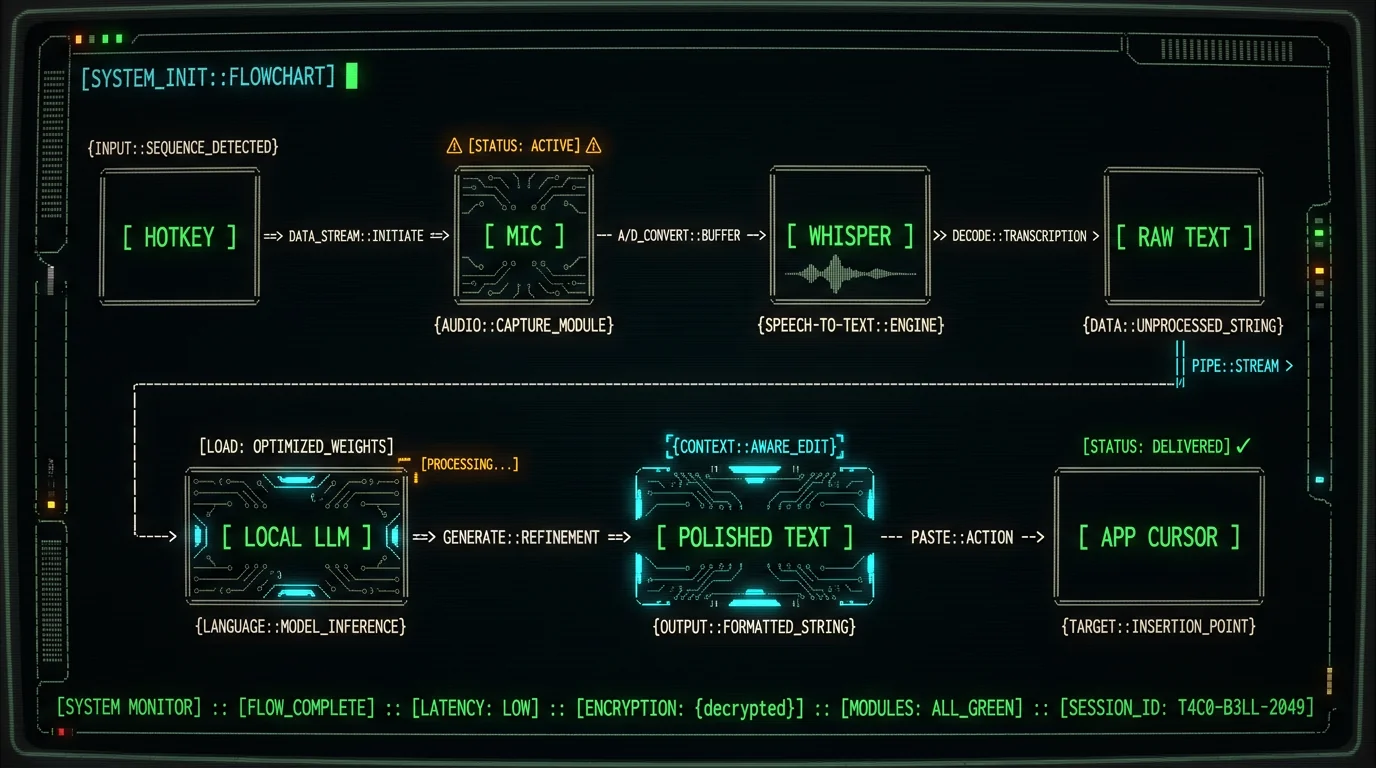
Does the local-LLM polish mode replace the BYOK modes? No. They're complementary. The BYOK modes — Structured, Correct, Rewrite — route the transcript text (not audio) to your own OpenAI or Cerebras account, which is faster and often stronger. The local polish mode is for when the transcript text itself can't leave the Mac. Translation is also BYOK on the free tier, not part of the local-LLM path. MetaWhisp also has Pro for built-in cloud AI without managing an API key, priced at $30/year or $7.77/month per the pricing page. Pick whichever path matches your privacy and quality bar.
What does a local polish pass actually fix (and what doesn't it)?
The polish pass is scoped to one job. Here's what it's actually good at, based on running it daily:- Removing "um", "uh", "like", false starts, and the trailing "…" you mutter when you stop talking.
- Punctuation. Whisper does a credible job but it doesn't know where you meant a period vs. a comma in stream-of-consciousness dictation.
- Sentence breaks. Dictation often comes out as one long run-on; polish splits it back into readable sentences.
- Light rewording for clarity. It will not invent facts. It will not rewrite your argument. It just makes you sound less like you were dictating.
- Translate. Translation in MetaWhisp is BYOK or Pro on the free tier, never the local polish model. The local LLM is not a translator.
- Summarize a long meeting. It's scoped to a single dictated utterance, not a long transcript.
- Act as a general assistant. There is no chat box. There is no system-prompt editing. The polish model has one job.
- Speaker diarization. We don't ship that yet. Dictation is single-speaker today.
Frequently asked questions
What is local dictation with a built-in local LLM on Mac — and why does it require no LM Studio?
Local dictation with a built-in local LLM on Mac means both the speech-to-text model and the text-polishing model run entirely on your Mac — no LM Studio server, no Ollama process, no cloud endpoint. MetaWhisp ships Whisper large-v3-turbo for transcription and an on-device polish model for cleanup, all in one app download. Because the models run through Apple's on-device ML stack and WhisperKit, there is no separate server process to start or port to configure.Why do most dictation apps require LM Studio or Ollama instead of bundling a local LLM?
Most dictation apps require LM Studio or Ollama because bundling a local LLM means picking one model family, hosting the weights, keeping them updated, and handling the support burden when a user's hardware can't run them. LM Studio and Ollama let developers skip that decision entirely — the user supplies the model, the app just calls an OpenAI-compatible endpoint. That's a reasonable architecture, but it breaks the one-app promise. You end up with a dictation app, a model runtime, a model file, and a hotkey chain that must work across two processes.Can a Mac run Whisper and a local LLM polish model at the same time?
Yes, on most modern Macs with Apple Silicon. The key enabler is unified memory — the CPU, GPU, and Neural Engine all share the same RAM pool, so Whisper can run on the Neural Engine while the polish LLM runs on the GPU without any memory-copy tax between them. On 8 GB machines the fit is tight and you may prefer to keep polish off. On 16 GB it's comfortable with normal background apps. On 24 GB and above there is clear headroom. Exact performance varies by Mac model year, model size, and quant level.Does the local LLM polish pass in MetaWhisp replace BYOK modes?
No — they are complementary. The BYOK modes (Structured, Correct, Rewrite) route the transcript text to your own OpenAI or Cerebras account, which can be faster and stronger for many tasks. The local polish mode is for when the transcript text itself cannot leave the Mac at all. Translation is also BYOK on the free tier, not part of the local-LLM path. MetaWhisp Pro adds built-in cloud AI polish without managing an API key. Pick whichever path matches your privacy and quality requirements.What does the local LLM polish pass actually fix in a dictated transcript?
The local LLM polish pass removes filler words like "um", "uh", and false starts; fixes punctuation that Whisper leaves ambiguous; splits run-on sentences into readable prose; and does light rewording for clarity without adding or inventing content. It will not translate, summarize long meetings, act as a general assistant, or perform speaker diarization. The model is given a tight, scoped prompt and is not exposed as a general-purpose chat interface — it has exactly one job.How much RAM do I need on my Mac to run local dictation with a built-in local LLM?
The minimum practical configuration is 8 GB of unified memory, but the fit is tight — you may need to keep the local polish model disabled or use the lightest available option. 16 GB unified memory is the comfortable baseline: both Whisper large-v3-turbo and the on-device polish model fit alongside a normal background app workload. 24 GB and above gives clear headroom for larger polish models or longer recordings. Because Apple Silicon uses unified memory shared across CPU, GPU, and Neural Engine, there is no separate VRAM pool to worry about.Is the local LLM polish feature in MetaWhisp free or a paid Pro feature?
The local LLM polish mode is free — it lives on the free tier of MetaWhisp, not behind the Pro paywall. The free tier also includes unlimited local Whisper transcription with large-v3-turbo across 99 languages, with no account required and no time caps. MetaWhisp Pro ($30/year or $7.77/month per the pricing page) adds built-in cloud AI polish and a cloud transcription option with a 60-minute-per-day cap. The local-only path — Whisper plus on-device polish — costs nothing and requires no internet connection.Should you skip the local LLM and use BYOK or Pro instead?
Sometimes yes. The local-LLM polish pass is one of three text-polish paths in MetaWhisp, not the only one. Use the local LLM when: you don't want transcript text to leave your Mac under any circumstances, you're offline, or you dictate short bursts and want instant polish without an API round-trip. Use BYOK instead when: you have an OpenAI or Cerebras key and want stronger rewrites, structured output formatting, or translation. The BYOK path routes only text — not audio — so it's still meaningfully more private than a cloud transcription app. Use Pro instead when: you don't want to manage API keys at all, you want built-in cloud AI that just works, and you're comfortable with the transcript text leaving your machine for that polish step.
Which path is right for me? The quick decision tree: if your text can never leave your Mac, use the local LLM polish. If you want stronger rewrites and have an API key, use BYOK. If you want the simplest possible experience and don't mind a subscription, use Pro. All three paths start from the same local Whisper transcription — audio never goes to the cloud regardless of which polish path you choose on the free tier. The local polish option is there specifically for the user who wants zero network, zero configuration, and zero ongoing cost.
The setup: what "one app" actually means for your workflow
In practice, "no LM Studio, no separate server" means your workflow is:- Download MetaWhisp from the download page.
- On first launch, MetaWhisp downloads the Whisper large-v3-turbo weights (~950 MB). This happens once.
- If you want local polish, enable it in Settings. MetaWhisp will download or activate the on-device polish model. This also happens once.
- Set your hotkey. Default is Right Option ⌥ held down.
- Hold hotkey, talk, release. Polished text appears at cursor.
What about privacy — does any audio or text leave my Mac in the free local mode? No. In the free local mode, audio is processed entirely on-device by WhisperKit running Whisper large-v3-turbo. The resulting transcript text is then processed on-device by the local polish model through Apple's on-device ML stack. Neither audio nor text is transmitted to MetaWhisp servers or any third party. There is no telemetry on the content of your dictation. This changes if you use BYOK (text goes to your OpenAI or Cerebras account) or Pro (text goes to MetaWhisp servers for polish). But the local-only free path is fully air-gapped after the initial model download.
What MetaWhisp doesn't do (honest list)
I'd rather tell you what doesn't work than have you figure it out after download:- Meeting transcription. MetaWhisp is a dictation tool — you talk into it. It is not a background meeting recorder or a Zoom bot. We may add this, but it's not today's product.
- Speaker diarization. Single-speaker dictation only. "Who said what" is not something the current pipeline handles.
- A local-LLM chat interface. The on-device model is not a chat assistant. There is no chat box. If you want local LLM chat on Mac, use LM Studio — it's genuinely excellent at that job.
- Windows or Linux. Mac only, Apple Silicon strongly preferred.
- Offline translation. Translation in MetaWhisp requires a BYOK key or Pro. The local polish model is English-first cleanup, not a translation engine.
Where to go from here
If you've been waiting for a Mac dictation app that does both transcription and polish locally — without LM Studio, without Ollama, without a separate server — MetaWhisp is the answer. Free, local, one hotkey.- Download MetaWhisp free — Whisper large-v3-turbo, 99 languages, local polish LLM, no account required.
- On-device transcription details — how WhisperKit and large-v3-turbo work on your Mac.
- Processing modes — Structured, Correct, Rewrite, and the local polish path explained side by side.
- Best Whisper model for 8 GB MacBook — if you're on the tight end of the RAM spectrum.
- Pricing — free vs. Pro compared, including the $30/year option.
