For files, dictation and calls, checked November 8, 2026
Short answer: pick by the job you use MacWhisper for. For audio and video files, Buzz and Vibe are free and open source, Aiko costs $24 once, and VoiceInk and Spokenly take files too; MacWhisper's own free version also transcribes them. For dictation into any app, Apple Dictation, Superwhisper's free plan, Spokenly's free plan and MetaWhisp cost nothing. For recording calls, Vibe and MetaWhisp are free, Spokenly appears to be, and Superwhisper needs Pro, just like MacWhisper. And "Whisper Transcription" on the App Store isn't an alternative: it's MacWhisper itself. One disclosure: we make MetaWhisp, which can't transcribe files. We read every app's pages and docs on November 8, 2026, and didn't run them for this piece.
Key takeaways
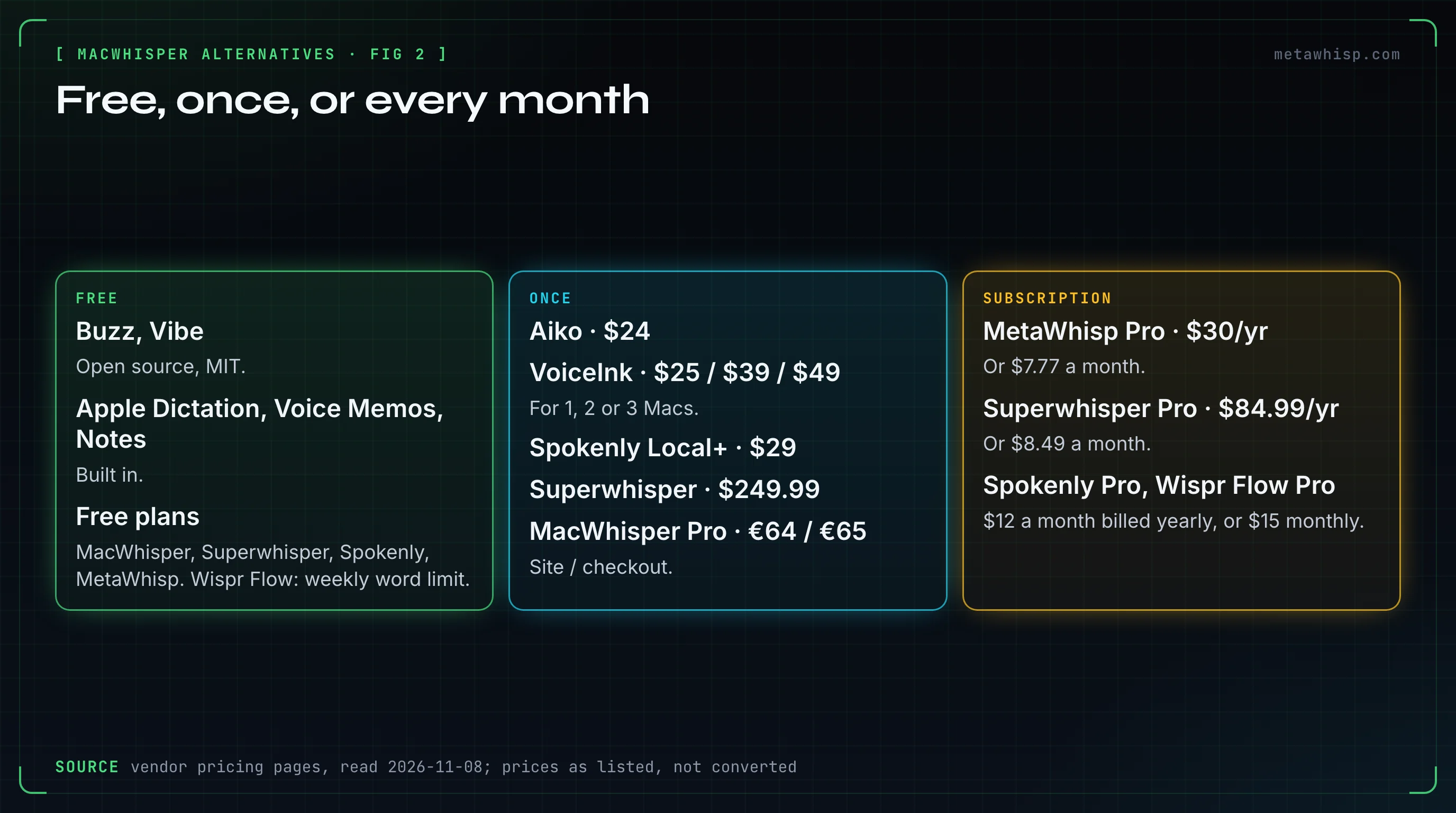
- MacWhisper's free version already transcribes files and dictates. Pro, at €64 on its site or €65 at checkout, once, adds batch work, YouTube links, speaker labels and meeting recording.
- Buzz and Vibe are free, open source and run on Mac, Windows and Linux. Both transcribe files and YouTube links and label speakers.
- Aiko is no longer free: it costs $24 once and needs macOS 26.6, with free older builds for macOS 13 to 15.
- Wispr Flow can't import audio or video files on any plan, and Superwhisper keeps file transcription for Pro.
- In our Reddit count, 7 of the 52 people who judged MacWhisper named another app, all for dictation: VoiceInk 3, and Superwhisper, Aqua Voice, Wispr Flow and Spokenly 1 each.
What Does MacWhisper Do, and Why Look for an Alternative?
MacWhisper does several jobs, and you may only need to replace one of them. The free version transcribes audio and video files and your microphone, exports text and subtitles, and dictates into any app. Pro, at €64 on macwhisper.com or €65 at checkout on Gumroad, once, adds batch transcription and watched folders, YouTube and media links, speaker labels, and automatic meeting recording.
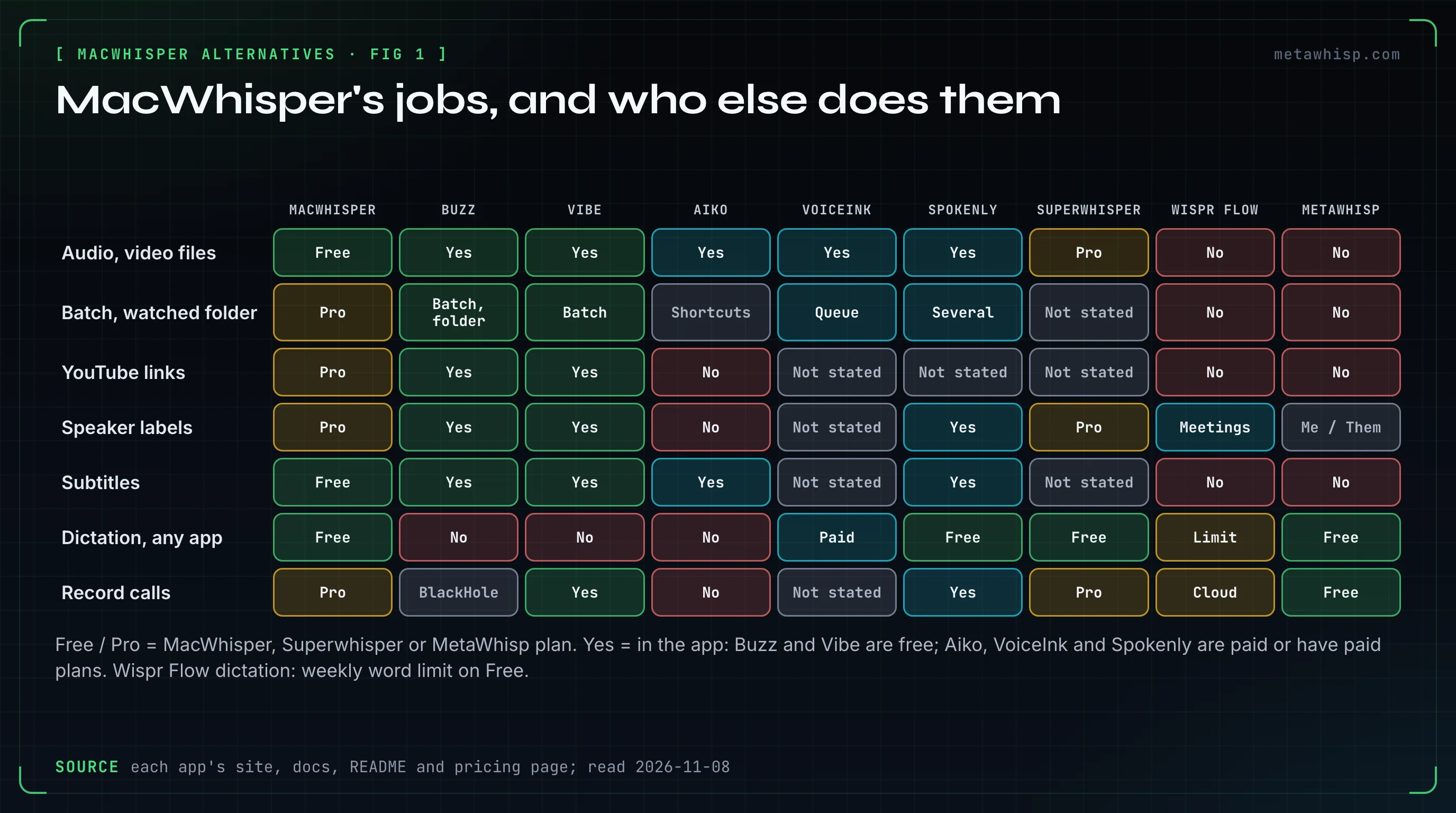
Reasons to look elsewhere come straight from those facts. Meeting recording, batch work and speaker labels are Pro, and MacWhisper's docs still call meeting recording a beta with "occasional issues or data loss". Version 15 needs macOS 15: the latest, 15.10, came out on November 5, 2026, and Sonoma users can stay on version 14.8.1. There's no Windows version. And the App Store app "Whisper Transcription" is MacWhisper's own App Store edition, not a different app; it doesn't do the direct version's system-wide dictation. For the prices in detail, see our MacWhisper pricing guide.
Which Apps Transcribe Audio and Video Files Like MacWhisper?
Buzz and Vibe are the free, open-source choices, and both run on Mac, Windows and Linux. Aiko is a native app for $24 once. VoiceInk and Spokenly, which are mainly dictation apps, transcribe files too. Superwhisper does it only in Pro, and Wispr Flow can't import files at all.
| App | Price | Runs on | Local or cloud | Exports | Needs macOS |
|---|---|---|---|---|---|
| MacWhisper (for reference) | Free; Pro €64 (site) or €65 (Gumroad) once | Mac; Whisper Transcription on iPhone and iPad | Local; cloud is a Pro option | .txt, .srt, .vtt free; more in Pro | 15 (14.8.1 for Sonoma) |
| Buzz | Free, MIT licence | Mac, Windows, Linux | Local; optional OpenAI API | TXT, SRT, VTT | Not stated |
| Vibe | Free, MIT licence | Mac, Windows, Linux | Local; optional summaries through the Claude API | SRT, VTT, TXT, HTML, PDF, JSON, DOCX | Not stated |
| Aiko | $24 once; 14-day trial | Mac, iPhone, iPad, Apple Vision Pro | On device only | Text, SRT, WebVTT, JSON, CSV | 26.6 (free older builds for 13 to 15) |
| VoiceInk | $25 / $39 / $49 once, for 1 / 2 / 3 Macs | Mac; iPhone app in beta | Local, or cloud with your own keys | Text; CSV from History | 15 (pricing page says 14.4) |
| Spokenly | Free; Local+ $29 once; Pro $144/year or $15/month | Mac, Windows, Linux, iPhone | Free local models; cloud with your keys or Pro | Text or subtitles | 13.3 |
| Superwhisper | Files need Pro: $8.49/month, $84.99/year or $249.99 once | Mac, Windows, Linux, iPhone, Android | Cloud by default, or local models | Not stated | 13.3 or 14 (its pages differ) |
What each one does with files, in its makers' words where it matters:
- Buzz: "Transcribe audio and video files or Youtube links", plus live microphone transcription, "Speaker identification in transcribed media", a watched folder for new files and exports to TXT, SRT and VTT. You can import several files or a whole folder at once, or pass many files to its command line. Version 1.4.5 (August 23, 2026) still has an Intel build, but its README says Buzz "now requires Apple silicon" and 1.4.5 is the last version for Intel Macs.
- Vibe: "Batch transcribe multiple files!", links from YouTube, Vimeo and other sites, speaker diarization, Whisper, Nemotron and Parakeet models, and seven export formats. Version 3.3.0 came out on October 29, 2026, with Apple silicon and Intel builds.
- Aiko: "$24, one-time purchase for all platforms", with a 14-day TestFlight trial. It needs macOS 26.6, but older builds "are free for everyone": 1.10.1 for macOS 15, 1.8.2 for 14 and 1.5.3 for 13. Its large model needs an Apple silicon Mac with at least 16 GB of memory; on Intel, "transcription is very slow". It has no built-in batch (its maker suggests Shortcuts), no live transcription, no speaker names and no YouTube support. We found no public source code, so don't assume it's open source.
- VoiceInk: "Queue audio or video files, transcribe with a Mode, and save the results", one file after another, from wav, mp3 and m4a to mp4 and mov. Its docs don't mention speaker labels.
- Spokenly: it can "transcribe several files at once, label who said what" and export text or subtitles. Its paid tiers add only sync, styles and cloud models, so this appears to be free with local models.
- Superwhisper: "File transcription is a Pro feature."
- Wispr Flow: its help center says you "can't upload, attach, or import an existing audio or video file" on any platform or plan.
Which Alternatives Handle Batches, YouTube Links and Subtitles?
Buzz and Vibe cover all three for free. Vibe does batch transcription, YouTube and Vimeo links, and SRT and VTT subtitles among seven export formats. Buzz imports several files or a whole folder at a time, takes YouTube links, watches a folder for new files and exports SRT and VTT. Aiko has no built-in batch or YouTube support. In MacWhisper, batches, watched folders and YouTube links are Pro, while subtitles are free.
The dictation apps handle batches in their own ways. VoiceInk processes the files in its queue one after another. Spokenly transcribes several files at once and exports text or subtitles. Superwhisper's docs don't describe batch, link or subtitle support for its Pro file transcription, so we've left those as "not stated".
Which MacWhisper Alternatives Label Speakers?
Buzz and Vibe label speakers for free. Spokenly labels who said what in file transcripts, except on iPhone, and that appears to be free with local models. Superwhisper's speaker separation is Pro. Aiko and VoiceInk don't offer speaker labels in their docs. MacWhisper Pro labels speakers: its Nemotron model handles up to 8, and since version 15.3 you can pick Pyannote instead.
Aiko's FAQ calls naming the people in a recording "something I would like to support", so it isn't there yet. Wispr Flow adds name labels only in its meeting Notetaker transcripts. MetaWhisp doesn't transcribe files, and in the meetings it records it labels speakers only as "Me" (your microphone) and "Them" (your Mac's audio).
What Can Replace MacWhisper's System-Wide Dictation?
First, check whether you need to: MacWhisper's free version already dictates into any app. Its "high quality" dictation, grammar improvement and AI prompts are Pro. Free alternatives are Apple Dictation, Superwhisper's free plan, Spokenly's free plan and MetaWhisp. VoiceInk costs $25 to $49 once, and Wispr Flow's free plan has a weekly word limit and needs an internet connection.
- Apple Dictation: lets you "speak to enter text anywhere you can type it", with no timeout; it stops after 30 seconds without speech. On macOS 27, Apple Intelligence improves spelling and punctuation in English on Macs with an M3 or later and at least 12 GB of memory.
- Superwhisper's free plan: "unlimited dictation with local Whisper models", plus up to two modes, custom vocabulary and text replacements.
- Spokenly's free plan: unlimited use with free local Whisper and Parakeet models, or your own API keys.
- Wispr Flow: "An internet connection is required for transcription."
- VoiceInk: local models by default, with a 7-day trial before you buy.
- MetaWhisp: tap Right Command to dictate into any app, with unlimited on-device transcription on the free version. Clean mode removes Russian filler words offline; for English, Structured mode's AI cleanup tidies text with an optional on-device model you download in Settings, your own OpenAI or Cerebras key, or Pro.
If dictation is the main thing you need, our VoiceInk alternatives guide compares nine dictation apps on price, platforms and privacy.
Which Apps Record Calls Without MacWhisper Pro?
Spokenly records your microphone and your Mac's audio without a meeting bot, on macOS 14.4 or later, and that appears to be free with local models. Vibe can transcribe system audio for free. MetaWhisp records calls for free, also without a bot. Wispr Flow's Notetaker runs on Mac and Windows and uploads recordings for cloud processing. Superwhisper's docs call its meetings feature Pro, like MacWhisper's.
Two details matter here. Superwhisper's home page lists meetings under its free plan, while its docs say "It's a Pro feature", so check before you rely on it. And Buzz can transcribe what your Mac plays only through a virtual audio device such as BlackHole; our guides cover what replaced Soundflower and how to remove BlackHole if you change your mind.
MetaWhisp's Meeting Recording is off by default: turn it on in Settings, under Meetings, then start a recording from the menu bar. It records your microphone plus your Mac's own audio through Apple's ScreenCaptureKit, so it needs no BlackHole, and it saves a transcript and a recap, not an audio file you can export. Apps that record without a bot send no notice to the other people on the call, so tell them yourself.
Can Apple's Built-In Apps Replace MacWhisper?
Partly. Apple Dictation types what you say into any app for free. Voice Memos transcribes its own recordings on Apple silicon Macs with macOS Sequoia or later, and Notes can record and transcribe on Macs with M1 or later in a list of languages. Apple doesn't document importing an existing audio file into either app for transcription, so they don't replace MacWhisper's file work.
The limits are in Apple's guides. Apple says "Audio transcription isn't available in all countries or regions". Notes transcription works when your device language is English (Australia, Canada, New Zealand, South Africa, UK or US), Spanish, Portuguese, Italian, French, German, Japanese, Korean or Chinese. For the basics, see how to use dictation on a Mac and how to download voice memos on a Mac.
Which MacWhisper Alternative Will Run on Your Mac?
On macOS 14 Sonoma: Wispr Flow, Spokenly, Superwhisper and MetaWhisp, plus MacWhisper 14.8.1 and Aiko's free 1.8.2 build. On macOS 15 you can also run the current MacWhisper and VoiceInk, and Aiko's free 1.10.1 build. The current Aiko needs macOS 26.6. Buzz and Vibe don't state a minimum macOS.
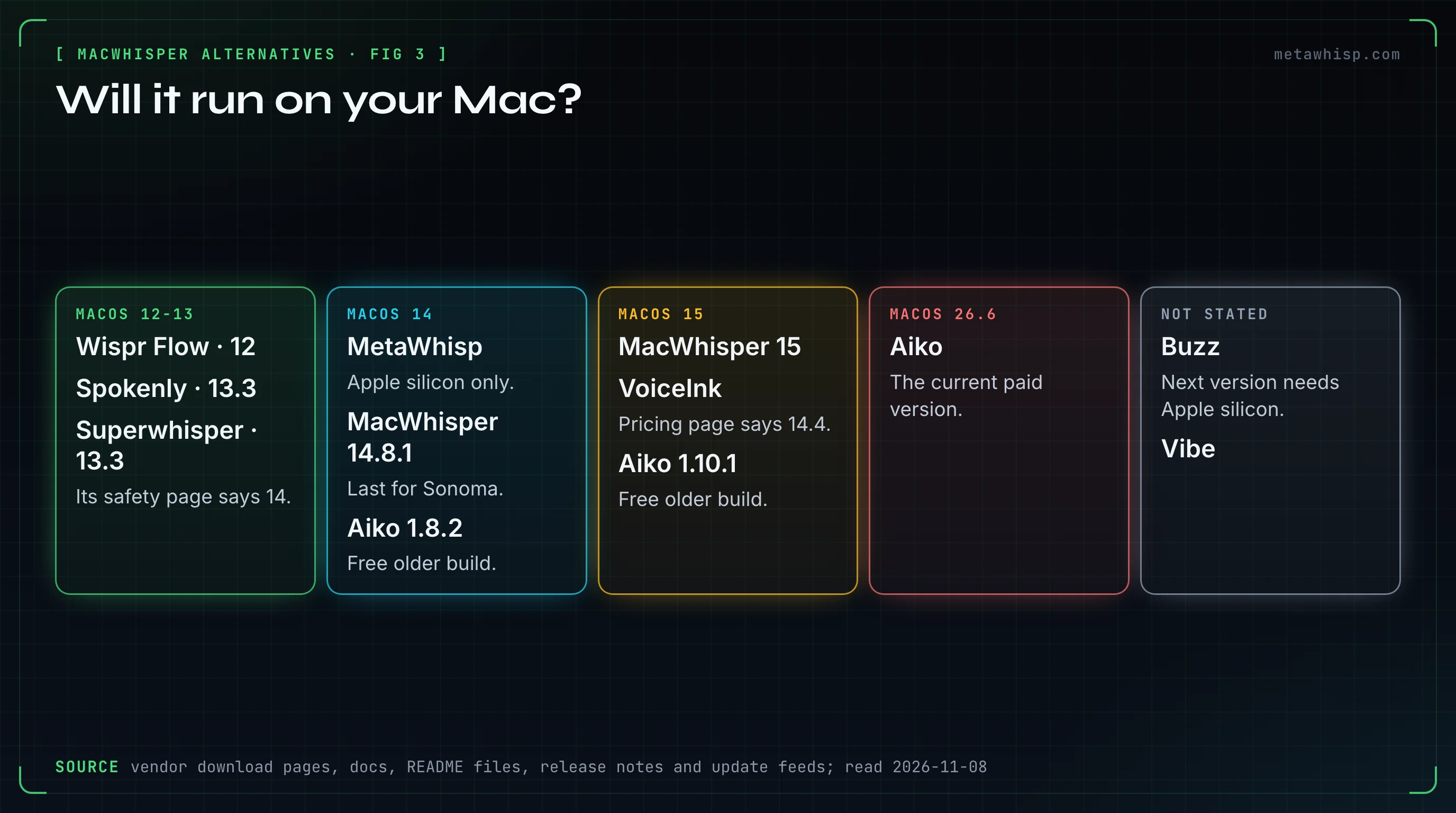
On an Intel Mac: Wispr Flow runs on "Apple Silicon or Intel", Spokenly says "Yes, with some limits", and MacWhisper "also works on Intel Macs". Superwhisper says "Intel Macs work best with Cloud models", Aiko calls transcription on Intel "very slow", and Buzz 1.4.5 is the last version for Intel. Vibe ships an Intel build. VoiceInk's pages disagree on Intel, and MetaWhisp needs Apple silicon.
Which Apps Do Reddit Users Name, and Where Does MetaWhisp Fit?
Few people in our count named another app at all. In the Mac dictation threads we read for our Reddit roundup, 52 people gave MacWhisper a verdict: 32 positive, 12 negative and 10 mixed (two count in more than one). Seven named another app: VoiceInk (3), and Superwhisper, Aqua Voice, Wispr Flow and Spokenly (1 each). All seven were talking about dictation, so this says nothing about file work.
Their reasons were practical. One said MacWhisper used far more memory than Superwhisper on their iMac. Another settled on Aqua Voice for real-time text and said MacWhisper drains their battery. One stayed on Wispr Flow because it handles two languages in one dictation, and one moved to Spokenly, calling these apps overpriced.
Where MetaWhisp, our app, fits, limits first. It can't open or transcribe audio files at all: no m4a, mp3 or wav, no batch, no YouTube links and no subtitles. For that, use MacWhisper's free version, Buzz, Vibe, Aiko, VoiceInk or Spokenly. It labels meeting speakers only as "Me" and "Them", saves transcripts and recaps rather than audio you can export, and runs only on Apple silicon Macs with macOS 14 or later, with no Windows, iPhone or Android app. Dictated text goes through the clipboard and replaces what was there.
What it does well: free, unlimited dictation into any app with Whisper large-v3 on your Mac, and free meeting recording with no bot and no virtual audio driver. It still runs on Sonoma, and its code is open source under the MIT licence. Pro, at $7.77 a month or $30 a year, moves transcription to the cloud with 5,400 minutes a month.
FAQ
Is there a free alternative to MacWhisper for transcribing files?
Yes. Buzz and Vibe are free and open source, run on Mac, Windows and Linux, and transcribe audio and video files. MacWhisper's own free version also transcribes files. Aiko used to be free but now costs $24 once.
Is Whisper Transcription on the App Store a MacWhisper alternative?
No. Whisper Transcription is MacWhisper's own App Store edition, from the same developer. It sells Pro through in-app purchases and doesn't have the direct version's system-wide dictation.
Can Wispr Flow transcribe audio files?
No. Wispr Flow's help center says you can't upload, attach or import an existing audio or video file for transcription on any platform or plan. It's built for live dictation, plus a meeting Notetaker.
Does MacWhisper still work on macOS 14 Sonoma?
Version 14.8.1 is the last for Sonoma; version 15 needs macOS 15, according to MacWhisper's release notes and update feed. Its Gumroad page still says 14.0 and higher.
Which MacWhisper alternatives work on Windows?
For files: Buzz and Vibe for free, plus Spokenly and Superwhisper Pro. For dictation, Superwhisper, Spokenly and Wispr Flow. MacWhisper itself has no Windows version.
Which alternatives label speakers for free?
Buzz and Vibe, and Spokenly appears to with its free local models. Superwhisper's speaker separation is Pro, and MetaWhisp labels only "Me" and "Them" in the meetings it records.
How we checked
On November 8, 2026, we read each app's website, pricing page, docs, GitHub repository and release notes or update feed, Apple's guides for Dictation, Voice Memos and Notes, and the App Store listing for Whisper Transcription. We didn't install or run these apps for this piece. Reddit counts come from the threads we read for our October 2026 Mac dictation roundup, counted by person, with thread authors, self-promotion and copied text left out. Prices and versions change, so check the vendors' pages before you buy.
Related reading
- MacWhisper Pricing 2026
- VoiceInk Alternatives
- MetaWhisp vs MacWhisper
- Best Dictation App for Mac, According to Reddit
- Best Local Transcription Apps for Mac
Sources
- MacWhisper: website and feature table, Gumroad page, MacWhisper vs Whisper Transcription, meeting recording, release notes, update feed
- Buzz: GitHub repository, command line, installation, FAQ
- Vibe: GitHub repository
- Aiko: website and FAQ
- VoiceInk: pricing, file transcription, installation, iPhone app
- Spokenly: pricing, downloads, docs summary, dictation for Mac, Android page
- Superwhisper: plans, file transcription, meetings, home page, downloads, safety page
- Wispr Flow: pricing, audio file uploads, Notetaker, what Flow is, system requirements
- Apple: Use Dictation on Mac, Voice Memos transcription, Notes recordings
- Reddit threads summarized: r/macapps, r/macapps, r/macapps
- MetaWhisp: pricing, privacy, source code
