What happened to it, and what to use instead
Short answer: no, not on a current Mac. Soundflower's last release is 2.0b2, a beta from December 19, 2014 (UTC). Its GitHub page now opens with "DEPRECATED Silicon Macs are not supported", and macOS 27 runs only on Apple silicon Macs. If an old tutorial tells you to install Soundflower, install BlackHole instead: it's free, it does the same job, and it needs no kernel extension. Loopback, at $99, is the paid option. And if all you want is to record what your Mac plays, macOS 27 can now do that by itself.
Key takeaways
- Soundflower's driver code hasn't changed since December 19, 2014. Its README has said "DEPRECATED Silicon Macs are not supported" since December 7, 2024.
- It's a kernel extension with no Apple silicon build. Rosetta can't translate kernel extensions, and macOS 27 runs only on Apple silicon, so no Mac on the current macOS can load it.
- BlackHole is the free replacement for routing audio between apps. It needs no kernel extension and no change to your Mac's security settings.
- Loopback costs $99. Its free trial has every feature, but the audio is degraded after 20 minutes.
- To just record what your Mac plays, macOS 27's screen recording has an Include System Audio option, and OBS 30 can capture desktop audio without a driver.
Does Soundflower Still Work on Mac in 2026?
Not on any Apple silicon Mac, and that covers every Mac that runs macOS 27. Soundflower's release notes say "M1 chip-based Macs are NOT YET SUPPORTED", and its README marked the project deprecated in December 2024. Homebrew, which used to install it with one command, deprecated its Soundflower package in November 2024 and disabled it on November 16, 2025.
| Your Mac | Does Soundflower work? | Who says so |
|---|---|---|
| Apple silicon (any M-series or A-series chip), any macOS | No | Soundflower's README and release notes |
| Any Mac on macOS 27 | No: macOS 27 runs only on Apple silicon | Apple Support |
| Intel Mac, macOS Big Sur 11.1 or earlier | Yes, according to the release title | Soundflower 2.0b2 release notes |
| Intel Mac, macOS 12 to 26 | The developer doesn't say | No official statement |
Soundflower's own pages don't agree with each other. The repository description still says it "works on macOS Catalina", the release is titled "Signed Version for macOS Big Sur (11.1) and earlier", and the README says it's deprecated. The README has also promised "New version coming shortly!" since December 7, 2024, while the last change to the driver's code is from December 19, 2014.
Who Made Soundflower, and Who Maintains It Now?
Matt Ingalls wrote it for Cycling '74, which maintained it at first. In 2014, Cycling '74 passed it to Rogue Amoeba, and at the end of 2015 Matt Ingalls took it over again. Rogue Amoeba says it "lacked the time and resources needed to manage the product", and its Soundflower page now says "Looking for Soundflower? Consider Loopback", its own paid app.
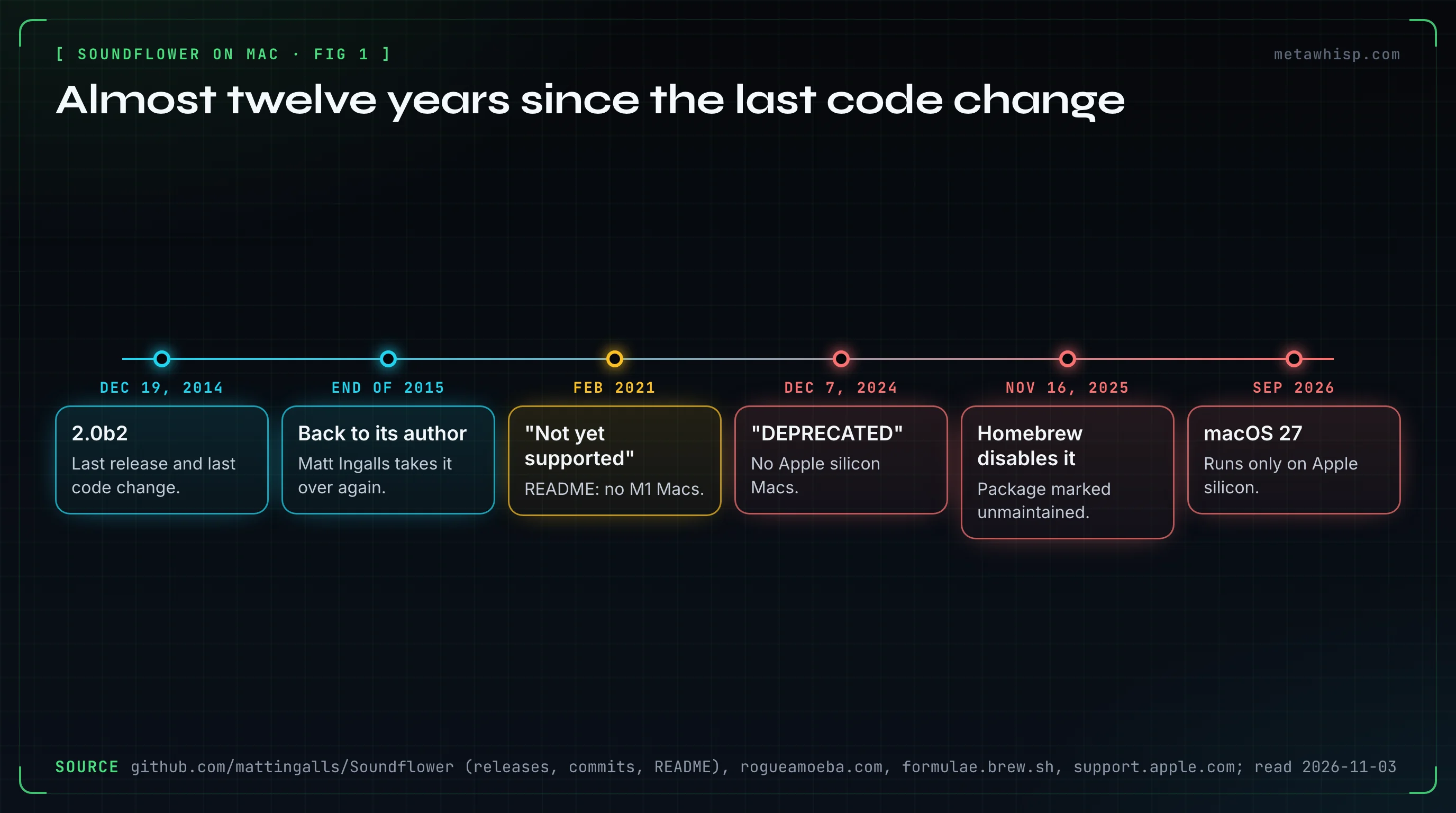
The project lives on GitHub under an MIT license, and it has only two releases: 2.0b1 on December 1, 2014, and 2.0b2 on December 19, 2014. It added two virtual audio devices, "Soundflower (2ch)" and "Soundflower (64ch)". The SoundflowerBed menu bar app that many tutorials show is retired.
Why Won't Soundflower Install on an Apple Silicon Mac?
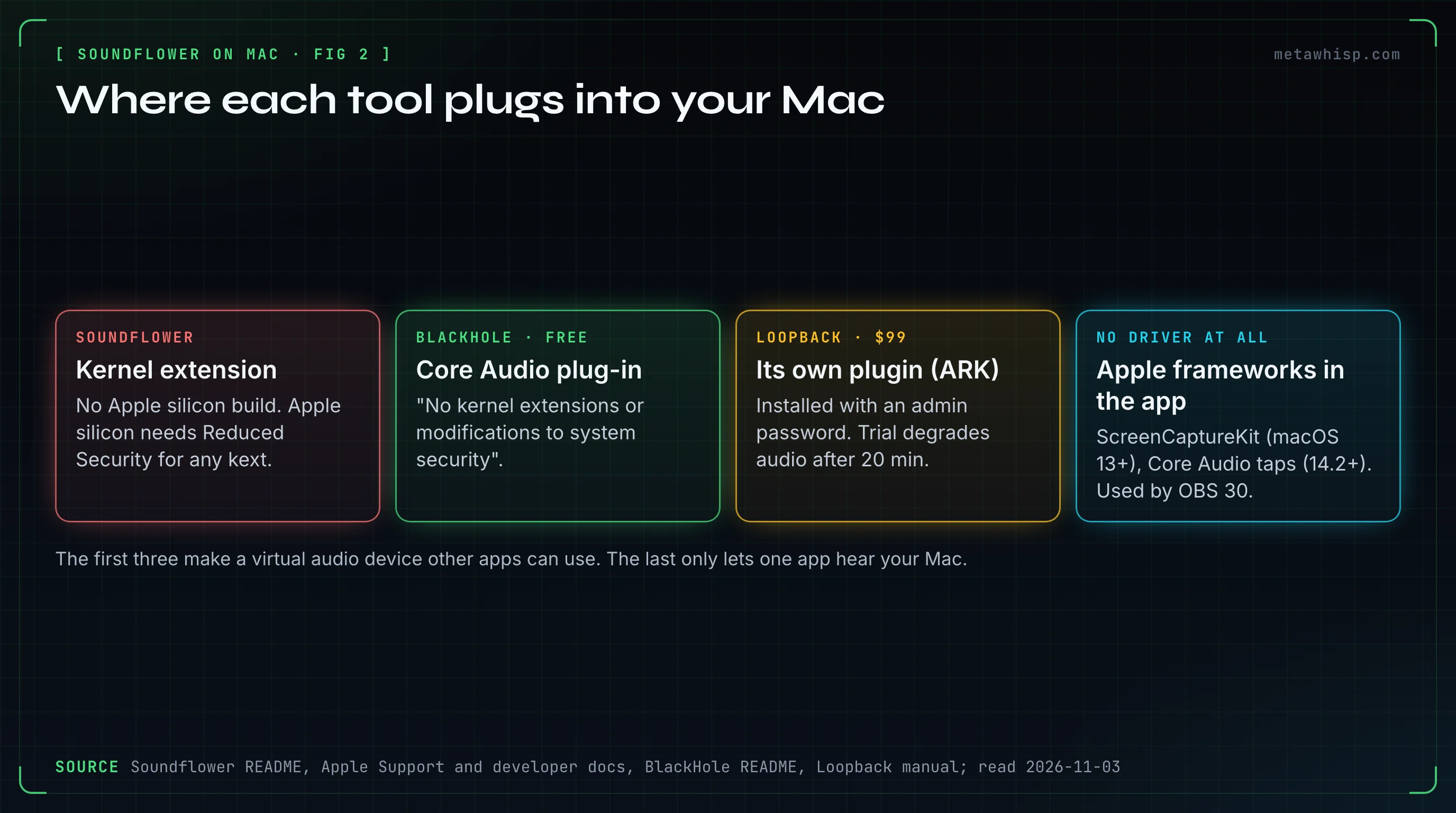
Because it's a kernel extension, and it has no Apple silicon build. Apple says a kernel extension can only be installed on an Apple silicon Mac after you lower the startup security policy to Reduced Security. Even then there's nothing to load: Soundflower ships only for Intel, and Rosetta, which runs Intel apps on Apple silicon, doesn't translate kernel extensions.
- Kernel extensions are on their way out. Apple's security guide says "Kexts are no longer recommended for macOS", and Apple announced that macOS Catalina 10.15 was the last version to fully support them.
- Lowering security has a cost. On Apple silicon you'd shut down, hold the power button, open Startup Security Utility, pick Reduced Security and tick "Allow user management of kernel extensions from identified developers". Apple notes that with kernel extensions loaded, Apple Pay may not work.
- Homebrew agrees. Its Soundflower package was marked unmaintained and lists Intel as a requirement.
Can You Still Run Soundflower on an Older Intel Mac?
Maybe, if it runs macOS Big Sur 11.1 or earlier, the newest version the release names. The kernel extension is signed, but the installer isn't, so macOS blocks it until you Control-click to open it. Its release notes say the first run will fail: you approve the extension, then run the installer a second time. On macOS 12 to 26, the developer makes no promise either way, and Homebrew can no longer install it.
If you still want it, the only official download is the 2.0b2 release on the mattingalls/Soundflower GitHub page. On macOS Sequoia 15 and later, Apple moved extension approval to Login Items & Extensions in System Settings. In our view, though, an Intel Mac is better served by BlackHole too: it supports Intel and Apple silicon and runs on macOS 10.10 Yosemite and newer, so the same setup carries over when you change Macs.
What Is the Free Replacement for Soundflower?
BlackHole, from Existential Audio. It's "a modern macOS virtual audio loopback driver" that passes audio from one app to another, built for Intel and Apple silicon. Unlike Soundflower, it needs "No kernel extensions or modifications to system security". You can download it free, with an optional $10 donation, or install it with Homebrew.
- Versions: 2, 16 and 64-channel builds. With Homebrew it's
brew install blackhole-2ch, or-16chand-64ch. - Current release: 0.7.1, published July 3, 2026. Since 0.6.1 the installer makes you restart, "as recommended by Apple".
- License: the source code is GPL-3.0. The official installers, the name and the logo are Existential Audio's.
- Known limits: its README says you can't change a Multi-Output device's volume in macOS, and that Apple Podcasts and Messages don't work with Multi-Output devices.
To hear the audio while BlackHole captures it, you combine your speakers and BlackHole into a Multi-Output device in Audio MIDI Setup. Our BlackHole setup guide walks through it, and if you change your mind later, here's how to uninstall BlackHole cleanly.
What About Loopback, the Paid Replacement?
Loopback is Rogue Amoeba's app for building virtual audio devices that combine audio from apps and from microphones or other inputs. A license costs $99 for one user on one or more Macs, or $49 to upgrade from Loopback 1. The free trial has every feature, but audio passing through it is degraded after twenty minutes. Version 2.5.1, from October 26, 2026, supports macOS 14.5 to 27.
Loopback installs its own Audio Routing Kit plugin, which asks for an administrator password, and you remove it with Help > Uninstall Loopback. Rogue Amoeba also sells a $134 bundle with Audio Hijack, its recording app, and considers refunds within 14 days of purchase. The difference is how you build the routing: BlackHole is one blank virtual device that you combine with your speakers in Audio MIDI Setup, while Loopback builds a device from the specific apps and inputs you pick.
Do You Still Need a Virtual Audio Driver Just to Record What Your Mac Plays?
Often you don't. In macOS 27 or later, the Screenshot toolbar's screen recording has an Include System Audio option. OBS Studio 30 on macOS 13 or later has a macOS Audio Capture source that grabs all desktop audio or a single app without any driver. Before macOS 27, Apple's own screen recording offered only a microphone.
Apps like OBS use two newer Apple frameworks. ScreenCaptureKit can capture audio from macOS 13, and Core Audio process taps arrived in macOS 14.2. Apps built on either one can record your Mac's sound once you grant them permission, with no virtual driver involved. Background Music, a free open-source app under the GPL, takes the other route: it installs its own virtual audio device that QuickTime can record, and its 0.5.0 release from June 10, 2026 installs without Rosetta. For more ways to do it, see how to record internal audio on Mac.
Which Soundflower Replacement Fits Your Job?
It depends on what you used Soundflower for. To route live audio into another app, like a game's sound into a Zoom call or OBS, use BlackHole for free or Loopback for $99. To record what the Mac plays into a file, macOS 27's screen recording, OBS or Background Music will do. To get a written transcript of your calls, you don't need any driver at all.
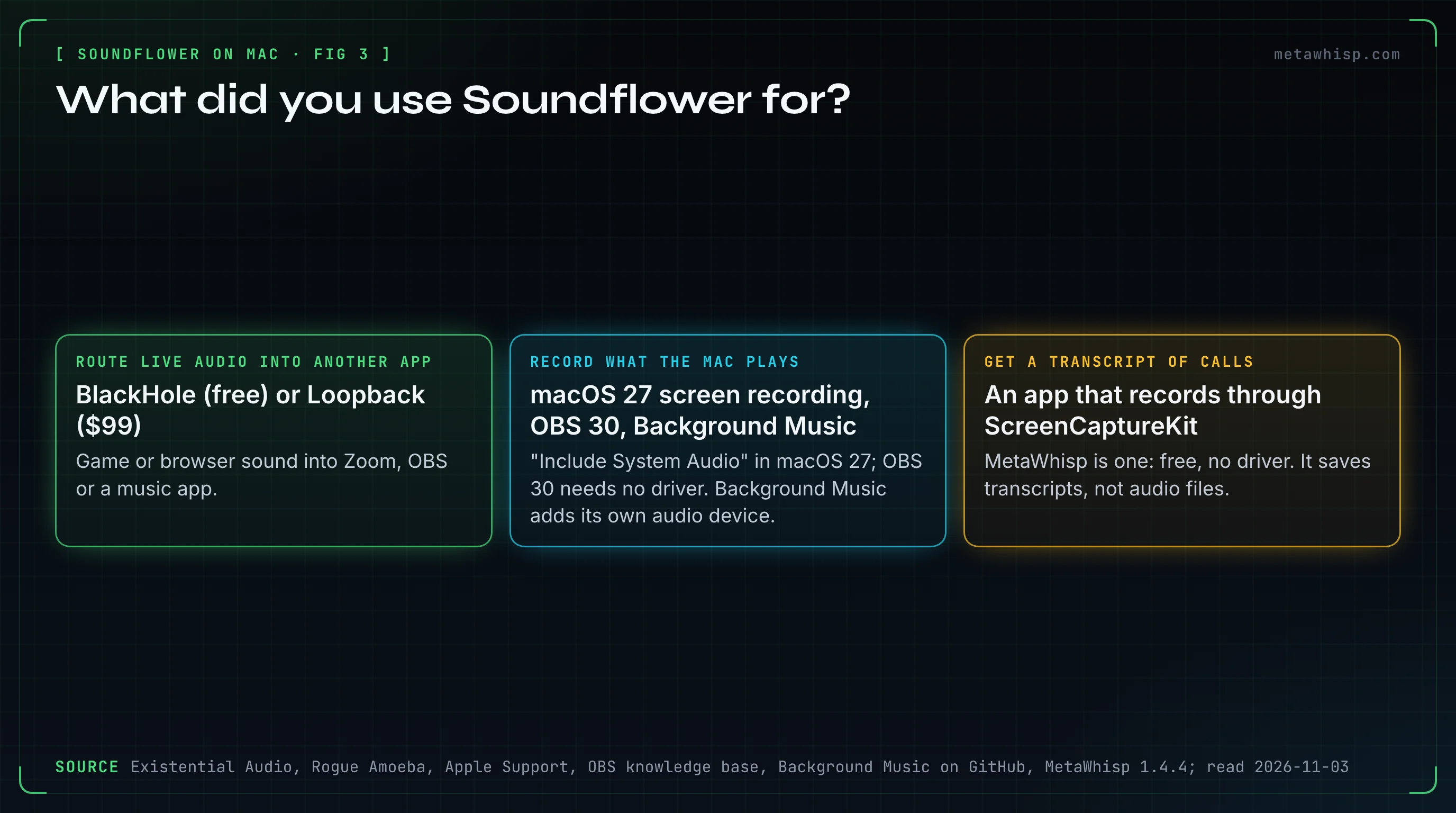
That last job is where MetaWhisp, our app, comes in. It records your microphone plus your Mac's own audio through Apple's ScreenCaptureKit, so there's no BlackHole or Soundflower to install, and no bot joins the call. Meeting recording is in the free version: turn on Meeting Recording in Settings, under Meetings (it's off by default), then start a recording from the menu bar. The free version transcribes on your Mac with Whisper large-v3.
It isn't a Soundflower replacement for everything, though. It saves transcripts and recaps, not audio files, and it can't route sound into another app. It labels speakers only as "Me" and "Them", it sends no notice to the other people on the call, and it runs only on Apple silicon Macs with macOS 14 or later. For more on that route, see how to record and transcribe any call on Mac.
How Do You Remove an Old Soundflower Install?
Soundflower's README gives the steps: find the Soundflower.kext file in /Library/Extensions and in /System/Library/Extensions, drag it to the Trash, run sudo touch /Library/Extensions/ in Terminal, and restart the Mac. Some guides give a different path, a .driver file in the HAL plug-ins folder. The developer's own instructions name the .kext file.
Once it's gone, open System Settings, then Sound, and make sure Output and Input point at your real speakers and microphone, not at a Soundflower device that no longer exists.
FAQ
Is Soundflower free?
Yes. Soundflower is open source under the MIT license and costs nothing. The catch is age, not price: its last release, 2.0b2, is a beta from December 19, 2014, and it has no build for Apple silicon Macs.
Is Soundflower safe to install?
Its kernel extension is open source and signed, but it hasn't been updated since 2014, Apple no longer recommends kernel extensions, and Apple silicon Macs would need Reduced Security to load one. Homebrew has disabled its package. If you must, download it only from the official GitHub release.
Does Soundflower work on M1, M2, M3 or newer Macs?
No. Soundflower's README says "Silicon Macs are not supported", and its release notes say M1 Macs aren't supported. Rosetta can't translate kernel extensions, so there's no workaround. Use BlackHole or Loopback instead.
Does BlackHole need Reduced Security or a kernel extension?
No. BlackHole's README says it needs "No kernel extensions or modifications to system security". It installs as an audio plug-in, works on Intel and Apple silicon Macs, and the installer makes you restart once.
Can a Mac record system audio without extra software?
On macOS 27, yes: the screen recording in the Screenshot toolbar has an Include System Audio option. On earlier versions, Apple's screen recording only offers a microphone, so you need an app like OBS Studio or a driver like BlackHole.
Is there a free trial of Loopback?
Yes. Loopback's trial includes every feature, but audio passing through its virtual devices is degraded after twenty minutes. A license costs $99 for one user on one or more Macs.
How we checked
On November 3, 2026, we read Soundflower's GitHub repository, its two releases and its commit history, Rogue Amoeba's Soundflower and Loopback pages, Existential Audio's BlackHole site and README, Apple's support and developer documentation, and Homebrew's package records. We didn't install Soundflower for this piece. Versions, prices and dates are as those pages showed them on that day.
Related reading
- BlackHole Audio on Mac: Install & Setup Guide
- How to Uninstall BlackHole on Mac
- How to Record Internal Audio on Mac
- Record and Transcribe Any Call on Mac
Sources
- Soundflower: GitHub repository and README, releases, Rogue Amoeba's Soundflower page, Homebrew cask record
- Apple: startup security settings, securely extending the kernel, legacy system extensions, Rosetta translation environment, macOS 27 compatibility, screen recording, ScreenCaptureKit audio, Core Audio taps
- BlackHole: Existential Audio, GitHub README, releases
- Loopback: product page, pricing, trial and refunds
- Other tools: OBS macOS desktop audio capture, Background Music
