567 posts and comments in 35 threads, read and counted
Notion records your calls now. Yes, Notion, the docs-and-databases app. Since May 2025 it has had a meeting recorder built into its pages, and on Reddit it splits opinion almost down the middle. We read 35 Reddit threads about the feature. Of the 137 people who gave a clear verdict, 58 were positive, 62 negative and 30 mixed (12 of them posted more than one kind). Fans love the summaries and having their meetings inside Notion. Critics name missing or mixed-up speaker labels and the Business plan you need to use it.
Here's the twist. In August 2025, the most upvoted reply in r/Notion's "Is AI Meeting Notes worth the money?" thread told people they already had the same thing in ChatGPT Plus, through the Record button in ChatGPT's Mac app. In July 2026, users reported that button missing from ChatGPT's new Mac app.
Key takeaways
- Reddit is split: 58 positive, 62 negative and 30 mixed among 137 people with a verdict. The praise goes to notes that land in Notion (18 people) and the summaries (17).
- Who said what is the most one-sided complaint: 24 people complained about missing or wrong speaker labels, and 1 praised them. Notion says labeling works best in one-on-one calls, and in English only.
- Price is the most discussed point. Notion's help page puts AI Meeting Notes on Business ($20 per seat a month billed yearly), whose seats now come with 1,500 monthly Standard AI credits (for existing customers from November 2). 20 people complained about the plan or a trial running out; 13 called it good value.
- By default, it notifies no one. Starting a transcription counts as your word that everyone agreed. A voice message, a text to paste and a Google Meet add-on can tell people for you.
- On a computer, live audio goes straight to Notion's cloud sub-processors, six of them, including OpenAI and AssemblyAI, which Notion says don't keep it.
Why Is Notion Recording Your Calls at All?
Notion's own pitch is meeting notes that "keep all your ideas and decisions in one place", next to your docs. AI Meeting Notes arrived in Notion 2.51 on May 13, 2025, as "a new kind of block" that transcribes a call and summarizes it inside your page, taking the notes you typed into account. It launched alongside enterprise search and Notion's new all-in-one AI pricing, and Notion's pricing page lists it among the features of the Business plan.
It still surprised us. Notion is where you write docs and track projects, and now its desktop app asks for screen and system audio recording permissions, so it can hear the other side of a call while you wear headphones. Our read, and it's only an opinion: a transcript is just another page, and Notion wants every page your work produces. A recorder bundled into Business also makes that plan harder to skip.
The bigger surprise came from ChatGPT. By users' accounts, its Record button didn't survive the move to OpenAI's new Mac app. On July 9, 2026, OpenAI renamed its old Mac app ChatGPT Classic and started prompting users to download a new ChatGPT app. Three days later, a bug report on GitHub said the Record button, which recorded meetings and wrote notes, hadn't made the move. The report is still open, and a commenter confirmed that Record still works in the Classic app. An OpenAI forum thread with the same complaint got one staff reply, in late September, asking whether the user's plan was eligible, and was closed in October.
OpenAI's Record help page now opens by pointing to something else: a Meetings plugin, in beta on the Mac for Pro and Business plans. Its own help page says Meetings "is separate from the Record feature in the older ChatGPT desktop app". So both companies now keep their newest meeting recorder for their higher-priced plans: Notion's Business and Enterprise (Free and Plus get only a trial), ChatGPT's Pro and Business.
What Does Reddit Think of Notion AI Meeting Notes?
It's split. In the 35 Reddit threads we read, 137 people gave a clear verdict: 58 positive, 62 negative and 30 mixed. Fans praise the summaries and having meetings inside Notion. Critics name speaker labels, the Business-plan requirement and transcriptions that stop partway through. 32 of the 35 threads are in r/Notion. They started between May 2025 and September 2026.
| Point raised | Praised | Complained |
|---|---|---|
| Who said what | 1 | 24 |
| Price and plan | 13 | 20 |
| Reliability and capture | 9 | 17 |
| Phones and languages | 9 | 16 |
| Where things are in the app | 8 | 9 |
| Transcript accuracy | 7 | 6 |
| Summaries and action items | 17 | 5 |
| Notes live in Notion | 18 | 5 |
| No bot in the call | 6 | 0 |
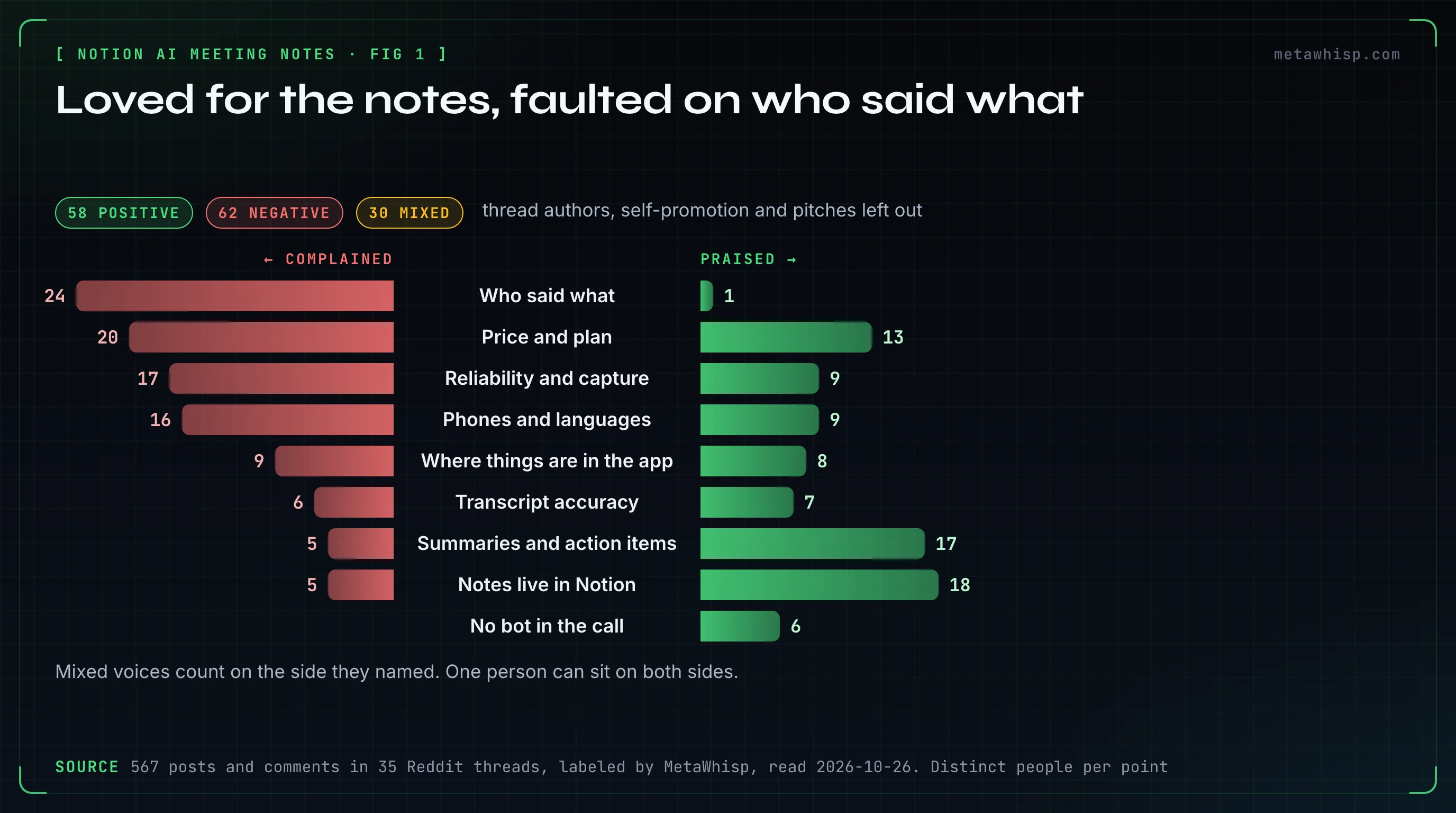
Read these as "in these threads", not "of Notion users". Several of our searches named a problem, like accuracy, speaker labels or mobile, and that pulls in complaint threads. Self-promotion was heavy, so on top of the usual exclusions we set aside 59 comments that read as self-promotion. Seven of them, from four accounts, linked the same App Store app with Reddit campaign tags in the link. Counting the people who started the threads, the totals rise to 66 positive, 75 negative and 39 mixed. The split holds.
Why Do People Like Notion AI Meeting Notes?
Because the notes land where the rest of their work already is. 18 people praised having meetings inside Notion, next to projects and databases they can search with Notion AI, and 17 praised the summaries and action items. 6 also singled out that no bot joins the call, so nobody has to let a recorder in.
- One place for everything: in an April 2026 r/Notion thread asking whether meeting transcribing is worth it, one user grants that Granola may be the better standalone app, but says "having all knowledge in a single app (Notion) is unbeatable". Another reply in the same thread feeds tasks from the transcript straight into a task database.
- The summaries: in a May 2025 thread from the alpha, days before the launch, one reply called it a godsend for avid note takers, with a transcript and summary you can both edit. A September 2025 reply describes what you get, in three tabs: the full transcript, a summary, and key points with tasks.
- No bot: one April 2026 reply calls it a huge win that it doesn't join as a participant, so there are no hosts rejecting bots. One August 2025 reply from a research scientist, with 12 upvotes, said the meeting notes alone made the Business plan worth the price.
What Do People Complain About?
Mostly three things. 24 people complained about who said what: some say it didn't label speakers at all, as late as April 2026; others, since September 2025, say summaries swap the host and the guest, even on one-on-one calls. 17 complained about reliability, chiefly transcriptions that stop partway through a meeting. And 16 complained about phones and languages, from recording that pauses on iPhone to an English meeting transcribed in Russian. The Business-plan requirement gets its own section below.
- Who said what: in a September 2025 thread, a user who runs Notion and Granola on the same one-on-one calls says Granola never mixes the speakers up, while Notion is inconsistent. In a March 2026 thread about Notion confusing the host with the guest, a Business-plan user says they "can't trust them at all". Another has to ask Notion AI to swap the attribution after every meeting. In July 2026, one user found a fix that worked for them: in the transcription settings, they set the microphone to their headset instead of the computer, and the mix-ups dropped sharply.
- It stops: in July 2025, an r/Notion user reported transcription stopping three times in one day, with a "high demand" notice that showed only inside Notion. Replies kept reporting stops in November 2025 and March 2026, including a 30-minute meeting that couldn't be found. Others said calls lagged while it ran; an April 2026 reply says that slowdown was fixed.
- Phones: on iPhone it can only record what's in the room, and users in January 2026 said recording still paused when they switched apps; one thread author said it worked after an update. In February, one user said Notion support had confirmed it was a known issue. We couldn't check whether it's fixed.
- Languages: one team's first meeting, held in English, came out transcribed in Russian, with no way to re-run it. A July 2026 thread reports conversations repeatedly transcribed into Thai. One user runs it in Portuguese without trouble. Check the language setting before you start.
How Much Does Notion AI Meeting Notes Cost?
It comes with Notion's Business plan, $20 per seat a month billed yearly or $24 billed monthly, and with Enterprise, which is priced on request, as of October 26, 2026. Free and Plus include only a trial of Notion AI, and the help page also lists eligible mobile subscriptions that include Notion AI. The feature is capped at 10 hours a day per user.
The pricing is shifting, too. Since October 19, 2026, Notion AI runs on monthly credits, and meeting notes use Standard credits: a Business seat includes 1,500 a month, and Notion expects the vast majority of users not to run out. Existing customers move over on November 2. Notion's pages also disagree with each other right now: the redesigned pricing page ticks meeting notes on every plan, while giving Free and Plus only a limited trial of those credits. The help page still says Business or Enterprise.
That gate is the most discussed point in the threads. 20 people complained about the plan or a trial running out: solo users, students and people on older Plus plans. One September 2025 commenter wasn't willing to pay for Business just for that one feature. In a thread about the student discount, one commenter decided Notion's education AI plan was pointless without it. On the other side, 13 people called it good value. A May 2025 reply pointed out that Granola then charged $18 a month for this one job alone.
The most upvoted money-saving tip in the threads pointed to ChatGPT. The most upvoted reply in "Is AI Meeting Notes worth the money?" said ChatGPT Plus already did the same thing through the Record button in its Mac app. One reader said that stopped them buying Notion AI; another, two months later, regretted already having paid for it. In all, 8 people named ChatGPT as an alternative. That tip now comes with a catch: OpenAI's Record page still lists Plus, but users say the button is gone from the new Mac app and survives in ChatGPT Classic, and the new Meetings plugin is for Pro and Business.
Does Notion AI Meeting Notes Notify Others?
Not by default. When you click Start transcribing, Notion treats it as you confirming that everyone agreed to be recorded. It gives you tools to ask: a consent text to paste into the meeting chat, a voice message it plays through your speakers, and, with its Google Meet add-on for Chrome, a pinned chat message and a recording indicator. A workspace owner can make the voice message play every time.
One catch with the voice message: Notion says it plays through your computer speakers, not into the call's microphone, and asks you to unplug headphones so people in the room can hear it. In our view, pasting the text into the chat is the surer way to reach everyone on a video call. Notion's help page recommends following the strictest consent law that might apply and asking every participant, including people who join late. This isn't legal advice.
On Reddit, consent barely came up: only 2 people gave a verdict on it. One warned that the feature lets you possibly break the law where you live by not telling the other side. Another counted it as a plus that it doesn't force you to ask for consent. A May 2025 commenter also noted that nothing in the meeting window shows it's running. So by default, the people on the call only know if you tell them.
Does It Work With Headphones, in Person and on Your Phone?
With headphones, use the desktop app: it records your microphone and your computer's audio, so it hears the other side of the call. In a browser it only hears your microphone, so with headphones on it misses everyone else. The phone app only hears the phone's microphone. That suits a meeting in a room, but not a call in your earbuds.
- Who said what: the desktop app can label speakers, and it works best in a one-on-one video call, where it captures both your microphone and your computer's audio. Linked to a calendar event, it can name the other person. In a room, in group calls, in a browser or on a phone, labels get unreliable, except group Google Meet calls, where Notion's Chrome add-on supplies labels on desktop. Speaker labels work in English only.
- Languages: Notion lists 16 for transcription: English, Chinese, Spanish, French, German, Japanese, Korean, Portuguese, Russian, Thai, Vietnamese, Danish, Finnish, Norwegian, Dutch and Swedish.
- Offline: not supported. You also need at least about a minute of speech, 300 transcribed characters, before it writes a summary.
- Files: you can upload an AAC, M4A, MP3 or WAV recording to a meeting block and get a transcript and summary. Notion's help says MOV, MP4 and Loom files aren't supported for that upload.
Reddit users mostly confirm this. The author of an August 2025 thread took a call in Bluetooth earbuds on a MacBook and said it worked flawlessly with no adjustments. On iPhone, users describe the room-only limit. 6 people praised how it captures audio, and none complained about the capture itself.
Where Does Your Meeting Audio Go?
To the cloud, briefly. In the desktop app and the browser, live audio goes straight to Notion's sub-processors for real-time transcription. Notion names six, OpenAI, Anthropic, Fireworks, Baseten, xAI and AssemblyAI, and says they don't store audio. A temporary copy on your computer is deleted after processing or within 24 hours. If processing fails, the audio goes to Notion's servers for up to 3 days so it can try again.
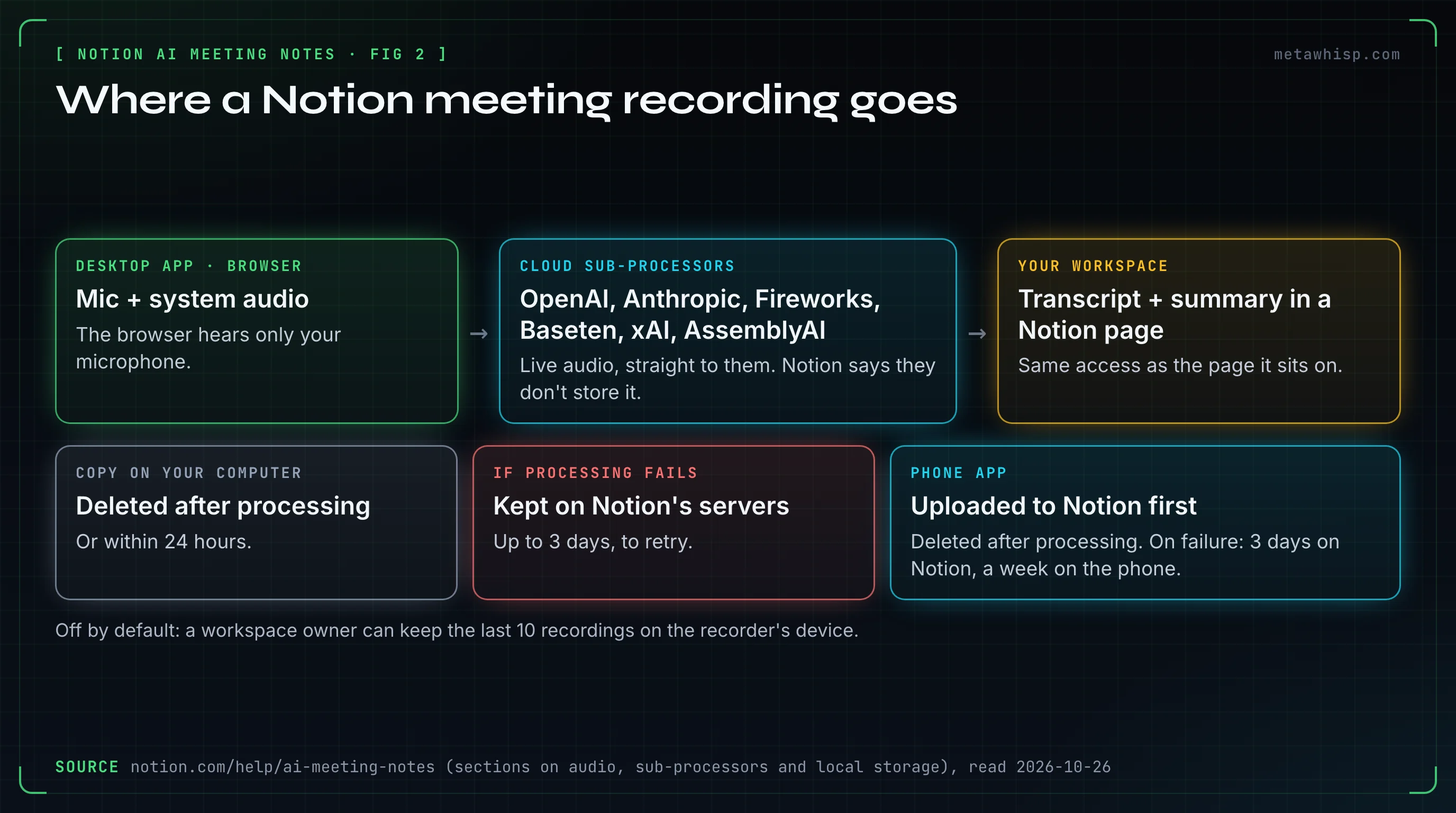
The phone app works differently: it uploads the audio to Notion's servers first, and deletes it there once the notes are done. If processing fails, Notion keeps it for up to 3 days and your phone for up to a week. Keeping the last 10 recordings on your own device is off by default; a workspace owner can turn it on, and only the person who recorded can download them. Uploaded audio files are different: they stay on Notion's servers until you delete them. The transcript and summary live in a Notion page and have the same access as the page they sit on. On Enterprise, an owner can also set transcripts to delete on a schedule.
On Reddit, a May 2025 commenter believed it runs locally; Notion's help page says live audio goes to those cloud providers. Another said Notion deletes the audio after transcription, which matches the help page. The flip side came up too: there's no recording to play back unless an owner turns on local storage. In August 2025, the research scientist above asked for a way to transcribe recordings made earlier. Uploading audio files is now on Notion's help page.
How Do You Turn Off Notion AI Meeting Notes?
Only a workspace owner can turn it off for everyone: Settings, then Notion AI, then switch off Workspace availability. If you just want the pop-ups that offer to take notes to stop, turn off Desktop meeting detection notifications under Settings, then Notifications. To hide the Meetings tab in the sidebar, turn on Hide meetings tab under Settings, then Notion AI.
About those pop-ups: Notion says the desktop app notices when another app, like Zoom, is using your microphone, and offers to take notes. It doesn't listen to do that, and it records only once you start AI Meeting Notes.
Notion AI Meeting Notes vs MetaWhisp: Which Should You Use?
If your team already works in Notion and pays for Business, Notion's recorder is, in our view, the better fit: notes land next to your docs, it labels speakers in English, and it has built-in consent tools. If you're on a Mac, don't want a Business plan just for meeting notes, and would rather transcribe on your own computer, look at MetaWhisp. It's our product, and it didn't come up in any of these threads, so weigh this section accordingly.
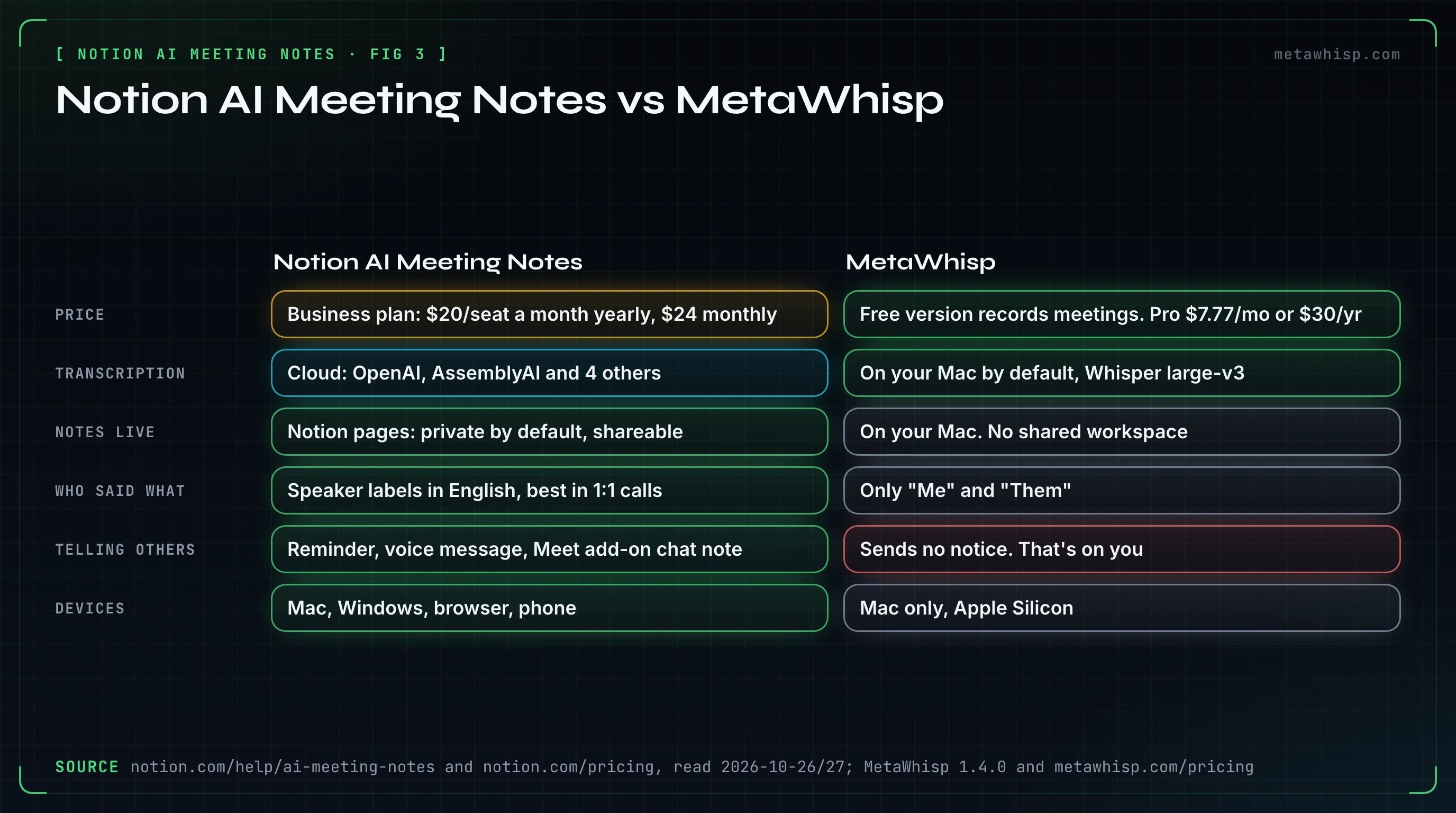
| Notion AI Meeting Notes | MetaWhisp | |
|---|---|---|
| Price | Business plan, $20 per seat a month billed yearly or $24 monthly, with 1,500 Standard AI credits a month; Enterprise on request | Meeting recording is in the free version; Pro is $7.77 a month or $30 a year |
| Bot in the call | No: the app records your device's audio | No: it records your mic and your Mac's audio |
| Devices | Mac, Windows, browser (mic only), phone (mic only) | Mac only: macOS 14 or later on Apple Silicon |
| Transcription | In the cloud: Notion names six sub-processors, including OpenAI and AssemblyAI | On your Mac by default, with Whisper large-v3; Pro or your own key can move it to the cloud |
| Where notes live | Notion pages: private by default, shared like any page | On your Mac; no shared workspace or share link |
| Who said what | Speaker labels in English, best in one-on-one video calls and, with the Chrome add-on, Google Meet | "Me" and "Them" only; in a room, every voice is "Me" |
| Telling others | Consent reminder, voice message, Google Meet add-on chat message | No notice of any kind; it's on you |
| Audio files | Upload AAC, M4A, MP3 or WAV | No audio-file import |
| Limits | 10 hours a day per user; uses the seat's monthly AI credits | No length cap on recordings you start; Pro's cloud has 5,400 minutes a month |
Here's how MetaWhisp handles a meeting. Turn on Meeting Recording in Settings, under Integrations; it's off by default. Then you start each recording from the menu bar or the Meeting Coach window, and it records your microphone plus your Mac's own audio. Recaps come from a local model if one is ready, otherwise from Pro's built-in AI or your own API key. There's no meeting hotkey, and call detection is off by default.
If you like Notion but not the Business plan, there's a middle path: keep writing in Notion and dictate into it. MetaWhisp types wherever your cursor is, Notion included: tap Right Command and talk. It won't file a meeting summary into a Notion database for you, though, because there's no Notion export. More in Notion voice to text on Mac.
FAQ
Does Notion AI Meeting Notes notify other participants?
Not by default. Clicking Start transcribing counts as your confirmation that everyone agreed. Notion gives you a consent text to paste and a voice message played through your speakers. With its Google Meet add-on it pins a chat message itself, and a workspace owner can make the voice message play every time.
Does Notion AI Meeting Notes work with headphones?
Yes, in the desktop app, which records your microphone and your computer's audio, so it hears the other side of the call. In a browser it only hears your microphone, so with headphones on it misses everyone else. The phone app can't hear people in your earbuds either.
How do I turn off AI Meeting Notes in Notion?
A workspace owner can turn it off for everyone under Settings, Notion AI, Workspace availability. To stop the pop-ups that offer to take notes, turn off Desktop meeting detection notifications under Settings, Notifications. Hide meetings tab, under Settings, Notion AI, removes it from the sidebar.
Can I use Notion AI Meeting Notes on the Free or Plus plan?
Mostly as a trial. Notion's help page says you need Business or Enterprise, or an eligible mobile subscription that includes Notion AI. Business costs $20 per seat a month billed yearly or $24 monthly. On Notion's redesigned pricing page, Free and Plus get a limited trial of the AI credits meeting notes run on. In our threads, 20 people complained about the plan or a trial running out.
Can Notion AI Meeting Notes tell who is speaking?
Partly. The desktop app labels speakers best in one-on-one video calls, and can name the other person if the note is linked to a calendar event. Labels get unreliable in rooms, group calls, browsers and phones, except group Google Meet calls with Notion's Chrome add-on, and work in English only. In our threads, 24 people complained about missing or wrong speaker labels.
Does Notion keep a recording of my meetings?
Not by default. On a computer, live audio goes straight to Notion's cloud providers for transcription, and Notion says they don't store it; the temporary copy is deleted after processing or within 24 hours. The phone app uploads audio to Notion first and deletes it after processing. An owner can turn on local storage of the last 10 recordings.
How we counted
On October 26, 2026, we ran 14 Google searches about Notion's meeting notes, such as "notion ai meeting notes reddit" and "notion ai meeting notes speaker labels reddit", and saved the Reddit threads on the first page: 38 threads. We kept 35. Two predate the feature, and in the third a developer showed off their own tool. Reddit itself blocks automated reading, so we read public copies of the threads, with every comment, from the Arctic Shift archive. In r/Notion threads we counted every post and comment, since the feature is the subject even when a comment doesn't name it; in the three threads elsewhere, only comments that name Notion. That gave 567 posts and comments from 372 accounts, from May 2025 to September 2026. We labeled each one as positive, negative, mixed, neutral or off-topic and noted the reasons. We counted each person once per verdict and left out thread authors, comments flagged as self-promotion by keyword, text copied between accounts, and 59 more comments that read as self-promotion. A mixed verdict counts as praise for the points the person liked and as a complaint for the points they didn't. We didn't test Notion AI Meeting Notes for this piece. We read what people wrote and checked their claims against Notion's pages.
Related reading
- Granola AI on Reddit: What 116 People Say About It
- Best AI Note Taker According to Reddit
- Notion Voice to Text on Mac: 3 Working Routes
- AI Note Taker for In-Person Meetings: What Works
- AI note taker without a bot
Sources
Notion's and OpenAI's pages, the GitHub issue, the OpenAI forum thread and the Reddit threads were read on October 26 and 27, 2026. Plans and settings change, so check Notion's pages before you rely on them. Reddit comment scores are from the archive copy and may differ from the live page.
- Notion: Take AI meeting notes in Notion, pricing, October 19, 2026 release notes, the new credit system, Notion AI FAQs, Notion 2.51 release notes, May 13, 2025
- OpenAI: ChatGPT Record, The Meetings plugin in ChatGPT, ChatGPT macOS app release notes, Moving to the new ChatGPT desktop app, GitHub issue 32576, OpenAI community forum thread
- Reddit threads quoted or summarized: r/Notion (worth the money?), r/Notion (is transcribing worth it?), r/Notion (alpha thread), r/Notion (speaker identification), r/Notion (host and guest mix-ups), r/Notion (transcription stopping), r/Notion (on mobile), r/Notion (iOS and iPad), r/Notion (transcribed in Russian), r/Notion (transcribed in Thai), r/Notion (opinions), r/Notion (education plan), r/Notion (too expensive), r/Notion (earbuds on a MacBook), r/Notion (where the audio goes)
- MetaWhisp: pricing, privacy
