A playbook for AI notes when everyone's at the same table
The quick answer: put one phone or laptop in the middle of a small table, use a multi-mic recorder or a room system for bigger groups, and tell everyone before you start. Otter, Granola, Fireflies, Fathom, Read AI, Fellow, Jamie, Plaud, Microsoft Teams and Zoom can all record a meeting in a room now. Getting the words down is the easy part. Knowing who said what is harder, because everyone in the room shares one microphone.
Key takeaways
- No bot joins a room. You record with a phone app, a laptop app, a wearable recorder or a conference-room system.
- On a call, apps can tell voices apart by audio channel. In a room everyone shares one mic, so many tools fall back to "Speaker 1" and "Speaker 2".
- Otter recommends keeping the mic within 3 feet of whoever is speaking. In large rooms it suggests several mics, or one per person.
- California, Florida, Maryland and Washington require everyone's consent to record a private conversation, and Illinois bans recording one secretly. Ask everyone before you start, then repeat it once the recorder is running so the announcement is on the recording. This isn't legal advice.
Can an AI Note Taker Record an In-Person Meeting?
Yes, and no bot is involved. Most major note takers now record a room through a phone app, a laptop app or a dedicated recorder. Fathom joined them with an iPhone app first released on the App Store on September 30, 2026. The catch is speaker labels: in a room, many tools fall back to "Speaker 1" and "Speaker 2".
| Tool | Phone | Computer | Other |
|---|---|---|---|
| Otter | iOS and Android apps | Browser or desktop app, using the device mic | External mics supported |
| Granola | iOS and Android apps, built for in-person meetings | Desktop app: the room lands on your mic channel | — |
| Fireflies | Mobile app | Web Recorder, or the desktop app's "Take Notes" with no bot | — |
| Fathom | iPhone app, on every plan | Desktop apps are for calls | — |
| Read AI | iOS and Android apps, with a live transcript | Desktop "Record": mic plus system audio | — |
| Fellow | iOS and Android, no bot | Mac and Windows, no bot | — |
| Jamie | iOS and Android apps | Mac and Windows apps | — |
| Plaud | App for syncing and transcripts | — | NotePin wearable; Note and Note Pro recorders |
| Microsoft Teams | Teams mobile, "Take notes with Facilitator" (needs a Copilot license) | — | Teams Rooms with an intelligent speaker |
| Zoom | My Notes on mobile, in-person only | My Notes in the Zoom Workplace app | Not designed for Zoom Rooms |
| ChatGPT | — | Record in the macOS app, on paid plans | — |
| MetaWhisp | — | Mac app: mic plus Mac audio, no bot | — |
Two of the top-ranking "best of" lists we read are already out of date: one says Fathom is online-only and Granola can't capture a conference room, and the other says Granola has no phone app. Granola's docs describe its phone apps as built for in-person meetings, and Fathom's iPhone app records them on every plan, Free included.
New or coming soon
- Fathom's iPhone app records in-person meetings on all plans. Its first App Store release was September 30, 2026, and it needs an internet connection to record.
- Plaud's speaker-labeling help page, edited October 14, 2026, says auto-labeling names only your own voice. Everyone else is Speaker 1, Speaker 2 and so on.
- Microsoft's roadmap lists Facilitator for in-person-only meetings in Teams Rooms as in development, targeting October 2026 on Windows and November 2026 on Android.
Why Is a Room Harder Than a Call?
On a call, the app gets each side as separate audio. In a room, it doesn't. Granola's docs say everyone in the same room as you lands on your microphone channel, while remote callers arrive on a separate system-audio channel. Microsoft says that without speaker recognition, in-room voices in a hybrid Teams meeting are attributed to the room itself.
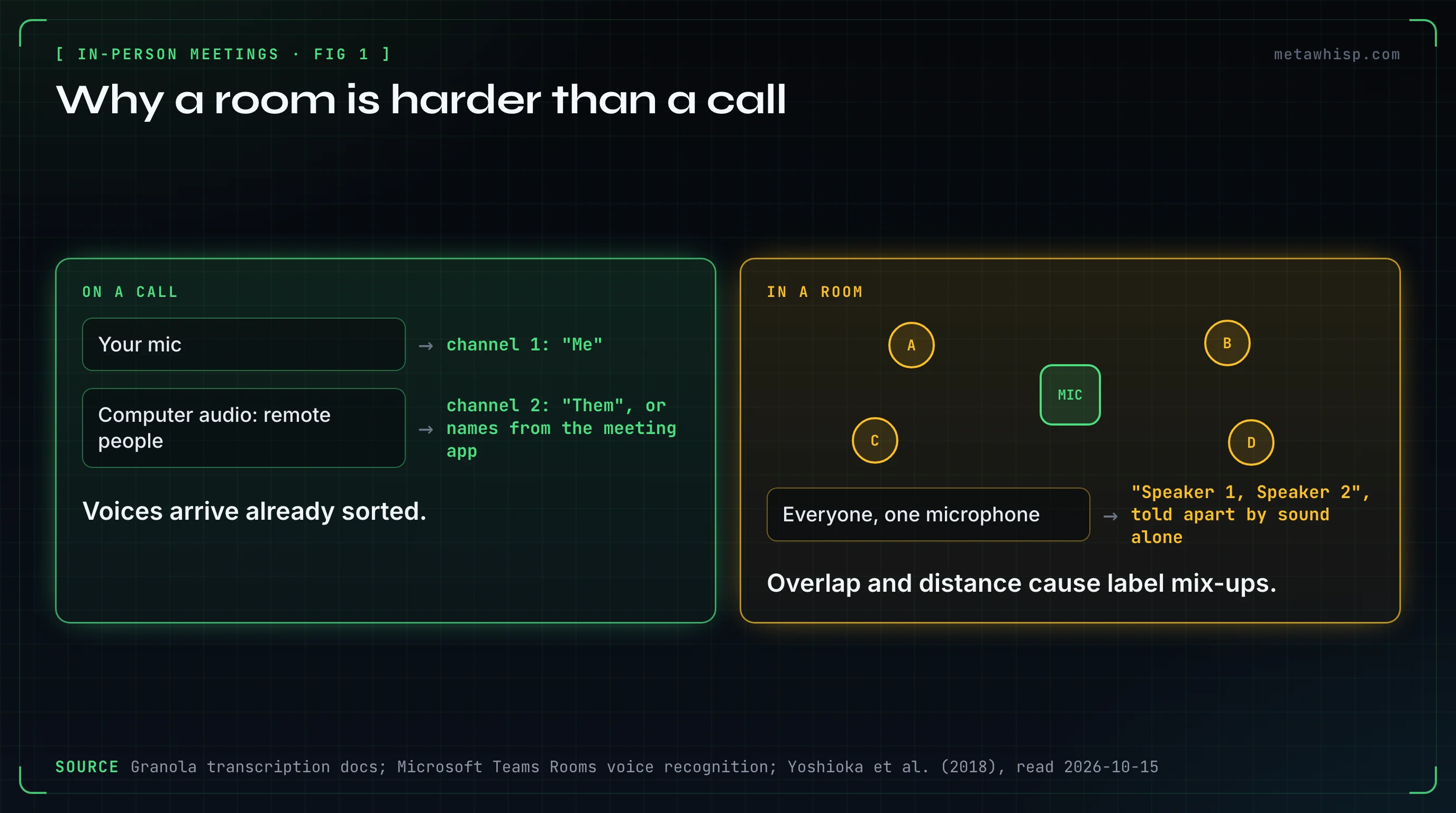
Calls come with help that rooms don't get:
- Separate channels. In fully virtual meetings, Fellow attributes each speaker to the microphone they use.
- Participant names. Otter names speakers live only on Zoom, through its Notetaker bot.
- Cleaner audio. Otter says accuracy is generally higher when its Notetaker takes the meeting's internal audio stream than when you record through a device's mic.
In a room, the software has to tell voices apart by sound alone. Researchers call this speaker diarization, and people talking over each other make it much harder. A 2018 paper by Takuya Yoshioka and colleagues describes overlapping speech as a major obstacle to transcribing meetings accurately. Their 2019 follow-up called it unsolved in realistic settings for over a decade. It tackled the problem with a microphone array and a 360-degree camera, in real meetings of up to 11 people.
Distance makes it worse. In open air, each doubling of distance cuts sound intensity by about 6 dB. Real rooms add reflections, so treat that as a rough guide rather than a rule. One Reddit commenter says the mic matters far more than the app.
Which Setup Fits Your Room?
Choose by room size first, then by noise and by what you need afterwards. One device in the middle works for a small table. Bigger groups need a central omnidirectional mic or a multi-mic recorder, and large rooms need several mics or a room system. For the most precise transcript in its Teams Rooms, Microsoft suggests 10 or fewer in-person attendees.
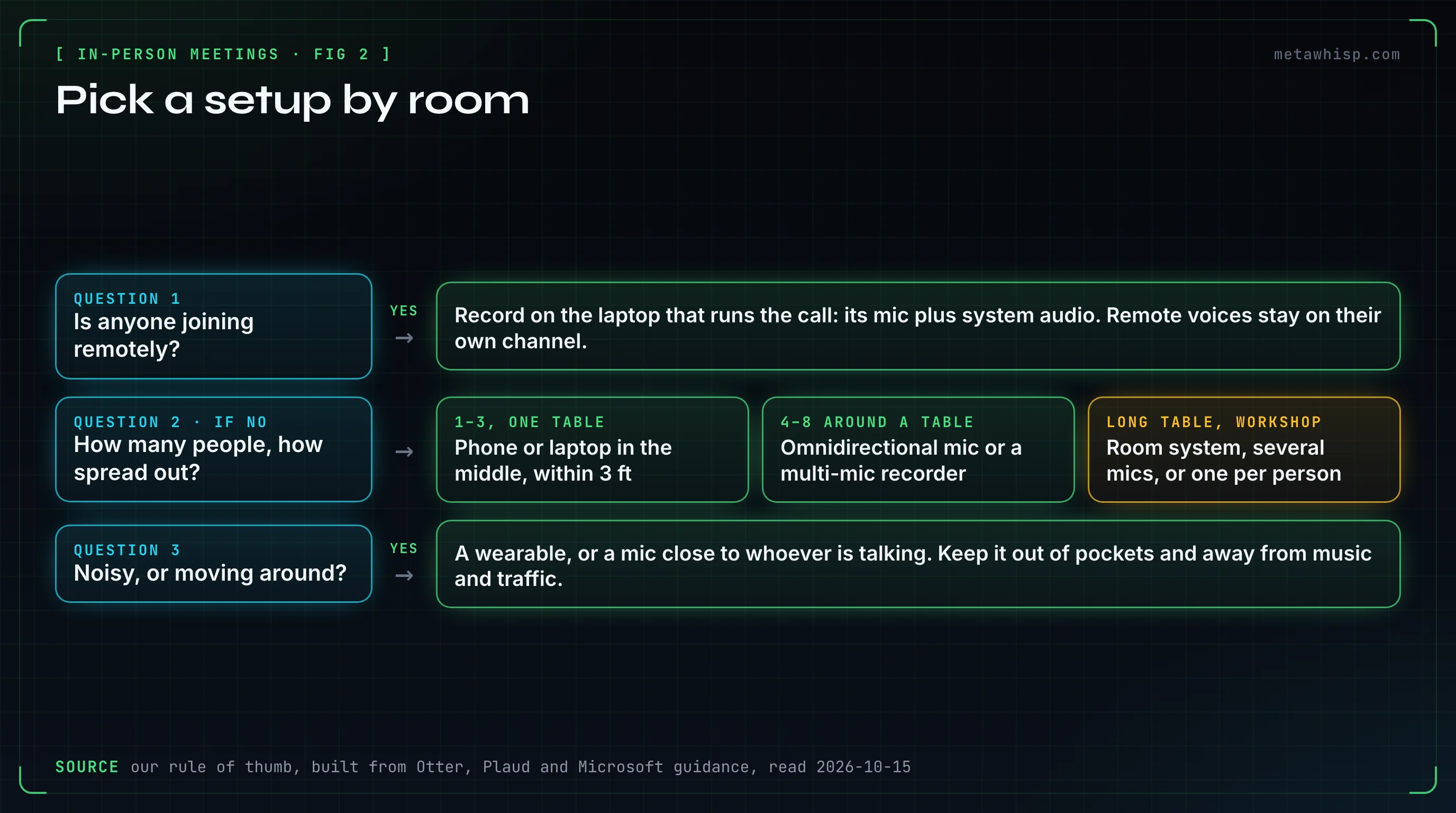
Is anyone joining remotely?
If yes, record on the laptop that runs the call, capturing its mic and system audio. Remote voices arrive on their own channel, and everyone in the room shares the mic. In a conference room with Teams Rooms Pro, people who enrolled a voice profile and were invited to the meeting can be named. If nobody is remote, go to step 2.
How many people, and how spread out?
Our rule of thumb: for one to three people at one table, a phone or laptop in the middle is enough. For four to eight, use an omnidirectional mic in the center or a multi-mic recorder, such as the Plaud Note Pro with four microphones and up to 5 m of pickup in its Enhance mode. A long table or a workshop needs a room system, several mics or one mic per person. Expect mix-ups whenever people talk over each other.
Is it noisy, or are you moving around?
In a café, on a site walk or at a trade-show booth, get the mic close to whoever is talking. Plaud designed its NotePin wearable for hands-free in-person use. Keep any recorder out of pockets and bags, and move away from music, traffic and wind.
What do you need afterwards?
For an internal working meeting, decisions and actions matter most, and generic speaker labels may be fine. For a client meeting, check who owns each action before the recap goes out. Interviews and research need named speakers and the original audio, so check both tables below. For sensitive meetings, check where the data is stored, and ask for a BAA if you handle US health data.
Will your plan cover the whole meeting?
Check the per-meeting cap before a long session. Otter's free plan shows only 30 minutes of each conversation's transcript, and on Jamie's free plan a meeting over 30 minutes gets its notes locked until you upgrade. The free-plan table below has the rest.
How Do You Set Up the Device for a Clean Transcript?
Put the mic in the middle, close to the people talking, and keep it uncovered. Otter recommends keeping it within 3 feet of the speaker, and calls background noise generally the biggest cause of inaccurate or missing transcription. Then check the phone itself, because a couple of its settings can work against recording a room.
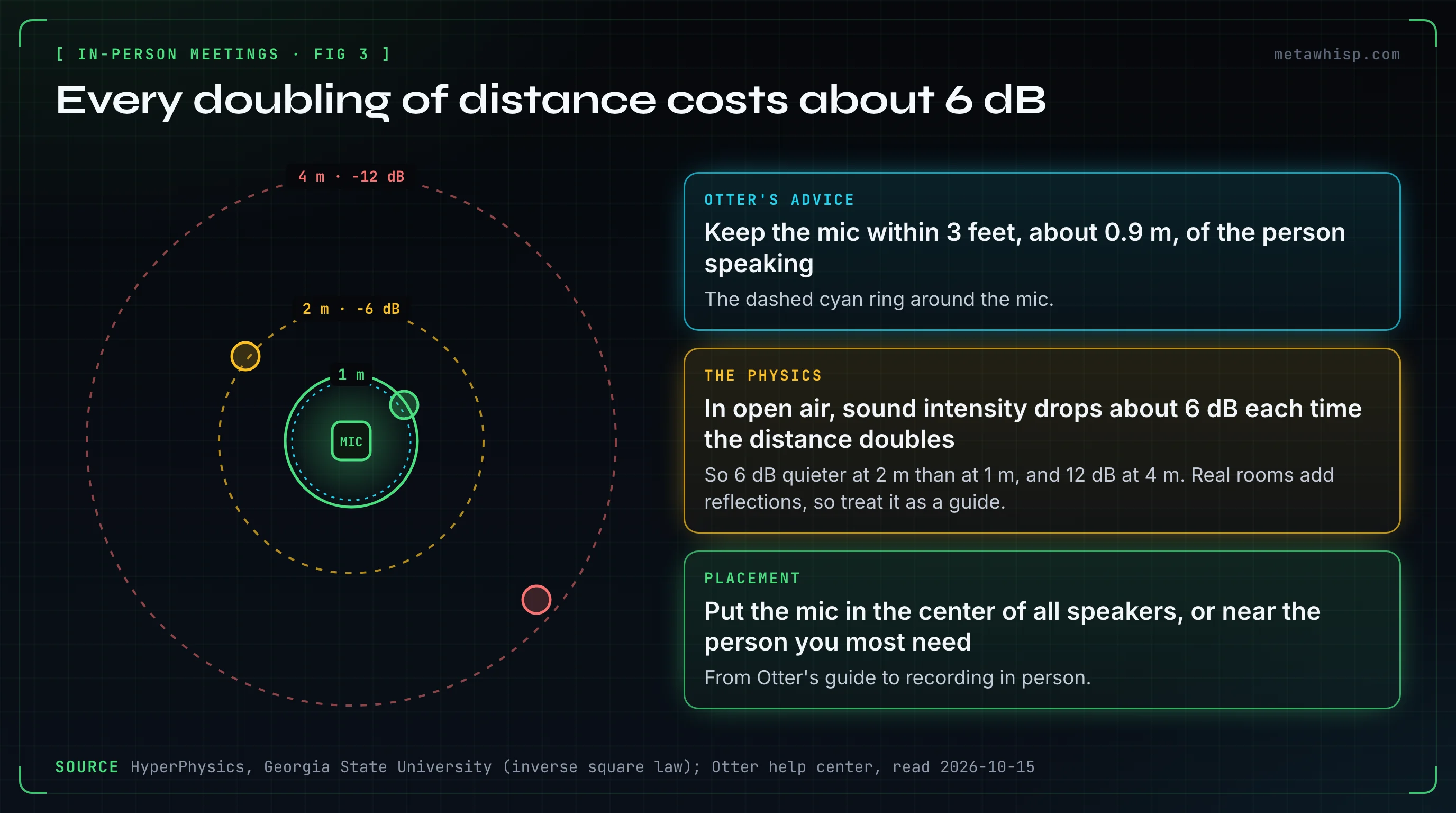
- Center it. Otter suggests placing the mic in the center of all speakers, or near the person you most need. Use an omnidirectional mic for a group, and a bidirectional one between two people in an interview.
- Turn off Voice Isolation on an iPhone. Microsoft's Facilitator guide says to switch the iOS Mic Mode to Standard when you take in-person notes.
- Skip the Bluetooth headset. Otter says Bluetooth headphones record your own voice well but not the others in the room. Granola warns that a connected Bluetooth device can become the mic and miss the room.
- Leave it alone. Otter says not to move or touch the device while it records. Plaud says not to bury a wearable in clothing.
- Take turns. Otter says overlapping dialog may not be transcribed at all. One Reddit user who records in person repeats questions from the far end of the table, so the device catches them.
- Know your connection. Otter keeps recording offline and uploads later. Plaud records to the device and syncs afterwards. Fathom's iPhone app needs internet to record. MetaWhisp's privacy page says its on-device mode works offline once the speech model is downloaded.
Which Tools Name the Speakers in a Room?
Few do it on their own. In a room, Zoom My Notes, Fireflies' bot-free desktop mode, ChatGPT Record and Granola's phone apps use generic labels. Plaud and Fathom name only you, from your own voice profile. Otter, Jamie, Fellow and Teams Rooms can name other people once you tag them or they enroll their voices.
| Tool | Labels in a room | How people get names |
|---|---|---|
| Zoom My Notes | Speaker 1, Speaker 2 | — |
| Fireflies "Take Notes" | Speaker 1, Speaker 2 | You edit the labels |
| ChatGPT Record | "Speaker 1" when it doesn't know names | You rename speakers after recording |
| Granola phone apps | Speaker A, Speaker B | Named tags only on Zoom, Meet and Teams calls in the desktop apps |
| Plaud | You by name; others Speaker 1, 2 | Your voice profile; names you add apply to that recording only |
| Fathom iPhone app | You by name; others may be unnamed | An opt-in voiceprint of you |
| Otter | Speaker 1, 2, after the recording stops | Tag a speaker once, and Otter can tag known speakers later |
| Jamie | Detected speakers | Name them from short clips; Jamie remembers them |
| Fellow | Per-speaker labels, or "Room - A" as a fallback | Voice matching for people in your workspace |
| Teams Rooms | Enrolled people by name | Voice profiles, with Teams Rooms Pro |
| MetaWhisp | Everyone the Mac's mic hears is "Me" | On calls, remote voices are "Them"; no per-person labels in a room |
Fellow's own help pages disagree. One from February 2026 says each attendee should join from their own device, or speakers can't be told apart. An October 2026 page says Fellow tries to separate speakers on a shared mic.
Names are a separate problem from words. Even with a clean transcript, a summary can hand a task to the wrong person, so check who owns each action before the notes go out.
Which Tools Keep the Audio, and Where Does It Go?
Granola, Jamie, Zoom My Notes and ChatGPT Record delete the audio after transcribing it, and Fireflies' bot-free desktop mode saves no audio file. Otter, Plaud, Fellow and Fathom's iPhone app keep a recording. Read AI lets you choose, though playback needs an Enterprise plan. If you might need to replay a disputed line, that difference matters.
| Tool | Audio after transcription | Where data is stored |
|---|---|---|
| Otter | Kept | AWS, US West |
| Granola | Deleted | AWS, US |
| Jamie | Deleted | Frankfurt, Germany |
| Plaud | Kept on the device and in the app; the server copy is deleted after processing unless you turn on Private Cloud Sync | AWS, by account region; EU accounts in Frankfurt |
| Fireflies "Take Notes" | No audio file saved | US; Enterprise can store, not process, data in the EU |
| Fathom iPhone app | Kept | US |
| Read AI | Your choice; playback needs an Enterprise plan | AWS, us-east-1 |
| Fellow | Kept | AWS; region not stated on the pages we read |
| Zoom My Notes | Deleted | Zoom's cloud |
| ChatGPT Record | Deleted | OpenAI; transcripts follow your workspace's retention |
| MetaWhisp | Not kept, except a recovery copy if transcription fails or the app quits mid-meeting, deleted at the first launch after 7 days | Your Mac |
If you need data kept in the EU, Jamie stores transcripts in Frankfurt, and so does Plaud for EU accounts. MetaWhisp keeps transcripts on your Mac. By default its free version also transcribes there; with Pro, audio passes through MetaWhisp's server to Groq for transcription, and MetaWhisp's privacy page says its server stores no audio or transcripts. If you add your own Groq, OpenAI, Deepgram or Gemini key, the audio goes to that provider instead.
Will a Free Plan Cover a One-Hour Meeting?
Often not. Otter's free plan shows only 30 minutes of each conversation's transcript, and Jamie's free plan locks the notes of any meeting over 30 minutes until you upgrade. Read AI's free plan covers an hour, five times a month. Fathom's free plan has unlimited recordings, but its in-person app is iPhone-only and needs internet.
| Tool | Free plan | A 60-minute meeting |
|---|---|---|
| Otter Basic | 300 minutes a month, 30 minutes per conversation | Records it, but only 30 minutes of transcript is available |
| Jamie Free | 10 meetings a month, 30-minute limit | Notes are locked until you upgrade |
| Read AI Free | 5 meetings a month, up to 1 hour each | Fits, five times a month |
| Fellow Free | 5 AI recordings per user, in total | Fits, five times ever |
| Fathom Free | Unlimited recordings | Fits, on an iPhone with internet |
| Granola Basic | Free, with 30 days of meeting history | Fits; meetings older than 30 days are hidden until you upgrade |
| Plaud Starter | 300 minutes a month, with a Plaud device from $159 | Five a month |
| ChatGPT Record | Not listed for Free; Plus and higher | Up to 4 hours per session |
| MetaWhisp | Free, no account | Fits; a recording you start runs until you stop it |
Long meetings are where paid tiers come in. Otter Pro raises the cap to 90 minutes per conversation, at $16.99 a month or $8.33 a month billed annually, and Otter Business to 4 hours. Jamie Plus allows 2 hours, at €25 a month (US $29). For all-day sessions, Plaud rates the NotePin at up to 20 hours of recording and the Note Pro at up to 50 hours in its Endurance mode.
Do You Need Consent to Record an In-Person Meeting?
Often, yes, and asking is wise everywhere. US federal law allows recording when one party to the conversation consents. California, Florida, Maryland and Washington require consent from everyone, and Illinois bans recording a private conversation secretly. California's law expressly covers people talking in each other's presence. This isn't legal advice.
What the statutes say, as we read them on October 15, 2026:
- California (Penal Code §632) requires all parties' consent to record a confidential communication, including one carried on in person. A first violation can bring a fine of up to $2,500, jail time, or both.
- Florida (§934.03) allows recording when all parties have consented beforehand. A violation is a third-degree felony.
- Washington (RCW 9.73.030) counts an announcement to everyone as consent, as long as the announcement itself is recorded.
- Illinois (720 ILCS 5/14-2) bans recording a private conversation "in a surreptitious manner" without everyone's consent, and its definitions include talk in person.
- Maryland (§10-402) requires all parties' prior consent. A violation is a felony, with up to five years in prison, a $10,000 fine, or both.
- The EU: the GDPR requires a lawful basis for processing personal data (Article 6), and telling people about it when you collect their data (Article 13).
We didn't review other states or case law. Most vendors we checked put the duty to get consent on you, and a room has no bot or chat window to warn people. There are a few exceptions. Fireflies' desktop app can play an audio consent message through your speakers when Take Notes starts. Jamie can email attendees a recording notice before a scheduled meeting. And in Microsoft's demo video of Facilitator on Teams mobile, Facilitator announces that the meeting is being recorded and transcribed.
A simple routine: ask everyone before you start. For example: "I'd like to record this so I can listen instead of typing. I'll share the notes with everyone. Is that OK?" If anyone objects, don't record; take notes by hand. Once the recorder is running, repeat the announcement so it's on the recording, which Washington's law counts as consent. On Reddit, Plaud's own account suggests a casual one-liner, and a user who records clients asks first and offers to send the transcript.
What Do Reviewers and Users Report?
On Reddit, mostly that labels break before words do. We read the transcripts of seven YouTube videos about in-person note taking, and ten Reddit threads from 2026. Three videos come from vendors' own channels, one discloses a sponsor, and two others carry affiliate links to Plaud. None measured accuracy or checked speaker labels with three or more people in a room.
- Daniel's Tech Studio (2024, more than 330,000 views) compared a Plaud Note with phones' built-in recorder apps and found the free phone route works but is less accurate. It's the only comparison we found from neither a vendor nor a sponsor. Its description carries an affiliate link to the Plaud, and its Plaud prices are out of date.
- Faizan Jahangir uses a Plaud Note Pro for corporate meetings and says his old iPhone recordings missed parts of conversations. His narration describes no side-by-side test.
- Joseph Chandler, in a video sponsored by Fellow, recorded a staged meeting from a laptop and a phone. Both recaps listed decisions and action items, but he didn't check who said what.
On Reddit, the same themes kept coming up:
- Who said what breaks first. A poster who records three- and four-person meetings on a laptop says labels get messy past one-on-ones, and comments get pinned on the wrong person.
- Placement matters. One commenter says a phone flat on the table hears the person next to it clearly and the person across the table "underwater".
- Phone or recorder: no consensus. A design-build firm is trying iPhone Voice Memos for seated meetings, partly to have one less device to charge. One commenter prefers a recorder because of phone battery life in long meetings.
- People want the original audio, so they can re-listen when a label or a line looks wrong.
- Self-promotion is everywhere. Many replies come from developers pitching their own apps, so treat tool picks in these threads as mentions, not evidence.
Nobody we found publishes a controlled test of speaker labels in a real multi-person room. Until someone does, plan a few minutes after each meeting to fix names and check owners.
Where Does MetaWhisp Fit?
MetaWhisp fits hybrid meetings you run from a Mac, and small rooms where one combined transcript is enough. It's a free Mac app that records your microphone and your Mac's audio, with no bot, and by default the free version transcribes on your Mac. It doesn't split a room into separate speakers.
On a call, the transcript is split into "Me" for your microphone and "Them" for the Mac's audio, so remote callers stay apart from the room. In a room, everything the microphone hears is labeled "Me", other people included. If you need each person named, pick a tool from the speaker table above.
Turn on Meeting Recording in Settings, then start and stop a recording from the menu bar. Nothing records until you press it, unless you also switch on auto-start for calls, which is off by default. That suits an ask-first routine, but MetaWhisp won't announce anything for you. A recording you start runs until you stop it, with a reminder card at two hours.
The transcript stays on your Mac. The audio isn't kept, apart from a recovery copy if transcription fails or the app quits mid-meeting, deleted the next time you open the app after seven days. So it's not the pick if you need the original recording. It can't import audio files either, so it won't transcribe a recording made on a phone. AI recaps need a local model, Pro at $7.77 a month or $30 a year, or your own API key. It runs on macOS 14 or later on Apple Silicon. See how meeting transcription works.
FAQ
Can ChatGPT take notes during an in-person meeting?
Yes, if you have a Mac. ChatGPT Record works in the macOS desktop app on Plus, Pro, Business, Enterprise and Edu plans, for up to 4 hours per session; on Enterprise and Edu, an admin has to turn it on first. It labels people "Speaker 1" and so on when it doesn't know their names, and OpenAI says it works best in English.
Can I use Read AI for in-person meetings?
Yes. Read AI's iOS and Android apps record in-person conversations with a live transcript, and its desktop app can record your mic plus system audio. The free plan covers 5 meetings a month, up to an hour each. Pro costs $19.75 a month, or $15 a month billed annually.
Does Otter work for in-person meetings?
Yes. Record with Otter's phone app, or in a browser or its desktop app, and keep the mic within 3 feet of the person speaking. Speaker labels arrive after the recording stops. Otter's free plan shows only 30 minutes of each conversation's transcript.
Can Granola record in-person meetings?
Yes. Granola's iOS and Android apps are built for in-person meetings and label people Speaker A, Speaker B and so on. Phones can't capture other apps' audio, so the mobile apps can't transcribe Zoom, Meet or Teams calls, though the iPhone app can take notes on outbound phone calls placed through Granola's own dialer. Granola deletes the audio after transcription, so there's no recording to replay.
How do I use AI to take notes in an in-person meeting?
Get everyone's consent, then put the device in the middle of the table, within about 3 feet of the people talking. Keep background noise down and ask people not to talk over each other. Afterwards, fix the speaker labels and check who owns each action before you share the notes.
Is it legal to record an in-person meeting?
It depends on where you are. US federal law needs one party's consent, but California, Florida, Maryland and Washington require every party's consent for private conversations, and Illinois bans recording them secretly. Under Washington's law, telling everyone and recording that announcement counts as consent. This isn't legal advice.
Related reading
- Fireflies alternatives that don't join your calls
- Granola pricing: is the free plan enough?
- How to transcribe meeting minutes on a Mac
- AI note taker without a bot
Sources
Checked on October 15, 2026. Prices and limits change often; each vendor's own page is the final word. The laws below were read from statute text only, with Washington and Illinois from archived copies of the official pages. This isn't legal advice.
- Otter: in-person recordings, accuracy tips, accuracy FAQ, speaker identification, speaker ID best practices, offline recording, free plan limits, pricing, data security
- Granola: mobile apps, mobile transcription, transcription channels, security and data, billing
- Plaud: Note vs NotePin, Note vs Note Pro, battery life, speaker labeling tips, auto speaker labeling, data after transcription, data regions, transcription minutes, US store prices
- Jamie: mobile app, identify speakers, data handling, plans, recording consent
- Fireflies: mobile recording, desktop without a bot, desktop audio, data storage
- Fathom: iOS app, App Store listing, security, pricing
- Read AI: iPhone app, Android app, desktop app, plans, pricing, recording length, security
- Fellow: in-person meetings, speaker identification, mobile recording, recording storage, free plan
- Microsoft: Facilitator in Teams, voice recognition in Teams Rooms, roadmap items 560318 and 560700
- Zoom: My Notes whitepaper, My Notes on mobile. OpenAI: ChatGPT Record
- Laws: California Penal Code §632, Florida §934.03, Washington RCW 9.73.030 (archived), Illinois 720 ILCS 5/14-2 (archived), Illinois 14-1 definitions (archived), Maryland §10-402, 18 U.S.C. §2511, GDPR
- Research: HyperPhysics on the inverse square law, Yoshioka et al. (2018), Yoshioka et al. (2019), Park et al. (2021) on speaker diarization
- Videos: Daniel's Tech Studio, Faizan Jahangir, Joseph Chandler, Microsoft, We Review AI, HappyScribe, Bluedot
- Reddit: r/ProductivityApps, r/PLAUDAI on dedicated note takers, r/AiNoteTaker, r/PlaudNoteUsers on Plaud vs iPhone, r/PLAUDAI on Plaud vs phone vs recorder, r/PLAUDAI on interviews in a loud café, r/PlaudNoteUsers on five recorders, r/ExecutiveAssistants, r/AIDiscussion, r/productivity
- MetaWhisp: pricing, privacy
