Verbalize until the loop empties. Capture-to-sorted, not capture-to-inbox.
The capture-to-inbox problem: why most brain dump apps quietly fail
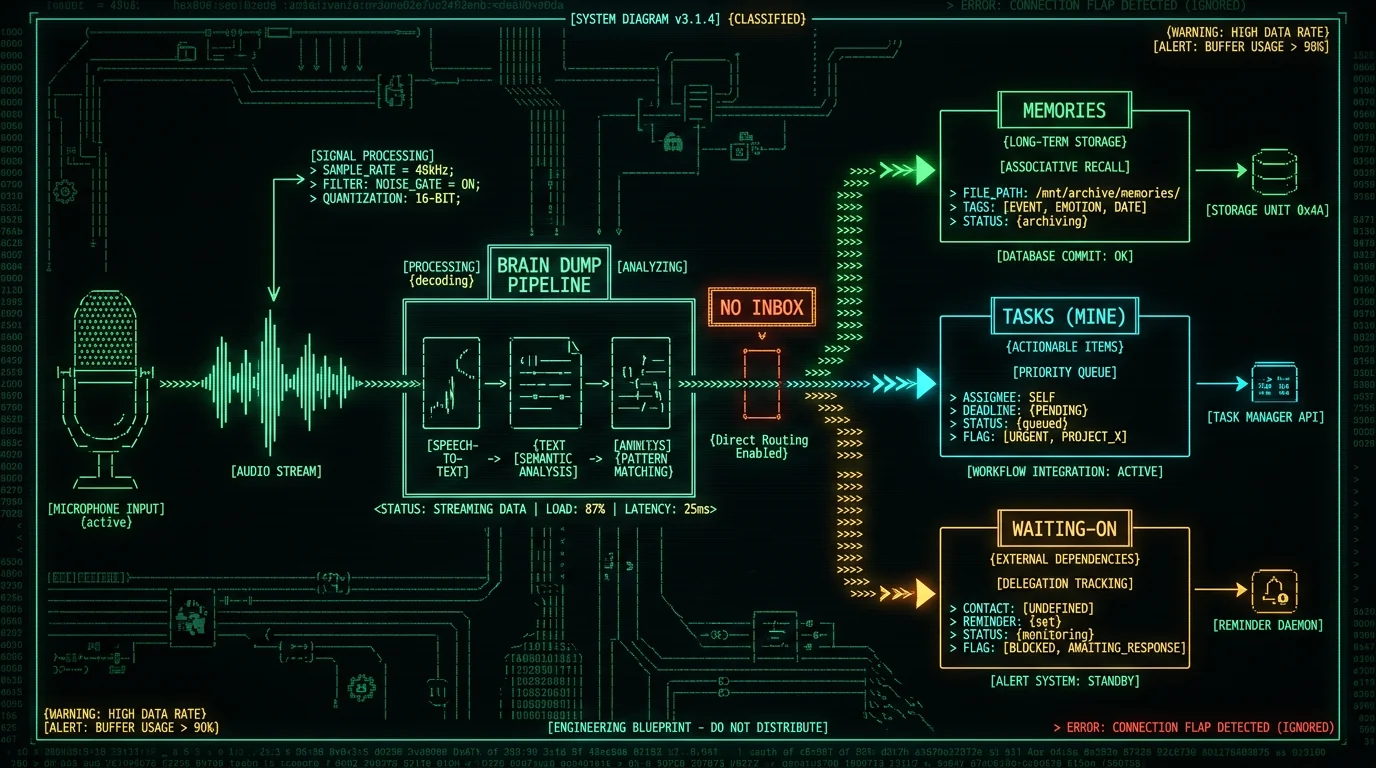
Most "brain dump" apps are voice recorders in a trench coat. You hold a button, talk, get a transcript, and the transcript lands in a generic inbox. The inbox feels productive for about three days. Then you have dozens of uncategorized voice notes, and the moment you have to decide "is this a task, a journal entry, or a project note?", the flow breaks.How does capture-to-sorted fix the brain dump flow?
The shift is small but decisive: instead of one bucket ("Inbox"), you define two or three destinations ahead of time, and the app picks one for each utterance based on its content.What makes a brain dump app actually work on Mac?
A working brain dump app on Mac needs four things, and most apps miss at least one.Pro tip: Before you install anything, decide what your destinations are. Two is fine (Memories + Tasks). Three is better if you collaborate (Memories + Tasks mine + Tasks waiting-on). More than four and you've rebuilt an inbox with extra steps.
7 brain dump apps for Mac worth a shortlist
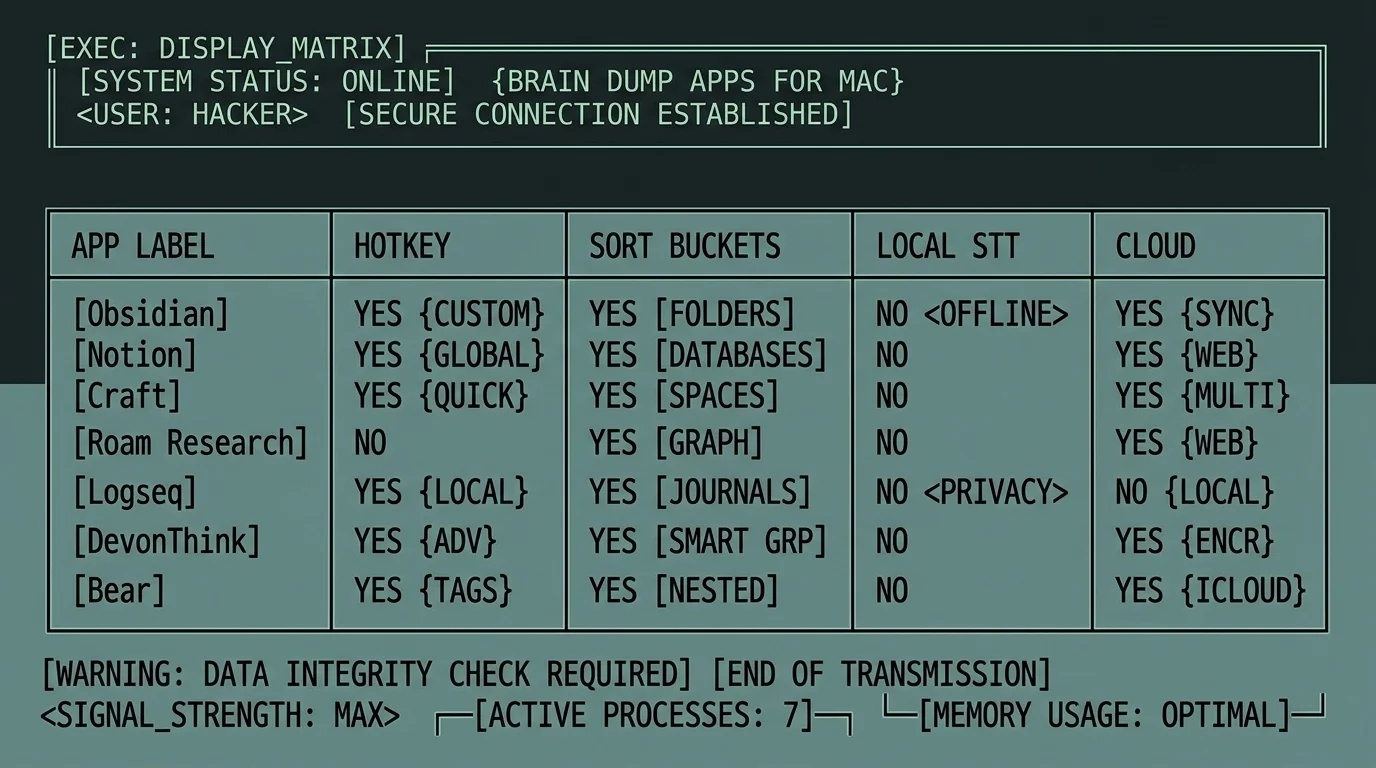
These are the seven I keep returning to in conversations with people shopping for a brain dump workflow on Mac. I'm biased toward tools I've personally used; cells I'm not certain about I mark with —. Pricing reflects what each vendor's site shows today; check the vendor's pricing page for current numbers.| App | Hotkey capture | Sorts at capture | Speech recognition | Free tier |
|---|---|---|---|---|
| MetaWhisp | Yes (Right Option default) | Yes — Memories, Tasks mine, Tasks waiting-on | Local (Whisper on Neural Engine); optional BYOK cloud AI | Yes, unlimited local |
| Apple Dictation | Yes (Fn Fn) | No — types into the focused app | On-device when offline; Apple cloud when online | Yes, built into macOS |
| Wispr Flow | Yes | No — polished text into focused app | Cloud (per their site) | Trial only (per their site) |
| SuperWhisper | Yes | No — types into the focused app | Local Whisper (per their site) | Trial; paid license (per their site) |
| MacWhisper | Yes | No — transcript file output | Local Whisper (per their site) | Yes, limited models; paid for large-v3 (per their site) |
| Google Docs voice typing | No — toggle in menu | No — types into the doc | Cloud (Google) | Yes with a Google account |
| Obsidian + Voice Memos | No — manual recording | Manual — you file into folders | None built in | Yes (Obsidian is free for personal use) |
How do you set up a brain dump workflow in five minutes?
If you decide to go with MetaWhisp (the only one on the list that sorts at capture), the setup is short.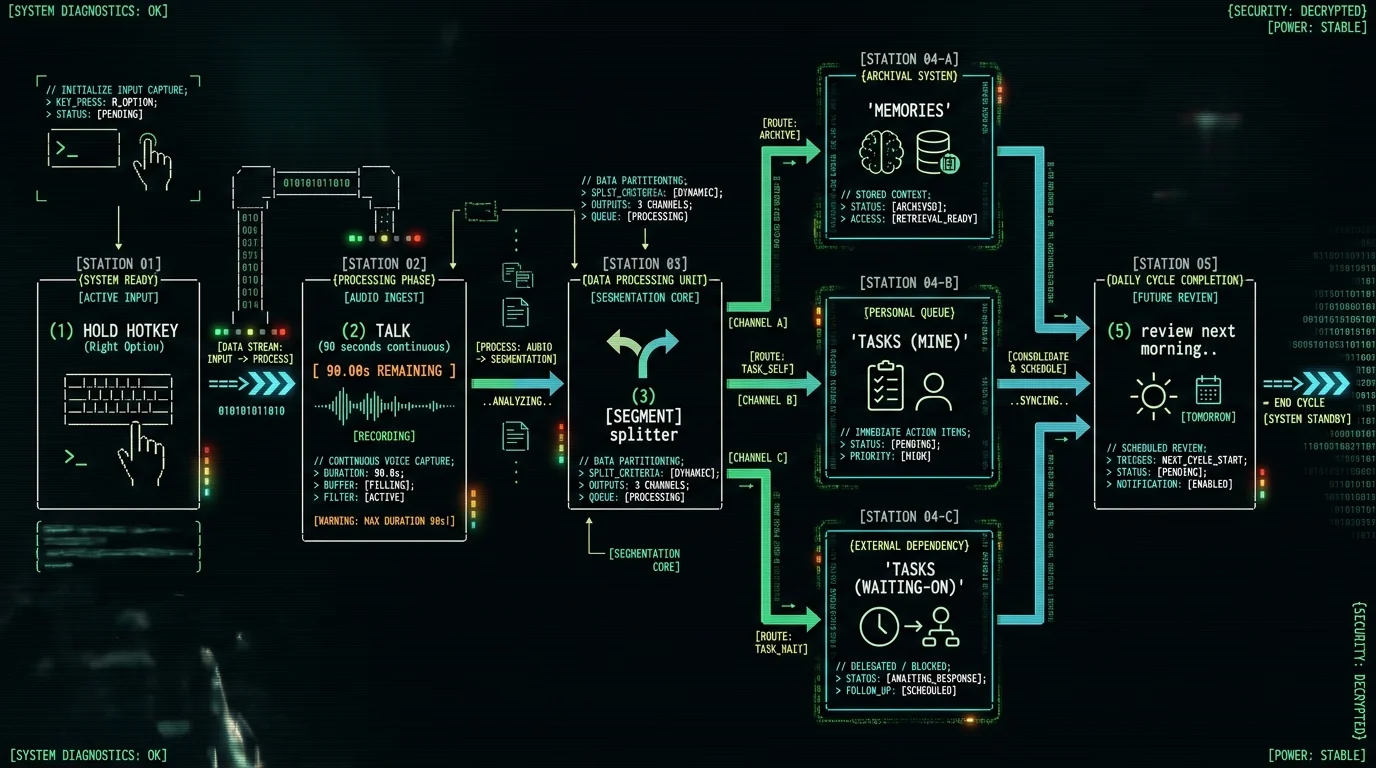
Why does local Whisper matter for private brain dumping?
Because the content of a brain dump is uniquely sensitive. A task list might say "schedule dentist". A brain dump says "I'm worried that the Q3 plan is wrong and I don't know how to tell Sarah without making it personal" or "the idea I had in the shower: maybe we kill the onboarding wizard entirely and replace it with...". That is not material you want quietly uploaded.Honest gate: local dictation + the second-brain sorting work on the free tier with the on-device Whisper model. If you want AI polish (rewrite, clean-up, translation) or chat-with-your-dump actions via MetaChat, those need either your own API key (BYOK) or Pro. MetaChat is action-executing chat — it can act on your dumps — and it does not run on the local LLM; it requires BYOK or Pro because the model has to live on a server. Weekly Insights, the digest that summarises a week of dumps, is Pro and runs in the cloud only.
How does MetaWhisp sort a brain dump while you talk?
The mechanism is what makes this approach different from "voice recorder plus inbox." Here's the honest version of what's happening under the hood.What does a brain dump app actually cost on Mac?
Three pricing tiers exist across the seven apps above, and the spread is wide. Apple Dictation and Google Docs voice typing are free with the OS or a Google account. Obsidian is free for personal use but doesn't capture voice natively. MacWhisper has a free tier with smaller models; the large-v3 tier is paid (per their site). SuperWhisper and Wispr Flow are paid from the start (per their sites; check their pricing pages for current numbers). MetaWhisp local mode is free and unlimited; Pro is $30/year or $7.77/month and removes the BYOK requirement, adds cloud transcription (60 min/day cap), and unlocks Weekly Insights. If you're choosing on price alone and your dumps are non-sensitive, Apple Dictation plus a manual sorting habit is the cheapest possible setup. If you're choosing on price plus sorting, MetaWhisp free is the only option that does both. Full MetaWhisp pricing is here.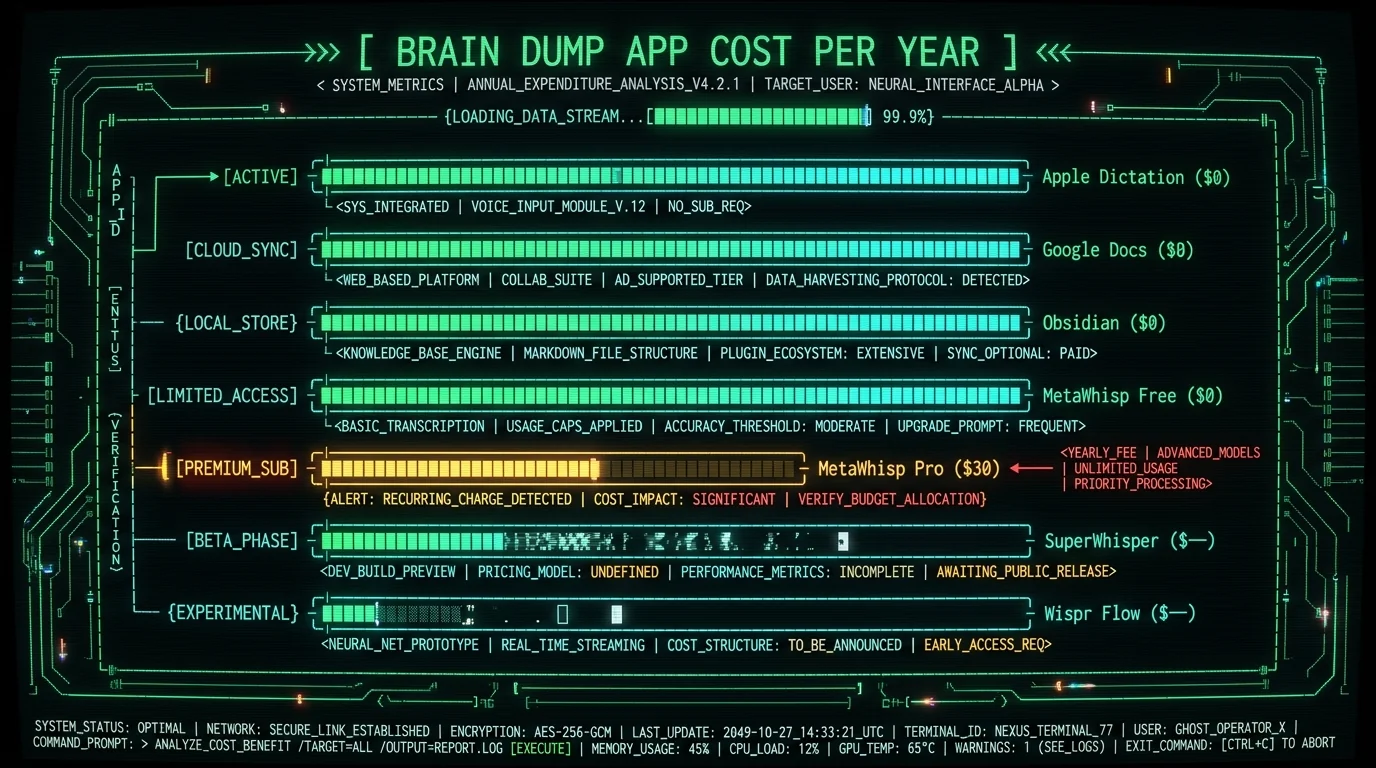
Which brain dump app fits ADHD thinking on a Mac?
A specific note, because I get this question a lot: if your thinking tends to jump, interrupt itself, and arrive in clusters rather than linear sentences, the most important feature isn't accuracy. It's how forgiving the capture moment is.What should you try this weekend?
If you want a one-weekend test plan: install MetaWhisp from the download page, declare three buckets (Memories, Tasks mine, Tasks waiting-on), and do one brain dump per day for a week. Five to ten minutes each. The first morning, look at each bucket without sorting anything — just read what your past self was thinking. By day four you'll know whether the routing is helping or whether you need to tweak the destination names. If you don't want to commit, start with Apple Dictation for a day to feel the limit of "types into the focused app with no sorting," then try MetaWhisp so the contrast is obvious. Both are free. Whichever you pick, the goal isn't to find the perfect tool. It's to remove the half-second of decision between "I have a thought" and "the thought is captured and routed" — because that's the half-second where every brain dump goes to die. ---FAQ
What is the best brain dump app for Mac?
The best brain dump app for Mac is the one that removes folder-picking from the capture moment. MetaWhisp is the only app on the mainstream shortlist that routes into Memories, Tasks (mine), and Tasks (waiting-on) automatically while you talk. If you want a free, no-account starting point, that's the one to try first — download here. Alternatives like Wispr Flow, SuperWhisper, and MacWhisper transcribe well but leave routing to you.
Is there a free brain dump app for Mac?
Yes — several. Apple Dictation is free and built into macOS. Google Docs voice typing is free with a Google account. MetaWhisp's local mode is free and unlimited with no account. Obsidian is free for personal use, though it doesn't capture voice natively. Free tiers on Wispr Flow, SuperWhisper, and MacWhisper are limited; check each vendor's pricing page for current limits.
Can a brain dump app sort into tasks and notes automatically?
MetaWhisp does, on-device by default. You pre-declare the buckets (Memories for reference notes, Tasks / mine for things you'll do, Tasks / waiting-on for things others owe you) and the app classifies each segment of your dump into the right bucket. Most other brain dump apps give you a transcript and an inbox; they don't route.
Do brain dump apps work offline?
Only if they use local speech recognition. MetaWhisp works fully offline because it runs Whisper large-v3-turbo on the Apple Neural Engine. Apple Dictation works offline when explicitly enabled (per Apple's docs). Wispr Flow and Google Docs voice typing require a network connection. If offline capture matters — on a plane, in a coffee shop with bad wifi, in a sensitive meeting — pick a local-first app.
Are brain dump apps private?
Depends entirely on whether the speech recognition is local or cloud. Cloud STT means your raw, unfiltered thoughts are uploaded to a server every time you dump. Local STT means the audio never leaves your Mac. For anything sensitive — business strategy, client names, mental-health venting, anything touching HIPAA or GDPR in a work context — local-only is the only sensible default. MetaWhisp local mode is free for this reason.
What's the difference between a brain dump app and a voice recorder?
A voice recorder captures audio. A brain dump app captures, transcribes, and routes. The routing is the whole point — it's what makes the dump usable the next morning instead of a pile of untouched audio files. If the app only records and transcribes, you can rebuild that yourself with Apple Voice Memos plus any transcription service. You're paying for the routing.
Can I use a brain dump app with Apple Notes or Obsidian?
You can, but it's not the path of least friction. Apple Notes and Obsidian are storage destinations — excellent ones — but they don't capture voice in a single keystroke from any app, and they don't auto-route. MetaWhisp captures and sorts; you can still export or copy into Notes/Obsidian after. The longer discussion of audio journaling on Mac with these tools is covered separately.
Is MetaWhisp a brain dump app?
Functionally, yes — that's the use case I built it for and the one I use it for daily. Technically it's an on-device voice-to-text app with a built-in second brain (Memories + Tasks with mine and waiting-on). Free local mode is unlimited; Pro is $30/year and removes the BYOK requirement, adds cloud transcription (60 min/day cap), and unlocks Weekly Insights.
Do I need a paid brain dump app?
Probably not to start. Apple Dictation plus a manual sorting habit is enough for some people. MetaWhisp's free local tier is enough for most of the rest — unlimited local dictation, BYOK for cloud AI polish, full second-brain routing. You only need Pro if you want built-in cloud AI without managing your own API key, more than 60 minutes/day of cloud transcription, or the Weekly Insights digest.
How do I pick a brain dump app for ADHD thinking on a Mac?
Look for three things: long continuous capture with no per-utterance button press, tolerant segmentation that doesn't split mid-thought, and routing that puts half-formed ideas in a low-pressure bucket. MetaWhisp was built for this pattern; the longer read on voice-first workflows is in our verbal-processors guide.
About the author
Andrew Dyuzhov is the solo founder of MetaWhisp. He builds the app on top of open-source Whisper with AI coding tools, dictates in Russian and English daily, and runs the seven-app Mac head-to-head himself. He has ADHD and uses voice-first workflows to get past writing paralysis — which is why MetaWhisp exists. @hypersonq on X.
