The setting, what it misses, and how to take notes back
Short answer: in Otter on the web, open Account Settings → Meetings and set Default audience for shared notes to Don't share - keep meeting notes private. Then check the events you changed one by one, because they keep their own setting. Old notes stay shared, and the pre-meeting email, chat links and workspace invites have their own switches.
Key takeaways
- "Don't share" stops notes and the Meeting Summary email going to calendar guests. It doesn't cover events you set by hand or notes already shared.
- To take notes back, set each person to "No access" and the link to "Restricted". Each misses the other.
- Only receiving the emails? "Unsubscribe" needs no login, per Otter, and covers one email type at a time. The lasting fix is on the sender's side.
- Workspace-wide sharing controls are Enterprise features, per Otter's help center.
Which situation are you in? Your Otter emailed people, you only receive Otter emails, or you're an admin.
| What you want | Your Otter sent it | You only receive it | Admin |
|---|---|---|---|
| Stop notes and summaries | Don't share, then check each event | Unsubscribe, then ask the sender | Enterprise: workspace auto-share setting |
| Stop the pre-meeting email | Send pre-recording emails off | Reply: it reaches the Otter user | Enterprise: Compliance setting |
| Take back or limit sharing | No access, plus a Restricted link | Ask the owner | Enterprise: External sharing |
| Stop invites | Revoke invitation (admin) | Block Otter's addresses | Invite-on-share toggle off |
Why Is Otter Emailing People From Your Meetings?
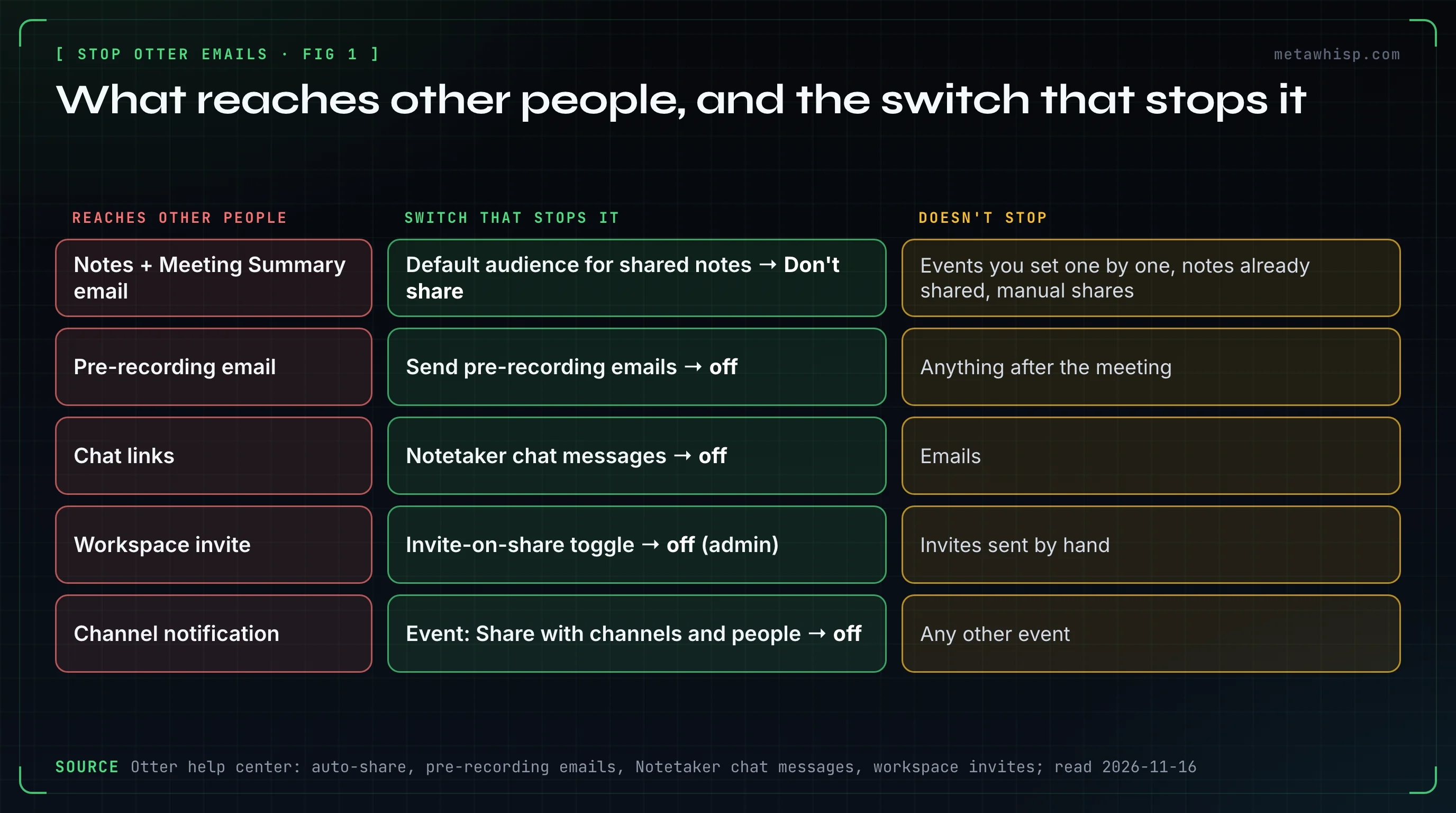
A recording tied to a calendar event met an auto-share audience. Otter's help center says auto-share only applies to conversations recorded through a calendar event. With the widest audience, All event guests, you and everyone invited get a Meeting Summary email within 2 hours after the meeting ends, unless the conversation is too short for a summary and has no action items.
That email carries the summary and action items, and a guest without an Otter account must create one to open the full conversation. None of Otter's pages says which audience a new personal account starts with, so check yours. Other things reach people too: emails when you share by hand or to a channel, a pre-recording email, chat messages in the call and workspace invitations.
How Do You Stop Otter From Emailing Meeting Notes to Your Guests?
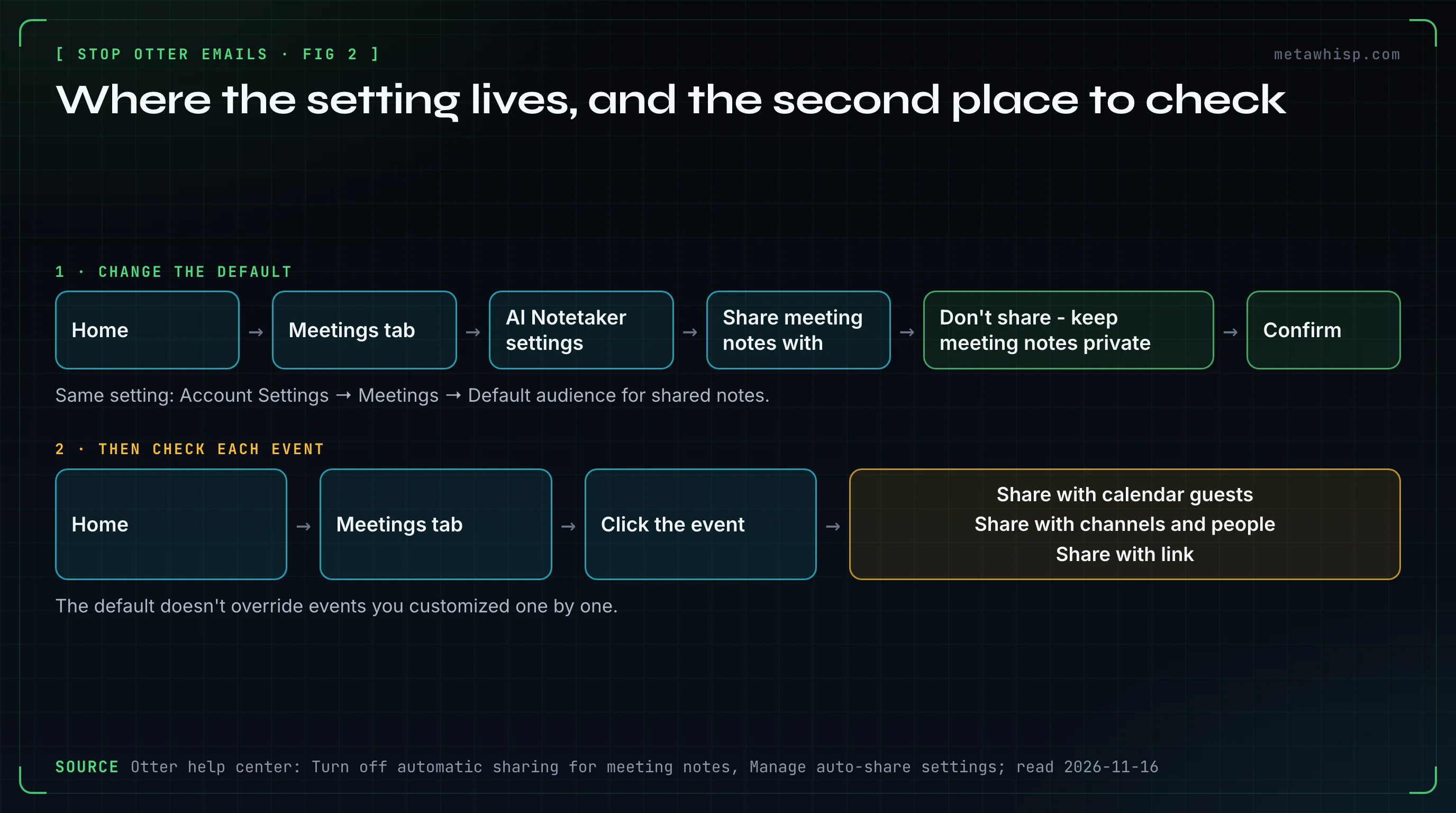
On the web, open Account Settings → Meetings and set Default audience for shared notes to Don't share - keep meeting notes private. Then open the events you customized one by one: Otter says the account default doesn't override them, so they keep sharing until you switch them off too.
- Or from the home page: Home → Meetings tab → AI Notetaker settings → Share meeting notes with → the same option → Confirm.
- Or on a phone: profile → Account Settings → Meeting Settings → Automatically share notes → Don't share.
- Then each customized event: Home → Meetings tab → click the event, then check Share with calendar guests, Share with channels and people and Share with link.
To share only inside your company, pick Same domain guests (offered only on a company email domain) or Workspace members.
Your screen may differ, because Otter's articles disagree on labels. The settings page is Account Settings → Meetings in most and Integrations → Meetings tab in others (same link, otter.ai/setting/share-notes); the left menu says "Integrations" or "Apps". The home control is "Share meeting notes with" or "Share meetings notes with". The guest options have three sets of names. On a phone, the profile is upper-left, upper-right or an Account tab at the lower right. On a single event, two articles show three switches and one shows the same audience picker. Look for the option that starts with "Don't share".
Why Is Otter Still Sharing After You Turned It Off?
Then something other than the default is doing the sharing. Otter's help center names two things the switch doesn't change: events you customized, and conversations already shared. After those, check for an open link, a channel, an Automation, a collaborator and an admin setting, in this order.
- A customized event. Check its three switches.
- An earlier share. Turning auto-share off doesn't revoke access people already have.
- An open link. "Anyone with the link" may open without sign-in.
- A channel. Sharing to a channel emails every member, and later joiners may get access.
- An Automation. A Share with action under Automations shares on its own, and Otter doesn't say whether "Don't share" covers it. Another article mentions an action that sends an email; the Automations article lists none.
- A collaborator. They can re-share by default: Account Settings → Meetings → Sharing → Allow Collaborators to share.
- Still happening? Missing options can mean an admin restricted them. Otherwise Otter says to contact support with the meeting's name and date.
How Do You Take Back Notes Otter Already Sent?
Open the conversation, click Share in the upper right and look at Who has access. Set each person or channel to No access, then set the link to Restricted. Do both: Otter says restricting the link doesn't remove people added by name, and removing a person doesn't close an open link.
The owner can do this at any time. On a phone it's Share icon → permission dropdown → Remove. Restricted takes effect at once, also for links copied earlier. Two things can't be pulled back: a snippet link, which Otter says can't be revoked, and the email itself, which carries the summary and action items. No Otter page we read offers a recall.
How Do You Stop Otter's Pre-Meeting Emails, Chat Links and Invites?
Each has its own switch. The email before a meeting is Send pre-recording emails in Account Settings > Meetings. The chat links are two toggles under Notetaker chat messages on the same page. Workspace invitations come from members or a workspace setting, and pending ones can be revoked.
- Pre-recording email. It goes to all calendar guests 5-10 minutes before the event. On Enterprise the admin may control it. One Otter article calls the feature Enterprise only; two others describe a personal switch and name no plan.
- Chat messages. The Notetaker posts a live transcript link, then a summary. Under Notetaker chat messages, turn off Send live transcript and summary and Send Otter Chat Q&A.
- Invitations. A workspace admin can take one back at Workspace > Manage Workspace > Members → 3 dots → Revoke invitation → Revoke. An admin toggle can also invite same-domain people whenever you share with them. Per Otter, an invite from an admin becomes a paid seat once it's accepted.
You Don't Use Otter: How Do You Stop Getting Its Emails?
Start with the Unsubscribe link at the end of the email. Otter says it needs no login, but it covers only that one type of email. The lasting fix is on the sender's side: ask the person whose Otter sent it to choose "Don't share" or remove you.
Otter doesn't say whether guests get that link on every email, so have a fallback:
- Check the sender. Otter's pages name reply@otter.ai and no-reply@otter.ai as its sending addresses, though a From address can be forged.
- Tell the sender. A reply to a pre-recording email reaches the Otter user.
- Block the address. Gmail: open the message → More → Block the sender. Outlook desktop: right-click it → Block > Block Sender.
- Ask Otter to erase your data. Email privacy@otter.ai. If the sender is on a Business or Enterprise contract, the policy says their company is the data controller.
Signed up to read the notes? Then you have an account, and Otter's docs don't say whether that connected your calendar. Set auto-join to Meetings I manually select (see how to stop Otter from joining meetings), disconnect the calendar under Integrations, then delete the account: Account Settings → General → Delete account → Verify and continue → Delete account. That works only if you're the only user in your workspace, and Otter keeps your email.
Your own Otter emails are under Account Settings → Notifications, which does nothing about emails to other people.
What Can a Workspace or IT Admin Turn Off?
On Otter's Enterprise plan, an admin can turn guest auto-share off for the whole workspace, keep sharing inside the company domain and control pre-recording emails. Any workspace admin can turn off invite-on-share, revoke invitations and remove members. IT can block the app or the sender.
| Control | Where | What it misses |
|---|---|---|
| Guest auto-share | Manage Workspace → Settings → Sharing & Permissions → Default auto-share setting → Edit: leave only the "Don't share" option, then Next and Apply changes | Manual sharing, channel auto-share |
| Outside sharing | Same page → External sharing | Sharing inside your domain |
| Pre-recording emails | Settings → Compliance | The switch's label differs between Otter's articles |
| Chat messages | Settings → Otter Notetaker → Notetaker chat messages | Another article says Otter manages this setting |
The invite-on-share toggle is under Manage Workspace → Settings. Members → 3 dots → Revoke access to Workspace → Remove account from Workspace → Revoke access removes a member, who becomes an individual account. Otter's pages disagree on who can invite: one says anyone can, another says Enterprise invites are admin-only by default.
- Microsoft Entra: Identity > Applications > Enterprise apps > Consent and permissions > User consent settings.
- Google Workspace: Admin console → Menu → Security → Access and data control → API controls → Manage App Access → Blocked.
- The sender: Gmail's Blocked senders setting, or Microsoft 365's Tenant Allow/Block Lists (choose Never expire: the default entry lasts 30 days, and staff can't send to a blocked domain either). Blocking otter.ai also blocks password resets and invoices for staff who use it.
Those Google and Microsoft pages are generic and don't name Otter.
What Do People on Reddit Say About Otter's Emails?
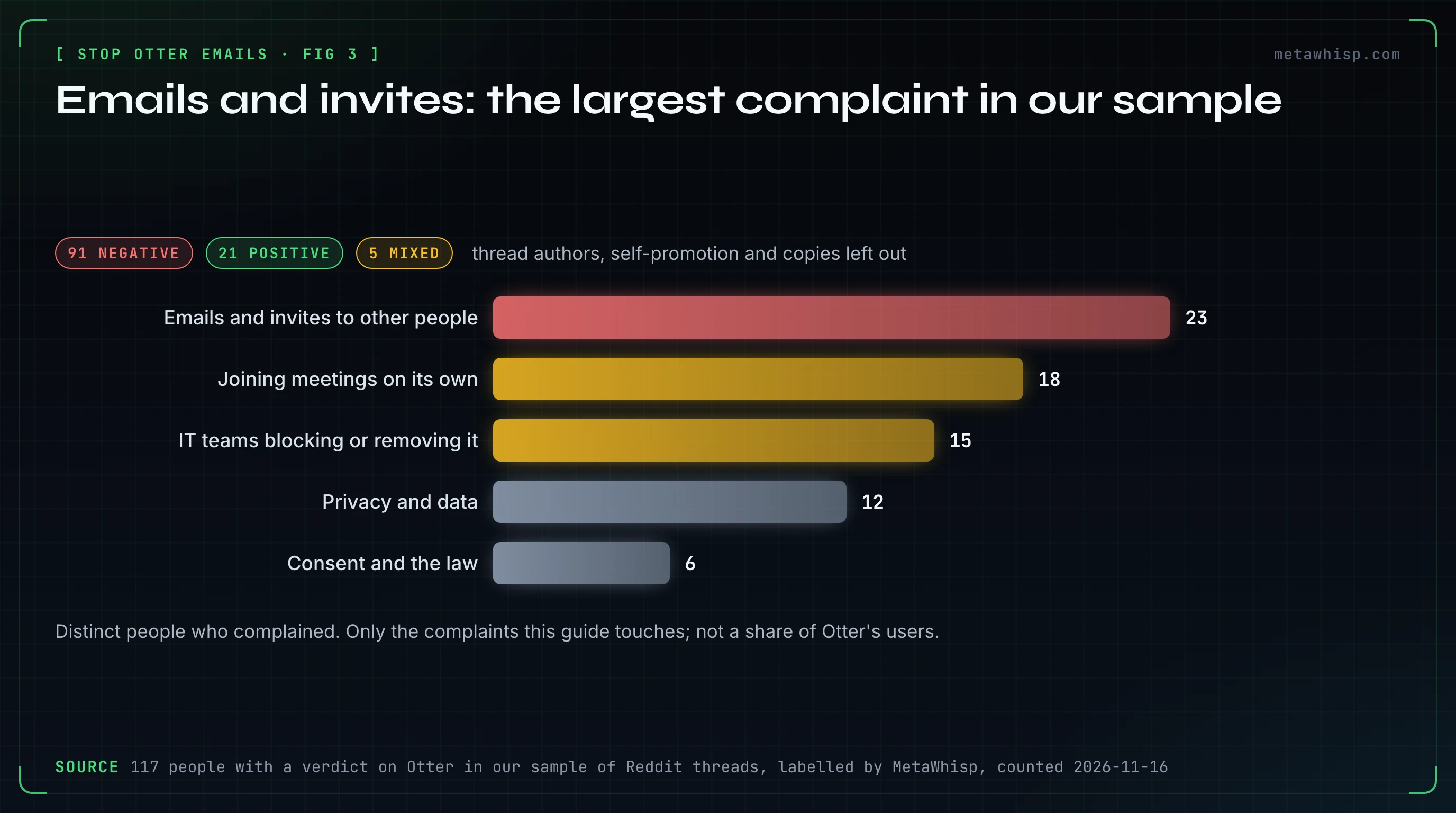
23 people in our sample of Reddit threads complained about Otter's emails and invites, or the way it spreads to other people, the largest complaint about Otter in the sample. 17 of them wrote in 2025. Nobody among the 23 reports switching to "Don't share" and what happened next, so the sample can't show whether Otter's fix works.
By our own reading of those comments (not a tool count), what got sent was most often a transcript, notes or a summary. One person who didn't want interviewers to have their notes wrote: "it automatically sends notes to all participants without telling you so!" Another opened a summary, got an account they didn't ask for, and found Otter in a meeting before they arrived.
What people tried:
- Removing the bot from the call. One person says the transcript was sent anyway. Otter's conditions for the summary email are a synced event, auto-share to guests and a recording; the bot staying isn't one.
- Unsubscribing. One person did, and resented having to. Per Otter, that covers one email type.
- Blocking it company-wide. 15 people raised IT trouble with Otter, most of them about blocking or removing it. One says blocking the domain didn't stop the bots and the accounts had to be deleted; they describe Fireflies and add that Otter works the same way.
Counts leave out thread authors, self-promotion and copies. More in our Otter on Reddit article, which uses a wider count.
Is There a Way to Take Meeting Notes That Emails Nobody?
Yes, if you're on a Mac and the notes are only for you. MetaWhisp, our own app, sends nothing to other participants: no email, no invite, no chat message, no summary. It has no team workspace and no share link. It never came up in the Reddit threads we read.
No bot joins: it records your microphone plus the Mac's own audio through Apple's ScreenCaptureKit. Meeting Recording is off by default in Settings → Meetings, and you start each recording yourself from the menu bar, unless you turn on auto-start, which is also off by default. The free version needs no account, no trial and no card, and by default it transcribes on the Mac.
The limits: it does nothing about emails from someone else's Otter, and it has no admin console. Nobody in the call sees anything, so telling people and getting consent is on you. It runs only on macOS 14 or later on Apple silicon, labels speakers only as "Me" and "Them", and has no audio-file import. Sharing a recap is by hand.
FAQ
Does Otter automatically email meeting notes to everyone?
It can. Auto-share applies to conversations recorded through a calendar event. If the audience is All event guests, everyone on the invite gets the notes and a Meeting Summary email within 2 hours. Otter's pages don't say which audience a new account starts with.
How do I unsubscribe from Otter emails if I never signed up?
Click Unsubscribe at the end of the email. Otter says no login is required, but it stops only that type of email. Then ask the sender to stop sharing with you, block reply@otter.ai and no-reply@otter.ai, or email privacy@otter.ai to ask Otter to erase your data.
Does Otter read my contacts?
Otter's pages aren't consistent. The privacy policy says Otter receives contact information from services you connect and names Google Contacts, and its Microsoft setup pages list a Contacts.Read permission. The Privacy and Security page gives username, email address and calendar information as examples and doesn't mention contacts. No page we read says Otter emails your contacts itself.
How do I stop Otter from joining my meetings?
On the web, open Integrations, then the Meetings tab, then Default auto-join settings, and choose Meetings I manually select. Events you toggled by hand keep their setting. In a live call, anyone can type stop otter in the chat to remove every Notetaker.
What is the status of the Otter.ai class action?
In re Otter.AI Privacy Litigation, No. 5:25-cv-06911, was filed in federal court on August 15, 2025. NPR reported that the suit says Otter records without asking attendees. A motion to dismiss was granted in part on August 13, 2026, and Otter filed an amended answer on October 29, 2026. No class has been certified, and nothing has been proven. This isn't legal advice.
How we checked
On November 16, 2026, we read Otter's help center, terms, privacy policy and Privacy & Security page, Google and Microsoft docs, the CourtListener docket and NPR's report. We didn't run Otter or open the court PDFs. Reddit counts are distinct people in our sample of threads, found on Google on October 21, 2026.
Related reading
- How to Stop Otter AI From Joining Meetings
- Meeting Transcription Without a Bot on Mac: 2026
- How to Cancel Otter AI Subscription (Web, Apple, Google)
- How to Cancel an AI Note Taker Before It Charges You
- Meeting Notes When AI Notetakers Are Banned
Sources
- Otter help, sharing: auto-share, turning it off, still sharing, Meeting Summary, sharing, stopping sharing, collaborators, channels, Automations, templates
- Notices and invites: Notetaker settings, pre-meeting emails, chat messages, recording permissions, invitations, invite on share, billing
- Account: unsubscribing, calendar, deletion, auto-join, removal
- Admins: workspace auto-share, external sharing, Enterprise settings, admin controls, User Groups, members, Entra consent
- Otter: privacy policy, terms, Privacy & Security
- Google: blocking, app access, blocked senders
- Microsoft: blocking, user consent, Tenant Allow/Block Lists
- Court: CourtListener docket, NPR
- Reddit: r/NoteTaking, r/sysadmin, r/sysadmin, second thread, r/sales, r/projectmanagement
