Stop the charges, keep your notes
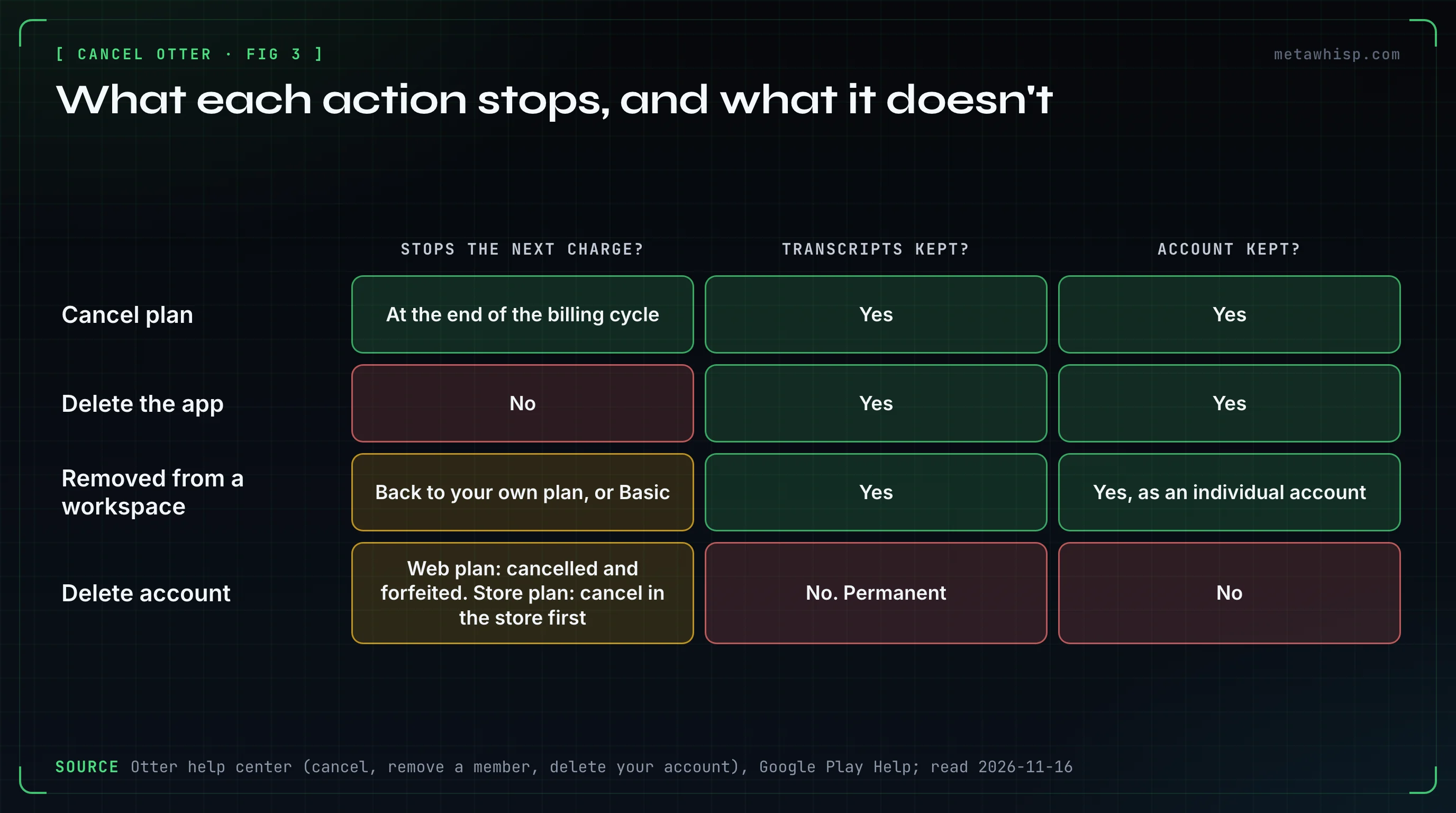
Short answer: cancel where you subscribed, at least 24 hours before the next billing date. On otter.ai, the workspace owner or an admin opens otter.ai/setting/plan and clicks Cancel plan; an Apple or Google Play subscription can only be cancelled in the store. Otter's terms say fees are non-refundable. Cancelling keeps your account and transcripts; deleting the account is a separate, permanent step.
Key takeaways
- Web: otter.ai/setting/plan → Cancel plan → pick a reason → Cancel subscription. Owner or admin only.
- Apple or Google Play: cancel in the store. Deleting the app cancels nothing.
- Money: Otter's terms say fees are non-refundable, and there's no phone support.
- Cancelling isn't deleting. Your conversations stay, but free Basic shows only the 25 most recent, so export first.
| What you want | Paid on otter.ai | Paid through Apple or Google Play | Member of someone's workspace | Free Basic plan |
|---|---|---|---|---|
| Stop the next charge | Owner or admin: Cancel plan at otter.ai/setting/plan | Cancel in the store | Ask the owner or an admin | Nothing to cancel |
| Get money back | Terms say non-refundable; ask support | Apple: reportaproblem.apple.com. Google Play: within 48 hours | Only an admin sees billing | Charged anyway? Look for a second account |
| Delete the account | Export, empty the workspace, then Delete account | Cancel in the store first | Hidden. Ask the admin | Stop auto-join, disconnect the calendar, delete |
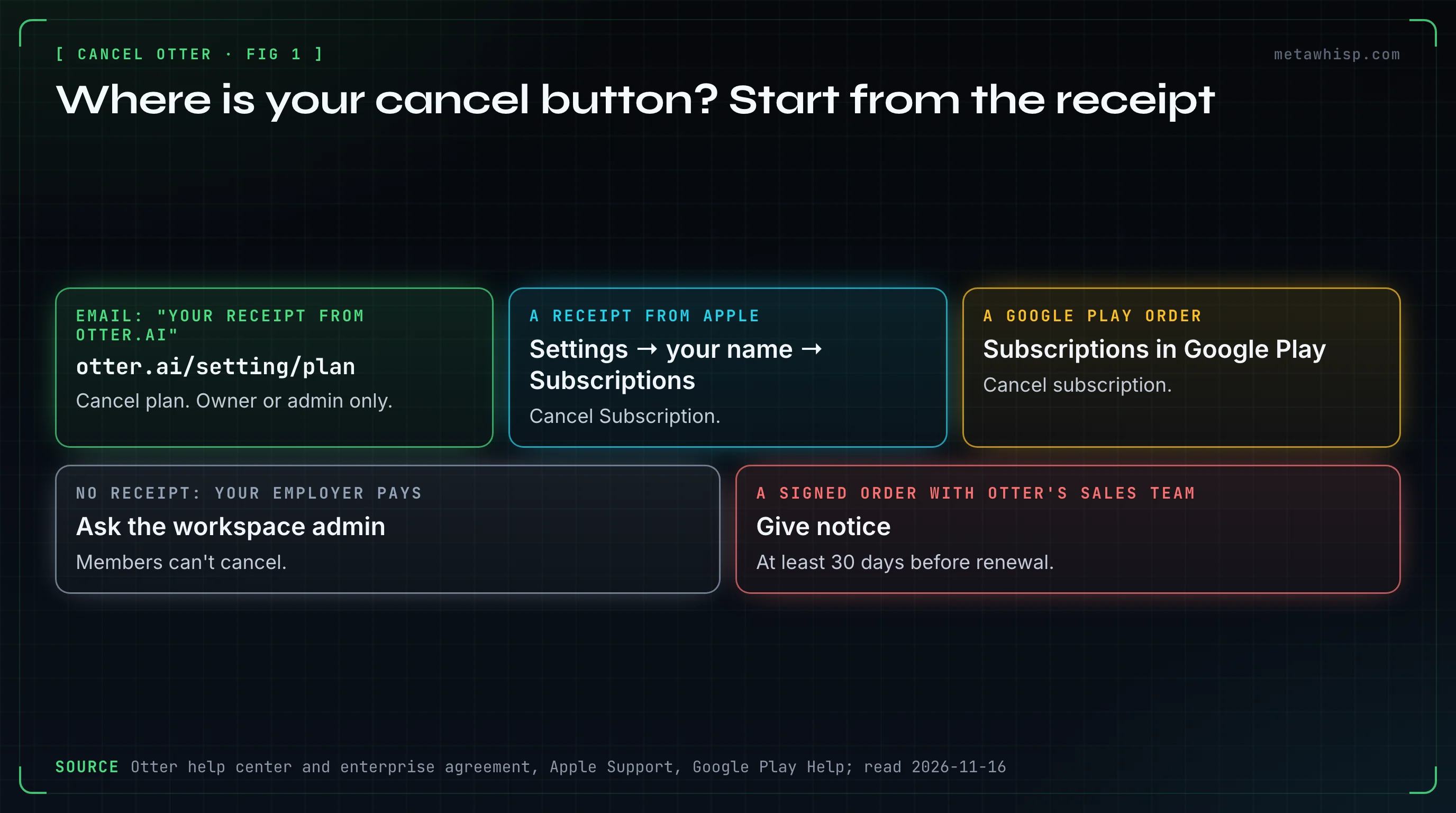
Not sure who bills you? Check the receipt.
How Do You Cancel Otter Pro or Business on the Web?
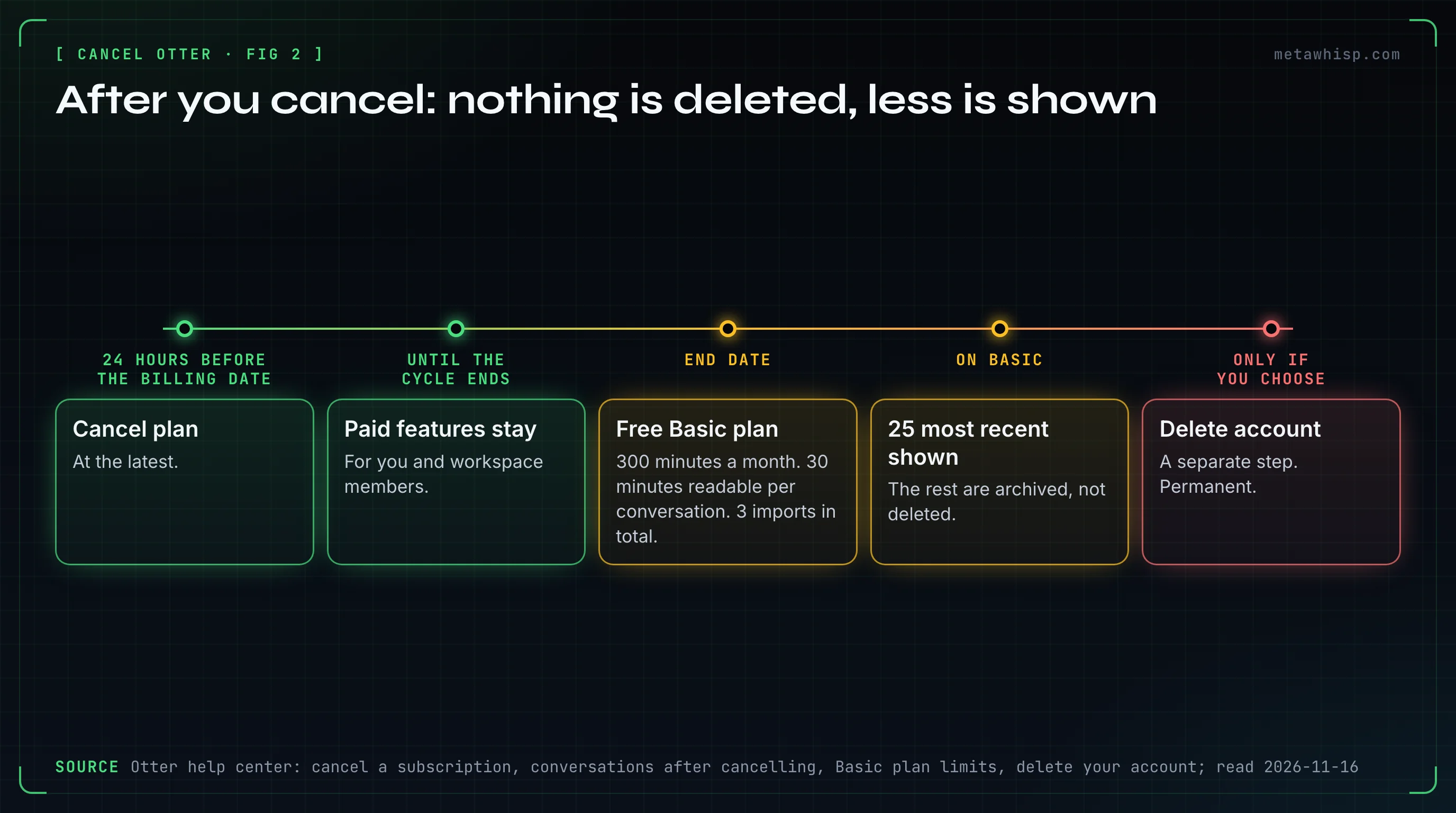
Sign in at otter.ai in a browser as the workspace owner or an admin, open otter.ai/setting/plan and click Cancel plan. Otter's help center says to do it at least 24 hours before the next billing date. The plan then runs to the end of the billing cycle and drops to free Basic.
- Open otter.ai/setting/plan.
- Click Cancel plan. On Business it's at the bottom of the page.
- Select your main reason and click Continue.
- Click Cancel subscription.
Go by the link, because Otter's articles disagree on labels: the tab is Billing in the cancel articles and Plan in the trial article, and the profile menu is upper left in some and upper right in another.
- It worked if the end date shows under Account Settings → Plan and a Reactivate plan button has appeared, which undoes the cancellation until that date. Otter's help center describes the result as cancelled, expiring at the end of the billing period.
- Deadline: the help center says 24 hours; the terms say before it renews, and the same clause asks for thirty days' written notice to end an Order Form. Orders signed with Otter's sales team need notice at least thirty days before renewal.
- On a phone: Otter gives in-app steps but also says web purchases are managed in a browser, and Business only there. Use a browser.
How Do You Cancel the Otter Business Trial Before It Charges You?
Otter's trial is 7 days of Business and needs a credit card. Only an admin can cancel it: click your profile, select Account Settings, open the Plan tab and, under the Billing Contact section, click Cancel trial, then Cancel trial again in the pop-up. Otherwise the workspace is charged for every current seat at the Business monthly rate.
The end date is under Account Settings > Plan. The pricing page shows Business monthly at $24 per user (20% off for 3 months, first-time subscribers) beside a crossed-out $30.
People who join your workspace can come in as trial members. They become paid seats the day their trial ends.
- The Trial tab in workspace settings shows each charge date under Billing starts.
- To end one: 3 dots → Cancel trial → End and remove. Don't invite them back: Otter says that means an immediate charge.
- On company-domain workspaces, Join instantly as free trial members is on by default (Workspace > Manage Workspace > Settings).
How Do You Cancel Otter Bought Through Apple or Google Play?
In the store, not in Otter. Otter's help center says its support team can't cancel or manage an Apple subscription for you, and sends billing, refunds and cancellations of store purchases to the store. Apple says it's already cancelled if there's no Cancel button or you see an expiration message in red text.
- iPhone or iPad: Settings → your name → Subscriptions → the Otter.ai subscription → Cancel Subscription → Confirm.
- Mac: App Store → your name at the bottom of the sidebar → your name on the page that appears → Subscriptions → the Otter subscription → Cancel Subscription.
- No Apple device: account.apple.com.
- Android: subscriptions in Google Play → the Otter subscription → Cancel subscription.
Can't find it in the store? Apple suggests searching your email for "receipt from Apple" and checking a family member's Apple Account. If Apple bills you but the Otter account you're signed in to shows no paid plan, Otter says the most common reason is a second Otter account made through Apple Private Relay.
Who Can Cancel a Workspace Plan, and How Do You Leave One?
Only the workspace owner or an admin can cancel, and only an admin sees billing. A member can't cancel or leave alone: Otter says to contact your workspace admin. Ask to be removed, not deleted: removal keeps your data in an individual account, while deletion erases the account and everything in it.
Otter's article mentions only deletion in one place and deletion or removal in another, so say which you want. Owners and admins can:
- Remove: Revoke access to workspace → Remove account from Workspace → Revoke access. They keep their data.
- Deactivate: Deactivate account and keep in Workspace. The seat is freed and the data stays.
- Delete: permanent. A 2024 article says 3 dots → Delete forever; a 2026 one, deactivate first, then Delete member.
Otter's pages disagree on three money points:
- Invites. Three articles say only an admin's invite is charged at once, and members' invitees join as a trial. Two others say any invite is charged, prorated, once the person joins.
- Credit for a removed seat. By article: it will be issued, may be issued, or isn't if you never exceeded your first seat count. Credits aren't cash.
- After a Business plan ends. One article says the workspace continues on Basic, another that the service is suspended. Export first.
Why Does Otter Keep Charging You? What Reddit Reports
Otter's pages point to three checks: the plan runs until its billing cycle ends, the subscription may sit with Apple, Google Play or a second account, and seats may have been added to your workspace. 4 people in our sample of Reddit threads complained about Otter charges they didn't expect (2025 to 2026). We couldn't check their accounts.
- One accepted what they took for a friend request from a stranger at the same college and was then charged $92: "This is after I canceled my subscription." Five days later the same person wrote that Otter gave a full refund.
- Another saw a single-user yearly Pro plan turn multi-user, with join requests and large monthly charges. Otter's pages say workspaces are rolling out to Pro accounts and any member can invite.
- A third bought Otter with a Zoom purchase, cancelled Zoom, and Otter kept billing. No Otter page we read mentions such a bundle; its terms name otter.ai settings, the app stores and support@otter.ai as the places to cancel.
Then check:
- Check the end date under Account Settings → Plan. Cancelling stops the renewal, not the current period.
- Find who bills you. Otter's Stripe receipt, usually titled "Your receipt from Otter.ai", shows the account's email under Bill to. An Apple receipt or a Google Play order means a store subscription.
- Empty the seats: remove people you don't pay for and cancel member trials.
- Write to support. There's no phone line: use profile → Contact Support, or the request form at help.otter.ai/hc/en-us/requests/new if you're locked out.
11 people in the sample complained that Otter is hard to get rid of, mostly IT staff deleting staff accounts and people whose bot came back. By our reading of those rows, only two concern a paid plan.
Can You Get a Refund From Otter?
By Otter's terms, no: all fees are non-refundable. The help center repeats it, also for people who forgot to cancel and want the unused part back, then tells anyone with questions about their specific scenario to contact support. Apple and Google Play purchases follow the stores' refund policies.
The terms say no, but the person charged $92 above wrote five days later: "They gave me a full refund." We couldn't verify it, so write to support even though the terms say no. What the pages offer:
- Pro credit lost by joining a workspace: it isn't refunded automatically. Contact support.
- Apple: reportaproblem.apple.com → I'd like to → Request a refund. Expect an update in 24 to 48 hours.
- Google Play: a refund is possible within 48 hours, depending on the purchase. After that, Google sends you to the developer, which is Otter, and Otter's help center sends store refunds back to the store.
On card disputes: that Zoom buyer says the card issuer credited five months of charges. Otter's terms mention fees tied to chargebacks and send disputes to binding individual arbitration, small claims court excepted. This is not legal advice.
How Do You Keep Your Transcripts Before You Leave?
Cancelling deletes nothing: Otter says your conversations remain in your account. But free Basic opens only your 25 most recent; older ones are archived, not deleted. So export while the plan is active: in a conversation, click the three dots, select Export and choose TXT, DOCX, PDF or SRT, plus Audio for an MP3.
- Bulk export is on Business and Enterprise only: in My Conversations, tick the checkboxes, click the Export icon, pick formats, click Export. A ZIP link arrives by email.
- Select all picks only the conversations loaded on the page, so scroll to the bottom first.
- On Basic, the help center says TXT only; the pricing table lists "mp3, txt". Export audio before the plan ends.
- Archived conversations aren't deleted over time. Two documented ways back: upgrade, or delete some of your 25 most recent.
One user in the sample, with hundreds of recordings, saw only days of one-by-one downloads or paying on. The documented bulk route is Business. We did not try it, and while Otter's pages say you can upgrade to Business, none describes going up for one month and back. See our bulk export guide.
How Do You Delete Your Otter Account for Good?
Cancel and export first. On the web, go to Account Settings → General, scroll to the bottom, click Delete account, enter your password (or verify through your Google, Microsoft or Apple sign-in), click Verify and continue, then Delete account. It's permanent: Otter says it can't recover deleted accounts or conversations. The option shows only when you're the only user in your workspace.
- Mobile app: Account → Account Settings → Delete account → Verify and continue → Delete account permanently.
- No Delete account option? It's hidden when the workspace has 2 or more members. Members ask the admin. Owners must clear everyone out; Otter's page lists deactivating as one way, then says deactivated users must be removed or deleted too.
- A paid plan: Otter says subscriptions are cancelled and forfeited when you delete. Its pages don't say what happens to an Apple or Google Play one, so cancel that in the store first.
- What stays: limited account information, such as your email.
On the free plan, deleting is the whole job once the notetaker is off: see how to stop Otter joining meetings and how to stop its emails.
IT admins removing staff accounts: see the admin section of how to stop Otter AI from joining meetings.
Is There a Mac Note Taker With No Subscription to Cancel?
If you're on a Mac and leaving Otter over the bot, the minute caps or the price, MetaWhisp is one option. It's our product. The free version has unlimited on-device dictation and meeting recording with no account, no trial and no credit card, so there's nothing that can renew. No bot joins your calls.
It records your microphone plus the Mac's own audio through Apple's ScreenCaptureKit and, by default, transcribes on the Mac with Whisper large-v3 (a download of about 3 GB). Meeting Recording is off until you turn it on in Settings → Meetings, and you start each recording from the menu bar. Pro is optional, $7.77 a month or $30 a year, moves transcription to the cloud and is cancelled at metawhisp.com/account. Its terms don't mention refunds: they say you can cancel at any time and keep access to the end of the billing period.
Its limits:
- Mac only: macOS 14 or later, Apple silicon.
- No audio-file import, so it can't re-transcribe what you export from Otter.
- Speaker labels are only "Me" and "Them".
- No team workspace or share link. It saves transcripts and recaps, not audio.
- It tells other participants nothing, so consent is on you. Not legal advice.
MetaWhisp isn't in our Reddit sample. More: MetaWhisp vs Otter.ai.
FAQ
Does cancelling Otter delete my account or my transcripts?
No. Otter's help center says cancelling is not the same as deleting your account, and your conversations remain. Free Basic opens the 25 most recent; older ones are archived, not deleted. They go only if you delete them or your account, or an admin deletes your account.
How do I cancel Otter's free plan?
There's nothing to cancel: Basic is free and has no subscription. But it still includes the meeting notetaker. To stop it, set auto-join to Meetings I manually select under Integrations, Meetings, and disconnect your calendar. To leave completely, delete the account under Account Settings, General.
Does Otter have a phone number for billing?
No. Otter's help center says it doesn't offer phone support. Signed in, click your profile and select Contact Support. If you can't sign in, use the request form on help.otter.ai with an email you can access. Business and Enterprise are answered first.
Can I pause Otter instead of cancelling?
Otter's help center says you can pause a subscription once, under Account Settings, Plan, with the Pause Plan button. It doesn't say how long a pause lasts. The Pause Plan tip appears in both the Pro and the Business cancel articles. If the button isn't there, cancelling is the documented way to stop the renewal.
Can I remove my card from Otter?
Only partly. Under Account Settings, Billing, Payment Method, the three-dot menu next to a card has Delete. But Otter requires one card on file, so you can't delete the default card yourself. To remove every card permanently, contact Otter's support team.
How we checked
On November 16, 2026, we read Otter's help center, pricing and sign-up pages, terms and enterprise agreement, plus Apple Support and Google Play Help. The Reddit counts come from our labelled sample of 116 Reddit threads found on Google on October 21, 2026; they count people, and we couldn't verify anyone's story. We didn't run Otter or cancel a plan.
Related reading
- Stop Otter AI joining your meetings
- Stop Otter AI sending emails to others
- Cancel an AI note taker before it charges you
- Bulk export meeting transcripts before you cancel
Sources
- Otter help, billing: cancel a subscription, cancel Pro, cancel Business, Business trial, store subscriptions, subscription not showing (Apple), payment method, subscription not showing (web), support
- Otter help, workspaces: trial billing, trial members, seats, licenses, joining, invites, members, remove, delete, deactivate
- Otter help, your data: after you cancel, Basic limits, export, bulk export, delete account, auto-join, calendar
- Otter: pricing, sign-up, terms, enterprise agreement
- Apple: cancel, refund. Google Play: cancel, refund
- Reddit comments: invite charge, multi-user plan, Zoom purchase, hundreds of recordings
