[ VOICE MEMO ] → [ WHISPER LOCAL ] → [ STRUCTURED RECAP ] → [ CRM PASTE ]
[ OFFLINE: TRUE ] [ FREE LOCAL: TRUE ] [ BYOK POLISH: TRUE ]
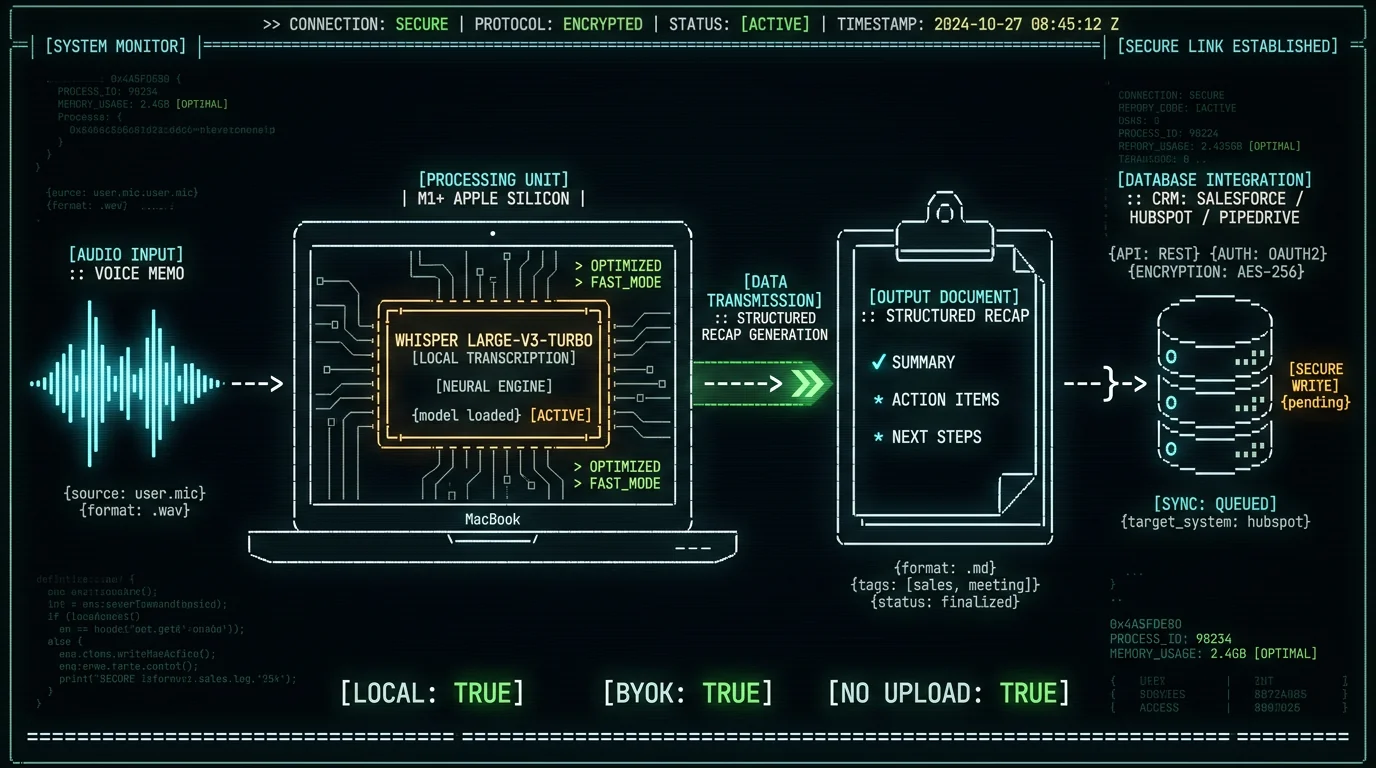
TL;DR: To turn sales voice memos into CRM notes on Mac, move the recording from your phone to your Mac (AirDrop is fastest), drop it into MetaWhisp to transcribe locally with Whisper large-v3-turbo for free, click Structured mode with your own OpenAI or Cerebras key to turn the transcript into a CRM-ready recap, then paste into Salesforce, HubSpot, Pipedrive, or wherever you keep notes. Local transcription stays on your Mac and never uploads. The whole loop takes under a minute on an M-series Mac.
How do I turn sales voice memos into CRM notes on my Mac?
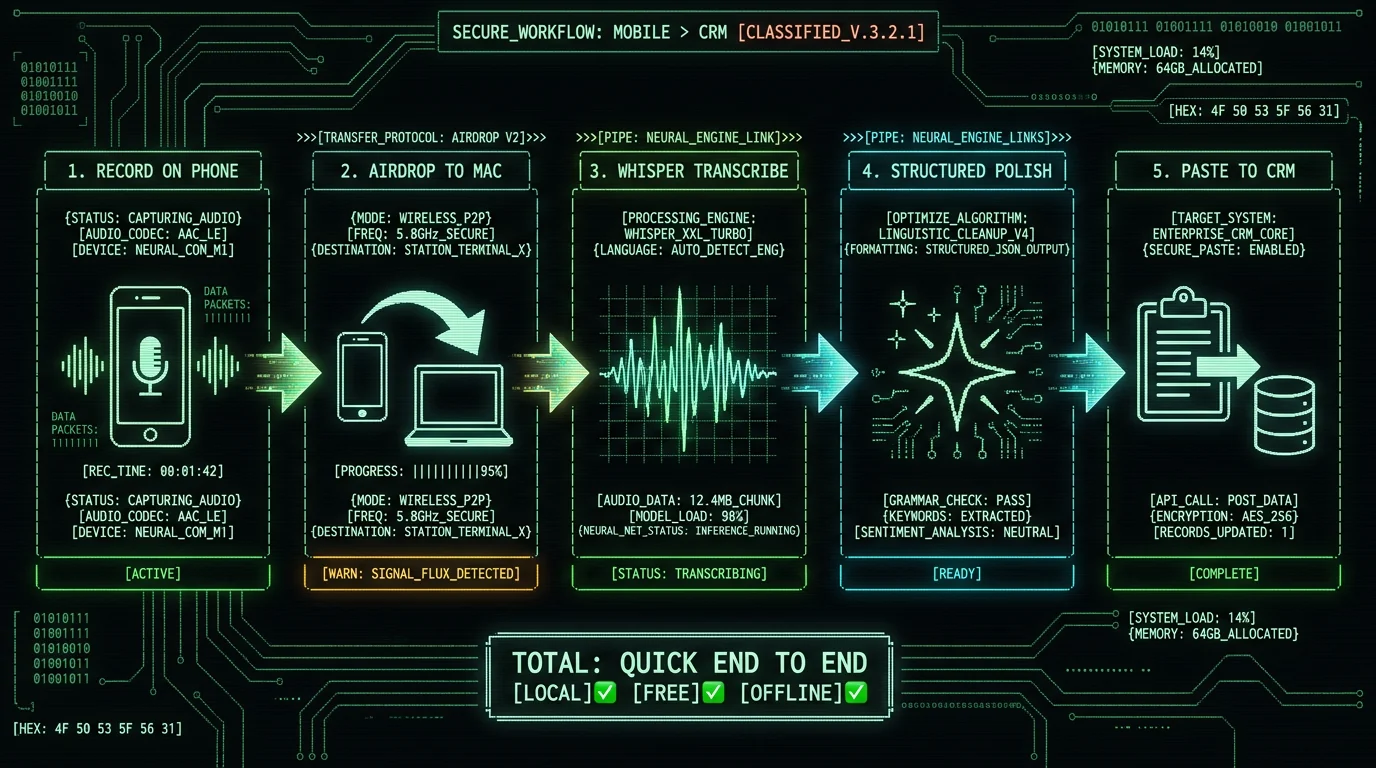
Four steps, end to end. Move the audio file from your phone to your Mac, transcribe it locally with Whisper on the Neural Engine, run it through a processing mode to tighten the prose, then paste the result into your CRM note field. None of these steps require an account, and the heavy lifting (transcription) stays free and offline.Turn a sales voice memo into a clean CRM note on Mac in four steps. First, move the audio from your phone to your Mac — AirDrop or iCloud Drive both work in seconds. Second, drop the file into MetaWhisp or hold the Right Option key to dictate fresh; WhisperKit runs Whisper large-v3-turbo on the Neural Engine for free, and audio never leaves the machine. Third, click Correct, Rewrite, or Structured to tighten the transcript — Structured adds a summary, action items, and next steps in your own voice. Fourth, copy the result and paste it into Salesforce, HubSpot, Pipedrive, or whatever CRM you use. Local transcription stays free and unlimited; the polish step uses your own OpenAI or Cerebras API key by default, so you control cost and data.
What you need before you start
- An Apple Silicon Mac (M1, M2, M3, M4 — anything from the last several years). Intel is not supported because the local pipeline needs the Neural Engine. - macOS 14 or later. - MetaWhisp, free from the website. One-time model download of about 950 MB on first launch, then everything is offline. - Optionally, your own OpenAI or Cerebras API key. Without one, you can still paste the raw transcript directly. With one, you unlock Correct, Rewrite, and Structured on the free tier, no Pro required. - A CRM that accepts pasted text. Which is, in practice, all of them. The free tier is the only tier most reps need. Pro at $30 per year (or $7.77 per month) exists for two things: built-in cloud AI polish so you do not have to paste your own API key, and cloud transcription. If you are fine adding your own OpenAI key once, Pro is optional.Step 1: Get the voice memo onto your Mac
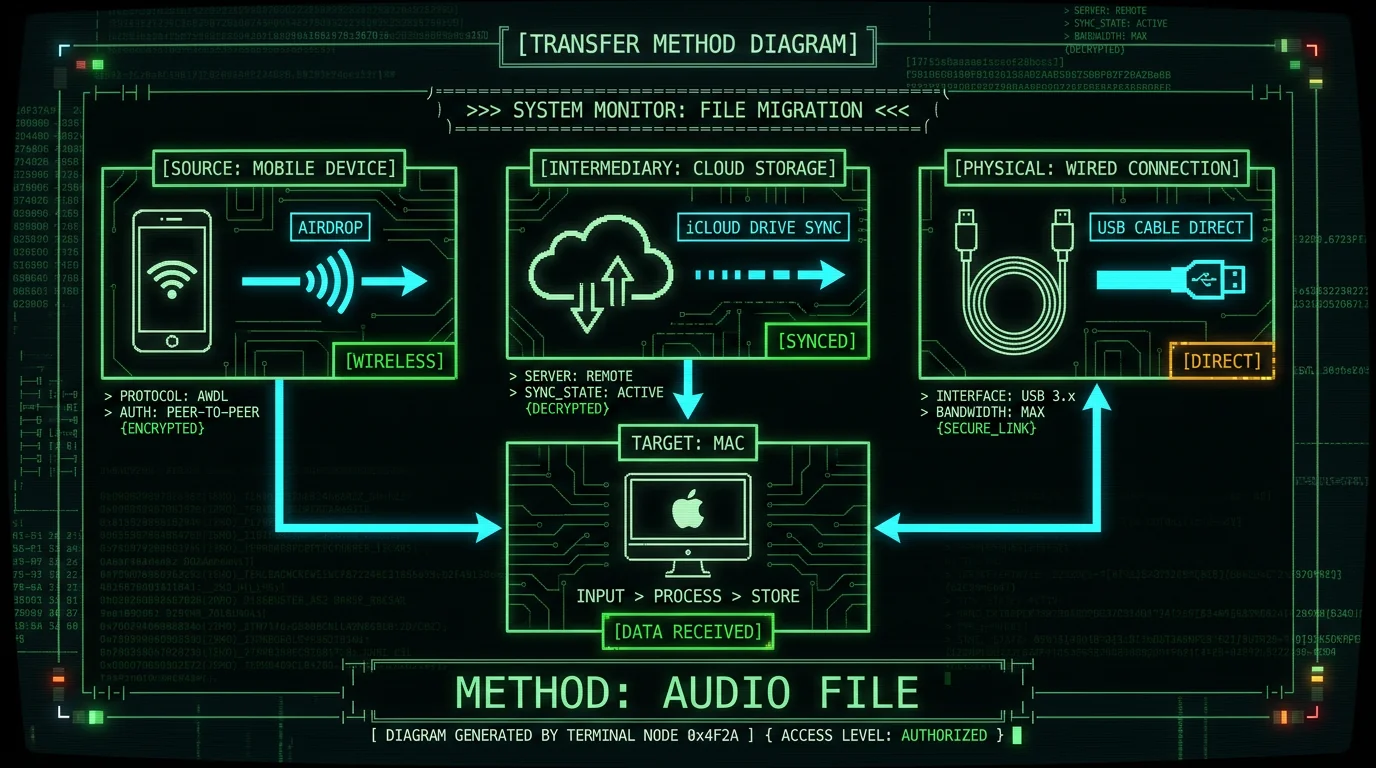
Your phone is the recorder. The Mac is where the cleanup happens. Three honest transfer methods, in order of speed:- AirDrop — open the Voice Memos app on iPhone, tap Share on the memo, choose AirDrop, pick your Mac. Lands in your Downloads folder. Usually 10-20 seconds for a 3-5 MB audio file.
- iCloud Drive — if Voice Memos sync is on, the file is already in
~/Library/Mobile Documents/iCloud~com~apple~VoiceMemoson your Mac. Zero transfer, zero effort, slightly slower sync. - USB cable — open the iPhone in Finder, drag the memo out. Works without Wi-Fi, useful when you're on the road with bad signal.
Pro tip: Before you AirDrop, rename the Voice Memo on your phone to the prospect or company name. The file name travels with the recording and saves you from guessing which memo is which a day later, when you have eight of them stacked up.
Step 2: Transcribe it locally (free, no upload)
Open MetaWhisp, drop the audio file onto the window, and the local Whisper model kicks in. The full pipeline stays on your Mac:- WhisperKit (Argmax's open-source wrapper) loads the large-v3-turbo weights.
- Audio runs through the Apple Neural Engine — no GPU contention, low power.
- Text appears in the editor in roughly 20-30 seconds for a 2-minute memo on an M2 or newer.
Yes, this whole workflow can stay private. Local mode in MetaWhisp runs Whisper on the Neural Engine, so the audio never leaves your Mac — no upload to OpenAI, no upload to MetaWhisp, nothing. The only network call happens when you click Correct, Rewrite, or Structured, and only the transcript text is sent, to the API provider you chose yourself (OpenAI or Cerebras), not to MetaWhisp. Audio stays local, and even the text leaves your machine only because you explicitly asked for AI post-processing. If you need zero third-party calls, skip the polish step entirely and paste the raw transcript into your CRM note — that path is fully offline and zero-cost. The local model is the original OpenAI Whisper running locally, not a MetaWhisp-owned service.
Step 3: Polish the transcript into a CRM-ready recap
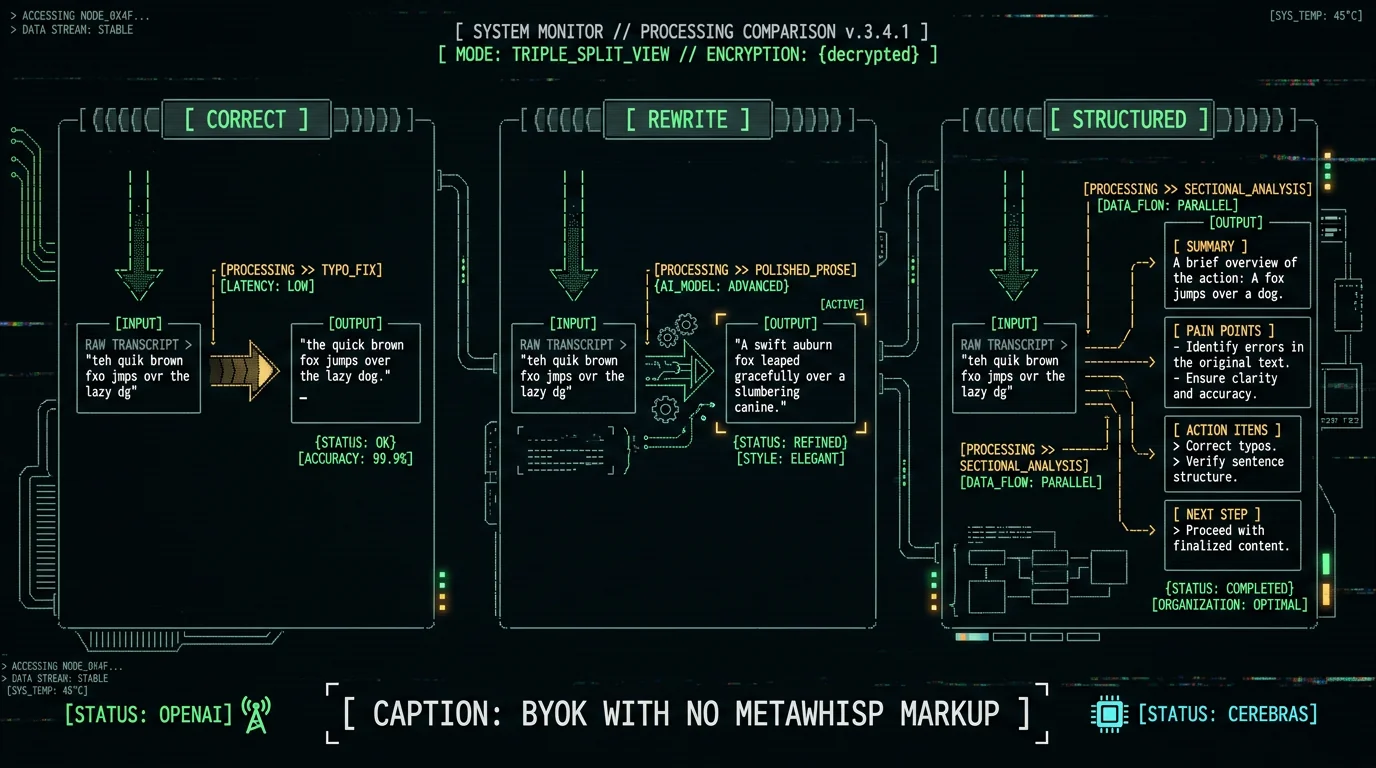
A raw transcript is not a CRM note. It's three paragraphs of "yeah, totally, so basically what we were thinking is..." with filler words, false starts, and missing punctuation. The processing modes exist to bridge that gap. See the full list on the processing modes page, or pick from this short version:| Mode | What it does | Best for | Cost |
|---|---|---|---|
| Correct | Fixes typos and trims filler, keeps your wording | Cleanup of your own dictation | BYOK |
| Rewrite | Rewrites into more polished prose | Follow-up emails, not CRM notes | BYOK |
| Structured | Adds sections: summary, pain points, action items, next step | CRM recap, deal notes | BYOK |
| None | Verbatim transcript only | Maximum privacy, zero cost | Free, offline |
Step 4: Paste the recap into Salesforce, HubSpot, or Pipedrive
This is the deliberately boring step. There is no Salesforce connector, no HubSpot plugin, no OAuth token. The output is on your clipboard; you paste it where it belongs. The same flow works with every major CRM, plus the long tail:- Salesforce — paste into the Note field on the Account or Opportunity.
- HubSpot — paste into the Activity note on the deal.
- Pipedrive — paste into the activity description.
- Zoho CRM, Attio, Folk, Close — paste wherever text lives.
- Notion, Apple Notes, Obsidian — yes, those too.
For a sales rep, Structured mode is the closest thing to a one-click CRM recap. Send the raw transcript in and get a clean output with labeled sections: a 2-3 sentence summary, the prospect's stated pain points, what was agreed to, action items with owners, and a follow-up date. Correct mode is better when you want your own wording cleaned up with minimal restructuring — useful when you dictated the memo yourself and just need typos and filler words gone. Rewrite is best for follow-up emails rather than CRM notes, because it rewrites your prose into something more polished and less personal. All three modes run against your own OpenAI or Cerebras key by default, so each call is whatever those APIs charge you directly — MetaWhisp does not add a markup, and you can see usage in your OpenAI dashboard.
Which processing mode fits a sales workflow best?
Almost always Structured, with one exception. If you dictate the after-call memo yourself in a focused 60-90 second burst, Correct is enough — your structure is already there, you just want filler words trimmed. If you record a rambling 5-minute brain dump after a chaotic call, Structured is worth the extra API call because it forces a layout your CRM can actually display. Rewrite is rarely the right pick for CRM, because CRM notes are records of what was said, not polished marketing prose. If you want zero setup time and no BYOK, MetaWhisp Pro includes built-in cloud AI polish, so you skip the API key step. Local transcription stays free either way.Can I keep customer conversations private through this flow?
Three honest answers, depending on how strict your compliance posture is:- Local-only path — transcribe with Whisper on the Neural Engine, skip the polish step, paste raw transcript. Fully offline, no third party sees the text.
- BYOK polish path — add your own OpenAI or Cerebras key, transcript text goes to that provider under their data terms. Audio never leaves your Mac at any point.
- Pro cloud path — cloud transcription and cloud AI on MetaWhisp's servers, no BYOK. Convenient, but data does leave the machine. Read the privacy page before enabling.
Does MetaWhisp push directly into Salesforce or HubSpot?
No. By design. MetaWhisp is a Mac desktop dictation app, not a CRM connector, and there is no native push into Salesforce, HubSpot, Pipedrive, Zoho, or any other system. You copy and paste.MetaWhisp is a Mac desktop app, not a Salesforce or HubSpot integration. There is no OAuth handshake, no connector to configure, no API token to manage, and nothing syncing silently in the background. You drop an audio file in, you get text out, you paste. That tradeoff is intentional: a paste-based workflow is simpler, works with literally any CRM or note app, and avoids the security review burden of a CRM connector that holds customer data. For reps on MetaWhisp Pro, the cloud transcription path still ends with a copy-and-paste step — Pro adds convenience (no BYOK to set up, built-in AI polish), not a Salesforce pipeline. If your team needs a true CRM push from a recording tool, that is a separate product category — MetaWhisp is the lightweight, privacy-friendly layer that runs on your laptop and ends at the clipboard.
How fast is the whole workflow end to end?
Fast enough to do between two phone calls. On an Apple Silicon Mac (M1 works, M2 and newer faster), the timings stack like this:- AirDrop a 3-5 MB memo: 10-20 seconds.
- Local Whisper transcription of a 2-minute memo: 20-30 seconds on M2, less on M3 or M4.
- Structured mode polish via BYOK: 5-15 seconds depending on provider.
- Paste into CRM: 5 seconds.
The full workflow on an Apple Silicon Mac is fast enough to do between two calls. Local transcription of a 2-minute voice memo with Whisper large-v3-turbo finishes in roughly 20-30 seconds on an M2 or newer chip, often less on M3 or M4. Add another 5-15 seconds for the AI polish step depending on your API provider and the mode you picked — Cerebras is typically faster than OpenAI for the same prompt. The slowest part is usually AirDrop itself, which can take 10-20 seconds for a 3-5 MB audio file over Bluetooth or Wi-Fi. Total: about a minute from opening the Voice Memos app to having a structured recap sitting on your clipboard, ready to paste into your CRM. The model download is one-time, about 950 MB, and happens on first launch. After that, every transcription is offline and uncapped on the local path.
From my own workflow: I dictate every after-call note in Russian or English, depending on the call. The thing that changed my loop was not the AI polish — it was killing the upload. I record on my iPhone, AirDrop the file to my MacBook Air M1, and have a structured recap on my clipboard in under a minute. The CRM does not care how the text got there, only that it is there.
FAQ
Can I dictate straight into Salesforce or HubSpot instead?
Not directly. MetaWhisp is a Mac desktop dictation app, not a CRM plugin. You dictate or drop in an audio file inside MetaWhisp on your Mac, get a clean transcript back, then paste the result into whatever CRM field you want. There is no Salesforce or HubSpot connector, no OAuth handshake, no API token to manage — that is intentional. A paste-based workflow works with literally any CRM, works the same way in a notes app or email draft, and avoids the security review of a connector that holds customer data.
Will the AI clean up my "um"s and "uh"s?
Whisper already drops most filler words from the transcript on its own. For what remains, Correct mode fixes typos and trims repeated filler while keeping your sentence structure. Rewrite mode goes further and rewrites your prose into something more polished — better for follow-up emails than CRM notes, since CRM notes usually want your wording preserved. Structured mode adds labeled sections (summary, pain points, agreed next steps, action items) on top of an already-cleaned transcript.
Does this work without internet?
Local transcription, yes — it runs Whisper large-v3-turbo on the Neural Engine and audio never leaves the Mac. The AI polish step (Correct, Rewrite, Structured) needs a network call because it sends the transcript text to your API provider (OpenAI or Cerebras). If you skip the polish step entirely, you can go fully offline: record or AirDrop, transcribe locally, paste the raw transcript into your CRM. That is the maximum-privacy path.
Does it work with HubSpot and Pipedrive, not just Salesforce?
Yes. The paste step is the same regardless of CRM. MetaWhisp produces text — you decide where it goes. That includes Salesforce notes, HubSpot deal records, Pipedrive activity logs, Zoho CRM, Attio, Folk, Notion, Apple Notes, or a plain email draft. If you can paste into it, MetaWhisp works with it.
What about customer names and PII in the memo?
In local mode, audio stays on your Mac. The only network traffic is during the optional AI polish step, and that goes to the API provider you chose (OpenAI or Cerebras), not to MetaWhisp. If your CRM or compliance policy forbids sending customer text to any third-party LLM, skip the polish step and use the raw transcript — that path is fully offline. See the processing modes page for a per-mode data flow breakdown.
Why does not MetaWhisp push directly into my CRM?
Because a Mac dictation app and a CRM connector are different products with different security review burdens. A paste-based workflow is simpler, has zero integration surface area, and works with every CRM equally. If your team needs a true Salesforce or HubSpot push from a recording tool, look at Gong, Chorus, or a CRM-native call recording product. MetaWhisp is the lightweight, on-device layer that ends at the clipboard.
How long should my after-call voice memo be?
1-3 minutes is the sweet spot. That is enough time to cover: who you spoke with, what they care about, what was agreed, and the next step. Longer memos work fine — local transcription typically handles longer memos without breaking a sweat — but shorter memos translate into tighter CRM notes and faster processing. In practice, the Structured mode prompt tends to work best at that 1-3 minute length.
About the author. Andrew Dyuzhov is the solo founder of MetaWhisp. He builds the app on top of open-source Whisper and WhisperKit using AI coding tools, and uses the dictation workflow above daily for his own after-call notes in Russian and English. He is not a CRM consultant and the claims in this article are limited to his own testing — check your CRM vendor's documentation for the official paste-into-note-field flow. Find him on X.
Related reading
- How to record and transcribe any call on Mac — the fuller pipeline when you want to capture the call itself, not just the after-call memo.
- AI meeting recap and action items on Mac — same pattern aimed at internal meetings rather than sales calls.
- Processing modes explained — Correct vs Rewrite vs Structured, with the data flow for each.
- MetaWhisp pricing — when (and when not) to consider Pro.
