Why Otter, Fireflies and Fathom miss meetings, and how to take notes with no bot
The quick answer: a meeting bot joins only the calls it knows about and can get into. Check that the event synced to your note taker's calendar, that auto-join covers this kind of meeting, that the event holds the full meeting link, and that the call lets outside guests in without a waiting room or lobby. Or take the notes on your own Mac, where nothing has to join the call.
Key takeaways
- Otter, Fireflies and Fathom list the same causes in their help docs: the event never synced, auto-join skipped it, the link was missing, or a waiting room, lobby or company policy kept the bot out.
- Plan limits count too: Otter's free plan and Fireflies' Free and Pro plans record one meeting at a time.
- MetaWhisp records the call from your own Mac, so there's no bot to invite or admit, and it's free.
Why Do AI Note Takers Miss Meetings?
A meeting bot is a guest, and a guest needs three things: an invitation, a reason to go, and a way in. Otter, Fireflies and Fathom each publish troubleshooting pages, and their causes overlap almost completely: a calendar event that never synced, an auto-join rule that leaves the meeting out, a missing or app-only link, and a waiting room, lobby or company policy that blocks outside guests.
Reviews show what that looks like. A Fireflies customer wrote in June 2026 that none of their first four meetings recorded properly, and that support couldn't even see some of those meetings on their calendar. A Fathom customer wrote in August 2026 that the bot was joining only some of their calls, with no pattern they could see.
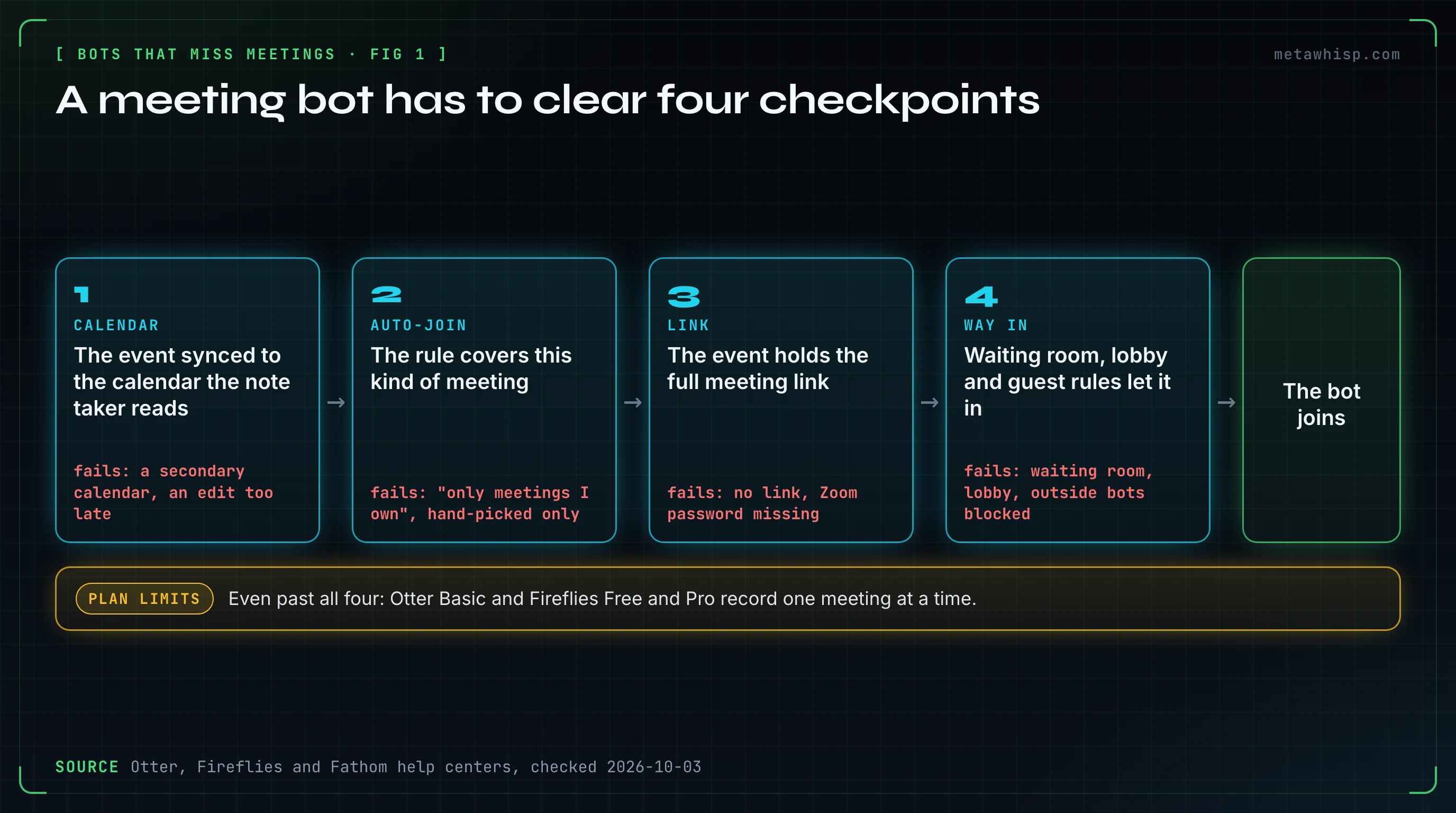
Here's where each vendor's help center points, side by side. Every cell comes from that vendor's own pages, checked on October 3, 2026.
| Cause | Otter | Fireflies | Fathom |
|---|---|---|---|
| The event never reached the bot | Joins automatically only if the event syncs to Otter; only your primary calendar syncs | "Your calendar isn't connected" is a listed cause | Reads only your primary calendar; a call elsewhere comes through as Impromptu, without its title |
| Auto-join left it out | Auto-join can be set to "Meetings I manually select" | With "Only meetings I own", it skips meetings someone else created | Auto-record is set to all, external, internal or no meetings |
| The link was missing or wrong | Zoom, Meet and Teams links only, with the password if the meeting has one | Needs a valid video link, and the Zoom password in the link or the invite | A Meet link must sit in the event's location field; Teams needs a web join link |
| A waiting room or lobby | Leaves after about 12 minutes in a waiting room | Waits up to 10 minutes on Google Meet and 15 elsewhere | Turn off the Zoom Waiting Room or admit the bot |
| Guests or bots are blocked | The meeting must allow external guests; Teams must let anonymous users join unverified | Teams and Meet must admit guests; the host's company can block outside bots | Teams must allow anonymous participants; end-to-end encryption blocks recording |
| Too many meetings at once | 1 at a time on Basic, 2 on Pro, 3 on Business | 1 on Free and Pro, 3 on Business and Enterprise | No published number; it can't join once the team bot limit is reached |
As of October 2026, all three vendors document the same four failure points for their meeting bots: calendar sync, the auto-join rule, the meeting link, and the meeting's own guest controls, such as waiting rooms and lobbies. When a bot misses a call, check those four in that order before you contact support.
Fireflies Not Joining Your Meeting? Check These First
Fireflies' troubleshooting guide puts auto-join first: with auto-join off, its bot, Fred, skips your meetings, and with "Only meetings I own" selected, it skips meetings someone else created. Next come a disconnected calendar, an invite without a valid video link, inviting Fred after the meeting already started, and a Zoom password that's in neither the link nor the invite.
Fireflies also says Meeting Rules always override auto-join, so a rule you set months ago can keep Fred out of today's meeting.
- Zoom: turn off "authenticated users only" for the web client, end-to-end encryption and the waiting room, and turn on join before host. Fireflies says to change these before you generate the meeting link.
- Microsoft Teams: an admin has to allow guest access, let guests bypass the lobby, drop the verification check and allow anonymous join. Fireflies' Teams guide also covers Microsoft's bot detection, which a Teams admin can switch off.
- Google Meet: the host's Google Workspace admin has to allow all users, including people who aren't signed in with a Google account, and the host's organization can block outside bots. If Fred appears as a potential risk, admit it from the ⋮ menu with Admit entry.
- Waiting rooms: Fred waits up to 10 minutes on Google Meet and 15 minutes on other platforms.
Two limits explain a bot that skips a call or leaves early. Fireflies' guide lists one meeting at a time on the Free and Pro plans and three on Business, counting auto-joined and manually added meetings together. It also leaves on its own after 2 hours on Free and Pro, 3 on Business and 4 on Enterprise; you can bring it back with Add to Live Meeting. Meetings shorter than 3 minutes aren't saved at all.
Fathom Not Joining Zoom, Teams or Google Meet?
Fathom reads only your primary calendar, so a call scheduled on another calendar comes through labeled Impromptu, without its title; Fathom's Teams guide lists a secondary calendar among the reasons the bot didn't join. Its auto-record setting decides which meetings it records: all, external only, internal only, or none. For Google Meet, the link has to be in the event's location field, not just the description.
One more rule: Fathom's help center says it can only record a Zoom, Teams or Google Meet call if you're on the call too. It can't attend for you.
- Zoom: Fathom recommends turning the Waiting Room off, letting removed participants rejoin, and giving every meeting its own ID instead of your Personal Meeting ID. A Zoom admin may also need to approve Fathom.
- Microsoft Teams: the meeting needs a web join link, the organization has to allow anonymous participants, and someone may need to admit the bot from the lobby. End-to-end encrypted meetings can't be recorded.
- Google Meet: check that the Fathom Chrome extension is installed and enabled.
Some meetings are off-limits by design. Fathom lists Zoom webinars, meetings that require registration and calls with more than 250 participants. And if an attendee declines Fathom's recording-consent email in advance, auto-record turns off for that call, which looks like a missed meeting from the outside.
Otter Notetaker Not Joining? The Fixes Otter Lists
Otter's Notetaker joins automatically only when the event syncs to Otter, and Otter says to edit events at least 30 minutes before the meeting. It supports Zoom, Google Meet and Microsoft Teams links, and the link needs the password if the meeting has one. Only your primary calendar syncs, so events on other calendars, such as Google Calendar's "Other calendars", don't, and auto-join may be set to meetings you pick by hand.
- The host hasn't started: the Notetaker waits up to 5 minutes and tries up to four times. Otter suggests letting participants join before the host.
- Waiting room: it leaves after about 12 minutes, so turn the waiting room off or admit it.
- Guests: the meeting must allow external guests. On Teams, anonymous users must be able to join without verification.
- Zoom settings: Otter needs the "Record to computer files" setting on in the meeting host's Zoom account. Meetings hosted by Zoom Rooms aren't supported, and if the host refuses the recording request, the Notetaker is removed straight away.
- Teammates: when several people send their Notetakers to the same meeting, only the primary recorder's joins.
Plan limits apply here too. Otter's pricing page lists one meeting at a time on Basic, two on Pro and three on Business, and a maximum transcription time per conversation of 30 minutes on Basic, 90 on Pro and 4 hours on Business. On the free plan, Otter's help center says the recording doesn't stop at 30 minutes, but you can only open the first 30 minutes of the transcript.
What If the Bot Joined but the Notes Are Missing?
Then check the limits before the settings. A bot can sit in the call and still come back with little: Fireflies doesn't save meetings under 3 minutes and leaves at its plan's time limit, Otter's free plan opens only the first 30 minutes of a conversation, and any host can remove a bot or refuse its recording request.
Sometimes it's simply a failure. In a September 2026 Trustpilot review, a Fireflies customer described six meetings of about 90 minutes where only around two minutes were recorded, and one not at all; Fireflies' engineers confirmed the capture had stalled, and the company replied that it has fixed the problem and added safeguards. For a meeting you can't afford to lose, run a second recorder. MetaWhisp works as that backup even next to a bot, because it records on your Mac instead of inside the call.
Can You Take Meeting Notes Without a Bot?
Yes, by recording on your own computer instead of sending a guest into the call. Otter, Fireflies and Fathom have started offering this. Otter's desktop app supports botless recording for supported meetings. Fireflies' desktop app has a Take Notes mode that captures your computer's audio with no notetaker in the call and saves no audio or video files. Fathom offers bot-free capture as a Mac beta.
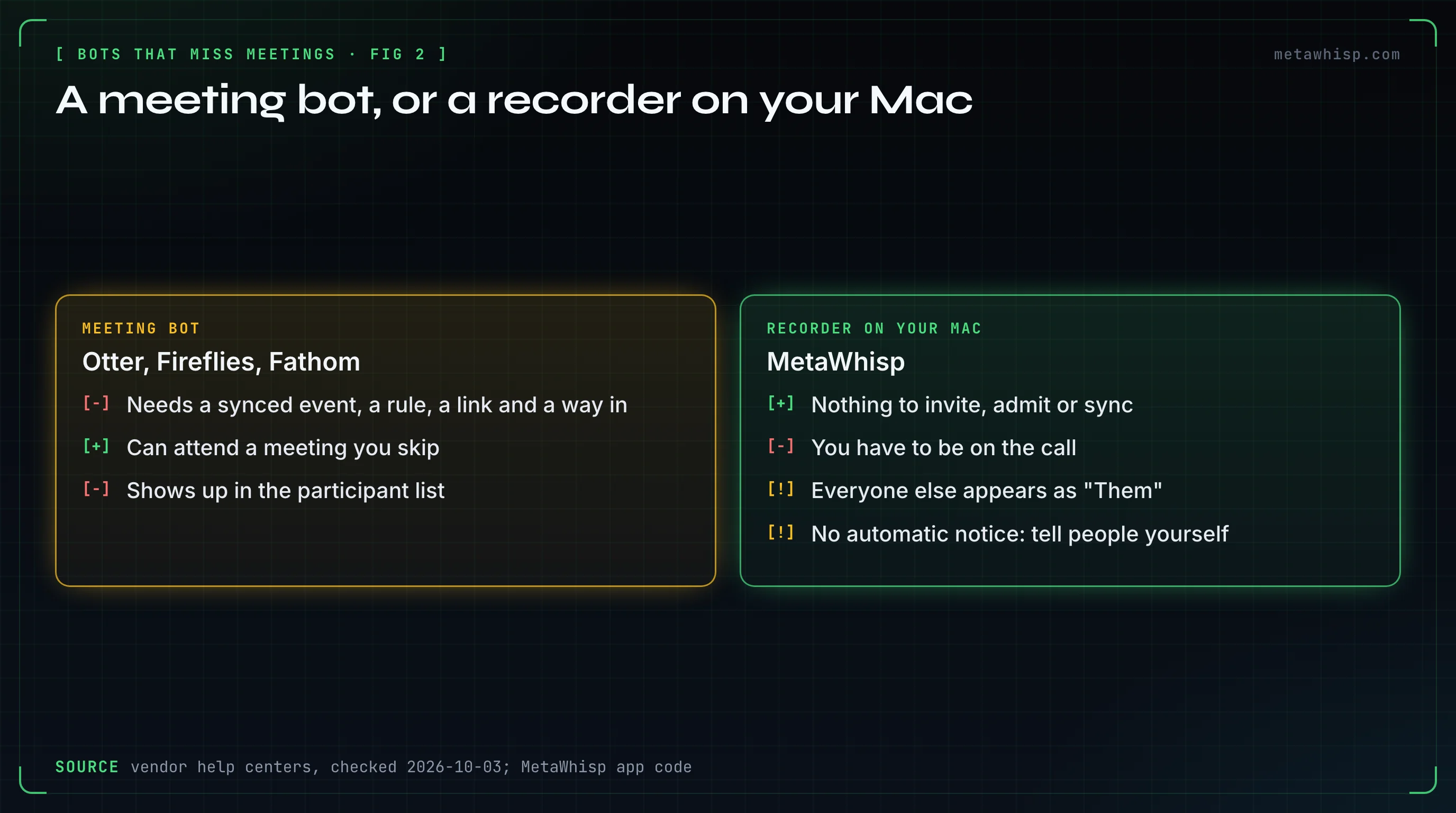
MetaWhisp only works this way: it has no bot at all. It records two tracks on your Mac: your microphone, which becomes Me, and the sound your Mac plays, which carries everyone else and becomes Them. Because nothing joins the call, there's no calendar to sync, no link to parse, and no waiting room, lobby or admin policy to get past. It works with Zoom, Microsoft Teams, Google Meet, FaceTime, Webex, GoTo Meeting, Slack huddles and Discord, and with any other call your Mac plays.
Turn on Meeting Recording in Settings. With call detection on, MetaWhisp notices the calls it recognizes and auto-start can begin recording for you, or you start a recording yourself. On the free plan, by default, the transcript is made on your Mac when you stop, with no limit. With an AI set up, a recap with decisions and action items follows for meetings longer than a minute. If a transcription fails, or you quit mid-meeting, the recording is kept in a Recovery folder on your Mac so you can try again; files there are deleted after 7 days.
The honest trade-offs:
- It hears what your Mac plays, so you have to be on the call. Otter's or Fireflies' bot can attend a meeting you skip; MetaWhisp can't.
- It records everything your Mac plays while the meeting records, so pause music and videos.
- Everyone on the other side appears as Them.
- There's no automatic recording notice, so tell people you're taking notes.
- It needs macOS 14 or later on Apple Silicon. On Pro's cloud transcription, meetings stop after 5,400 minutes in a month; on-device transcription has no such cap.
Download MetaWhisp: it's free, with no account and no credit card.
A One-Minute Check Before an Important Call
- Open the event and confirm it carries the full meeting link, with the Zoom password if your note taker needs it.
- Make sure the event is on the calendar your note taker reads.
- Check that the auto-join rule covers this meeting: internal or external, yours or someone else's.
- Turn off the waiting room, or plan to admit the bot yourself.
- For Teams or company Google Meet calls, ask whether outside bots are allowed at all.
- Check that you aren't over your plan's limit on overlapping meetings.
- If the meeting matters, start a local backup recording too.
FAQ
Why didn't my AI note taker join my meeting?
Usually because it didn't know about the meeting or couldn't get in. Otter, Fireflies and Fathom list the same causes: the calendar event didn't sync, auto-join skipped it, the link was missing, or a waiting room, lobby or company policy kept the bot out.
Why is Fireflies not joining my Google Meet?
Fireflies' guide says the host's Google Workspace admin must allow all users, including people not signed in with a Google account, and that the host's organization can block outside bots. If Fred shows as a potential risk, admit it from the ⋮ menu. It waits up to 10 minutes in a Meet waiting room.
Why is Fathom not joining Zoom?
Fathom's help center points to the Zoom Waiting Room, reused Personal Meeting IDs, a Zoom admin who hasn't approved Fathom, and meetings it can't join, such as webinars and registration-only meetings. It also reads only your primary calendar, and it records only when you're on the call.
How long does Otter's Notetaker wait to get in?
If the host hasn't started the meeting, Otter says the Notetaker waits up to 5 minutes and tries up to four times. In a waiting room, it leaves after about 12 minutes.
Can I record a meeting without a bot joining?
Yes. Otter's and Fireflies' desktop apps and Fathom's Mac beta can record without a bot in some cases. MetaWhisp records only that way: from your Mac's microphone and sound, free, with no limit on on-device transcription.
Does MetaWhisp join Zoom or Teams meetings?
No. Nothing joins the call. MetaWhisp records your microphone and your Mac's sound, so it works with any call your Mac plays, and nobody sees a recorder in the participant list. You do have to be on the call yourself.
Related reading
- How to Remove Otter AI from Zoom (and Meet, Teams)
- Meeting Transcription Without a Bot on Mac: 2026
- AI Notetaker Recorded Before the Meeting Started
- How to Cancel an AI Note Taker Before It Charges You
- Meeting Notes When AI Notetakers Are Banned
Sources
Checked on October 3, 2026. Vendor settings and limits change, so check the page before you rely on a number.
- Fireflies: why Fred didn't join, meetings at once, how long it stays, waiting rooms, Google Meet, Microsoft Teams, recording without a bot
- Fathom: calendars, settings, Google Meet, Zoom, Zoom admin approval, Microsoft Teams, meetings it can't join, recording consent, you must be on the call, pricing
- Otter: Notetaker troubleshooting, calendar sync, auto-join, several Notetakers, Zoom, recording refused, Microsoft Teams, free plan limits, desktop botless recording, pricing
- MetaWhisp: AI note taker without a bot, privacy, pricing
