What it takes, what it doesn't, and the routes that work
Short answer: no, not from a file. As of November 24, 2026, Claude's chat upload list has documents and images but no audio or video format, and the Claude API has no audio input. Claude does turn your own live speech into text, and on Team and Enterprise plans Claude Meetings (beta) can transcribe a Google Meet call. For a recording, get a transcript from a speech-to-text tool first and give Claude the text.
Key takeaways
- Claude can't transcribe an audio or video file, in the apps or the API. The chat upload list is documents (PDF, DOCX, TXT and others) and images (JPEG, PNG, GIF, WebP), and the API has no audio input block.
- Dictation and voice mode are on every plan, Free included. Anthropic says your speech becomes text and the recording is deleted.
- Claude Code has
/voicedictation, but only with a Claude.ai sign-in, and its docs say the audio streams to Anthropic's servers. - Claude Meetings is a beta for Team and Enterprise plans, on Google Meet only. It saves a transcript, not audio.
- For any recording: transcript first, Claude second. Paste the text or upload it as TXT, DOCX or PDF.
Which Situation Are You In?
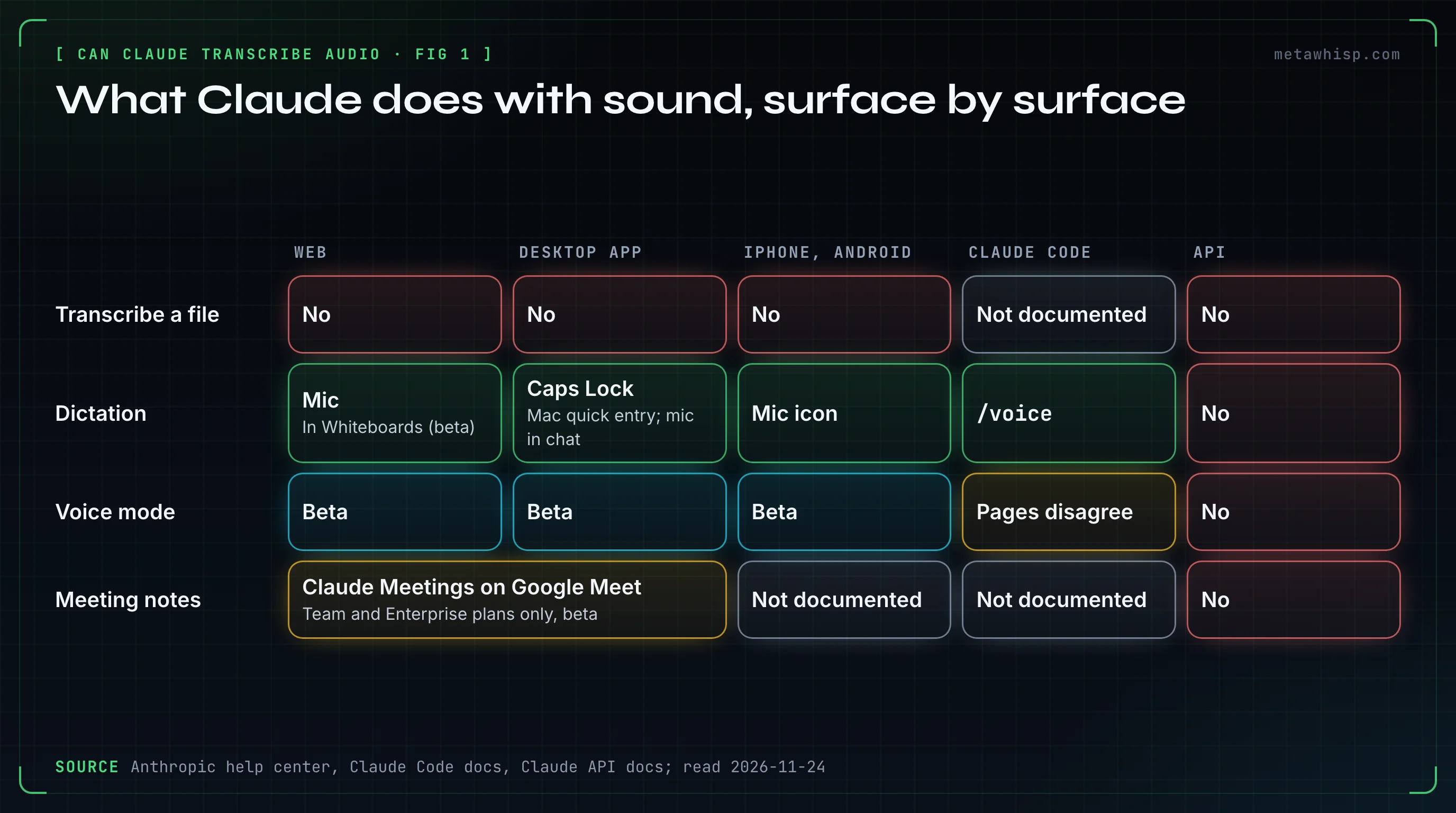
Find your row. With a recording, your route is a transcript first, because Claude doesn't support audio files. To speak instead of type, every Claude plan has dictation or voice mode. Developers get no audio input in the API. And Claude Meetings covers only Google Meet calls, on Team and Enterprise plans.
| Your situation | What Claude does | Your route | Limits to know |
|---|---|---|---|
| I have a recording (audio or video) | Not a supported file type | Transcribe it elsewhere, then paste the text or upload a TXT, DOCX or PDF | 500MB per file, 20 files per chat (another Anthropic page says 30MB) |
| I want to talk to Claude | Dictation for a written prompt; voice mode for a spoken chat (beta) | Microphone icon on mobile, Caps Lock on a Mac, sound wave symbol for voice mode | All plans; voice counts toward usage limits |
| I use Claude Code | /voice dictation in the terminal, Cmd+D in the VS Code extension | Run /voice, then hold Space | Claude.ai sign-in only; audio goes to Anthropic |
| I'm a developer using the API | No audio input block | Speech-to-text API first, then send the text to Claude | Only PDF, plain text and images map to message blocks |
| My team uses Claude Meetings | Joins a Google Meet call and saves a transcript | Meetings in Claude, then Add Claude | Team and Enterprise, beta, Google Meet only |
Can Claude Transcribe an Audio or Video File?
No. As of November 24, 2026, Anthropic's help page on uploads lists documents (PDF, DOCX, CSV, TXT, HTML, ODT, RTF, EPUB, JSON, XLSX) and images (JPEG, PNG, GIF, WebP). There's no audio or video format on it, and the API has no audio input block. The one time Claude transcribes other people's speech is a live Google Meet call it joins through Claude Meetings.
An MP3, M4A or WAV isn't on that list, and neither is any video format, so Anthropic doesn't support uploading a lecture, a voice memo or a screen recording.
Why Don't People Transcribe Directly in Claude?
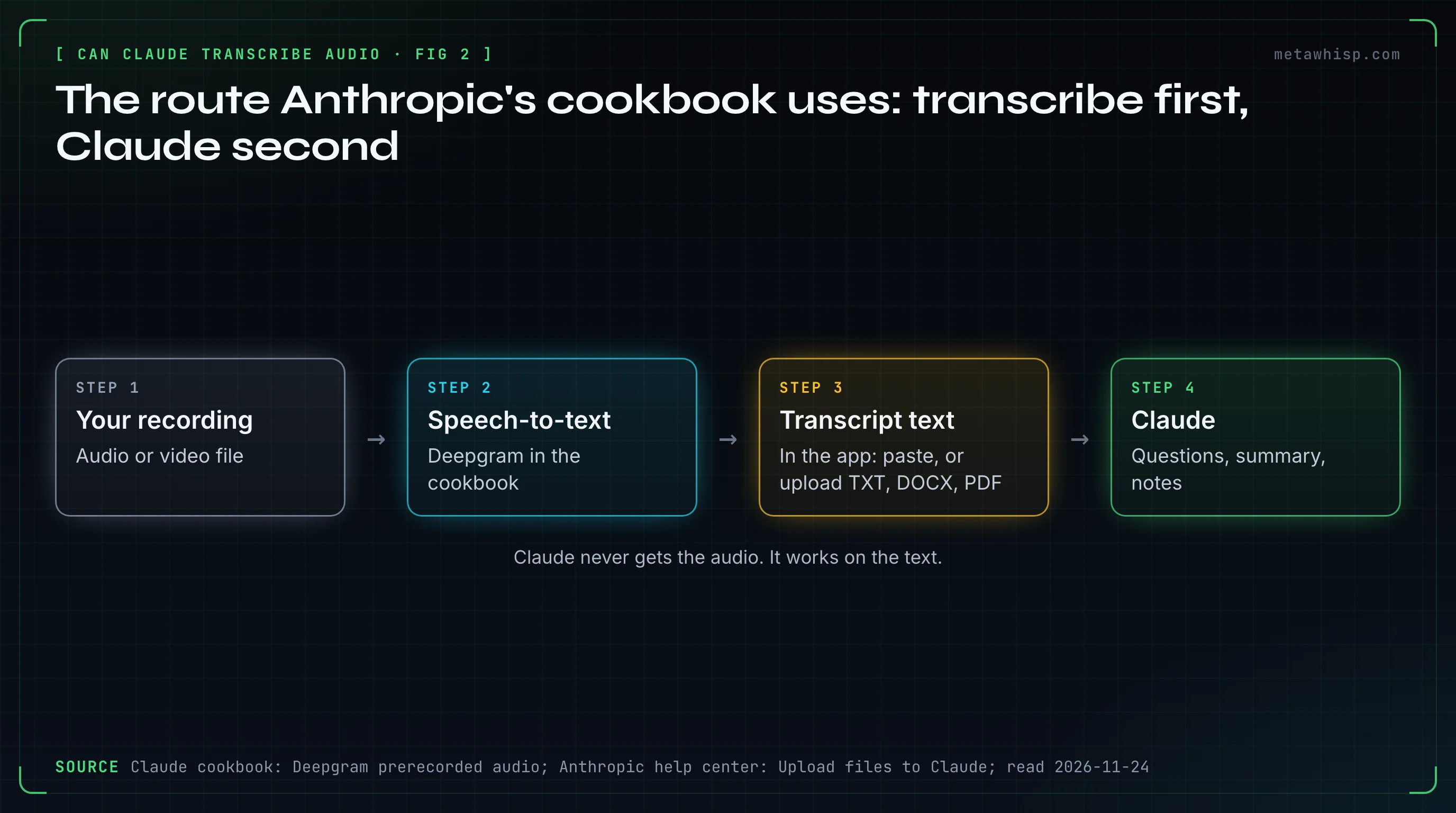
Because nothing Anthropic documents transcribes a recording. Dictation and voice mode take only your own live speech, and Anthropic says the recording is deleted once it's text. So a file has to go through a speech-to-text tool first, and Claude gets the text. A recipe in Anthropic's Claude Cookbook does exactly that, with Deepgram doing the listening.
- The cookbook example is called "Transcribe an audio file with Deepgram & use Anthropic to prepare interview questions!" Deepgram's nova-2 model makes the transcript, and Claude writes the questions from it.
- A second cookbook builds a voice assistant with ElevenLabs for speech-to-text and text-to-speech, combined with Claude.
- The cookbook page that does say "transcribe", How to transcribe documents with Claude, is about reading text from images and PDFs, not audio.
Our read: that title, plus voice features that turn speech into text, make it easy to assume Claude takes recordings. It doesn't.
How Do You Get a Recording Into Claude?
Transcribe it first, then give Claude the text. Turn the recording into text with whichever speech-to-text app or service you use. Then paste the text into the chat, or save it as a TXT, DOCX or PDF file and upload it with the + button. Then ask for what you need: a summary, action items, quotes or questions.
- Get a transcript. Our guides cover transcribing an audio file, M4A recordings and WAV files.
- Upload it as TXT, DOCX or PDF: click +, then Add files or photos. Or paste the text.
Another route is a custom connector, if your transcription service runs a remote MCP server. Custom connectors work on every plan (Free gets one). On Pro and Max, go to Customize > Connectors, + Add, Add custom connector. Anthropic notes that Claude reaches the server from Anthropic's cloud, not your computer, and that the service may not be verified by Anthropic.
How Do You Dictate to Claude on a Phone or a Mac?
On iPhone and Android, tap the microphone icon on the right side of the chat box, speak, and send with the arrow icon. On a Mac, use quick entry in the Claude desktop app and press Caps Lock. Anthropic lists both for every plan, Free included. Dictation turns your speech into a written prompt; it isn't a spoken conversation.
On iPhone and Android:
- Tap the microphone icon on the right side of the chat input field and speak.
- Tap the arrow icon to send, or X to cancel.
Mobile dictation works in 12 languages: English, French, German, Hindi, Italian, Japanese, Korean, Portuguese, Russian, Spanish, Turkish and Ukrainian. Everything except English is in beta. To change it, tap your initials, then Speech Input Language.
On a Mac, quick entry's voice shortcut is off by default because it takes over Caps Lock, and it needs macOS 14 or later. There's no Windows version. Anthropic's Whiteboards page also shows a microphone next to the send button in the chat box, on the web and in the desktop app.
- In the Claude desktop app, open Settings > Desktop app (in the older layout, Settings > System, under This computer).
- Next to Voice shortcut, choose Enable Caps Lock for voice input.
- Give Claude the Speech recognition permission, which Anthropic lists as required for voice dictation.
- Press Caps Lock, speak, press it again to stop, then click the arrow to send.
Can Claude Listen to You in Voice Mode?
Yes, to you, live. Voice mode is a spoken conversation with Claude, in beta on every plan, in the iPhone and Android apps, the desktop app and the web. It listens to your microphone, not to a file. Anthropic says your speech is converted to text, the recording is deleted, and the transcript stays in your chat history.
- On the web or desktop, tap the sound wave symbol in the lower right corner. On mobile, it's next to the microphone icon.
- Talk. Hands-free mode is the default; Push-to-talk mode is the other option.
- Click Stop to end.
Voice conversations count toward your usage limits. Claude Fable isn't available in voice mode. The voice mode page says Claude Code and Cowork have dictation but no voice mode (another Anthropic page disagrees, below). Voice settings are under Settings > Capabilities, then Voice settings, or Settings > General; the page gives both layouts. On mobile (Free to Ultra), you can opt in to share recordings, which Anthropic keeps for 30 days: see Settings > Privacy.
How Does Dictation Work in Claude Code?
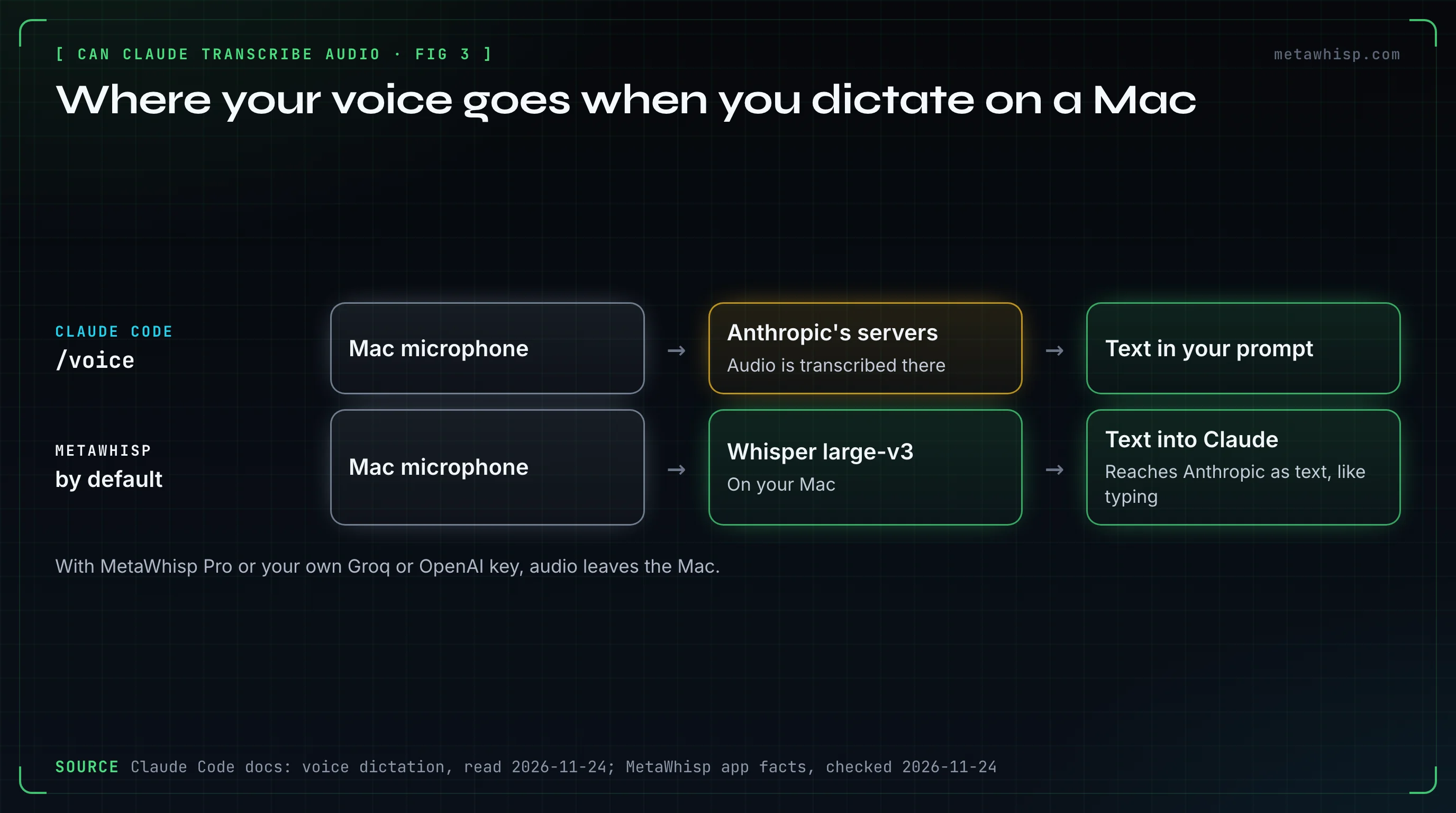
Type /voice to turn it on, then hold Space and talk. It works only when you sign in with a Claude.ai account, not with an API key, Bedrock, Google Cloud's Agent Platform or Microsoft Foundry. Claude Code's docs say the audio streams to Anthropic's servers and isn't processed locally. Dictation doesn't use up Claude messages or tokens.
- Sign in with your Claude.ai account. Anthropic's pricing page lists Claude Code on every paid plan (Pro, Max, Ultra, Team and Enterprise), not Free.
- Run
/voice. It takeshold,taporoff. - Hold Space to start recording (the default hold mode). In tap mode, recording stops on its own after 15 seconds of silence or two minutes in total.
It supports 20 languages, English by default, and doesn't work in cloud sessions or over SSH. In the VS Code extension, the shortcut is Cmd+D on a Mac. See also voice coding on Mac.
/voice won't turn on. Claude Code's docs say you'll see /voice needs a Claude subscription or /voice isn't available with your provider. An ANTHROPIC_API_KEY takes precedence over a Claude.ai sign-in, so remove it and restart Claude Code.Can Claude Take Notes in Your Meetings?
Only on Team and Enterprise plans, and only on Google Meet. Claude Meetings, a beta in Anthropic's November 12, 2026 release notes, adds Claude to a call as a visible participant. It can stay up to eight hours and saves a transcript, a summary and screen descriptions, not audio. Some organizations can't use it during the beta.
- Go to Meetings in Claude.
- Connect your Google Calendar (an owner has to enable Google Calendar for your organization first).
- Select the meeting and click Add Claude.
On Enterprise plans an owner has to turn Claude Meetings on; on Team plans it's on by default. The beta isn't available to organizations with zero data retention (ZDR), a HIPAA-ready configuration or customer-managed encryption keys (CMEK). Anthropic asks you to make sure everyone is okay with being transcribed. For Zoom, Teams or personal plans, see meeting transcription without a bot.
Does the Claude API Accept Audio?
No. As of November 24, 2026, the Messages API takes text, images (JPEG, PNG, GIF, WebP) and documents (PDF or plain text), plus search results, tool blocks and code execution uploads. There's no audio block. The pattern Anthropic documents has two steps: a speech-to-text API makes the transcript, then Claude works on the text.
The Files API takes files up to 500 MB, but only PDFs, plain text and images map to message blocks; other files go to the code execution tool. That tool's container has no internet access, and its pre-installed libraries include no speech-recognition package.
Where Do Anthropic's Own Pages Disagree?
On the upload size limit, on voice mode in Claude Code, and on where your speech is turned into text. None of it changes the main answer: nothing Anthropic documents transcribes an audio file. But each can trip you up, so here's what each page says and what to check on your screen.
- Upload size. "Upload files to Claude" says 500MB per file in chats (30MB in projects). "Create and edit files with Claude" says 30MB per file. If a transcript file is refused, paste the text or split it.
- Dictation or voice mode? The help center says Claude Code has dictation but not voice mode. Claude Code's own messages call it voice mode, as in "Turned on voice mode (hold)". It's the same feature:
/voicedictation. - Voice mode in Claude Code? The voice mode page says Claude Code and Cowork have dictation but no voice mode. Anthropic's Claude Code power user tips say "Voice mode is available to all users, including Claude Code Desktop and Cowork". Look for the sound wave symbol in your app.
- Where speech becomes text. Claude Code's docs say audio goes to Anthropic's servers. The mobile dictation and voice mode pages, and the page on sharing recordings, don't say where conversion happens, only that recordings aren't kept by default. Don't assume either way.
- Cookbook dates. The Deepgram recipe says April 10, 2024, but its code calls claude-opus-5-5, so it's been edited since.
How Does Claude Compare With ChatGPT and Gemini Here?
Both take audio files where Claude doesn't, with limits. OpenAI says ChatGPT accepts audio uploads on eligible paid plans, not Free, with up to 6 minutes per recording on GPT-6 at Instant. Google's Gemini app takes audio attachments up to 10 minutes in total, or 3 hours on Google AI Pro and Ultra. Both from their help pages, read November 24, 2026.
Can MetaWhisp Help You Dictate to Claude?
On a Mac, for your own voice, yes. MetaWhisp, our app, lets you tap Right Command and dictate into any app, including Claude in the browser, the Claude desktop app and the terminal running Claude Code. The free version transcribes on your Mac with Whisper large-v3 and needs no account. It can't transcribe a recording you already have, though.
By default the audio stays on your Mac (the model is a one-time download of about 3 GB). Pro's cloud transcription goes through Groq via MetaWhisp's server, and your own Groq or OpenAI key sends audio to that provider. Claude gets only the text.
For Zoom or Teams calls, MetaWhisp records meetings without a bot: turn on Meeting Recording in Settings → Meetings (off by default) and start each recording from the menu bar. It saves transcripts and recaps, not audio files.
The limits, plainly. MetaWhisp has no audio-file import, so it can't help with an M4A, MP3 or WAV you already have. It's Mac only (macOS 14 or later, Apple silicon). Speakers are labelled only "Me" and "Them", and it sends nothing to other participants, so their consent is your job.
FAQ
Can Claude transcribe an audio file?
No. Anthropic's help page on uploading files lists documents such as PDF, DOCX, CSV and TXT, and images in JPEG, PNG, GIF and WebP, with no audio or video format. Transcribe the recording with a speech-to-text tool first, then paste the text into Claude or upload it as a TXT, DOCX or PDF file.
Can Claude transcribe a video?
Not from a file. The upload list has no video formats, and the API's message blocks take only text, images and PDF or plain-text documents. Get a transcript from another tool first. On Team and Enterprise plans, Claude Meetings can transcribe a Google Meet call it joins, but that covers live meetings, not saved videos.
Does Claude have speech to text?
For your own voice, yes. Dictation turns speech into a typed prompt in the Claude apps for iOS and Android, and Mac users can dictate through quick entry with the Caps Lock shortcut. Voice mode is a spoken conversation on mobile, desktop and web. Claude Code has /voice dictation for Claude.ai accounts.
Does Claude keep my voice recordings?
Not by default. Anthropic says your speech is converted to text, the recording is deleted and the text stays in your chat. On Free, Pro, Max and Ultra plans you can opt in to share recordings from the mobile apps; shared ones are kept for 30 days. Claude Code dictation streams audio to Anthropic's servers.
Is Claude dictation free?
Yes. Anthropic lists mobile dictation, voice mode and Mac quick entry dictation for every plan, Free included, and voice conversations count toward your normal usage limits. Claude Code itself is not on the Free plan: Anthropic's pricing page lists it on every paid plan (Pro, Max, Ultra, Team and Enterprise).
How we checked
On November 24, 2026, we read the Anthropic help center, Claude Code and Claude API pages listed under Sources, three cookbook pages, Claude's pricing page, and OpenAI's and Google's help pages for the comparison. We didn't run Claude's voice features or the API for this piece. Features are as those pages described them on that day.
Related reading
- Dictate Prompts to Claude Code: Hotkey Workflow
- How to Transcribe an Audio File: 4 Methods (2026)
- Dictation vs Transcription Apps for Mac
- Private Voice to Text for Mac: 7 Apps Compared
Sources
- Anthropic help center: Upload files to Claude, Create and edit files with Claude, dictation on Claude mobile, voice mode, sharing voice recordings, quick entry on Mac, Claude Meetings, release notes, custom connectors, Claude Whiteboards, Claude Code power user tips
- Claude Code docs: voice dictation, VS Code, commands, overview
- Claude API docs and cookbook: Messages, Files API, code execution tool, Deepgram cookbook, ElevenLabs cookbook, transcribing documents
- Anthropic: Claude pricing
- For the comparison: OpenAI, uploading files and audio to ChatGPT, Google, Gemini Apps help
