Out now, out next time, out for good
Short answer: to get Fireflies out of a call now, remove it from the participant list, or type /ff leave in the meeting chat. To stop it joining again, the person whose Fireflies account sends it must turn off auto-join or delete the account. Blocking the Fireflies app in Teams, or looking for one in Zoom, usually won't do it: Fireflies reads a calendar and joins by the meeting link as a guest.
Key takeaways
- It shows as "Fireflies.ai Notetaker", "Fireflies Notetaker" or "Fred from Fireflies". Fireflies' own pages use all three. Paying users can give it a custom name, so it may show under another one.
- Recording rules or an invite to fred@fireflies.ai can bring it back after auto-join is off; Fireflies' Zoom app has an auto-join toggle too.
- Cancelling the paid plan only moves the account to Free. To remove Fireflies permanently, delete the account.
- No account? Someone else on the invite has one. Hosts can hold the bot in a waiting room or lobby.
| What you want | It's my Fireflies | I'm the host | I'm a guest | I'm the IT admin |
|---|---|---|---|---|
| Make it leave now | Fireflies Home → Live meeting banner → Stop | Remove it from the participant list | Try /ff leave, or ask the host | Same as a host |
| Stop it joining again | Auto-join off, or delete the account | Waiting room, lobby, or deny its request | Ask whoever the recap email names | App consent controls, lobby policy |
| Stop the recap emails | Send recaps to Only me | Unsubscribe link in the email | Unsubscribe link in the email | If you admin the Fireflies workspace: set recap emails for all teammates |
How Do You Remove Fireflies From a Zoom, Teams or Meet Call?
Open the participant list and remove the notetaker like any other participant. Zoom needs a host or co-host; Teams an organizer, co-organizer or presenter; on Google Meet it depends on the Host Management setting. Fireflies also documents a chat command, /ff leave, that makes it exit right away.
- Zoom: Participants → the ellipsis icon next to it (Fireflies calls it More) → Remove.
- Google Meet: hover its tile → More options → Remove from the call; the box that opens offers Remove or Block (Block covers that meeting only). With Host Management off, anyone from the organizer's domain can do it.
- Microsoft Teams: People → hover the name → More options → Remove from meeting.
Fireflies' consent guide contradicts itself on chat commands: one section says they work on Google Meet, Teams and Zoom; its FAQ says pause and resume work only on Google Meet, and that some platforms need host or organizer permissions. Fireflies says participants can pause or remove it, but its FAQ adds that some platforms need host or organizer permissions, so a guest's command may do nothing. If nothing happens, use the participant list.
Fireflies says no transcript or notes are created if it's removed before 3 minutes. After that its pages disagree: one says you still get notes for the recorded portion, another that none are captured after a manual removal. So watch for a recap email. Fireflies says it won't rejoin unless the meeting is restarted.
Why Did Fireflies Join, and Whose Is It?
Someone on the invite has a Fireflies account. Sign-up runs through a Google or Microsoft account, and Fireflies then syncs that calendar. By default it joins all calendar meetings with a web-conference link and emails a recap to everyone on the invite.
To find the owner, read the recap email: Fireflies says it shows the name of the person who invited it. More in our roundup of Fireflies on Reddit.
How Do You Stop Your Own Fireflies From Joining Meetings?
In Fireflies, go to Settings → Recording & Privacy (Personal tab) → Recording and toggle off Auto-record meetings. It saves automatically. Fireflies gives a second route: Home → Settings → Meeting Settings → Auto-join calendar meetings, a toggle with a dropdown; in that window, save your change. Use whichever your screen shows.
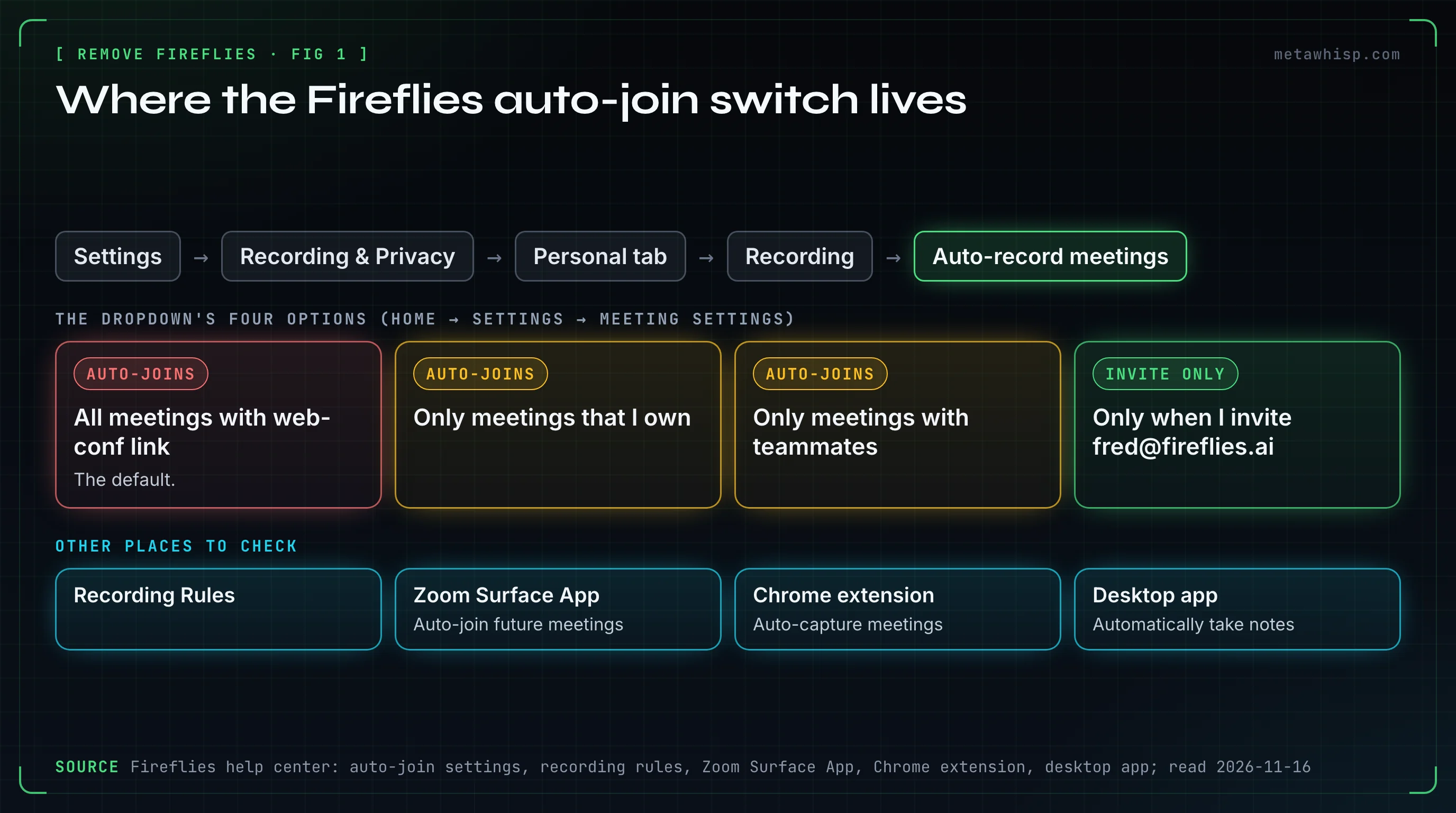
Three of the dropdown's four options still auto-join: All meetings with web-conf link (the default), Only meetings that I own and Only meetings with teammates. Only when I invite fred@fireflies.ai waits for that address on the invite. Then:
- Skip one meeting: Home → Upcoming tab → turn its toggle off. Only the next seven days are listed.
- Check your invites: remove fred@fireflies.ai from the event's guest list in Google or Outlook calendar, then save.
- Stop emailing everyone: Settings → Recording & Privacy → Email Notification → Meeting recap email → Only me.
One cost: for accounts created on or after September 1, 2026, the Free plan's unlimited transcription needs auto-join on; otherwise you get 3 meeting transcriptions. The invite-only option doesn't count as auto-join for this, Fireflies says. Fireflies' joins FAQ adds a condition its free-plan article doesn't mention: sharing recaps with all invitees.
Why Does Fireflies AI Keep Joining Meetings?
Because the auto-join toggle isn't the only switch. Fireflies' pages describe recording rules that override it, invites to fred@fireflies.ai, an auto-join toggle in its Zoom app, capture settings in its Chrome extension and desktop app, a workspace setting, and other people's accounts.
- Recording rules. Settings → Recording & Privacy → Recording Rules. Rules override the auto-record setting both ways, and match title keywords, email addresses or domains.
- A recurring invite that still lists fred@fireflies.ai.
- Fireflies' Zoom apps. The Surface App in Zoom's Apps panel shows an Auto-join future meetings toggle; Fireflies doesn't say whether it is the same setting, so check it too. The separate Zoom integration is removed in Fireflies: Integrations → Zoom → Disconnect.
- The Chrome extension and desktop app. Auto-capture meetings (extension, Google Meet) and Automatically take notes (desktop app, under Meeting Preference) record without a bot. The desktop app also shows the bot's own switch, Auto-record calendar meetings.
- A workspace setting. An admin can set Auto-record meetings for all teammates in the Team tab.
- Someone else's account, or a cancelled plan. Fireflies' page on joins after account deletion, stamped a year old, gives two causes: another invitee has an active account, or you cancelled only the paid subscription.
How Do You Remove Fireflies.ai Permanently?
Delete the account, not just the subscription: Settings → Account (bottom-left menu) → Delete Account section → Delete my account, pick a reason, then Continue → Delete Account. Fireflies says the account is deactivated immediately and permanently deleted, with its data, after 30 days; support can recover the data until then.
Export first: submit Fireflies' data request form and approve the confirmation email it sends; Fireflies says the data then arrives by email in 24 to 48 hours, with a link valid for 7 days (see bulk exporting meeting transcripts). Older Fireflies pages word the delete path differently.
Fireflies documents no "disconnect calendar" button: its articles on revoking Google access offer only deleting the account (complete removal) or adjusting auto-record settings (partial control). You can also remove its access on the other side; Fireflies doesn't say what that alone does:
- Google: Google Account → linked apps page → Fireflies → See details → Remove access.
- Microsoft work or school: My Apps portal → hover the app → ... → Manage your application → Revoke Permissions.
How Do Hosts and Guests Keep Someone Else's Fireflies Out?
Hosts control the door. Fireflies joins Zoom, Teams and Google Meet as a guest, so a waiting room, a lobby or a denied join request keeps it out. Guests can't lock the door, but they can ask its owner, use a decline link and unsubscribe from recaps.
For hosts:
- Zoom: turn on the Waiting Room, so someone has to admit it. Only authenticated users can join from web client (Settings → Meeting tab → Security) blocks it, Fireflies says, because it joins through Zoom's web client. A year-old Fireflies page says that when the Fireflies user has connected their own Zoom account, the bot bypasses waiting rooms and "authenticated users only" restrictions on their calls. For a meeting someone else hosts, the same page says the host gets a request to record and can decline it.
- Google Meet: only the meeting organizer sees its request: choose Deny entry. Meet now puts requests that need a closer look in a second queue that defaults to deny; Fireflies says its notetaker may appear under "With potential risks".
- Microsoft Teams: set Who can bypass the lobby? to Only organizers and co-organizers. Teams lists unverified bots it detects under Suspected threats, with Deny All; Fireflies says its bot may wait there.
Unadmitted, Fireflies says, it waits up to 10 minutes on Google Meet and 15 elsewhere, then exits. See also our guides to Read AI and Otter.
For guests:
- Find the owner. The recap email names who invited it. Ask them, or the host.
- Decline. If the Fireflies user turned on advance notice, you get an email 1 hour before with a decline link. Fireflies says it won't join if someone clicks it.
- Stop the emails. Click Unsubscribe in the recap, then uncheck Meeting recaps (full steps in the FAQ below).
- Ask for deletion. Fireflies says to contact the meeting host or its support. Its terms make its user responsible for every participant's consent. This is not legal advice.
How Do IT Admins Block Fireflies.ai in Teams, Google and Zoom?
Treat it as two problems. Your own users giving Fireflies their calendars is stopped with app-consent controls in Microsoft Entra or Google Workspace. Outside guests' bots are handled at the door, with lobby and waiting-room policy. Blocking the Fireflies app in Teams fixes neither: it only posts notes to channels.
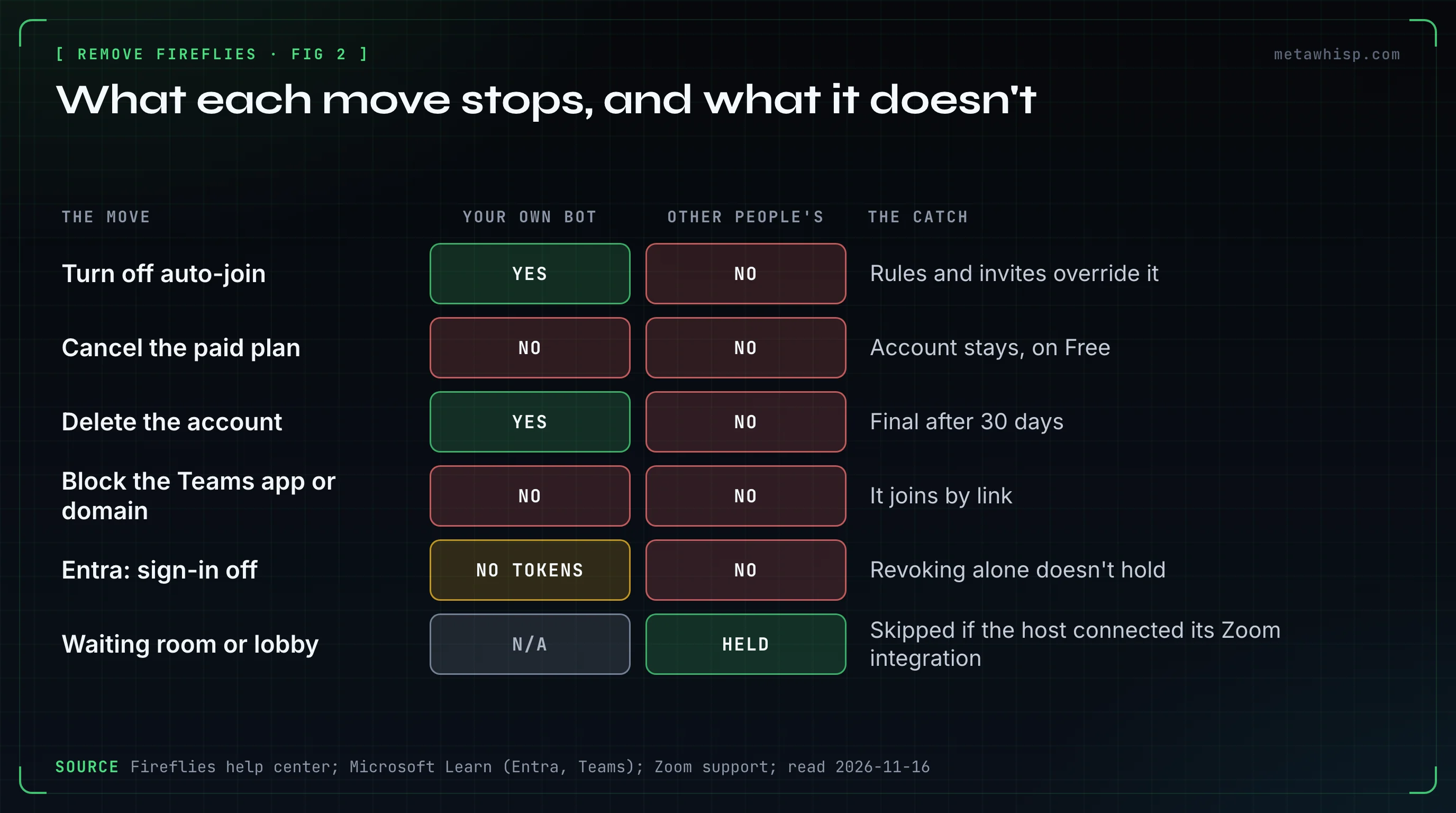
| Control | What it stops | The catch |
|---|---|---|
| Entra: Enterprise apps > Consent and permissions > User consent settings | Users consenting to new apps | Affects only future consent; existing grants stay |
| Entra: the app → Properties → Enabled for users to sign-in? → No | All tokens for the app | Also documented for a deleted app |
| Teams policy: Manage external bots and their access to meetings | Detected bots wait in the lobby | On by default; may miss some bots. Fireflies asks admins for Do not detect bots |
| Teams policy: Anonymous users can join a meeting unverified → Off | Unverified anonymous joins, which Fireflies says it needs | Set per organizer |
| Google Workspace: API controls → Manage App Access → Blocked | The app's access to Google services | Unconfigured apps are allowed by default |
| Zoom: Block specific SDK apps | Apps that join as a participant | Unverified for Fireflies, which says it joins through the web client |
Microsoft's pages differ on the consent default: one says all users can consent, another that new tenants get Let Microsoft manage your consent settings, which currently blocks user consent to Calendars.Read. We couldn't check which permissions Fireflies requests.
What Did People on Reddit Try That Didn't Work?
Three people in our sample of Reddit threads described a first fix that failed: blocking Fireflies' domain in Teams, deleting its enterprise apps, and looking for an app to remove. The documentation explains each: Fireflies joins by link as a guest, needs no Zoom app, and users can consent to it again.
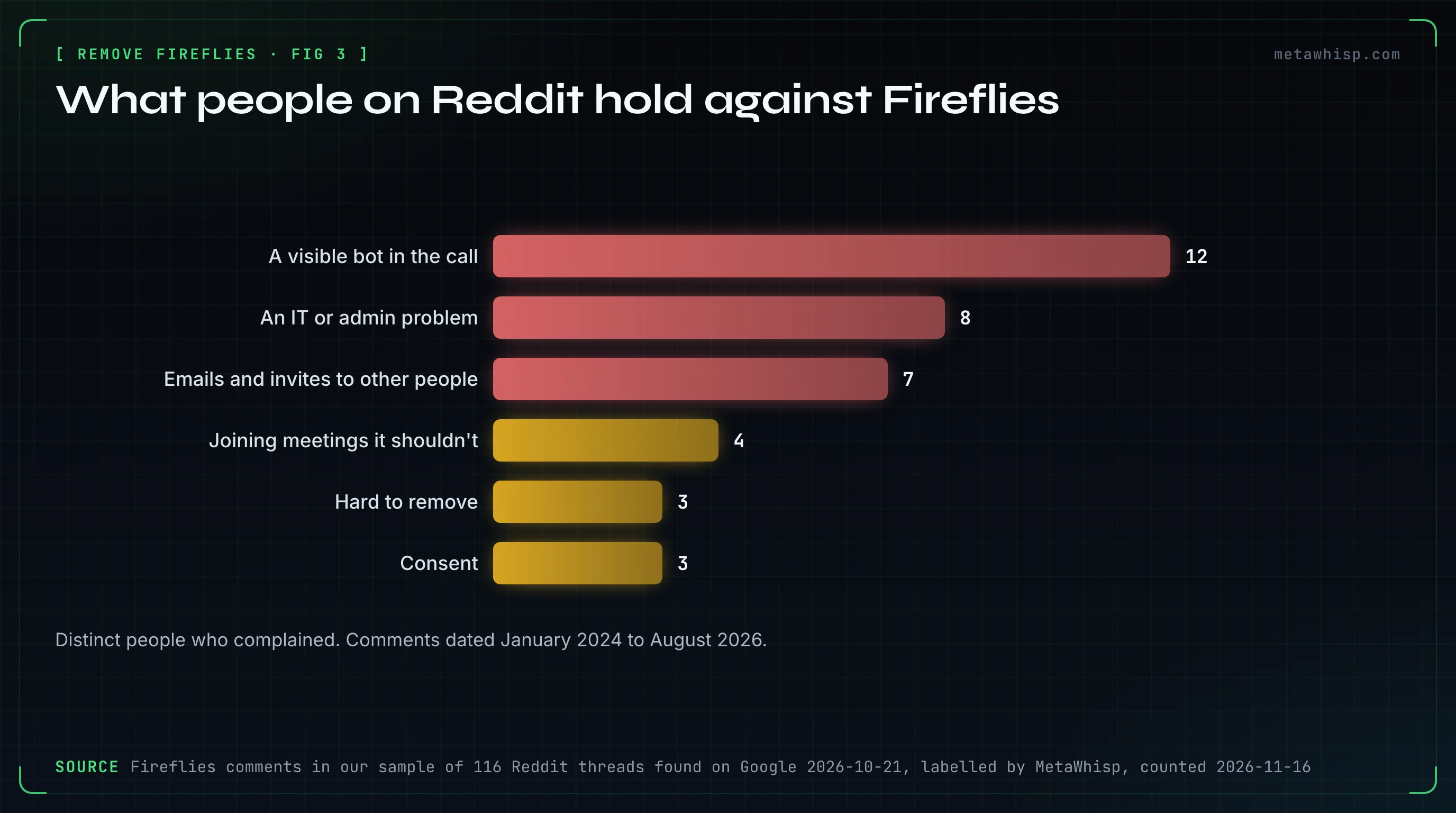
The sample is 116 Reddit threads found on Google on October 21, 2026. In it, 12 people complained about a visible bot in their calls, 8 about it as an IT problem, 7 about emails and invites reaching other people, 4 about it joining meetings it shouldn't, 3 that it was hard to remove and 3 about consent. Those are complaints, not a share of users.
- Blocked its domain in Teams. An r/sysadmin commenter, replying to advice to turn off open federation or block the domain, said they had done that and bots still joined users' meetings; they said you have to delete the account at Fireflies. Why: it joins by link as a guest, its Teams app only posts notes, and Microsoft says blocked domains can still join anonymously if anonymous access is allowed.
- Deleted the enterprise apps. An r/msp commenter: "If you delete them they just come back and are enabled again." Why: Microsoft says revoking a grant doesn't stop users consenting again. Turning sign-in off for the app is documented even for a deleted app.
- Found no app to remove. Another r/msp commenter said it got attached to a client's Zoom account, they thought through the client's Google account, and they could find no registered app. They couldn't get rid of it until they called Fireflies support. Why: Fireflies needs no Zoom app and reads the calendar from sign-up.
Can You Take Meeting Notes With Nothing Joining the Call?
Yes. Fireflies has its own no-bot options: Take Notes in its desktop app and a Chrome extension for Google Meet. Its recap setting still applies to desktop recordings linked to a calendar event, so set recaps to Only me first. On a Mac, MetaWhisp, our own app, records calls without a bot.
MetaWhisp is our product. It records your microphone plus the Mac's own audio, so no bot joins and nothing shows in the participant list. It sends other participants nothing: no email, invite, chat message or summary. By default the free version transcribes on the Mac, with unlimited meeting recording and no account. Meeting Recording is off by default, and by default you start each recording yourself.
Its limits: it can't remove or block anyone else's bot. It's Mac only (macOS 14 or later, Apple silicon), labels speakers only "Me" and "Them", can't import audio files and has no team workspace or share link. Nobody in the call sees anything, so consent is on you: tell people. See also Fireflies alternatives.
FAQ
How do I remove Fireflies from a Zoom meeting?
Hosts and co-hosts open Participants, click the ellipsis icon next to the notetaker and choose Remove. Look for Fireflies.ai Notetaker, Fireflies Notetaker, Fred from Fireflies or a custom name. Fireflies also documents typing /ff leave in the chat. A waiting room holds it next time.
How do I remove Fireflies.ai from Microsoft Teams?
Organizers, co-organizers and presenters open People, hover the notetaker's name and choose More options, then Remove from meeting. Blocking the Fireflies app in Teams doesn't stop it: that app only posts notes to channels, and the notetaker joins by link.
How do I remove Fireflies AI permanently?
Delete the Fireflies account: Settings, Account, Delete Account section, Delete my account. It's deactivated immediately and permanently deleted after 30 days. Cancelling a paid plan only moves the account to the Free plan. If it still joins, another invitee's account is sending it.
Why does Fireflies AI keep joining my meetings?
Check, in order: recording rules, which override the auto-join setting; fred@fireflies.ai on a calendar invite; the Auto-join future meetings toggle in the Fireflies Zoom Surface App; a workspace admin's setting; and another invitee's account. A cancelled paid plan leaves the account on the Free plan.
Why did I get a Fireflies recap if I don't use Fireflies?
Someone in the meeting uses Fireflies, and by default its recap goes to everyone on the invite. The email names the person who invited it. To stop the emails, click Unsubscribe, enter your email, open the link Fireflies sends, uncheck Meeting recaps and click Update email preferences.
How we checked
On November 16, 2026, we read Fireflies' help center and terms, the Zoom, Google and Microsoft pages below, and our labelled sample of Reddit threads. We didn't run Fireflies or any admin console, so labels may differ in the live product.
Related reading
- Fireflies.ai on Reddit: What People Say
- How to Stop Otter AI From Joining Meetings
- How to Cancel an AI Note Taker
- Meeting Notes When AI Notetakers Are Banned
Sources
- Fireflies: removal, auto-join, auto-join options, recording rules, upcoming meetings, consent guide, joins FAQ, troubleshooting, recap emails, non-users, sign-up, Google access (older), deleting, after deletion, cancelling, export, free plan, Zoom, Zoom integration, Surface App, Teams, Teams integration, Meet, teammates, extension, desktop app, terms
- Zoom: removing participants, waiting room, web client, SDK apps
- Google: Meet removal, admit flow, account access, API controls
- Microsoft: lobby, roles, external bots, anonymous users, blocked domains, user consent, consent policies, revoking grants, sign-in, My Apps
- Reddit: domain block, apps returned, no app to remove
