Plans, limits and the routes that work
Short answer: yes, on paid plans, with a tight limit. Since October 6, 2026, you can attach an audio file in ChatGPT and ask for a transcript. As of November 24, 2026, OpenAI's help page says to pick GPT-6 and then Instant, if it's available to you, in the model picker, and allows up to 6 minutes per recording and 512 MB per file. Longer files may be processed in sections when Data Analysis is available, best-effort. The Free plan can't upload audio. Every plan can dictate, and Mac users on Plus, Pro, Business, Enterprise or Edu can record meetings of up to 4 hours.
Key takeaways
- Audio files: eligible paid plans only, GPT-6 at Instant, up to 6 minutes per recording and 512 MB per file. Not on GPT-6.2, Work or Codex.
- No video files. MP4 and WebM files identified as video are rejected; audio-only ones are fine.
- Dictation is on every plan, and you edit the text before sending. Live Dictation removed the old 10-minute limit.
- Meetings on a Mac: Record (Plus and up) and the Meetings plugin (Pro, Business) stop at 4 hours per session.
- API: gpt-transcribe, an estimated $0.0045 a minute, files up to 25 MB. whisper-1 shuts down on February 26, 2027.
| Your situation | What works | The limit to know |
|---|---|---|
| Free plan, you have a recording | Another tool for the file; dictation or Voice for live speech | No audio uploads on Free |
| Paid plan, a short clip | Attach it in Chat with GPT-6 at Instant | 6 minutes per recording, 512 MB per file |
| Paid plan, a long recording | Upload it and let ChatGPT try sections when Data Analysis is available, or split it yourself (our suggestion) | Sections are best-effort; very long files may time out |
| A meeting coming up, on a Mac | Record or the Meetings plugin | 4 hours per session |
| Developer using the API | gpt-transcribe | 25 MB per file, $0.0045 a minute |
One gap: OpenAI says "eligible" paid plans and doesn't say whether ChatGPT Go is one, so on Go, try the steps below before you count on them.
Can ChatGPT Transcribe an Audio File?
Yes, on eligible paid plans. OpenAI added audio uploads to ChatGPT on October 6, 2026, and its help page says you can attach a recording and ask ChatGPT to transcribe and discuss it. The setup matters: choose GPT-6 and then Instant in the Chat model picker. The Free plan doesn't get audio uploads, and GPT-6.2 in Chat doesn't support audio transcription.
- Open a regular chat. Work and Codex can't transcribe an uploaded recording, even if the file attaches there.
- In the model picker, select GPT-6, then Instant if it's offered. GPT-6.2, rolling out in Chat since November 23, 2026, doesn't transcribe audio.
- Attach the recording. OpenAI's path for files is + in the prompt area, then Add photos & files.
- Ask for what you need: a word-for-word transcript, a summary, or notes.
- Check the result against the audio. OpenAI warns that transcripts may contain errors and speaker identification may be unreliable.
OpenAI adds that availability varies by workspace settings, region, app version and model, so update the app before you decide your plan lacks it.
How Long a Recording Can ChatGPT Transcribe?
Six minutes per recording, with GPT-6 at Instant, according to OpenAI's upload help page on November 24, 2026. Files can be up to 512 MB, so size is rarely the problem; length is. Longer recordings may be processed in smaller sections when Data Analysis is available, but OpenAI calls that best-effort and says very long recordings may time out.
Some summaries skip this cap: on November 24, 2026, Google's AI Overview for this question gave the 512 MB size but not the 6-minute limit.
Our suggestion for a long file: cut it into pieces of 6 minutes or less in any audio editor and upload them one at a time, or use OpenAI's API, whose limit is 25 MB per file. Our guide to transcribing an audio file covers tools outside ChatGPT.
Which Audio Formats Work, and Can ChatGPT Transcribe Video?
OpenAI lists WAV, MP3/MPEG, OGG/OGA, audio-only WebM, PCM, FLAC, AAC, M4A and audio-only MP4. Video doesn't work: WebM and MP4 files identified as video are not supported by audio uploads. So a screen recording or a phone video needs its audio track pulled out first, saved in one of those formats, and then uploaded.
- It uploads but won't transcribe? Check that the model handles audio (GPT-6 at Instant does; GPT-6.2 doesn't). Then, as OpenAI suggests, convert the file to WAV and upload it again.
Can You Transcribe Audio in ChatGPT for Free?
Not from a file. OpenAI's help page is plain about it: "Audio uploads are not available on the Free plan at this time." Free users can still turn live speech into text with dictation, the microphone icon, which every plan gets, and can talk to ChatGPT in Voice with limited access. For an existing recording on Free, you need another tool.
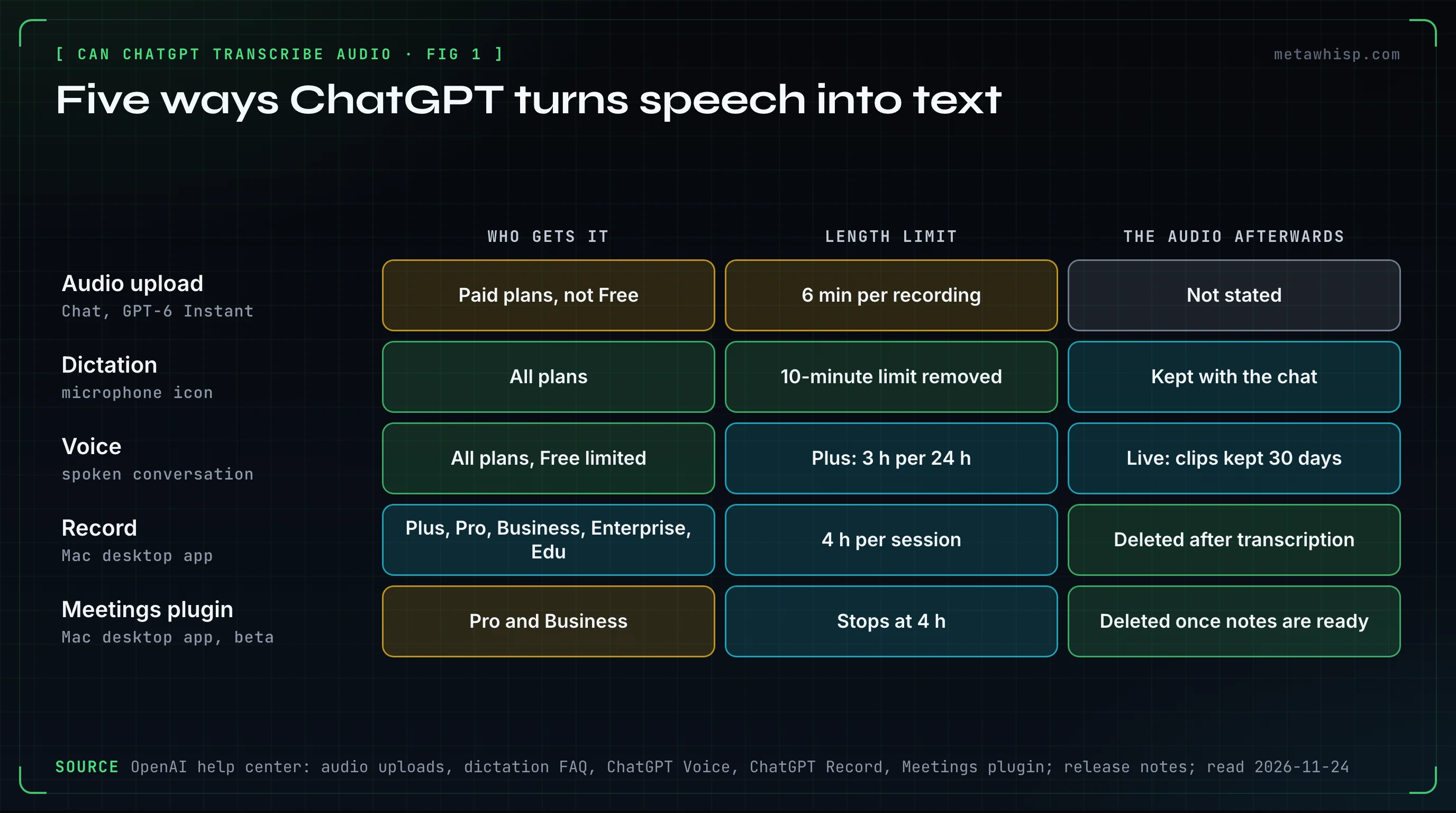
Free accounts get 3 file uploads a day, but not audio. Plus costs $20 a month, billed monthly.
What's the Difference Between Dictation and Voice?
Dictation turns what you say into text in the prompt box, and you can edit it before sending. Voice is a spoken conversation: ChatGPT talks back, and OpenAI says "Voice transcripts are not verbatim records". So when you need your exact words on the page, use dictation, which OpenAI's Voice page recommends for reviewing a transcription.
Dictation
- How it works: click the microphone icon, speak, and edit the text before you send.
- Live Dictation: OpenAI's November 18, 2026 release note says it's rolling out to all plans on iOS, Android, web and the desktop app, without the old 10-minute recording limit. Tap or click the waveform to show or hide the text as you go.
- Your audio: kept as long as the chat stays in your chat history. To stop sharing it, turn off Include your audio recordings or Improve the model for everyone.
Voice
- Start it: select the Voice icon in the prompt window.
- Modes: Live (GPT-Live-1.1 and GPT-Live-1.1 Quip), Advanced and Standard. Advanced and Standard retire on December 11, 2026.
- Limits in Chat, per rolling 24 hours: Free gets limited access to GPT-Live-1.1 Quip; Go 3 hours (Quip); Plus 3 hours; Pro ($100/month) 15 hours; Pro ($200/month) unlimited, within abuse guardrails.
- Your audio: Live and Advanced clips are kept for 30 days; Standard deletes audio after transcription.
More in our guide to dictating prompts to ChatGPT on a Mac.
How Do You Record a Meeting With ChatGPT on a Mac?
Use one of two features in the ChatGPT desktop app for macOS. Record works on Plus, Pro, Business, Enterprise and Edu: click the Record button at the bottom of any chat. The Meetings plugin, in beta, is for Pro and Business plans. Both stop at four hours per session, and OpenAI says both delete the audio once the transcript or notes are made.
Record
- Start: click Record at the bottom of any chat. On first use, you may need to allow ChatGPT under Microphone and Screen & System Audio Recording.
- Limits: 4 hours (240 minutes) per session. It tells several speakers apart, with labels like Speaker 1 you can rename, and OpenAI says it works best in English today.
- Audio: used only for transcription, then deleted.
- Plans: on Plus since July 16, 2025, at no extra cost at launch. Off by default for Enterprise and Edu workspaces, so ask your admin.
The Meetings plugin
- Set up (it's in the new desktop app): open Plugins in the sidebar, find Meetings and install it. Then open Meetings, finish onboarding, allow microphone and system audio, and click Take notes.
- No bot joins the call. The app streams the audio to OpenAI to write notes, then deletes it once the notes are ready.
- Limits: it stops when a session reaches four hours. People you share the notes page with see the notes, not the transcript.
OpenAI says Meetings is separate from Record, which belongs to the older desktop app. Our reading: if your app has Plugins in the sidebar, look there; if a chat shows a Record button, you have Record.
See also meeting transcription without a bot on a Mac.
How Do Developers Transcribe Audio With OpenAI's API?
Send the file to OpenAI's speech-to-text endpoint. OpenAI's guide says to start with gpt-transcribe, which its pricing page lists at an estimated $0.0045 per minute. Files can be up to 25 MB, in flac, mp3, mp4, mpeg, mpga, m4a, ogg, wav or webm. For live audio, OpenAI's realtime transcription guide says to start with gpt-live-transcribe, at $0.017 per minute.
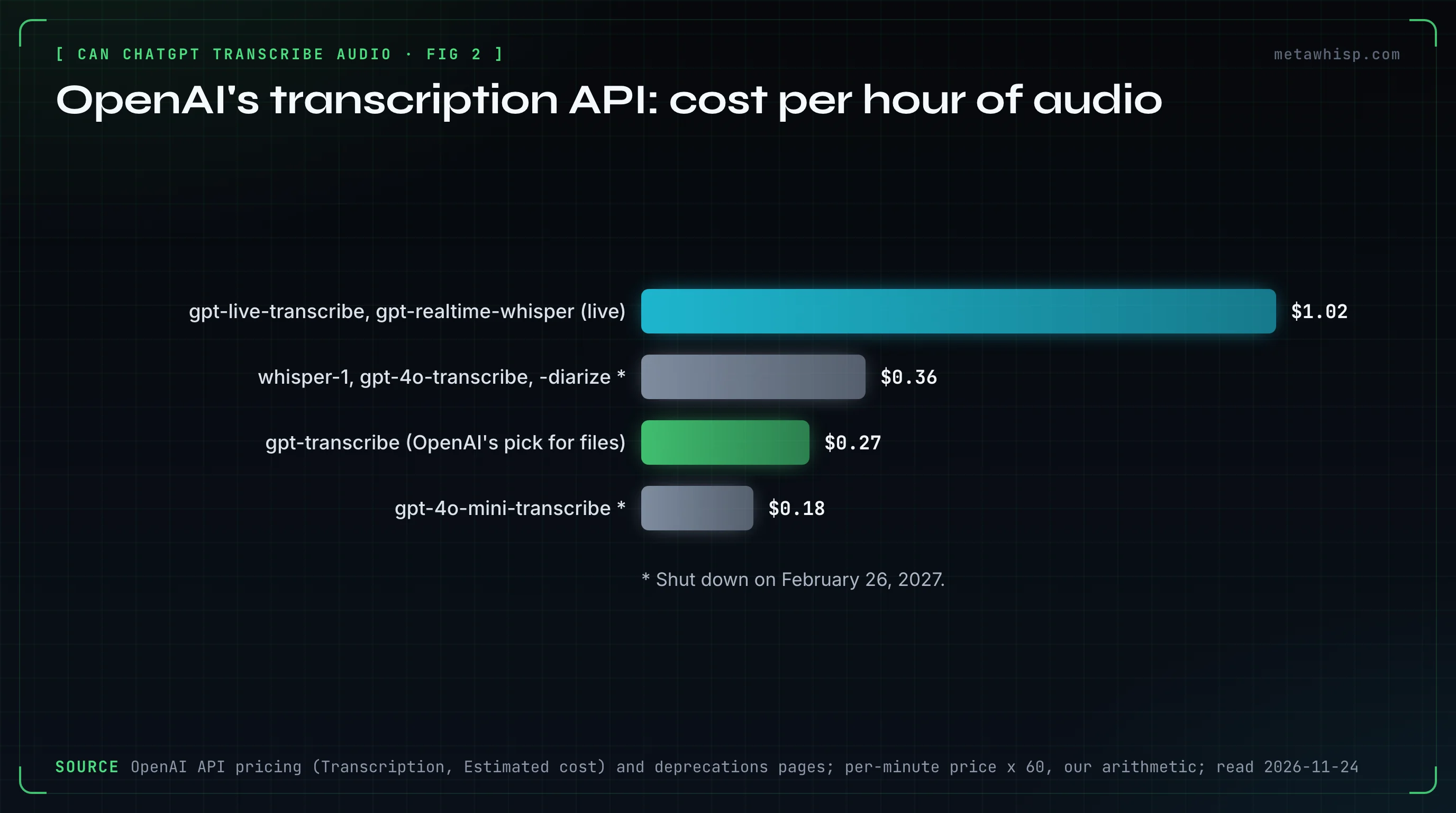
- Older models are on the way out. whisper-1, gpt-4o-transcribe, gpt-4o-mini-transcribe and gpt-4o-transcribe-diarize shut down on February 26, 2027, per OpenAI's deprecations page (notice dated August 26, 2026).
- Bigger files: use a compressed format or split the file into chunks of 25 MB or less, as the guide says. Our guide to the 25 MB limit shows both.
- No links: the Audio API FAQ says you must send a file in a supported format.
- Training: OpenAI says it doesn't use API inputs or outputs to improve its models by default.
- GPT-Realtime-Whisper, launched May 7, 2026, is also $0.017 per minute. We compare it in GPT-Realtime-Whisper vs on-device Whisper on a Mac.
Where Do OpenAI's Own Pages Disagree?
On three points. The release note and the help page describe audio uploads differently. Two API pages give the file limit in different units. And the Voice pages leave live video unclear after December 11, 2026. In each case, check what your own screen shows before you plan around a number: the model picker, the upload menu and any error message.
- Who gets audio uploads. The October 6 release note says paid ChatGPT subscriptions and workspaces. The help page narrows it to eligible paid plans, GPT-6 at Instant and 6 minutes per recording. Neither names Go. On screen: pick GPT-6 and Instant, open +, and try a short clip first.
- 25 MB or 25 MiB. The speech-to-text guide says 25 MB. The Audio API FAQ gives 25 MiB for legacy whisper-1 requests, says newer gpt-4o routes may validate differently, and doesn't mention gpt-transcribe. Stay under 25 MB and you're inside both.
- Live video in Voice. The Voice page says Advanced voice, the only mode with live video and screen sharing, retires December 11, 2026, moving users to Live, which has no video. The retirement page says video keeps running on Advanced until GPT-Live can do it.
How Does ChatGPT Compare With Claude and Gemini for Audio?
Claude's apps don't take audio files at all: Anthropic's upload page lists documents and images only. Google's Gemini app takes up to 10 minutes of audio in total, or 3 hours with Google AI Pro or Ultra. ChatGPT allows 6 minutes per recording. We compared published limits only, not transcript quality.
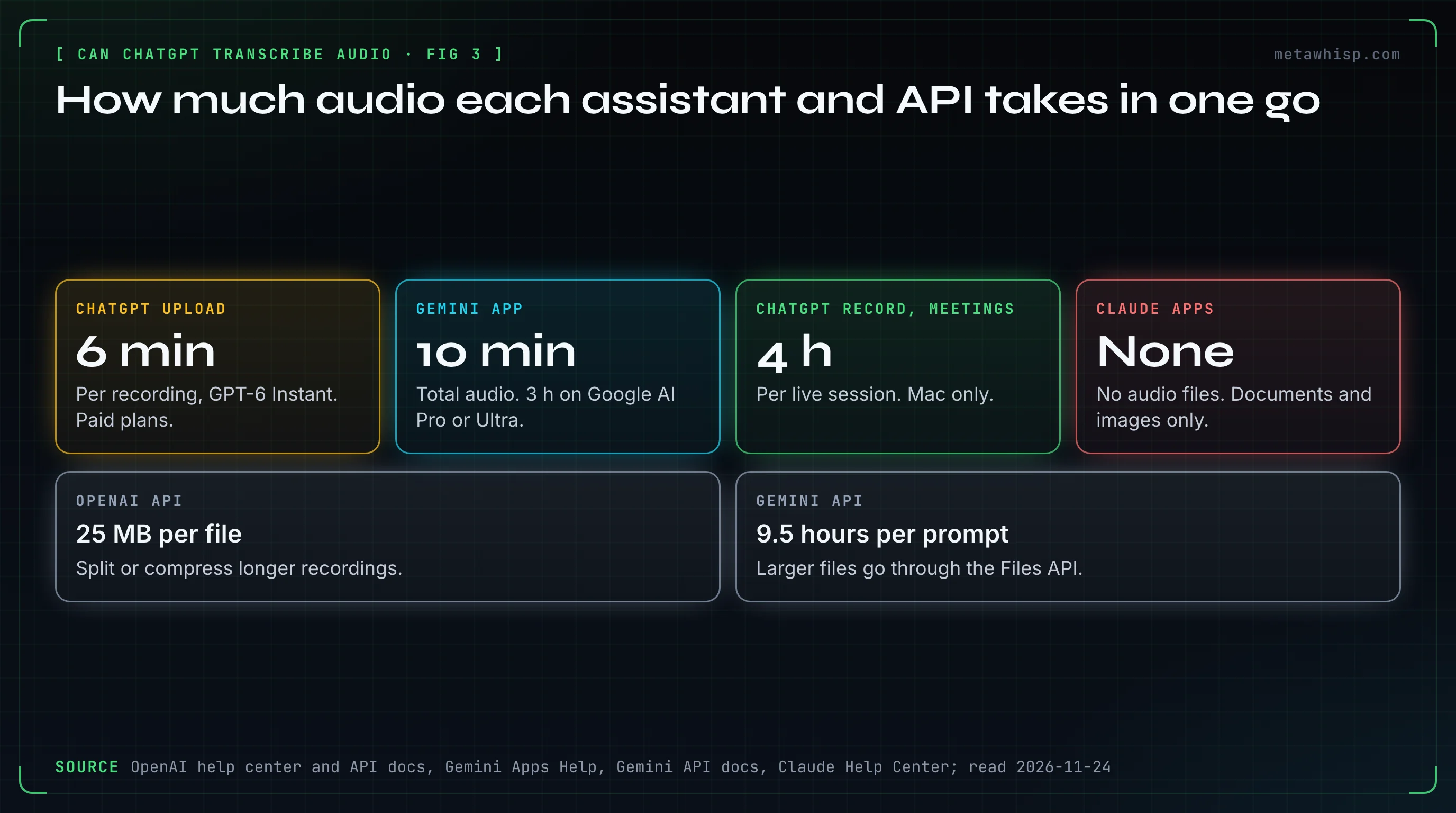
Claude does have dictation, which Anthropic says is available to all Claude users; our article on whether Claude can transcribe audio covers the rest. Google's Gemini API takes up to 9.5 hours of audio per prompt, with inline requests up to 20 MB and larger files through its Files API. More in our Gemini 3.5 Transcribe, Deepgram and Whisper comparison.
Where Does MetaWhisp Fit, and Where Doesn't It?
MetaWhisp, our Mac app, helps with two of these jobs and not the third. It dictates into any app, ChatGPT included, and records meetings on a Mac without a bot, free and on your Mac by default. It can't transcribe a recording you already have: it has no audio-file import, so for an existing file, use ChatGPT's upload or another tool.
Dictation. Tap Right Command, speak, and the text lands where your cursor is: ChatGPT's prompt box or any other app. The free version transcribes on your Mac with Whisper large-v3, a one-time download of about 3 GB, with no account. ChatGPT's dictation is free too, so the difference is that MetaWhisp works in every app and your audio stays on the Mac by default. Add your own OpenAI or Groq key, and dictation and meeting audio go to that service.
Meetings. Turn on Meeting Recording in Settings → Meetings (off by default), then start each recording from the menu bar. MetaWhisp records your microphone and your Mac's audio through ScreenCaptureKit, with no bot, and saves transcripts and recaps, not audio files. It's in the free version; Record and the Meetings plugin need a paid ChatGPT plan.
The limits: speakers are labelled only "Me" (your microphone) and "Them" (the Mac's audio), while Record tells several speakers apart. MetaWhisp sends nothing to other participants, so consent is your job. It runs only on Apple silicon Macs with macOS 14 or later, and it can't open an m4a, mp3 or wav file.
FAQ
Can ChatGPT transcribe audio for free?
Not from a file. OpenAI says audio uploads are not available on the Free plan at this time. Free users can still use dictation, the microphone icon, which turns live speech into text you can edit before sending, and Voice with limited access. For a recording, you need a paid plan or another transcription tool.
How long a recording can ChatGPT transcribe?
OpenAI's help page says audio files can be up to 512 MB, and with GPT-6 at Instant in Chat an uploaded recording can be up to 6 minutes long. Longer recordings may be processed in smaller sections when Data Analysis is available; OpenAI calls that best-effort and says very long recordings may time out.
Can ChatGPT transcribe a video file?
Not as video. OpenAI's audio upload rules say WebM and MP4 files identified as video are not supported, while audio-only MP4 and WebM files are. Extract the audio track first and upload that. Live video sharing in Voice exists for eligible subscribers on iOS and Android through Advanced voice, which OpenAI is retiring on December 11, 2026, but it isn't file transcription.
Which audio formats does ChatGPT accept?
OpenAI lists WAV, MP3/MPEG, OGG/OGA, audio-only WebM, PCM, FLAC, AAC, M4A and audio-only MP4. If a recording uploads but won't transcribe, check that you picked GPT-6 at Instant, since GPT-6.2 doesn't handle audio. Then, as OpenAI suggests, convert the file to WAV and upload it again.
How much does OpenAI's transcription API cost?
OpenAI's pricing page lists gpt-transcribe at an estimated $0.0045 per minute, and gpt-live-transcribe at $0.017 per minute for live audio. whisper-1 and gpt-4o-transcribe, both $0.006 per minute, are deprecated and shut down on February 26, 2027. The transcription endpoint accepts files up to 25 MB.
Does ChatGPT keep my audio?
It depends on the feature. Dictation audio is kept as long as the chat stays in your history. Live and Advanced Voice clips are kept 30 days; Standard voice deletes audio after transcription. Record and the Meetings plugin delete the audio once the text is made. For uploaded audio files, OpenAI's upload page doesn't say how long the audio is kept.
How we checked
On November 24, 2026, we read the OpenAI, Google and Anthropic pages listed below, and Google's results for this question. We didn't run ChatGPT, the API or the other apps for this piece. Limits and prices are as those pages showed them that day.
Related reading
- Can Claude Transcribe Audio?
- Dictate Prompts to ChatGPT on Mac (2026 Guide)
- Whisper API 25MB File Size Limit: Fix It
- How to Transcribe an Audio File: 4 Methods (2026)
Sources
- OpenAI Help Center: uploading files and audio to ChatGPT, ChatGPT release notes (October 6 and November 18, 2026; July 16, 2025), voice dictation FAQ, ChatGPT Voice, retiring Advanced and Standard voice, ChatGPT Record, the Meetings plugin, what is ChatGPT Plus, how your data is used, Audio API FAQ
- OpenAI API docs: speech to text, realtime transcription, pricing, gpt-transcribe, deprecations; OpenAI, advancing voice intelligence with new models in the API (May 7, 2026)
- Google: Gemini Apps Help, upload files, Gemini API audio understanding
- Anthropic: upload files to Claude, use dictation on Claude mobile
